当前位置:网站首页>RK3566添加LED
RK3566添加LED
2022-07-05 13:37:00 【火柴棍mcu】
在主板上设计了5个LED,其中2个绿色led用于运行指示,一个rgb灯用状态指示,分别用了5个GPIO口控制LED,均为高电平亮。
linux系统已经自带了leds-gpio的驱动,只需在内核中使能驱动即可。
LED驱动使能
一般内核中已经使能了LED Support for GPIO connected LEDs:
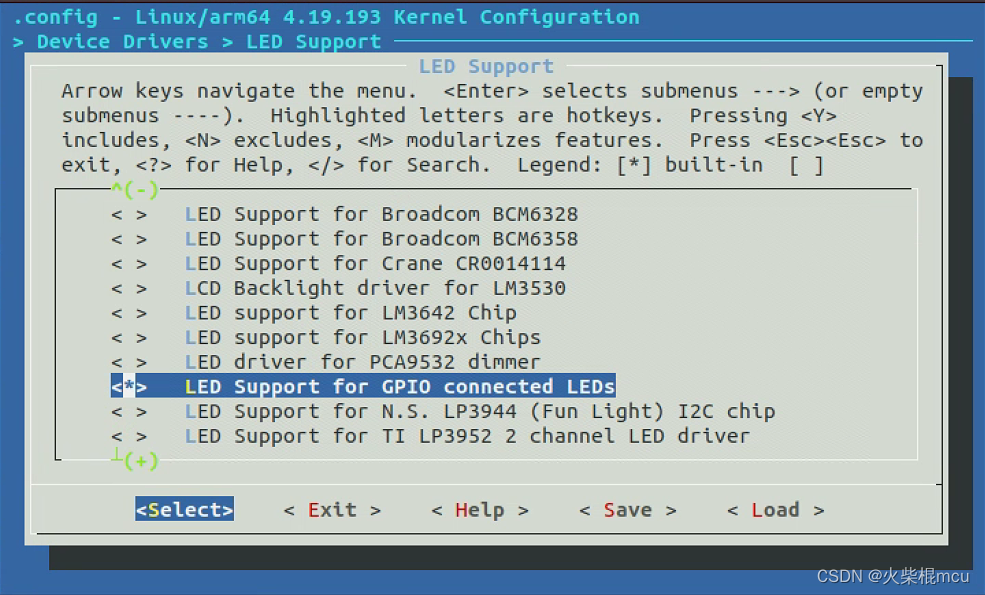
在DTS文件中增加LED的描述:
	leds{
		compatible = "gpio-leds";

		user1_led: user1 {
			label = "user1";
			gpios = <&gpio2 RK_PB1 GPIO_ACTIVE_HIGH>;
			linux,default-trigger = "heartbeat";
			default-state = "on";
		};
		user2_led: user2 {
			label = "user2";
			gpios = <&gpio2 RK_PB2 GPIO_ACTIVE_HIGH>;
			default-state = "off";
		};
		blue_led: blue {
			label = "blue";
			gpios = <&gpio4 RK_PC0 GPIO_ACTIVE_HIGH>;
			default-state = "off";
		};
		green_led: green {
			label = "green";
			gpios = <&gpio1 RK_PB0 GPIO_ACTIVE_HIGH>;
			default-state = "off";
		};
		red_led: red {
			label = "red";
			gpios = <&gpio1 RK_PB1 GPIO_ACTIVE_HIGH>;
			default-state = "off";
		};
	};
此描述添加在根节点下。
调试
修改DTS后编译内核,将boot.img烧写进主板,主板启动后,进入到/sys/class/leds/目录下查看led是否添加成功:
[[email protected]:/]# cd /sys/class/leds/
[[email protected]:/sys/class/leds]# ls
blue  green  mmc0::  red  user1  user2
5个led已经添加成功了。
向led灯名称下的brightness写非0或0的值,相应的led就会亮、灭。
[[email protected]:/sys/class/leds]# echo 1 > user1/brightness
[[email protected]:/sys/class/leds]# echo 0 > user1/brightness
遇到的问题
第一次修改DTS后将boot.img烧写进主板,进入到/sys/class/leds/目录下,没有看到添加的led,查看开机日志:
[[email protected]:/]# dmesg | grep leds
[    1.318922] leds-gpio: probe of leds failed with error -16
显示leds-gpio探测失败,反复检测dts文件,没有发现错误。
查看gpio使用情况:
gpiochip2: GPIOs 64-95, parent: platform/fe750000.gpio, gpio2:
 gpio-73  (                    |xgpio-pin           ) out lo
发现xgpio-pin与user1定义的gpio冲突了。
查找dts文件中关于gpio-73相关的描述:
	WORKLED {
		compatible = "9tripod,xgpio";
		pinctrl-names = "default";
		def_val=<0>;
		pinctrl-0 = <&io2_b1>;
		gpio = <&gpio2 9 GPIO_ACTIVE_HIGH>;
	};
WORKLED使用了此GPIO,将此描述删除,再次编译内核,将boot.img烧写进主板,led就添加成功了。
遗留问题
虽然user1配置了默认触发为heartbeat,但是user1并没有自动熄灭,可能还有一些heartbeat的一些功能没有配置好。
边栏推荐
- Godson 2nd generation burn PMON and reload system
- mysql econnreset_ Nodejs socket error handling error: read econnreset
- “百度杯”CTF比赛 九月场,Web:SQL
- Network security HSRP protocol
- Operational research 68 | the latest impact factors in 2022 were officially released. Changes in journals in the field of rapid care
- Talking about fake demand from takeout order
- MySQL --- 数据库查询 - 排序查询、分页查询
- 先写API文档还是先写代码?
- These 18 websites can make your page background cool
- Nantong online communication group
猜你喜欢
Go array and slice
The development of speech recognition app with uni app is simple and fast.
What is a network port

DataPipeline双料入选中国信通院2022数智化图谱、数据库发展报告

Laravel框架运行报错:No application encryption key has been specified
Write API documents first or code first?
Jasypt configuration file encryption | quick start | actual combat
Redis6 master-slave replication and clustering

面试官灵魂拷问:为什么代码规范要求 SQL 语句不要过多的 join?
Nantong online communication group
随机推荐
Intranet penetration tool NetApp
restTemplate详解
记录一下在深度学习-一些bug处理
Cloudcompare - point cloud slice
The development of speech recognition app with uni app is simple and fast.
leetcode 10. Regular expression matching regular expression matching (difficult)
什么是网络端口
redis6数据类型及操作总结
Get you started with Apache pseudo static configuration
Flutter draws animation effects of wave movement, curves and line graphs
Talk about seven ways to realize asynchronous programming
JS to determine whether an element exists in the array (four methods)
前缀、中缀、后缀表达式「建议收藏」
Idea设置方法注释和类注释
Fragmented knowledge management tool memos
Resttemplate details
【Hot100】33. 搜索旋转排序数组
【MySQL 使用秘籍】一網打盡 MySQL 時間和日期類型與相關操作函數(三)
Rocky basic command 3
Talking about fake demand from takeout order