当前位置:网站首页>State mode design procedure: Heroes in the game can rest, defend, attack normally and attack skills according to different physical strength values.
State mode design procedure: Heroes in the game can rest, defend, attack normally and attack skills according to different physical strength values.
2022-07-06 00:18:00 【newlw】
One . Application scenarios and case descriptions
We often play games in our spare time to relax our body and mind , relieve stress . In many games, heroes have different physical strength values , You can make different actions to face the enemy .
Heroes can rest 、 defense 、 Common attack 、 Skill attack . The physical strength value consumed or recovered is different , for example :
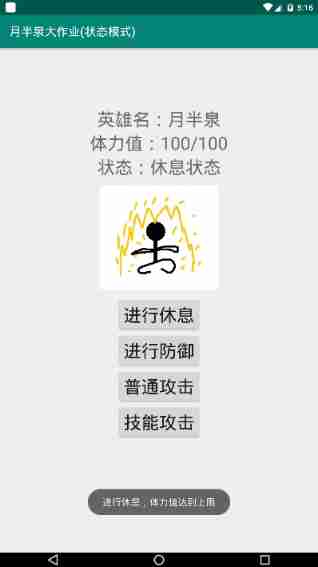
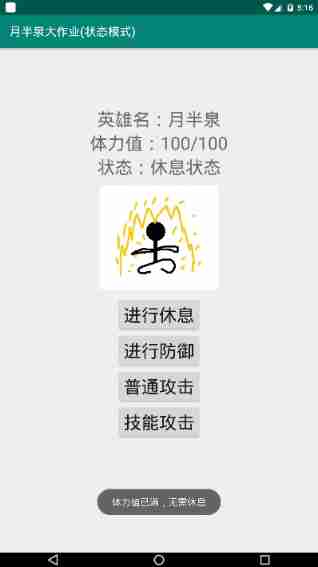
- rest : Restore physical strength to the maximum , There is no need to rest when the physical strength is the maximum ;
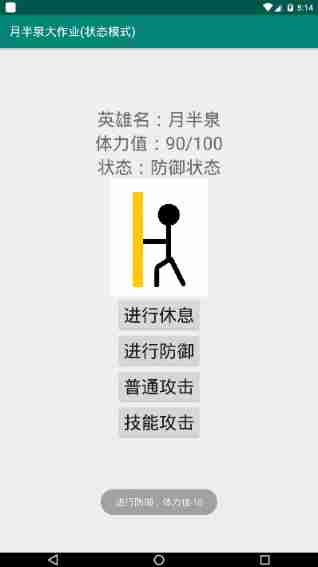
- defense : Consume 10 Some physical strength , You can't defend without physical strength ;
- Common attack : Consume 15 Some physical strength , You can't attack normally without physical strength ;
- Skill attack : Consume 20 Some physical strength , You can't attack skills without physical strength ;
Two . Case analysis and problem solving
If we write these operation logic in the same class —— The method of being a hero in the hero class , There will be the following problems :
- Later, if the operation logic ( Such as the change of physical strength value consumed ) If there is any change, you need to modify the whole hero class ;
- If you want to add operations later ( Such as increasing magic attack ) You need to modify the whole hero class ;
- Only a lot of if—else if—else, The code is not easy to maintain , Poor readability ;
So I decided to use state mode to solve this problem . The advantages of state mode in this scenario :
- Using a class to encapsulate a state of an object ( operation ), It's easy to add new States ( operation );
- In state mode , Environmental Science (Context)—— Heroes (Hero) You don't have to have a lot of conditional statements in . Environmental Science (Context) The state of the instance becomes clearer 、 Easy to understand ;
- Using state mode allows user programs to easily switch environments (Context)—— Heroes (Hero) Status of the instance ( operation );
- Using state mode doesn't make the environment (Context)—— Heroes (Hero) Internal state inconsistency occurs in the instance of ;
- When the state object has no instance variables , Environmental Science (Context)—— Heroes (Hero) Each instance of can share a state object ;
I abstract the operation of heroes into states , The four operations correspond to four different specific states :
- RestState( Resting state )
- DefenseState( Defensive state )
- NormalAttackState( Normal attack status )
- SkillAttackState( Skill attack status )
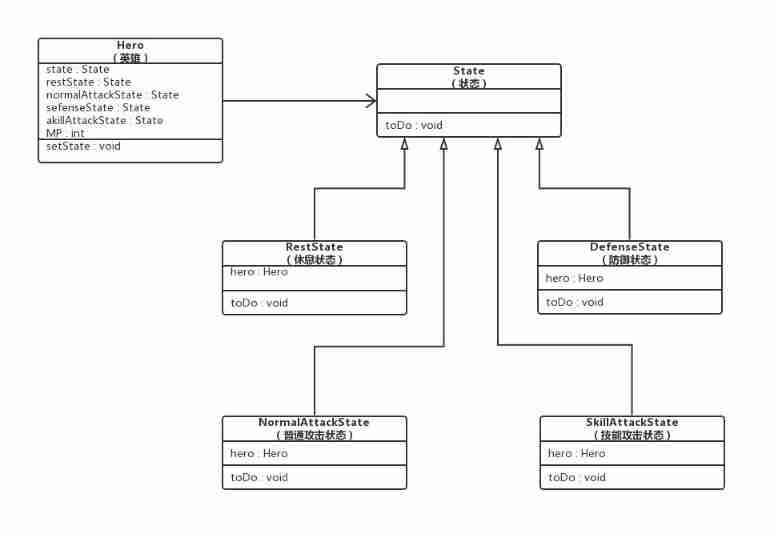
3、 ... and . Description of each role and UML Icon
Role description :
- Environmental Science (Context):Hero class
- Abstract state (State):State abstract class
- Specific state (Concrete State):RestState、DefenseState、NormalAttackState and SkillAttackState class
UML chart :
Four . Running effect
- Generated apk

- Icon after installation

Running results
Take a rest :
Defend :
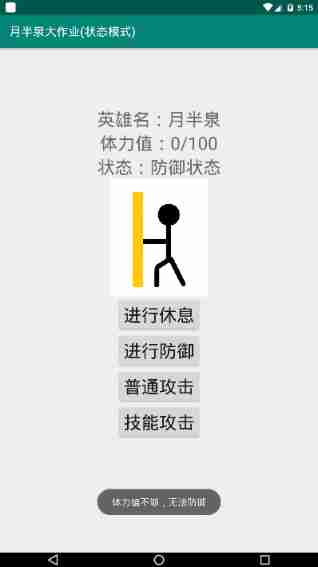
Common attack :

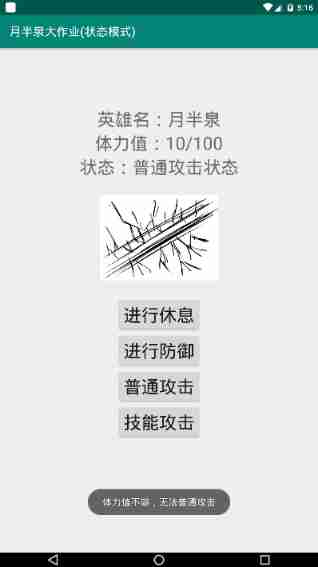
Skill attack :
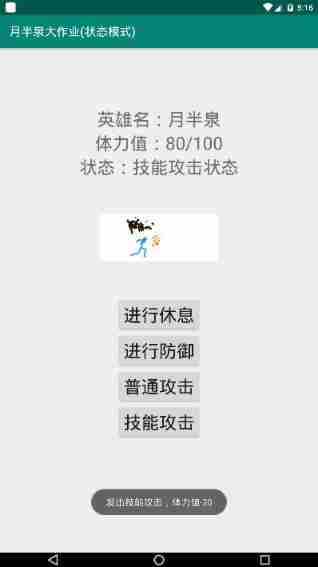
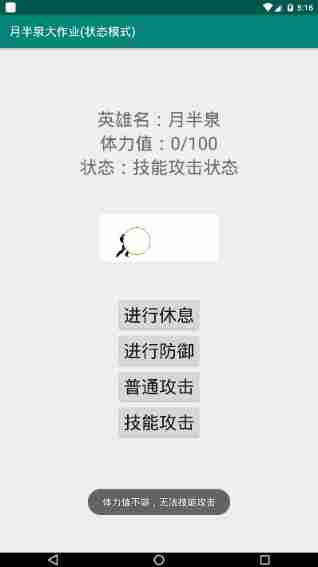
5、 ... and . Program complete source code
1. Environmental Science (CONTEXT)
In this design , The environmental role is Hero class , The code is as follows :
Hero.java
package com.yuebanquan.statepattern;

import android.content.Context;
import android.os.Bundle;
import android.support.v7.app.AppCompatActivity;
import android.view.Gravity;
import android.view.View;
import android.widget.Button;
import android.widget.TextView;
import android.widget.Toast;

import pl.droidsonroids.gif.GifImageView;

public class Hero extends AppCompatActivity implements View.OnClickListener {
    State state;        // current state
    State lastState;    // Last state
    private State restState;    // Resting state
    private State defenseState; // Defensive state
    private State normalAttackState;    // Normal attack status
    private State skillAttackState;     // Skill attack status

    private int MP;     // Hero's physical strength
    int MAXMP = 100;    // Maximum physical strength
    int MINMP = 0;      // Minimum physical strength

    // Declare the components of the interface
    TextView t_MP;
    TextView t_state;
    Button b_rest;
    Button b_defense;
    Button b_normalAttack;
    Button b_skillAttack;
    GifImageView doingGif;

    // Make a statement Toast
    ToastShow toast = new ToastShow(this);

    @Override
    protected void onCreate(Bundle savedInstanceState) {
        super.onCreate(savedInstanceState);
        setContentView(R.layout.activity_main);

        init(MAXMP);

    }

    /*************
     *  initialization Hero
     *************/
    public void init(int MP) {
        this.MP = MP;

        // Initialize various states
        restState = new RestState(this);
        defenseState = new DefenseState(this);
        normalAttackState = new NormalAttackState(this);
        skillAttackState = new SkillAttackState(this);

        // Heroes default to rest
        state = restState;
        lastState = restState;

        // Binding interface components
        t_MP = (TextView) findViewById(R.id.t_MP);
        t_state = (TextView) findViewById(R.id.t_state);
        b_rest = (Button) findViewById(R.id.b_rest);
        b_defense = (Button) findViewById(R.id.b_defense);
        b_normalAttack = (Button) findViewById(R.id.b_normalAttack);
        b_skillAttack = (Button) findViewById(R.id.b_skillAttack);
        doingGif = (GifImageView) findViewById(R.id.doingGif);
http://www.biyezuopin.vip
        // Set listeners for a few buttons
        b_rest.setOnClickListener(this);
        b_defense.setOnClickListener(this);
        b_normalAttack.setOnClickListener(this);
        b_skillAttack.setOnClickListener(this);
    }


    // Monitor
    @Override
    public void onClick(View v) {
        switch (v.getId()) {
            case R.id.b_rest:
                setLastState(getState());
                setState(getRestState());
                state.toDo();
                break;
            case R.id.b_defense:
                setLastState(getState());
                setState(getDefenseState());
                state.toDo();
                break;
            case R.id.b_normalAttack:
                setLastState(getState());
                setState(getNormalAttackState());
                state.toDo();
                break;
            case R.id.b_skillAttack:
                setLastState(getState());
                setState(getSkillAttackState());
                state.toDo();
                break;
        }
    }

    void midToast(String str, int showTime) {
        Toast toast = Toast.makeText(Hero.this, str, showTime);
        TextView v = (TextView) toast.getView().findViewById(android.R.id.message);
        toast.show();
    }


    // Various getter and setter
    public int getMP() {
        return MP;
    }

    public void setMP(int MP) {
        this.MP = MP;http://www.biyezuopin.vip
        t_MP.setText(String.valueOf(getMP()));
    }

    public void setState(State state) {
        this.state = state;
    }

    public State getState() {
        return state;
    }

    public State getLastState() {
        return lastState;
    }

    public void setLastState(State lastState) {
        this.lastState = lastState;
    }

    public State getRestState() {
        return restState;
    }

    public State getDefenseState() {
        return defenseState;
    }

    public State getNormalAttackState() {
        return normalAttackState;
    }

    public State getSkillAttackState() {
        return skillAttackState;
    }
}
2. Abstract state (STATE)
For this question , Abstract state (State) yes State abstract class , The code is as follows :
State.java
package com.yuebanquan.statepattern;

public abstract class State {
    public abstract void toDo();
}
3. Specific state (Concrete State)
For this question , share 4 Specific status roles , Namely RestState、DefenseState、NormalAttackState and SkillAttackState class , The code is as follows :
RestState.java
package com.yuebanquan.statepattern;

import android.widget.Toast;

public class RestState extends State {
    Hero hero;

    RestState(Hero hero) {
        this.hero = hero;
    }

    public void toDo() {
        if (hero.getMP() == hero.MAXMP) { // Physical strength is full
            //hero.midToast(" Physical strength is full , No need to rest ", Toast.LENGTH_SHORT);
            hero.toast.toastShow(" Physical strength is full , No need to rest ");
            hero.setState(hero.getLastState());
        }
        else { // Enter a resting state
            hero.setMP(hero.MAXMP); // Physical strength is set to the maximum 100
            hero.setState(hero.getRestState());
            hero.t_state.setText(" Resting state ");
            hero.doingGif.setImageResource(R.drawable.rest);
            //hero.midToast(" Take a rest , Physical strength has reached the upper limit ", Toast.LENGTH_SHORT);
            hero.toast.toastShow(" Take a rest , Physical strength has reached the upper limit ");
        }
    }
}
DefenseState.java
package com.yuebanquan.statepattern;

import android.widget.Toast;

public class DefenseState extends State {
    Hero hero;

    DefenseState(Hero hero) {
        this.hero = hero;
    }

    public void toDo() {
        if (hero.getMP() < (hero.MINMP + 10)) { // Physical strength is not enough
            //hero.midToast(" Physical strength is not enough , No defense ", Toast.LENGTH_SHORT);
            hero.toast.toastShow(" Physical strength is not enough , No defense ");
            hero.setState(hero.getLastState());
        } http://www.biyezuopin.vip
        else {  // Enter a defensive state
            hero.setMP(hero.getMP() - 10); // Defense physical strength -10
            hero.setState(hero.getDefenseState());
            hero.t_state.setText(" Defensive state ");
            hero.doingGif.setImageResource(R.drawable.defense);
            //hero.midToast(" Defend , Physical strength -10", Toast.LENGTH_SHORT);
            hero.toast.toastShow(" Defend , Physical strength -10");
        }
    }
}
NormalAttackState.java
package com.yuebanquan.statepattern;

import android.widget.Toast;

public class NormalAttackState extends State {
    Hero hero;

    NormalAttackState(Hero hero) {
        this.hero = hero;
    }

    public void toDo() {
        if (hero.getMP() < (hero.MINMP + 15)) { // Physical strength is not enough
            //hero.midToast(" Physical strength is not enough , Cannot attack normally ", Toast.LENGTH_SHORT);
            hero.toast.toastShow(" Physical strength is not enough , Cannot attack normally ");
            hero.setState(hero.getLastState());
        } else {  // Enter the normal attack state
            hero.setMP(hero.getMP() - 15); // Normal attack stamina -15
            hero.setState(hero.getNormalAttackState());
            hero.t_state.setText(" Normal attack status ");
            hero.doingGif.setImageResource(R.drawable.normal_attack);
            //hero.midToast(" Launch a normal attack , Physical strength -15", Toast.LENGTH_SHORT);
            hero.toast.toastShow(" Launch a normal attack , Physical strength -15");
        }
    }
}
SkillAttackState.java
package com.yuebanquan.statepattern;

import android.widget.Toast;

public class SkillAttackState extends State {
    Hero hero;

    SkillAttackState(Hero hero) {
        this.hero = hero;
    }

    public void toDo() {
        if (hero.getMP() < (hero.MINMP + 20)) { // Physical strength is not enough
            //hero.midToast(" Physical strength is not enough , Unable to attack skills ", Toast.LENGTH_SHORT);
            hero.toast.toastShow(" Physical strength is not enough , Unable to attack skills ");
            hero.setState(hero.getLastState());
        }
        else {  // Enter the skill attack state
            hero.setMP(hero.getMP() - 20); // Skill attack physical strength -20
            hero.setState(hero.getSkillAttackState());
            hero.t_state.setText(" Skill attack status ");
            hero.doingGif.setImageResource(R.drawable.skill_attack);
            //hero.midToast(" Launch skill attack , Physical strength -20", Toast.LENGTH_SHORT);
            hero.toast.toastShow(" Launch skill attack , Physical strength -20");
        }
    }
}
4. Other categories
Expand one ToastShow Class to solve Android Self contained Toast Show delay issues , The code is as follows :
Toast.java
package com.yuebanquan.statepattern;

import android.content.Context;
import android.widget.Toast;

public class ToastShow {
    private Context context;  // Prompt information in this window

    private Toast toast = null;  // It is used to judge whether there is Toast perform
    public ToastShow(Context context) {
        this.context = context;
    }
    public void toastShow(String text) {
        if(toast == null)
        {
            toast = Toast.makeText(context, text, Toast.LENGTH_SHORT);  // Normal execution
        }
        else {
            toast.setText(text);  // Used to overwrite the prompt information that has not disappeared before
        }
        toast.show();
    }
}
5. Android Layout file for
The layout file is located in app/src/main/res/layout, The code is as follows :
activity_main.xml
<?xml version="1.0" encoding="utf-8"?>
<LinearLayout xmlns:android="http://schemas.android.com/apk/res/android"
xmlns:app="http://schemas.android.com/apk/res-auto"
xmlns:tools="http://schemas.android.com/tools"
android:layout_width="match_parent"
android:layout_height="match_parent"
android:orientation="vertical"
tools:context=".Hero">
<!-- placeholder -->
<TextView
android:layout_width="match_parent"
android:layout_height="100dp" />
<!-- Hero name -->
<LinearLayout
android:layout_width="wrap_content"
android:layout_height="wrap_content"
android:layout_gravity="center">
<TextView
android:layout_width="wrap_content"
android:layout_height="wrap_content"
android:text=" Hero name :"
android:textSize="30sp"/>
<TextView
android:layout_width="wrap_content"
android:layout_height="wrap_content"
android:text=" Moon Spring "
android:textSize="30sp"/>
</LinearLayout>
<!-- Physical strength -->
<LinearLayout
android:layout_width="wrap_content"
android:layout_height="wrap_content"
android:layout_gravity="center">
<TextView
android:layout_width="wrap_content"
android:layout_height="wrap_content"
android:text=" Physical strength :"
android:textSize="30sp"/>
<TextView
android:id="@+id/t_MP"
android:layout_width="wrap_content"
android:layout_height="wrap_content"
android:text="100"
android:textSize="30sp"/>
<TextView
android:layout_width="wrap_content"
android:layout_height="wrap_content"
android:text="/100"
android:textSize="30sp"/>
</LinearLayout>
<!-- state -->
<LinearLayout
android:layout_width="wrap_content"
android:layout_height="wrap_content"
android:layout_gravity="center">
<TextView
android:layout_width="wrap_content"
android:layout_height="wrap_content"
android:text=" state :"
android:textSize="30sp"/>
<TextView
android:id="@+id/t_state"
android:layout_width="wrap_content"
android:layout_height="wrap_content"
android:text=" Resting state "
android:textSize="30sp"/>
</LinearLayout>
<!--<!– placeholder –>-->
<!--<TextView-->
<!--android:layout_width="match_parent"-->
<!--android:layout_height="100dp" />-->
<pl.droidsonroids.gif.GifImageView
android:id="@+id/doingGif"
android:layout_width="200dp"
android:layout_height="200dp"
android:layout_gravity="center"
android:src="@drawable/rest"/>
<Button
android:id="@+id/b_rest"
android:layout_width="wrap_content"
android:layout_height="wrap_content"
android:layout_gravity="center"
android:text=" Take a rest "
android:textSize="30sp" />
<Button
android:id="@+id/b_defense"
android:layout_width="wrap_content"
android:layout_height="wrap_content"
android:layout_gravity="center"
android:text=" Defend "
android:textSize="30sp"/>
<Button
android:id="@+id/b_normalAttack"
android:layout_width="wrap_content"
android:layout_height="wrap_content"
android:layout_gravity="center"
android:text=" Common attack "
android:textSize="30sp"/>
<Button
android:id="@+id/b_skillAttack"
android:layout_width="wrap_content"
android:layout_height="wrap_content"
android:layout_gravity="center"
android:text=" Skill attack "
android:textSize="30sp"/>
</LinearLayout>
6. Android Program declaration file
The program declaration file is located at app/src/, The code is as follows :
AndroidManifest.xml
<?xml version="1.0" encoding="utf-8"?>
<manifest xmlns:android="http://schemas.android.com/apk/res/android"
    package="com.yuebanquan.statepattern">

    <application
        android:allowBackup="true"
        android:icon="@mipmap/ic_launcher"
        android:label="@string/app_name"
        android:roundIcon="@mipmap/ic_launcher_round"
        android:supportsRtl="true"
        android:theme="@style/AppTheme">
        <activity android:name=".Hero">
            <intent-filter>
                <action android:name="android.intent.action.MAIN" />

                <category android:name="android.intent.category.LAUNCHER" />
            </intent-filter>
        </activity>
    </application>

</manifest>
7. Android Of build.gradle
Position in app/, Specify the generated apk Name and introduced module , The code is as follows :
build.gradle
apply plugin: 'com.android.application'

android {
    compileSdkVersion 28
    defaultConfig {
        applicationId "com.yuebanquan.statepattern"
        minSdkVersion 15
        targetSdkVersion 28
        versionCode 1
        versionName "1.0"
        testInstrumentationRunner "android.support.test.runner.AndroidJUnitRunner"
        vectorDrawables.useSupportLibrary = true
    }
    buildTypes {
        release {
            minifyEnabled false
            proguardFiles getDefaultProguardFile('proguard-android-optimize.txt'), 'proguard-rules.pro'
        }
    }
}

android.applicationVariants.all {
    variant ->
        variant.outputs.all {
            //  Specify generated here apk file name
            outputFileName = " Big homework ( The state pattern ).apk"
        }
}

dependencies {
    implementation fileTree(dir: 'libs', include: ['*.jar'])
    implementation 'com.android.support:appcompat-v7:28.0.0'
    implementation 'com.android.support.constraint:constraint-layout:1.1.3'
    implementation 'com.android.support:design:28.0.0'
    implementation 'com.android.support:support-vector-drawable:28.0.0'
    testImplementation 'junit:junit:4.12'
    androidTestImplementation 'com.android.support.test:runner:1.0.2'
    androidTestImplementation 'com.android.support.test.espresso:espresso-core:3.0.2'

    // Show GifView modular
    implementation 'pl.droidsonroids.gif:android-gif-drawable:1.2.7'
}
边栏推荐
- notepad++正则表达式替换字符串
- China Jinmao online electronic signature, accelerating the digitization of real estate business
- NSSA area where OSPF is configured for Huawei equipment
- Atcoder beginer contest 258 [competition record]
- Single source shortest path exercise (I)
- Hudi of data Lake (2): Hudi compilation
- GD32F4xx uIP协议栈移植记录
- 微信小程序---WXML 模板语法(附带笔记文档)
- "14th five year plan": emphasis on the promotion of electronic contracts, electronic signatures and other applications
- Extracting profile data from profile measurement
猜你喜欢
上门预约服务类的App功能详解

About the slmgr command
Gd32f4xx UIP protocol stack migration record
FFT 学习笔记(自认为详细)
Wechat applet -- wxml template syntax (with notes)
关于结构体所占内存大小知识
GD32F4xx uIP协议栈移植记录
Notepad + + regular expression replace String
NSSA area where OSPF is configured for Huawei equipment

wx.getLocation(Object object)申请方法,最新版
随机推荐
Tools to improve work efficiency: the idea of SQL batch generation tools
QT -- thread
Hudi of data Lake (1): introduction to Hudi
QT QPushButton details
Date类中日期转成指定字符串出现的问题及解决方法
权限问题:source .bash_profile permission denied
SQLServer连接数据库读取中文乱码问题解决
Classical concurrency problem: the dining problem of philosophers
FFMPEG关键结构体——AVFrame
Add noise randomly to open3d point cloud
Solve the problem of reading Chinese garbled code in sqlserver connection database
【DesignMode】适配器模式(adapter pattern)
FFT learning notes (I think it is detailed)
Transport layer protocol ----- UDP protocol
[designmode] Decorator Pattern
Codeforces Round #804 (Div. 2)【比赛记录】
What is information security? What is included? What is the difference with network security?
Gd32f4xx UIP protocol stack migration record
[QT] QT uses qjson to generate JSON files and save them
[online chat] the original wechat applet can also reply to Facebook homepage messages!