当前位置:网站首页>Txt file virus
Txt file virus
2022-07-07 23:03:00 【For the rest of Kali's life】
"TXT", That is, the most familiar plain text format , It is a basic format for saving text files . Small size 、 Compatibility is good. 、 No virus and other advantages . To be honest, big trees attract wind , Hackers take advantage of people's understanding of TXT This trust started TXT" bomb ".TXT The bomb is actually covered ".txt" Cuticular " Fragment object "( extension SHS) The file of , It is in the form of email attachments , Quietly enter your system . Kind people think they are coming TXT file , Double click to run without any consideration . At this time, this one in sheep's clothing " Old wolf ", But take it off " Sheepskin ", Show the original shape , Engage in activities that damage computer systems . In order to protect their own safety , Find out " other party " Details of . Today we show you how to make a formatted floppy disk TXT bomb . Our aim is to know ourselves and the enemy , The mutant .
actual combat "TXT" Viruses step 1 Open Notepad , Create one that contains only one space ( In order to reduce the file size ) Text file for , Take any name . step 2 Open the tablet , Drag this file into Notepad . You can also click 【 Insert 】|【 object 】, eject 【 Insert object 】 Dialog box , Choose 【 Create... From file 】, And then click 【 Browse 】 Button to select the file to insert ( Pictured 1). chart 1 Insert object step 3 Select the icon of the inserted object , Select... In the menu bar 【 edit 】|【 Package object 】|【 Edit Package 】( Pictured 2). chart 2 Add Icon In the pop-up 【 Object wrapper 】 In the dialog box , Select... In the menu bar 【 edit 】|【 Command line 】, Then type the following command :Format.com a: /autotest, single click 【 determine 】, here , The command content will be displayed in the content bar ( Pictured 3). chart 3 Add command step 4 Click... In the appearance bar 【 Insert Icon 】 Button , A warning dialog box will pop up , confirm , Then select any icon ( Pictured 4). chart 4 Select the icon step 5 Select... In the menu bar 【 edit 】|【 Volume label 】, Take a name for this embedded object ( Will replace the original file name )( Pictured 5). single click 【 file 】 Menu 【 to update 】, Then close this dialog . chart 5 Volume label step 6 Drag and drop the newly created embedded object onto the desktop . The default name of the file is " debris ", Now let's change it to "iloveyou.txt". Open the e-mail program and put "iloveyou.txt" Sent as an attachment , Or it will contain embedded objects ( With malicious commands ) The document of is sent as an attachment . step 7 When the mail recipient mistakenly "iloveyou.txt.shs" File as "iloveyou.txt" When opening safely , Or open the file , A malicious command is triggered when an embedded object in a file is clicked ( eject DOS Run window , Execute the format command ), Suppose another program is accessing the floppy drive , The following message will be displayed "Drive A: is currently in use by another process. Aborting Format."(A The drive is being accessed by another program , Formatting aborted ). Such a bomb for formatting floppy disks is made , If you add the code to format the hard disk , The effect is imaginable . defense Facing such a cunning TXT bomb , How can we be careful if we are usually informal , Here are two prevention measures , In case one side is safe . 1. uncover TXT The skin of Actually TXT The final harm of the virus lies in its concealment , How can we uncover its skin , Directly show ".SHS" Extension , In this way, the harm will be reduced a lot . Show ".SHS" The extension method is actually very simple , Just open the registry editor , Find from "HEY_CLASSES_ROOTShellScrap" key , A key value below it is "NeverShowExt", It is unable to display ".SHS" File extension " The culprit ", Delete it , In the future, we can directly see ".SHS" The extension has been changed , Of course, people at this time will never be half hearted . 2. Replace " Fragment object " Icon . Why can we see the specific format of a document at a glance , This is determined by their default icons . Because the default icon of the fragment object file is very similar to the icon of the text file, we often mistake the fragment object file for TXT file . To distinguish them , We just need to change the default icon of the fragment object file . open " Explorer ", Then select 【 see 】 Under the menu 【 Folder checkbox 】, Select in the pop-up dialog box 【 file type 】 Loose leaf card , stay 【 Registered file types 】 Find below 【 Fragment object 】. Click in the upper right corner 【 edit 】 Button , On the 【 Edit file type 】 In the dialog box, click 【 Change icon 】 Button ( Pictured 6). open C:WINDOWSSYSTEMPifmgr.dll, Choose one of the icons that appears as .SHS New icon for file ( Just choose the last one in the first row , A bomb !), In this way, you will know that this is a bomb at a glance , Don't be careless . chart 6 Editing type is convenient for daily operation , Common shutdown and restart commands Linux The commonly used shutdown and restart commands in shutdown、halt、reboot as well as init, They can be shut down and restarted , But the internal working process of each command is different , I will introduce one by one .1. shutdownshutdown The command is used to safely shut down Linux System . Some users will turn off the power supply directly Linux, It's very dangerous . because Linux And Windows Different , There are many processes running in the background , So forced shutdown may cause data loss of the process , Make the system unstable , It will even damage the hardware equipment . perform shutdown On command , The system will notify all logged in users that the system is about to shut down , also login The command will be frozen , That is, new users can no longer log in to the system . Use shutdown The command can directly shut down the system , You can also delay the specified time before shutting down the system , You can also restart . Delay the specified time before shutting down the system , It allows users time to save the files currently being processed and close the opened programs .shutdown Some parameters of the command are as follows : [-t] Specify how long to shut down the system [-r] Restart the system [-k] It doesn't really shut down , Just send a warning signal to each logged in user [-h] Shutdown system (halt)shutdown The essence of the order is to give init The program sends the signal (signal), It is required to switch the operation level of the system (Runlevel). The operation level of the system includes : 0: Shutdown system 1: Single user mode , If not for shutdown Command to specify -h or -r Parameters and directly execute , It will switch to this running level by default 2: Multi user mode ( I won't support it NFS)3: Multi user mode ( Support NFS), This operation level is commonly used 5: Multi user mode (GUI Pattern )6: Restart the system 2. halthalt Is the simplest shutdown command , It's actually a call shutdown -h command .halt Execution time , Kill the application process , The kernel will stop after the file system write operation .halt Some parameters of the command are as follows : [-f] There is no call shutdown And force a shutdown or restart [-i] Before shutting down or restarting , Turn off all network interfaces [-p] Call when shutdown poweroff, This option is the default 3.rebootreboot The working process and halt similar , Its function is to restart , and halt It's shut down . Its parameters are also similar to halt similar .4.initinit Is the ancestor of all processes , Its process number is always 1.init Used to switch the operation level of the system , Switching is done immediately .init 0 The command is used to immediately switch the system operation level to 0, Immediate shutdown ;init 6 The command is used to switch the system operation level to 6, That is to restart .(T115)
边栏推荐
- Microservice Remote debug, nocalhost + rainbond microservice Development second Bomb
- Debezium series: set role statement supporting mysql8
- 苹果在iOS 16中通过'虚拟卡'安全功能进一步进军金融领域
- Leetcode94. Middle order traversal of binary trees
- Cataloger integrates lidar and IMU for 2D mapping
- CTF exercise
- QT graphicsview graphical view usage summary with flow chart development case prototype
- 行测-图形推理-7-相异图形类
- Debezium系列之:支持 mysql8 的 set role 语句
- Unity technical notes (I) inspector extension
猜你喜欢
Nx10.0 installation tutorial
Sword finger offer 27 Image of binary tree

Digital transformation: five steps to promote enterprise progress
How pyGame rotates pictures
ASEMI整流桥KBPC1510的型号数字代表什么
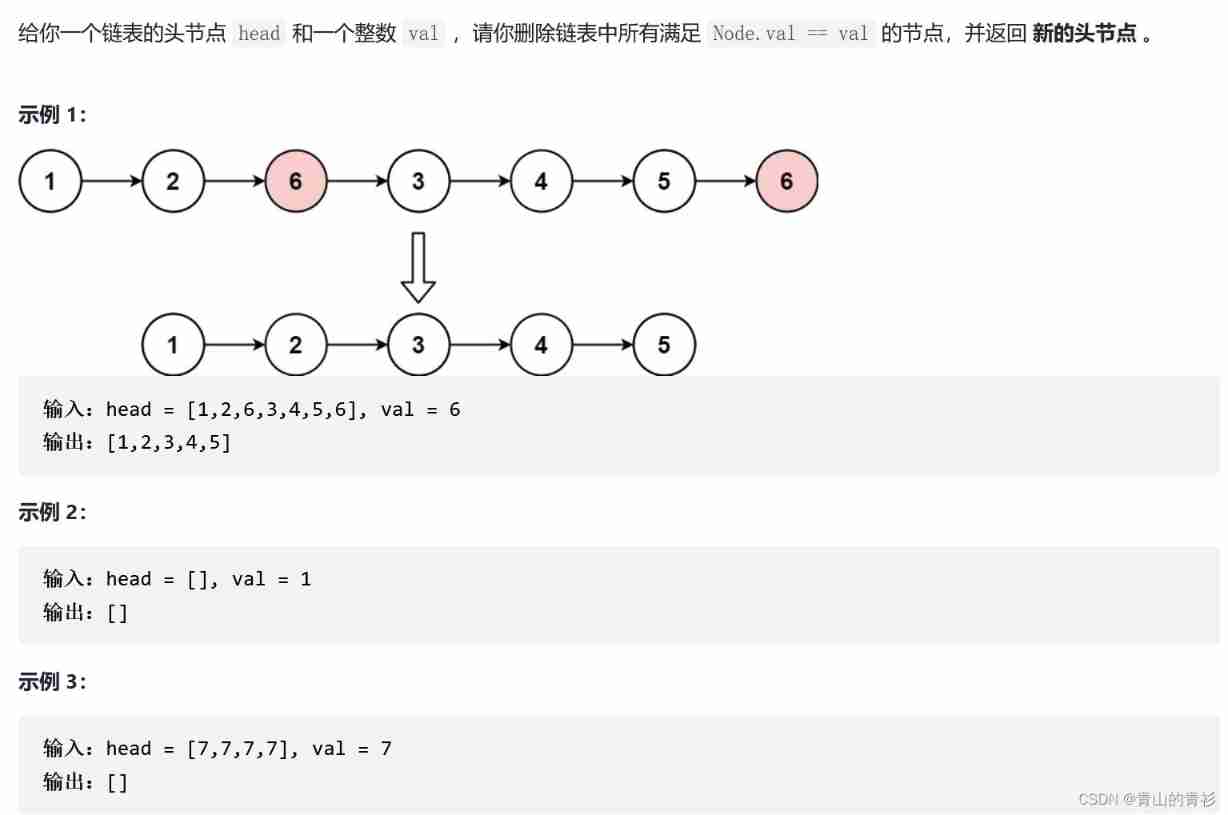
LeetCode203. Remove linked list elements
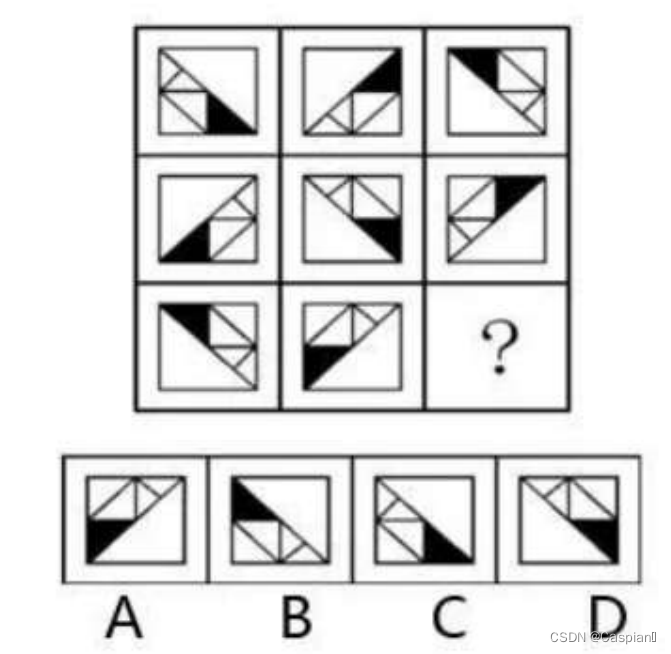
行测-图形推理-6-相似图形类

Online interview, how to better express yourself? In this way, the passing rate will be increased by 50%~
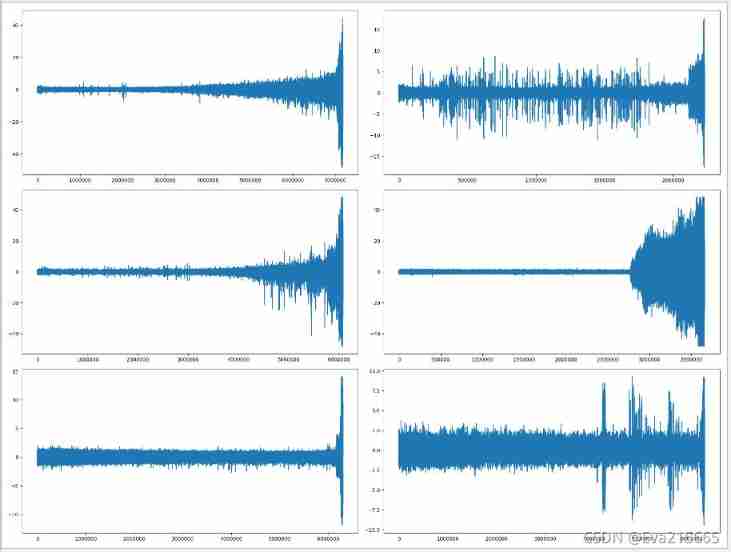
Time convolution Network + soft threshold + attention mechanism to realize residual life prediction of mechanical equipment
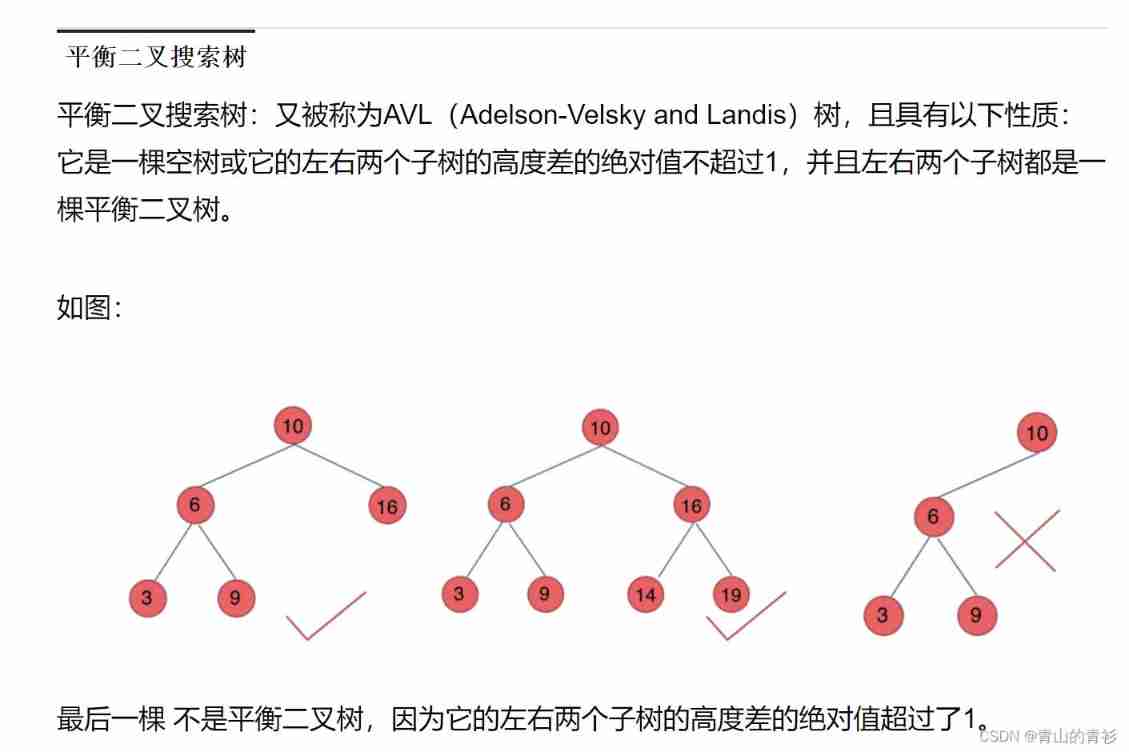
Basic knowledge of binary tree
随机推荐
Leetcode206. Reverse linked list
ASP. Net core introduction V
数据库每日一题---第22天:最后一次登录
LeetCode707. Design linked list
Unity与WebGL的相爱相杀
ASP.NET Core入门五
安踏DTC | 安踏转型,构建不只有FILA的增长飞轮
Line test - graphic reasoning -5- one stroke class
Take full control! Create a "leading cockpit" for smart city construction
Understand the autograd package in pytorch
This time, let's clear up: synchronous, asynchronous, blocking, non blocking
Gbu1510-asemi power supply special 15A rectifier bridge gbu1510
GBU1510-ASEMI电源专用15A整流桥GBU1510
Two minutes, talk about some wrong understandings of MySQL index
QT graphicsview graphical view usage summary with flow chart development case prototype
Use JfreeChart to generate curves, histograms, pie charts, and distribution charts and display them to JSP-1
Debezium series: introducing support for the final operator
C # realizes the communication between Modbus protocol and PLC
Debezium series: binlogreader for source code reading
Digital transformation: five steps to promote enterprise progress