当前位置:网站首页>2837xd code generation module learning (1) -- GPIO module
2837xd code generation module learning (1) -- GPIO module
2022-07-02 09:55:00 【Quikk】
2837xd Code generation module learning (1)——GPIO modular
The above part mainly looks at the official routines , Have a framework understanding of program operation and the basic framework of the model , The next part is mainly about c2000 Each module in the library builds its own model based on its own understanding , Achieve the effect of learning module .
Model links : Model links
1 Basic module
There is only one picture here , If you need to further study by yourself :

2 DSP Code generation library
2.1 GPIO_OUT
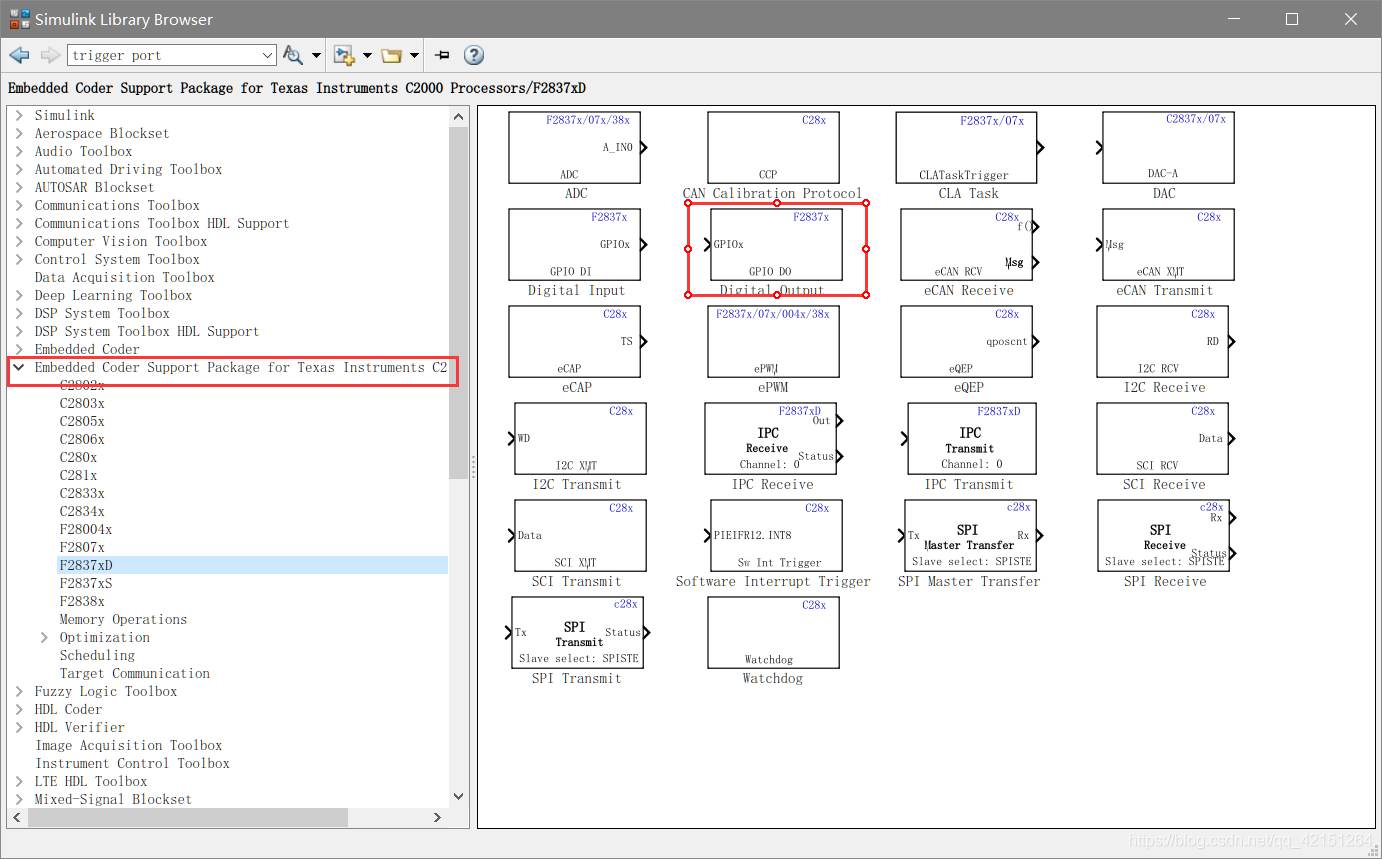
from Library Enter the component page of the corresponding hardware ( This is 2837xd), Have a look first GPIO output module . First configure the environment , The basic method is explained in the article of environment construction ( link ), You need to add a check here .
After checking , Will make the generated variables exist in the form of structures .
GPIO out The parameter configuration is as follows :
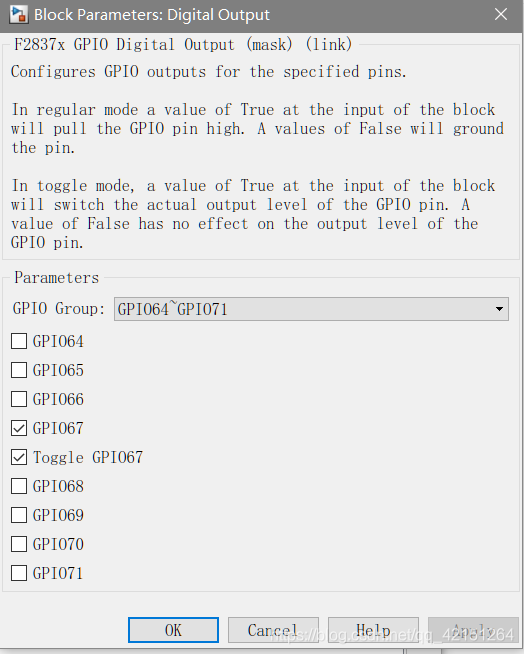
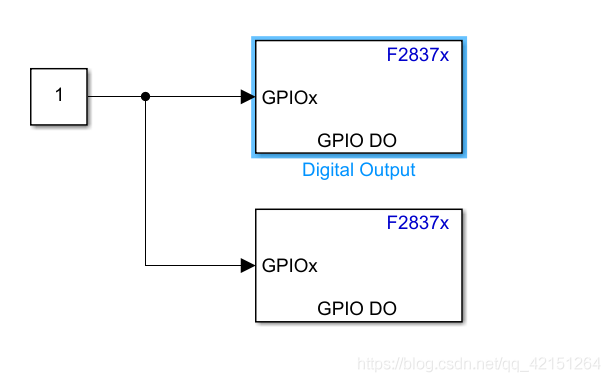
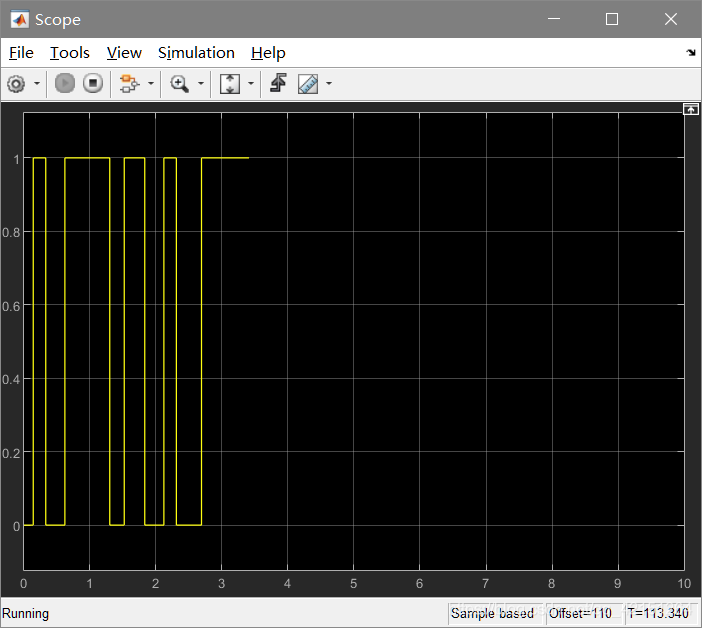
In the picture GPIO Group Used to select operations GPIO, Check the corresponding GPIO after . Access Constant( by 1 Output high level , by 0 Output low level ), Check Toggle It means to proceed with Solver Step size of .
2.2 GPIO_IN
GPIO_IN The module test here adopts , Configure in external mode ( That is what the previous article said SCI link ). First configure according to the above article SCI_A.

GPIO_IN The parameter configuration is as above , Follow GPIO_OUT similar , No more details here .

GPIO_in The module is connected to the hardware KEY,GPIO_OUT The connection is LED. The phenomenon is when the key is pressed ,LED Light on , After loosening LED The light goes out .

2.3 GPIO_INT
GPIO Pin external interrupt test model :
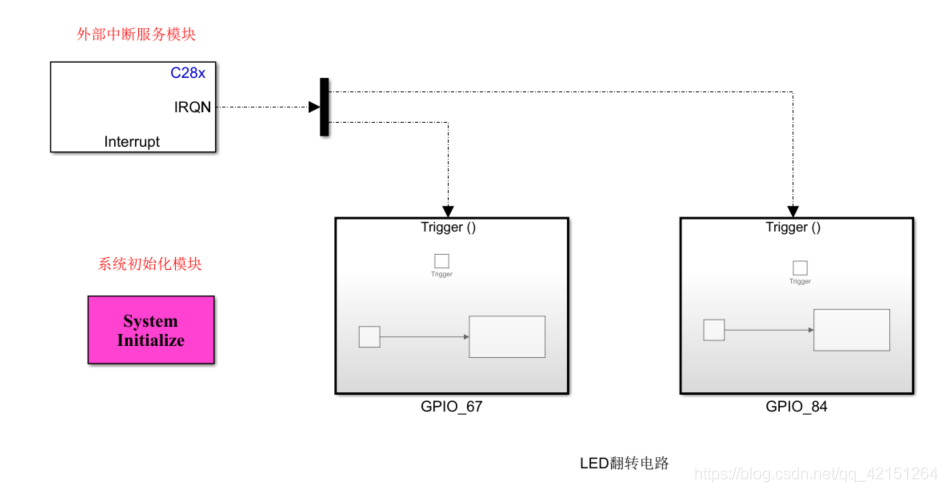
The board I use GPIO_67 and GPIO_84 Two are connected respectively LED( Low level on ).

Let's look at it module by module first :
1. External interrupt service module
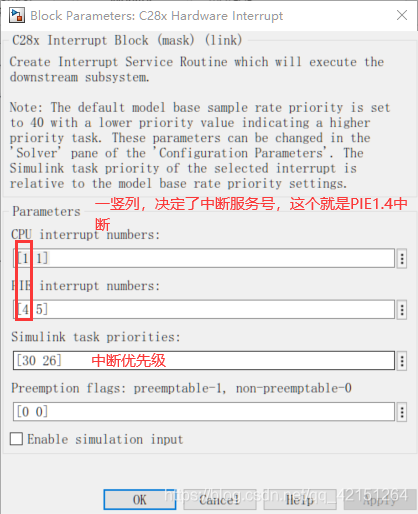
here PIE_1.4 and PIE_1.5 These are external interrupts 1 And external interruptions 2 The interrupt function of .
2. Then use a Demux The module implements interrupts in two trigger functions :
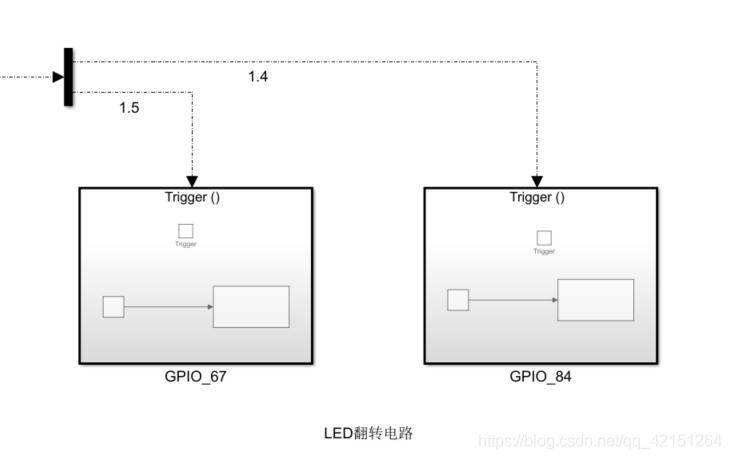
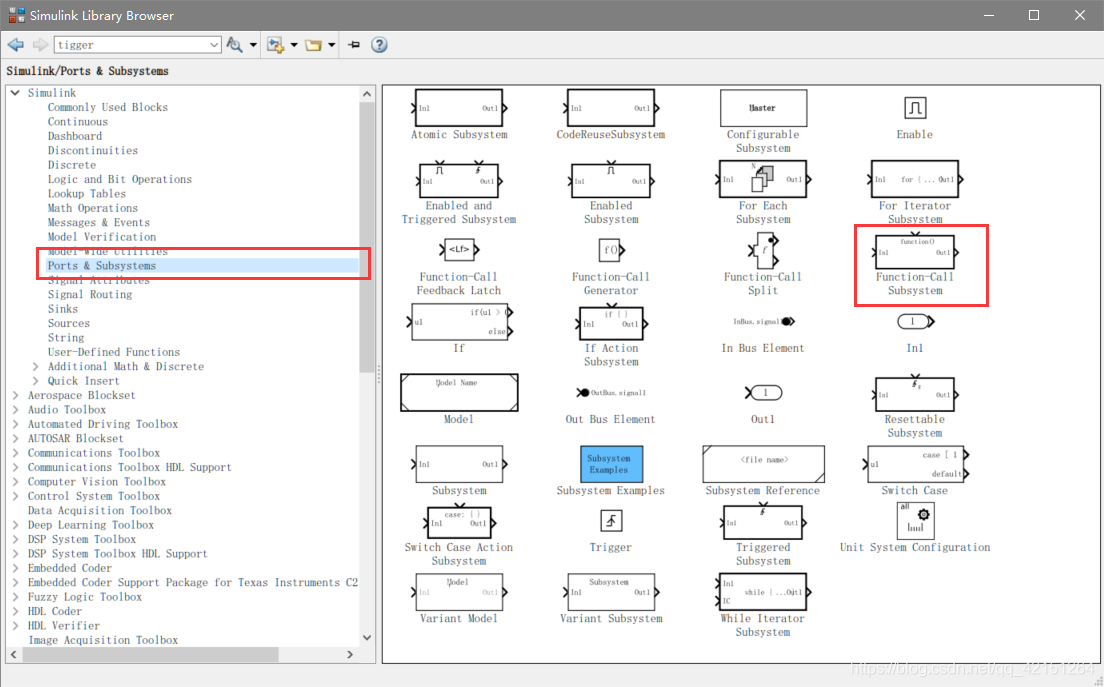
Trigger function at Library Medium simulink Under the subsystems below . Inside Function You can rename yourself , Under the GPIO_67 I also changed my name .
3. Inside the trigger function is an implementation GPIO Flipped module :Counter Limited stay Simulink -> source Next , The function is to produce a 0 To Upper limit( Parameters ) Number of cycles , here Upper Limit by 1, That is, every time the function is executed , Will be in 0-1 In between . So it's realized GPIO Flip of .


4. System initialization module : The definition is implemented in the system initialization module GPIO66 and GPIO133 Input pin for external interrupt . The code added here will regenerate the program Initialize Function , Will only be executed once .


  // GPIO66 are input
   EALLOW;
   GpioCtrlRegs.GPCMUX1.bit.GPIO66 = 0;         // GPIO
   GpioCtrlRegs.GPCDIR.bit.GPIO66 = 0;          // input
   GpioCtrlRegs.GPCQSEL1.bit.GPIO66 = 0;        // XINT1 Synch to SYSCLKOUT only
   EDIS;
   EALLOW;
   GpioCtrlRegs.GPEMUX1.bit.GPIO133 = 0;         // GPIO
   GpioCtrlRegs.GPEDIR.bit.GPIO133 = 0;          // input
   GpioCtrlRegs.GPEQSEL1.bit.GPIO133 = 0;        // XINT1 Synch to SYSCLKOUT only
   EDIS;
// GPIO66 is XINT1
   GPIO_SetupXINT1Gpio(66);//K1 GPIO66
   GPIO_SetupXINT2Gpio(133);//K1 GPIO133
// Configure XINT1
   XintRegs.XINT1CR.bit.POLARITY = 0;      // Falling edge interrupt
   XintRegs.XINT2CR.bit.POLARITY = 0;      // Falling edge interrupt
// Enable XINT1 and XINT2
   XintRegs.XINT1CR.bit.ENABLE = 1;        // Enable XINT1
   XintRegs.XINT2CR.bit.ENABLE = 1;        // Enable XINT1
Another way is to directly set the corresponding settings in the parameter list ( The effect of the two methods is exactly the same ):
Configuration Parameters -> Hardware Implementation -> Target hardware resources ->External interrupt
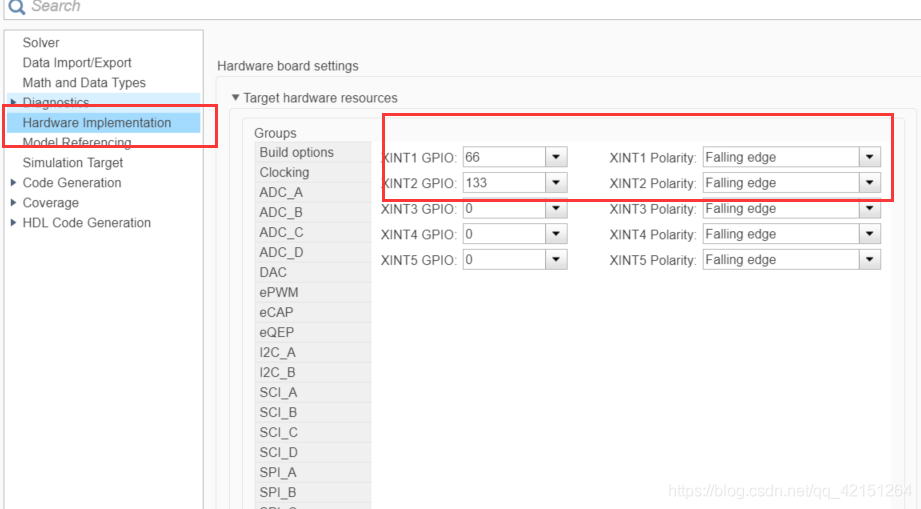
5. Program run results , Press the button ,LED Flip .
边栏推荐
猜你喜欢

Read Day6 30 minutes before going to bed every day_ Day6_ Date_ Calendar_ LocalDate_ TimeStamp_ LocalTime
每天睡前30分钟阅读Day6_Day6_Date_Calendar_LocalDate_TimeStamp_LocalTime

2837xd code generation - stateflow (3)

Navicat remote connection MySQL reports an error 1045 - access denied for user 'root' @ '222.173.220.236' (using password: yes)
2837xd code generation - stateflow (4)

Alibaba cloud SMS service

一次聊天勾起的回忆
图像识别-数据清洗

QT QLabel样式设置

Error reporting on the first day of work (incomplete awvs unloading)
随机推荐
Because of hard work, the fruit goes with fate
Thinkphp5 how to determine whether a table exists
图像识别-数据增广
Memories of a chat
The latest progress and development trend of 2022 intelligent voice technology
JDBC review
kinect dk 获取CV::Mat格式的彩色RGB图像(openpose中使用)
三相逆变器离网控制——PR控制
Matlab代码生成之SIL/PIL测试
CKEditor 4.10.1 上传图片提示“不正确的服务器响应” 问题解决
2837xd 代碼生成——StateFlow(4)
C语言之分草莓
2837xd 代码生成——StateFlow(1)
Read Day6 30 minutes before going to bed every day_ Day6_ Date_ Calendar_ LocalDate_ TimeStamp_ LocalTime
What are the waiting methods of selenium
Kinect DK obtains color RGB images in cv:: mat format (used in openpose)
C语言之最小数
C语言之到底是不是太胖了
阿里云ack介绍
How to use pyqt5 to make a sensitive word detection tool