当前位置:网站首页>uniapp 使用canvas 生成海报并保存到本地
uniapp 使用canvas 生成海报并保存到本地
2022-07-02 03:09:00 【Treasure girl1】
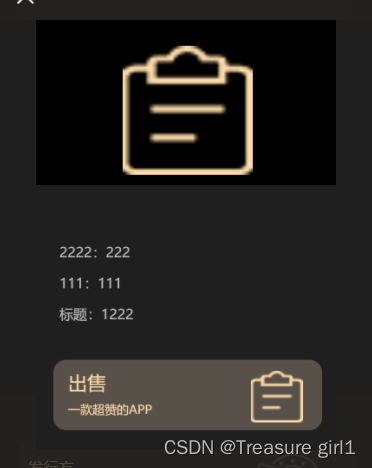
<template>
		<view>
			<!--  -->
			<view class="share">
				<view :class="{'share-box': shareState}" @click="places">
				</view>
				<view class="share-item" :class="{'share-show': shareState}">
					<view class="share-to">
						<image @click="places" src="../../../static/my/ic_guan.png" mode=""></image>
					</view>
					<!--  -->
					<view class="fenximg gui-flex gui-justify-content-center">
						<canvas style="width: 346px;height: 500px;position: fixed;opacity: 0;" class="canvas"
							canvas-id="canvasID"></canvas>
						<image :src="imgUrl" mode=""></image>
					</view>
					<!--  -->
					<view class="" style="height: 160rpx;"></view>
				</view>
			</view>
		</view>
</template>

<script>
	export default {
		data() {
			return {
				shareState: true,
				imgUrl: '',
				statusBarHeight: 0,
				hello: '../../../static/logo.png', // hello图标
				cname: '111',
			}
		},
		onLoad(option) {
			this.ss()
		},

		methods: {
			ss() {
				var that = this
				this.$nextTick(() => {
					let ctx = uni.createCanvasContext('canvasID', this);
					// ctx.setFillStyle("transparent"); //设置canvas背景颜色
					// ctx.fillRect(0, 0, 346, 500) //设置canvas画布大小
					// this.drawCircular(ctx, this.avatar, 36, 32, 50, 50) //绘制圆形头像
					this.fillRoundRect(ctx, 0, 0, 446, 550, 0, '#1F1F1F'); //绘制一个圆角矩形
					this.fillRoundRect(ctx, 0, 0, 356, 192, 0, '#000000'); //绘制一个圆角矩形


					ctx.drawImage(that.hello, 100, 30, 150, 150) //二维码

					// 绘制职位标题,多余文字自动换行
					ctx.setFontSize(22)
					ctx.setFillStyle("#ffffff")
					let str = ''
					// 字符串总长度
					let _strLength = str.length
					// 总结截取次数
					let _strNum = Math.ceil(_strLength / 9)

					// 每次开始截取字符串的索引
					let _strHeight = 0
					// 绘制的字体 x,y的初始位置
					let _strX = 27,
						_strY = 223
					// #ifdef APP-PLUS
					let strIndex = 185
					// #endif
					// #ifdef H5
					let strIndex = 220
					// #endif
					// 开始截取
					for (let i = 0; i < _strNum; i++) {
						strIndex = _strY + i * 40
						ctx.fillText(str.substr(_strHeight + i * 9, 9), _strX, _strY + i * 40)
					}


					strIndex += 20
					ctx.setFontSize(22)
					ctx.setFillStyle("#ffffff")
					let strtitlee = that.cname
					ctx.fillText(strtitlee, _strX, strIndex)


					strIndex += 36
					ctx.setFontSize(16)
					ctx.setFillStyle("#C3C3C3")
					let strtitle = '111:' + that.cname
					ctx.fillText(strtitle, _strX, strIndex)


					strIndex += 36
					ctx.setFontSize(16)
					ctx.setFillStyle("#C3C3C3")
					let strtitles = '222:'+that.cname
					ctx.fillText(strtitles, _strX, strIndex)

					strIndex += 36
					ctx.setFontSize(16)
					ctx.setFillStyle("#C3C3C3")
					let strtitlesl = '收藏:' + that.cname
					ctx.fillText(strtitlesl, _strX, strIndex)


					// #ifdef H5
					ctx.setFontSize(22)
					this.fillRoundRect(ctx, 20, 395, 310, 82, 15, '#585149'); //绘制一个圆角矩形
					ctx.setFillStyle("#FFDCAA")
					ctx.fillText('商品', _strX + 10, 430)
					ctx.setFontSize(14)
					ctx.setFillStyle("#FFDCAA")
					ctx.fillText('一款超赞的APP', _strX + 10, 458)
					// 绘制微信二维码
					ctx.drawImage(this.hello, 248, 408, 60, 60) //二维码
					// #endif


					ctx.draw(false, () => {
						// 返回canvas图片信息
						uni.canvasToTempFilePath({
							canvasId: 'canvasID',
							success: (res) => {
								this.imgUrl = res.tempFilePath
							},
							fail: function(err) {
								console.log(err)
							}
						})
					})
				})
			},

			// 保存图片
			shareB() {
				var _this = this;
				// #ifdef APP-PLUS
				uni.saveImageToPhotosAlbum({
					filePath: _this.imgUrl,
					success() {
						// uni.showModal({
						// 	title: "保存成功",
						// 	content: "图片已成功保存到相册",
						// 	showCancel: false
						// })
						this.showToast('保存成功')
					}
				})
				// #endif
				// #ifdef H5
				this.showToast('功能暂不支持')
				// #endif

			},
			// 绘制圆形头像
			drawCircular(ctx, url, x, y, width, height) {
				//画圆形头像
				var avatarurl_width = width;
				var avatarurl_heigth = height;
				var avatarurl_x = x;
				var avatarurl_y = y;
				ctx.save(); //先保存状态,已便于画完园再用
				ctx.beginPath(); //开始绘制
				ctx.arc(avatarurl_width / 2 + avatarurl_x, avatarurl_heigth / 2 + avatarurl_y, avatarurl_width / 2, 0, Math
					.PI * 2, false);
				ctx.setFillStyle("#FFFFFF")
				ctx.fill() //保证图片无bug填充
				ctx.clip(); //剪切
				ctx.drawImage(url, avatarurl_x, avatarurl_y, avatarurl_width, avatarurl_heigth); //推进去图片
				ctx.restore();
			},
			// 绘制带圆角的矩形方法
			fillRoundRect(cxt, x, y, width, height, radius, fillColor) {
				//圆的直径必然要小于矩形的宽高
				if (2 * radius > width || 2 * radius > height) {
					return false;
				}

				cxt.save();
				cxt.translate(x, y);
				//绘制圆角矩形的各个边
				this.drawRoundRectPath(cxt, width, height, radius);
				cxt.fillStyle = fillColor || '#fff'; //若是给定了值就用给定的值否则给予默认值
				cxt.fill();
				cxt.restore();
			},
			drawRoundRectPath(cxt, width, height, radius) {
				cxt.beginPath(0);
				//从右下角顺时针绘制,弧度从0到1/2PI
				cxt.arc(width - radius, height - radius, radius, 0, Math.PI / 2);

				//矩形下边线
				cxt.lineTo(radius, height);

				//左下角圆弧,弧度从1/2PI到PI
				cxt.arc(radius, height - radius, radius, Math.PI / 2, Math.PI);

				//矩形左边线
				cxt.lineTo(0, radius);

				//左上角圆弧,弧度从PI到3/2PI
				cxt.arc(radius, radius, radius, Math.PI, (Math.PI * 3) / 2);

				//上边线
				cxt.lineTo(width - radius, 0);

				//右上角圆弧
				cxt.arc(width - radius, radius, radius, (Math.PI * 3) / 2, Math.PI * 2);

				//右边线
				cxt.lineTo(width, height - radius);
				cxt.closePath();
			}
		},

	}
</script>

<style lang="scss">
	page {
		background: #111111;
	}
	// 分享
	.share {
		width: 100%;
		height: 100%;
		position: relative;
		z-index: 100;

		.share-box {
			width: 100%;
			height: 100%;
			position: fixed;
			top: 0rpx;
			left: 0rpx;
			bottom: 0rpx;
			right: 0rpx;
			background-color: rgba(#282624, 0.8);
			transition: .3s;
			// z-index: 1999;

		}

		// 进入分享动画
		.share-show {
			transition: all 0.4s ease;
			transform: translateY(0%) !important;
		}

		// 离开分享动画
		.share-item {
			position: fixed;
			left: 0;
			bottom: 0;
			width: 100%;
			height: auto;
			transition: all 0.4s ease;
			transform: translateY(100%);
			z-index: 1999;
			border-radius: 30rpx 30rpx 0 0;

			.share-to {
				width: 90%;
				height: 100rpx;
				display: flex;
				margin: auto;
				align-items: center;

				image {
					width: 35rpx;
					height: 35rpx;
				}
			}

			.content {
				width: 87%;
				display: flex;
				align-items: flex-end;
				margin: auto;
				justify-content: space-between;

				text {
					font-weight: bold;
					font-size: 29rpx;
				}
			}


			//
			.fenximg {
				width: 100%;
				margin: auto;
				height: 750rpx;
				background: #1F1F1F;

				image {
					width: 300px;
					height: 430px;
				}

			}

		}
	}
</style>
边栏推荐
- 2022-2028 global wood vacuum coating machine industry research and trend analysis report
- 连通块模板及变式(共4题)
- Mathematical calculation in real mode addressing
- Après le mariage
- [road of system analyst] collection of wrong topics in enterprise informatization chapter
- 4. Find the median of two positive arrays
- MongoDB非關系型數據庫
- What is hybrid web containers for SAP ui5
- el-table的render-header用法
- IPhone 6 plus is listed in Apple's "retro products" list
猜你喜欢

小米青年工程师,本来只是去打个酱油

Baohong industry | four basic knowledge necessary for personal finance
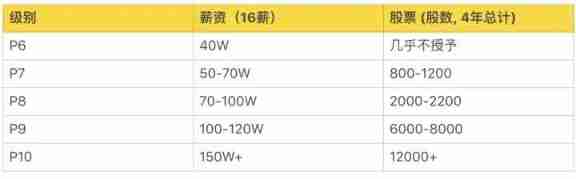
A list of job levels and salaries in common Internet companies. Those who have conditions must enter big factories. The salary is really high
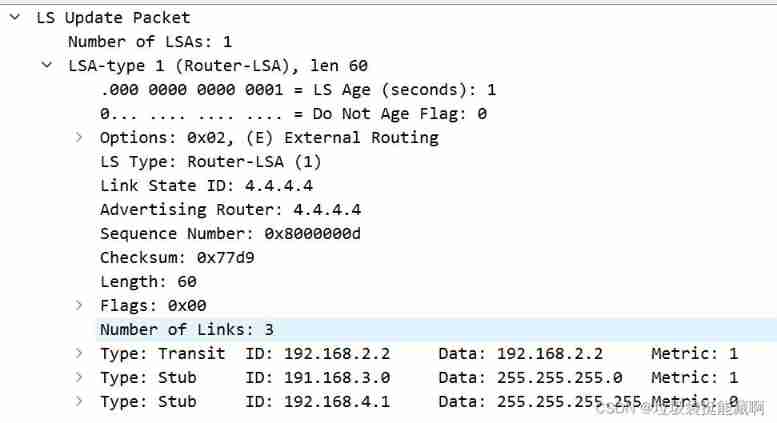
OSPF LSA message parsing (under update)

数据传输中的成帧
![[staff] pitch representation (treble clef | C3 60 ~ B3 71 pitch representation | C4 72 pitch representation | C5 84 pitch representation)](/img/e0/05890eafdb291c5aaff78cc241f455.jpg)
[staff] pitch representation (treble clef | C3 60 ~ B3 71 pitch representation | C4 72 pitch representation | C5 84 pitch representation)

Start a business

2022-2028 global military computer industry research and trend analysis report

Form custom verification rules
2022-2028 global human internal visualization system industry research and trend analysis report
随机推荐
Verilog wire type
MongoDB非關系型數據庫
ORA-01547、ORA-01194、ORA-01110
使用 useDeferredValue 进行异步渲染
venn图取交集
Design details of SAP e-commerce cloud footernavigationcomponent
2022-2028 global soft capsule manufacturing machine industry research and trend analysis report
跟着CTF-wiki学pwn——ret2shellcode
PMP personal sprint preparation experience
流线线使用阻塞还是非阻塞
buu_ re_ crackMe
Yyds dry goods inventory accelerating vacuum in PG
Batch detect whether there is CDN in URL - high accuracy
Redis cluster
Après le mariage
QT environment generates dump to solve abnormal crash
2022-2028 global nano abrasive industry research and trend analysis report
Xiaomi, a young engineer, was just going to make soy sauce
Addition without addition, subtraction, multiplication and division (simple difficulty)
Actual battle of financial risk control - under Feature Engineering