当前位置:网站首页>MCU通过UART实现OTA在线升级流程
MCU通过UART实现OTA在线升级流程
2022-07-06 00:34:00 【strongerHuang】
关注+星标公众号,不错过精彩内容

素材来源 | 网络
OTA升级已经不是什么新鲜事,现在大多数物联网终端设备,基本具备这个功能。
今天以AT32为例给大家分享一下OTA升级的详细流程。
概述
空中下载技术OTA(Over-the-Air Technology)是用户自己的程序在运行过程中对User Flash的部分区域进行烧写,目的是为了在产品发布后可以方便地通过预留的通信口,对产品中的固件程序进行更新升级。通常实现OTA功能时,即用户程序运行中作自身的更新操作,需要在设计固件程序时编写两个项目代码,第一个项目程序为Bootloader区域,第二个项目程序App代码为真正的功能代码,执行应用和升级。这两部分项目代码同时烧录在User Flash中。
图1. OTA代码执行流程
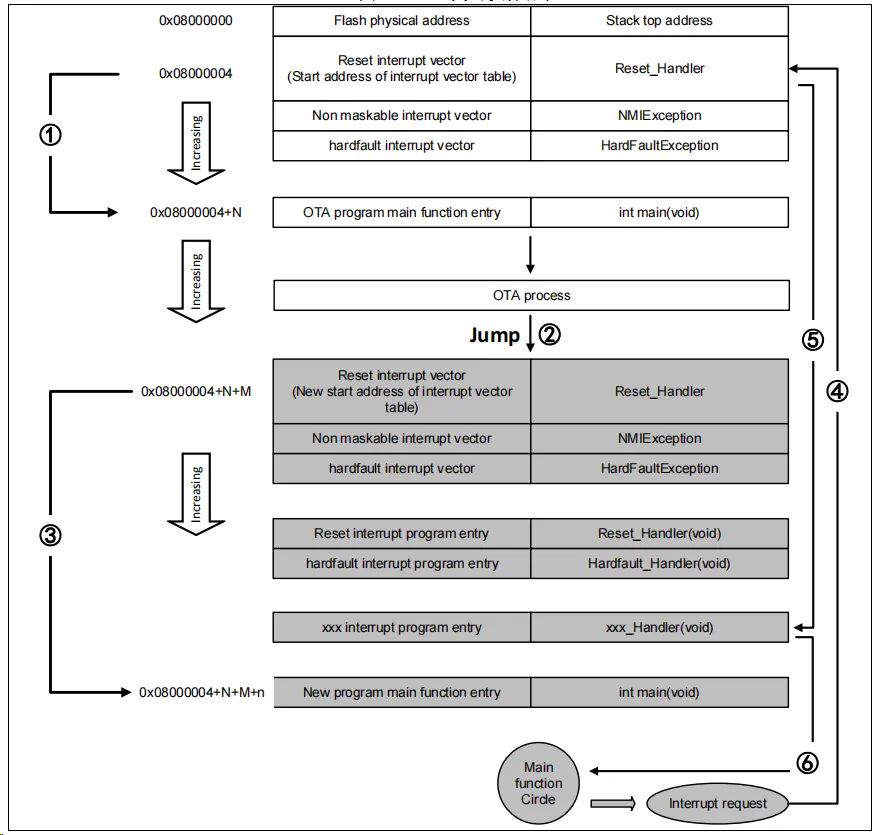
在上图所示流程中,MCU复位后,从0x08000004地址取出复位中断向量的地址,并跳转到复位中断服务程序,在运行完复位中断服务程序之后跳转到Bootloader的main函数,如图标号①所示;在执行完Bootloader以后(App代码为图中FLASH灰底部分App程序的复位中断向量起始地址为0x08000004+N+M),跳转至App程序的复位向量表,取出App程序的复位中断向量的地址,并跳转执行App程序的复位中断服务程序,随后跳转至App程序的main函数,如图标号②和③所示,同样main函数为一个死循环,并且注意到此时AT32的FLASH,在不同位置上,共有两个中断向量表。
在main函数执行过程中,如果CPU得到一个中断请求,PC指针仍强制跳转到地址0x08000004中断向量表处,而不是App程序的中断向量表,如图标号④所示;程序再根据我们设置的中断向量表偏移量,跳转到对应中断源新的中断服务程序中,如图标号⑤所示;在执行完中断服务程序后,程序返回main函数继续运行,如图标号⑥所示。
通过以上两个过程的分析,我们知道OTA程序必须满足两个要求:
1) App程序必须在Bootloader程序之后的某个偏移量为x的地址开始。
2) 必须将App程序的中断向量表相应的移动,移动的偏移量为x。
AT32 USART OTA 快速使用方法
硬件资源
文档中是用AT-START-AT32F403A实验板的硬件条件为例,OTA demo源代码还包括AT32其他型号,用户只需编译对应型号工程烧录于AT-START实验板运行即可。
1) 指示灯LED2/LED3/LED4
2) USART1(PA9/PA10)
3) AT-START实验板
软件资源
1) tool_release
● IAP_Programmer.exe,PC机tool,用于演示OTA升级流程
2) source_code
● Bootloader,Bootloader源程序,运行LED2闪烁
● App_led3_toggle,App1源程序,运行LED3闪烁
● App_led4_toggle,App2源程序,运行LED4闪烁
注:工程基于keil v5建立,若用户需要在其他编译环境上使用,请参考对应BSP目录AT32F403A_407_Firmware_Library_V2.x.x\project\at_start_f403a\templates中各种编译环境(例如IAR6/7/8,keil 4/5,eclipse_gcc)进行对应修改即可。
OTA Demo 使用
本文档描述了两种常用的OTA应用demo,template app和dual app,后面章节会分别介绍。
1) 打开Bootloader工程源程序,选择对应MCU型号的target编译后下载到实验板
2) 打开IAP_Programmer.exe
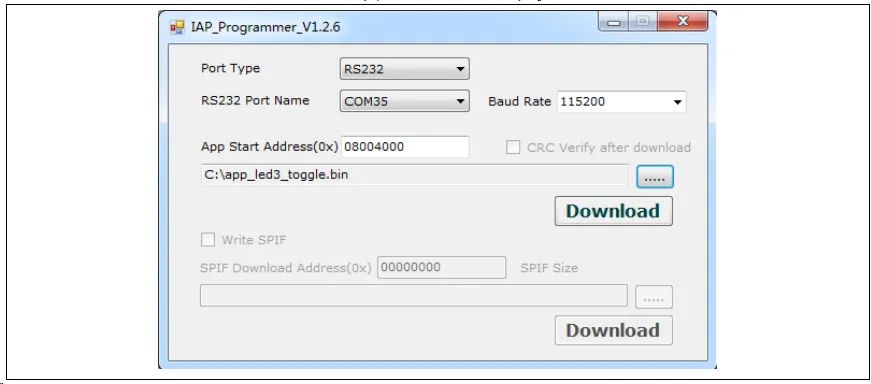
3) 选择正确的串口、APP下载地址和bin文档,点击Download下载,如下图
4) 观察LED2/3/4闪烁,LED2闪烁-Bootloader工作,LED3闪烁-App1工作,LED4闪烁-App2工作
图2. IAP demo上位机
Template app OTA程序设置
地址分布
图3. Flash地址分配
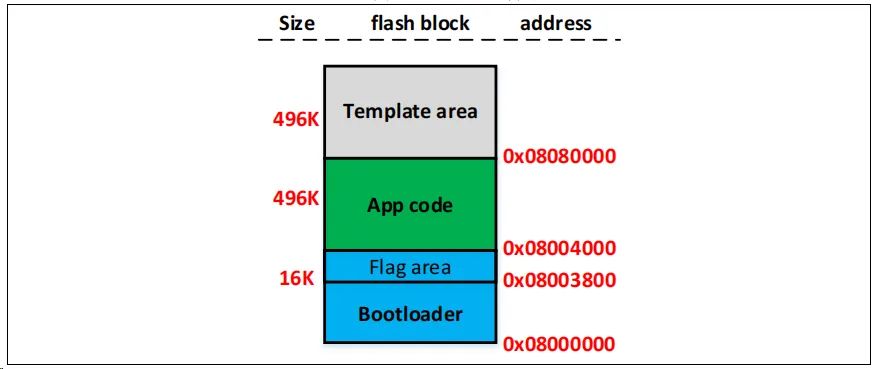
注:Bootloader区域最后一个扇区,用于存放防止升级过程出错(掉电等异常情况)的flag,用户编译修改Bootloader时,要保证不覆盖flag的地址。
执行流程
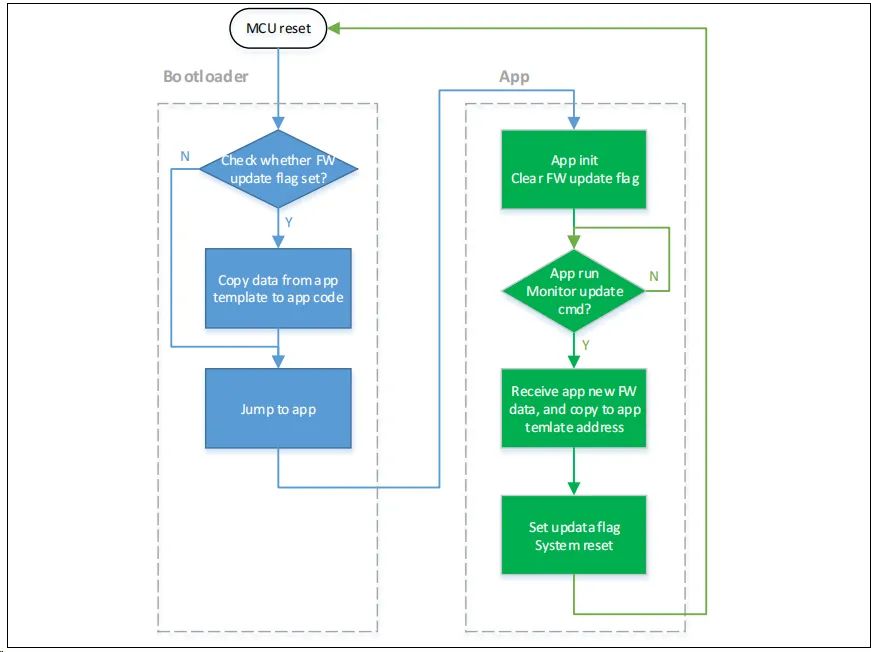
OTA分为Bootloader、App和Template三部分,应用在App中执行,Template仅作为新App固件数据的临时存放空间。程序执行整体流程框图如下:
图4. 程序执行流程
Bootloader project 设置
1) Keil设置
图5. Bootloader project中address 1在Keil设置
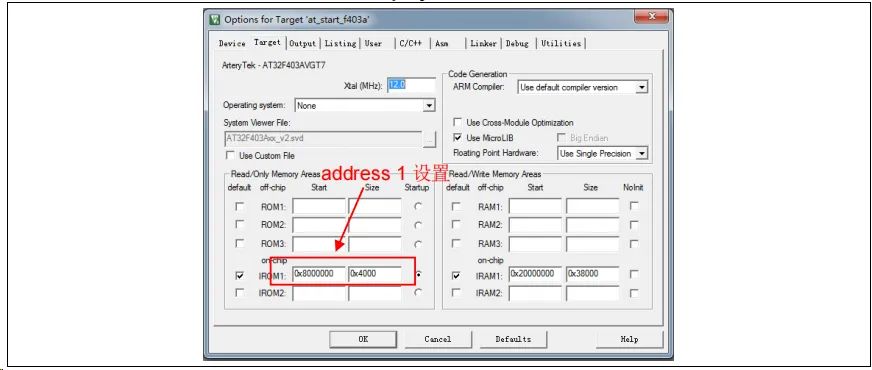
2) Bootloader源程序修改ota.h文件中
图6. Bootloader project中address 2在程序中设置

App project 设置
OTA demo提供了2个App程序供测试用,皆以address 2(0x800 4000)为起始地址。App1 LED3闪烁,App2 LED4闪烁。以App1为例,设计步骤如下:
1) Keil工程设置
图7. App project中address 2在Keil设置
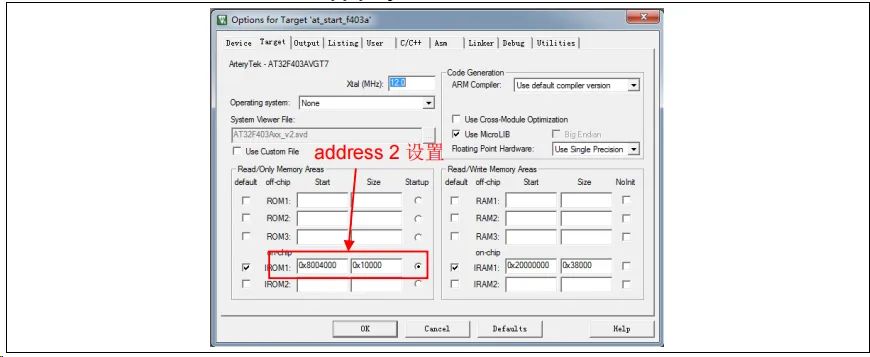
2) App1源程序设置
图8. App project向量表偏移在程序中设置

3) 编译生成bin文件
通过User选项卡,设置编译后调用fromelf.exe,根据.axf文件生成.bin文件,用于OTA更新。通过以上3个步骤,我们就可以得到一个.bin的APP程序,通过Bootloader程序即可实现更新。
4) 开启debug app code功能
如果在设计App code过程中需要对App project进行单独调试,请按照以下操作。
● 先下载Bootloader工程
● 再调试App工程
Dual app OTA与程序设置
地址分布
图9. Flash地址分配

注:Bootloader区域最后2个扇区,用于存放App是否正常的flag,用户编译修改Bootloader时,要保证不覆盖flag的地址。
执行流程
OTA分为Bootloader、App1和App2三部分,应用在App1或App2中执行。程序执行整体流程框图如下:
图10. 程序执行流程
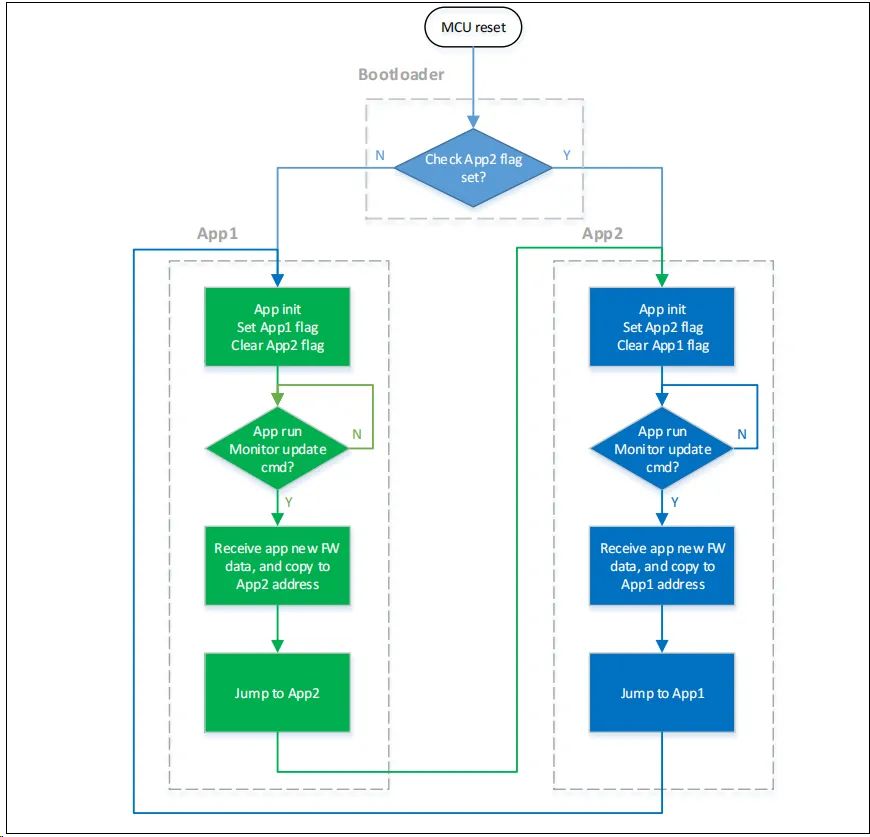
Bootloader project设置
3) Keil设置
图11. Bootloader project中address 1在Keil设置
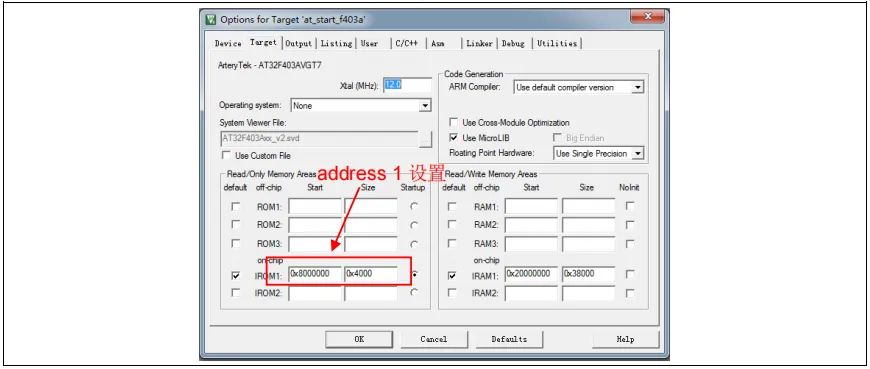
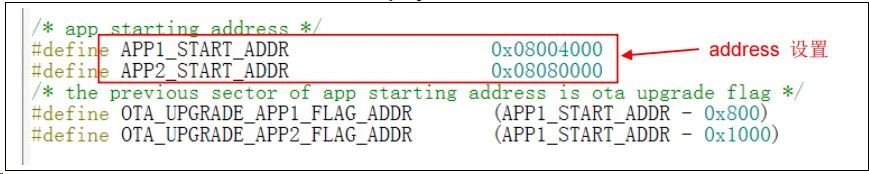
4) Bootloader源程序修改ota.h文件中
图12. Bootloader project中address 2在程序中设置
App project设置
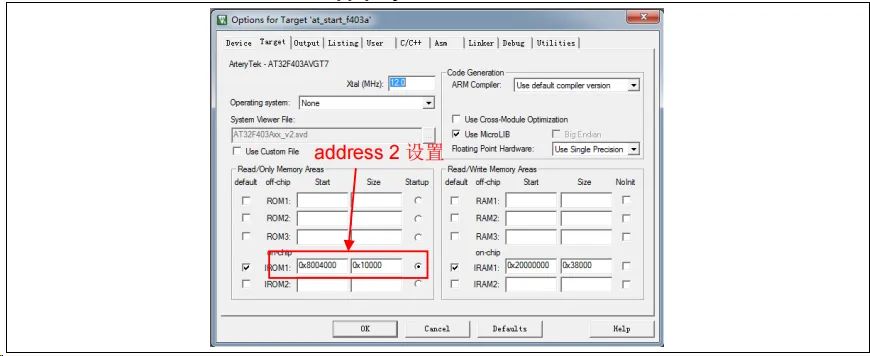
OTA demo提供了2个App程序供测试用,app_led3_toggle以0x800 4000为起始地址,app_led4_toggle以0x8080000为起始地址。App1 LED3闪烁,App2 LED4闪烁。以App1为例,设计步骤如下:
5) Keil工程设置
图13. App project中address 2在Keil设置
6) App1源程序设置
图14. App project向量表偏移在程序中设置

7) 编译生成bin文件
通过User选项卡,设置编译后调用fromelf.exe,根据.axf文件生成.bin文件,用于OTA更新。通过以上3个步骤,我们就可以得到一个.bin的APP程序,通过Bootloader程序即可实现更新。
8) 开启debug App code功能
如果在设计App code过程中需要对App project进行单独调试,请按照以下操作。
● 先下载Bootloader工程
● 再调试App工程
Bootloader/App与上位机串口通信协议
程序与上位机通信,接收固件升级数据,上位机端和嵌入式端通信协议如下:
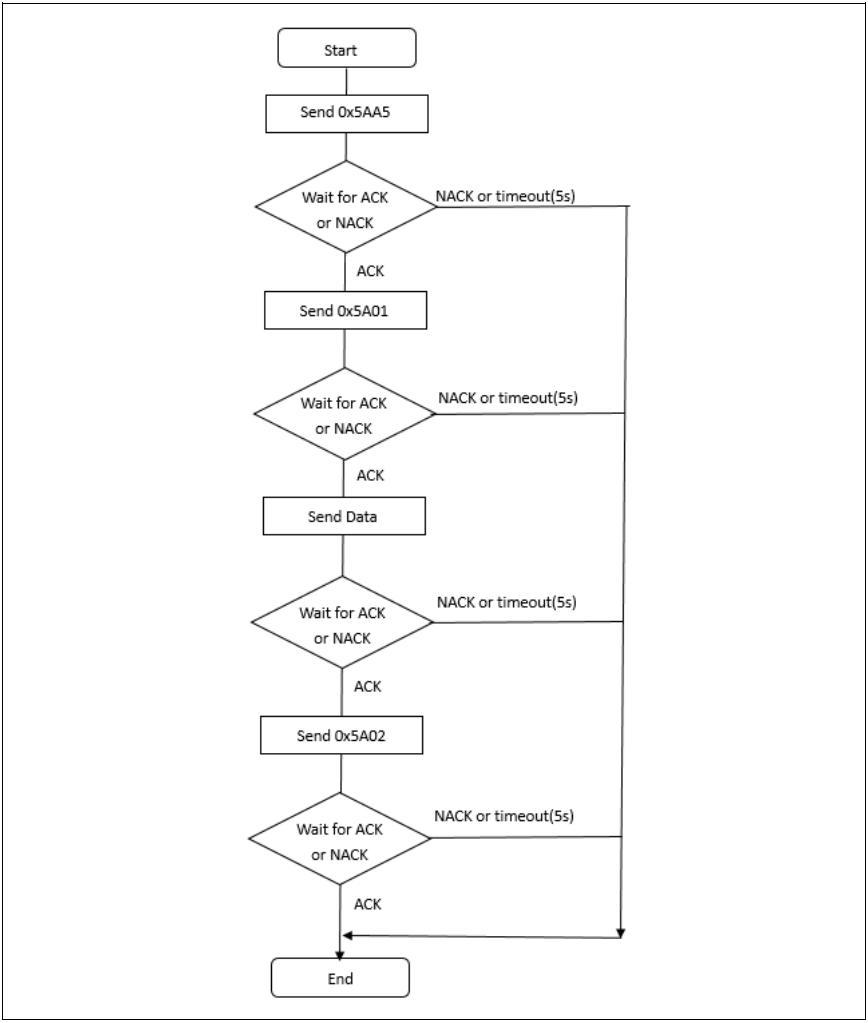
1) 上位机通信协议
图15. 上位机通信协议
2) 嵌入式端下位机通信协议
图16. 下位机通信协议
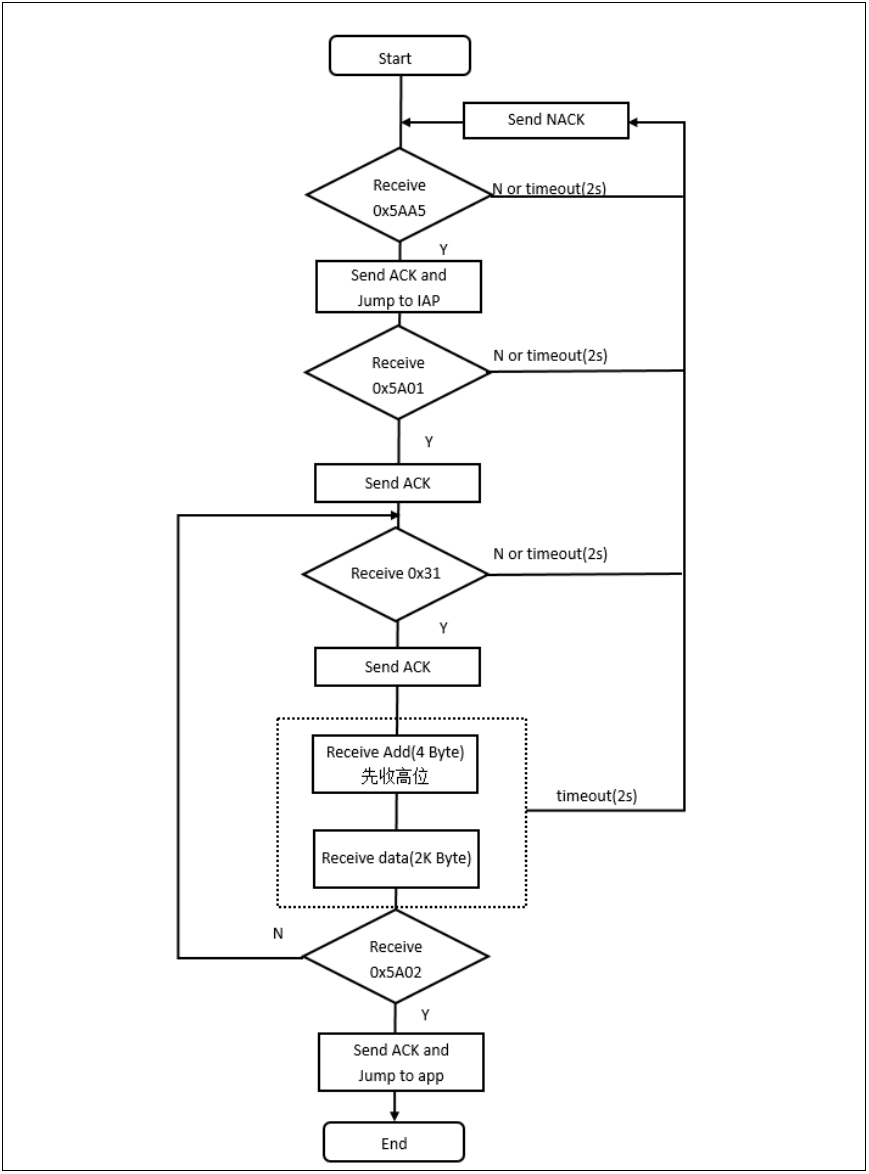
注:ACK:0xCCDD
NACK:0xEEFF
Data:0x31+Addr+数据+chenksum(1byte)
Addr:4bytes,高位在前
Kbytes,下载数据,不足2K内容填充0xFF
Checksum:1byte,4bytes的Addr+2KBytes数据的校验和的低八位
------------ END ------------

关注公众号回复“加群”按规则加入技术交流群,回复“1024”查看更多内容。
点击“阅读原文”查看更多分享。
边栏推荐
- Promise
- Spark SQL空值Null,NaN判断和处理
- Start from the bottom structure and learn the introduction of fpga---fifo IP core and its key parameters
- Browser local storage
- Uniapp development, packaged as H5 and deployed to the server
- MIT博士论文 | 使用神经符号学习的鲁棒可靠智能系统
- [groovy] JSON string deserialization (use jsonslurper to deserialize JSON strings | construct related classes according to the map set)
- 剖面测量之提取剖面数据
- 从 1.5 开始搭建一个微服务框架——调用链追踪 traceId
- Spark-SQL UDF函数
猜你喜欢
Go learning - dependency injection
如何制作自己的机器人
![[groovy] JSON serialization (jsonbuilder builder | generates JSON string with root node name | generates JSON string without root node name)](/img/dd/bffe27b04d830d70f30df95a82b3d2.jpg)
[groovy] JSON serialization (jsonbuilder builder | generates JSON string with root node name | generates JSON string without root node name)
Spark AQE
Notepad + + regular expression replace String
![[groovy] XML serialization (use markupbuilder to generate XML data | set XML tag content | set XML tag attributes)](/img/09/9076de099147b2d0696fe979a68ada.jpg)
[groovy] XML serialization (use markupbuilder to generate XML data | set XML tag content | set XML tag attributes)
MDK debug时设置数据实时更新
Ffmpeg captures RTSP images for image analysis
![[designmode] composite mode](/img/9a/25c7628595c6516ac34ba06121e8fa.png)
[designmode] composite mode
Analysis of the combination of small program technology advantages and industrial Internet
随机推荐
NLP generation model 2017: Why are those in transformer
Classic CTF topic about FTP protocol
MySQL存储引擎
Notepad++ regular expression replacement string
详细页返回列表保留原来滚动条所在位置
Idea remotely submits spark tasks to the yarn cluster
Room cannot create an SQLite connection to verify the queries
Single source shortest path exercise (I)
Global and Chinese markets of POM plastic gears 2022-2028: Research Report on technology, participants, trends, market size and share
孤勇者
看抖音直播Beyond演唱会有感
云导DNS和知识科普以及课堂笔记
The global and Chinese markets of dial indicator calipers 2022-2028: Research Report on technology, participants, trends, market size and share
Power query data format conversion, Split Merge extraction, delete duplicates, delete errors, transpose and reverse, perspective and reverse perspective
[groovy] JSON serialization (jsonbuilder builder | generates JSON string with root node name | generates JSON string without root node name)
Gd32f4xx UIP protocol stack migration record
Common API classes and exception systems
LeetCode 6004. Get operands of 0
AtCoder Beginner Contest 258【比赛记录】
MySQL functions