当前位置:网站首页>2837xd code generation - Supplement (2)
2837xd code generation - Supplement (2)
2022-07-02 09:43:00 【Quikk】
2837xd Code generation —— Add (2)
- 5 The basic process of model-based code generation (MDB)
5 The basic process of model-based code generation (MDB)
First, build the following Simulink Model :

Because code generation generally only supports discrete fixed step , So the parser needs to be set accordingly . The basic setting process is the same as that described above . After generating the code , Click on C CODE You can quickly locate the generated code statements :
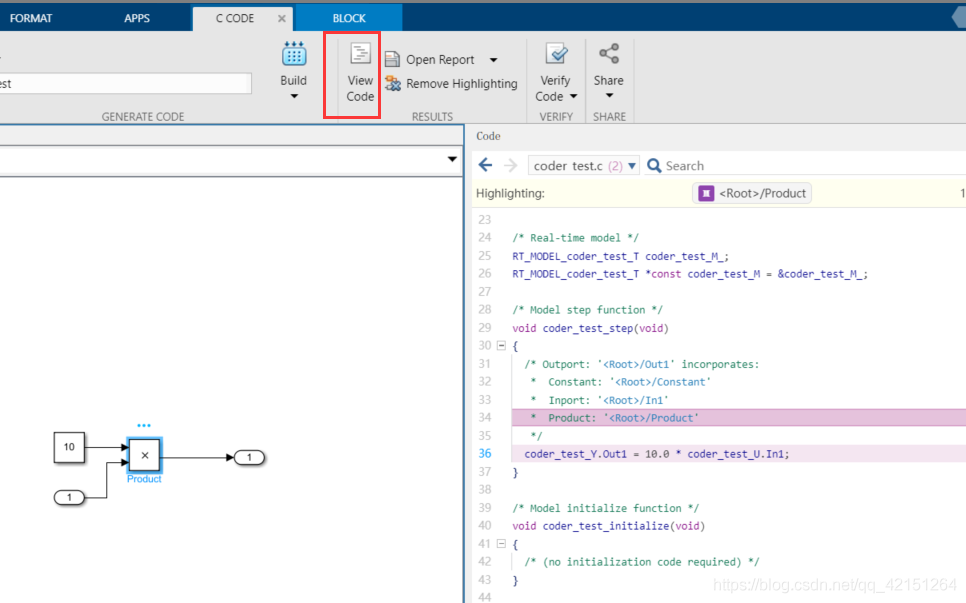
And then there is Report There will also be interactive probes , But my problem can't be shown , Now I can't find the reason .

5.1 Compilation process
The compilation process is as follows : First, the user builds Simulink Model , After the model is compiled, it will generate **.rtw file ..TLC**(Target Language Compiler) The file will call **.rtw And then generate .c and .h** file .
.rtw The file mainly writes the name, size and value of the resource , Be similar to .h file , Make a warehouse declaration . Tell the program what's in it , What can be used .
.TLC It can be well parsed **.rtw** The content in , And then generate the appropriate code .
Code generation type :

5.1.1 TLC Language
1) Basic syntax and data types
%<> Is to extract the value of a variable
%assign str="today"            %% Define string
%assign tr =TLC_TRUE
%assign tr2 =TLC_FALSE
%warning Hello Word %<str> or %<tr>		%% Output statement
%error Hello Word %<str>		%% Error prompt statement
%trace Hello Word %<str>		%% You have to use  tlc xxx.TLC -v function ( Debugging use )

%if ISEQUAL(tr,1)                       %%if sentence
	%warning Hello Word %<str>
%else
	%warning good %<str>
%endif

%assign data=[1,2,3,4]                  %% Array , Data must be separated by commas ( Cannot be separated by spaces )

%switch TYPE(data)						%%switch sentence
%case "Number"
%warning data is Number
%break
%case "String"
%warning data is String
%break
%case "Vector"
%warning data is Vector
%break
%case "Matrix"
%warning data is Matrix
%break
%case "Real"
%warning data is Real
%break
%case "Real32"
%warning data is Real32                             %%Real For floating point type , There are many types
%break
%endswitch
2) Loop statement
%assign data=[1,2,3,4]
%foreach idx=5								%% Loop statement
    %if ISEQUAL(idx,3)                       %%if sentence
		%continue
	%endif

    %warning data[%<idx>] = %<data[idx]>
%endforeach


%% Left middle 1 Position is the cyclic judgment bit , if 1 Then execute all loops once (iden2=3 Also execute )
%% If it is zero, execute body The sentence between ( Execution times are iden1),iden2=3 Don't execute
%for iden1 = 5,1,iden2=3
%warning start
%body
%warning data[%<iden1>] = %<data[iden1]>
%endbody
%warning over
%endfor
3) Matrix operations
%assign mat=[["A","B"],["A","B"],[6U,"B"]]
%foreach idx=size(mat,0)                       %% How many... Please [],
    %foreach idx2=size(mat,1)					%% Please, everyone [] How many elements are there in
    	%warning mat[%<idx>][%<idx2>] = %<data[idx][idx2]>
	%endforeach
%endforeach
4) Data flow control ( write file ), In this way, a .c file . You can know that the code is basically generated in this way, and the automated script writes some variables ( The frame has been fixed ).
%assign str="today"
%assign func_name="main"
%assign return_name="void"
%assign arg_name="void"

%openfile buf ="mytest.c"
#include "stdio.h"
%<return_name> %<func_name>(%<arg_name>)
{

    printf("Hello World");
    printf("%<str>");
}
%closefile buf
5)record( Similar to a structure )
%%create
%createrecord NEW_RECORD{
    Name "author";Age 25}
%warning %<NEW_RECORD.Name>

%%add
%addrecord NEW_RECORD School CJ          %% Additional data
%warning %<NEW_RECORD.School>

%%merge
mergerecord NEW_RECORD1 NEW_RECORD1       %% Put two record Merge into NEW_RECORD1 in

%%copy
%createrecord NEW_RECORD3{
     }
%copyrecord NEW_RECORD3 NEW_RECORD2        %% take NEW_RECORD2 Copy the value of to NEW_RECORD3 in

%%delete
%undef  NEW_RECORD1                        %% Delete

%with NEW_RECORD1			 %% The following statements are limited to NEW_RECORD1 Intermediate reading and writing
%undef School                %% In this way, internal members can be deleted
%endwith

%with NEW_RECORD1.SUB			 %% The following statements are limited to NEW_RECORD1 Intermediate reading and writing ( If in NEW_RECORD1 There is SUB Substructure )
%undef School                	 %% So you can delete SUB Internal members
%endwith
6) File stream data is appended
%openfile buf = "text.txt"
//This is a text
%openfile buf1 ="text.c"

%selectfile buf
 //add text.txt

%selectfile buf1
 //add text.c

%selectfile STDOUT
//This is std %% Be similar to cout Output to Command Window in

%selectfile NULL_FILE       %% Do not display ( Generally, it starts as a function )
//NULL FILE

%closefile buf
%closefile buf1
7)TLC Function writing
%selectfile NULL_FILE

%function hex2dec(hexnum) void           %%void  No return  output  return
    %assign hexnum = FEVAL("regexprep",hexnum,"0x","");  %% call matlab function regexprep, In the string 0x Just delete
    %warning hexnum = %<hexnum>
    %assign decnum = FEVAL("hex2dec",hexnum)
    %assign decnum = CAST("Number",%<decnum>)
    %warning decnum = %<decnum>
    %return decnum
%endfunction
call :
%assign a = hex2dec("0x5f")
- Code generation instance ( Write in the file func_gen.tlc in )
%selectfile NULL_FILE

%function code_gen(filename,ret,funcname,body,argu_list) Output
    %openfile buf ="%<filename>"
    #include <math.h>
    %<ret> %<funcname>(%<argu_list>)
    {

		%<body>
    }
	%closefile buf
%endfunction
call :
%include "func_gen.tlc"

%createrecord codegen_rec{

    ret "float";...
    funcname "my_calcu";...
    argument "int a";...
    filename "calculate.c";...
    body     "float a;\n b=sin(a);\n return b;"..
}
%<code_gen(codegen_rec.filename,codegen_rec.ret,codegen_rec.funcname,codegen_rec.body,codegen_rec.argument)>
TLC file , It is not recommended by the government to write by yourself , Unskilled writing will lead to code generation failure , But we can learn to read it . But use c—mex When encapsulating your own module , You must write your own module level TLC.
5.2 System default ert.tlc Generate code structure
The generation module structure can be divided into the following parts :
1) External input :struct:model_U(model by simulink The name of the document , I won't go over it again )
2) modular I/O:struct:model_B
3) External output :struct:model_Y
4) Module state variables :struct:model_X
5) Module parameters :struct:model_P
6) Module intermediate variables ( working space ):struct:rtRWork、rtIWork、rtPWork、rtDWork
5.3 Optimize code generation
The first optimization scheme is explained in the previous example :
1) Give our named value to the signal line that needs to be optimized . Here is the record before optimization step expression :
coder_test_Y.Out1 = coder_test_P.Constant_Value * coder_test_U.in;
The goal is optimized to :
Out = 10 * in;
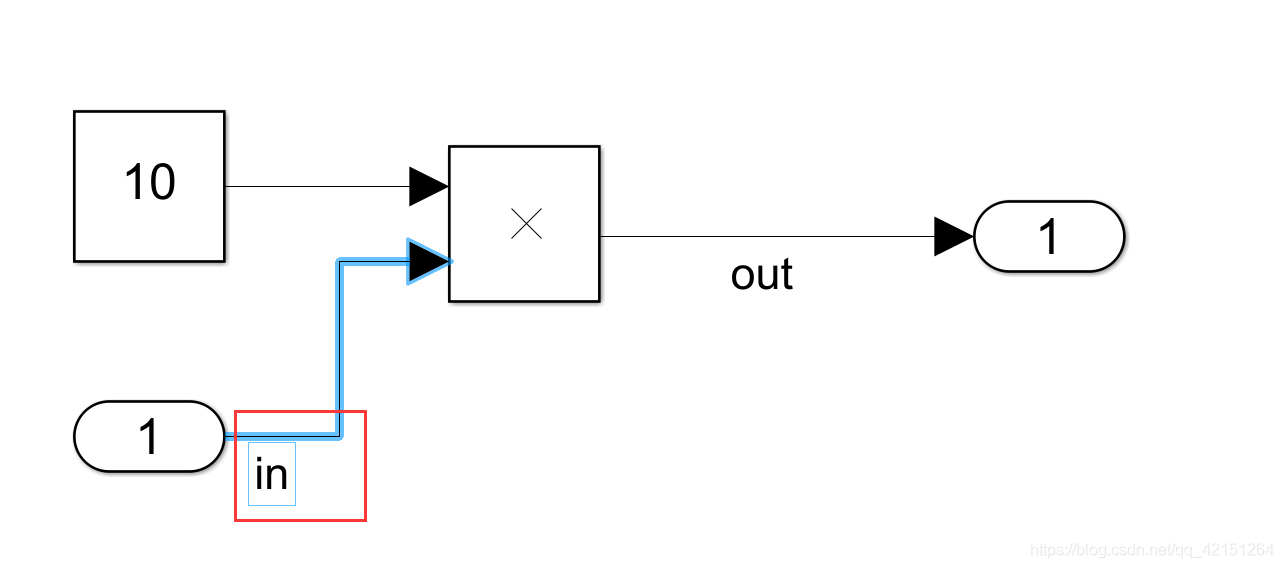
2) Select the signal line and select Properties.
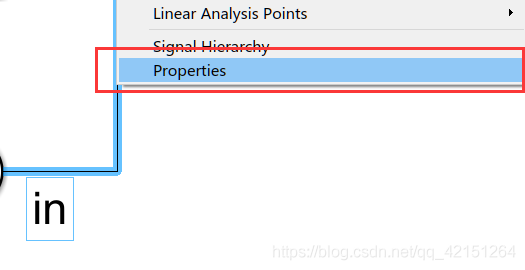
3) Enter the option box (Code Generation-Storage class Is shown in the figure ), Change here to global variable , The structure will no longer be used for inclusion .

4) Here we need to have a clear understanding , In the model in And out Belongs to variable , and 10 It belongs to constant . For constant setting, you need to go to Configuration Parameters Set in .

5) Generate the code again :

It can be found that the target requirements have been met . Here is the second way to add , Before starting, add a gain:
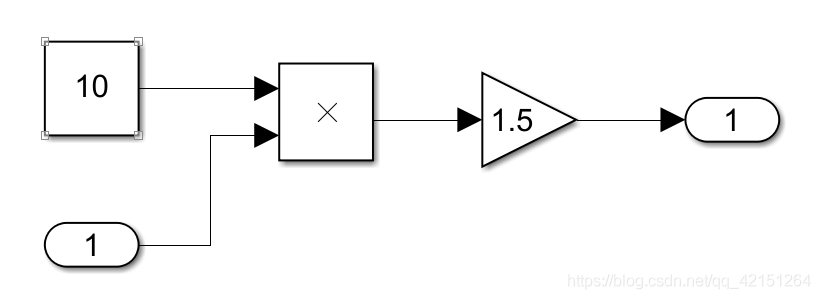
1) First, replace all constants with expressions :
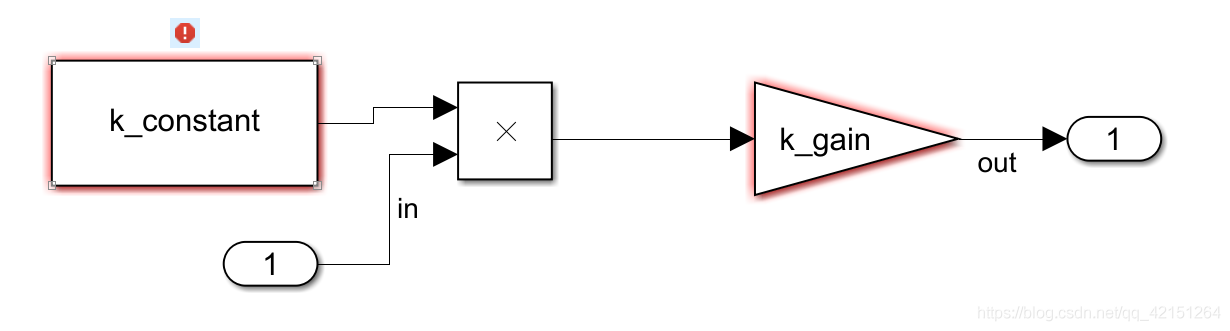
2) Get into Command Window Make the relevant configuration : Type the following statements respectively
k_constant=Simulink.Parameter;
k_gain=Simulink.Parameter;
in=Simulink.Signal;
out=Simulink.Signal;
Here are the constants and signals respectively Simulink Structure , Its kind Parameter Is the class of defined parameter type .

here Parameter Give an example to illustrate :
I、 Signal line configuration
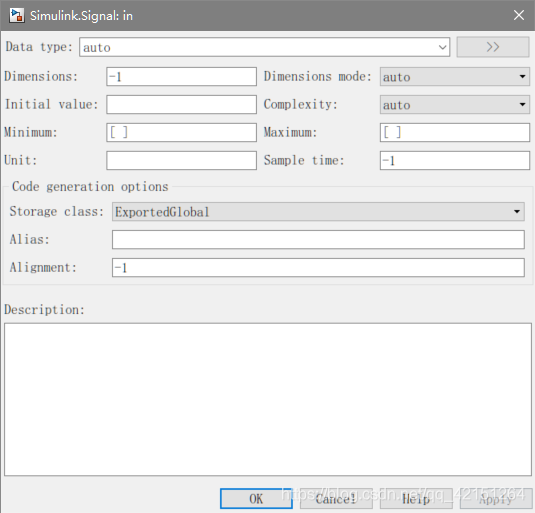
II、Parameter To configure

Then enter Simulink Configure the signal line : Check the box shown in the above figure box The other signal lines have exactly the same configuration .
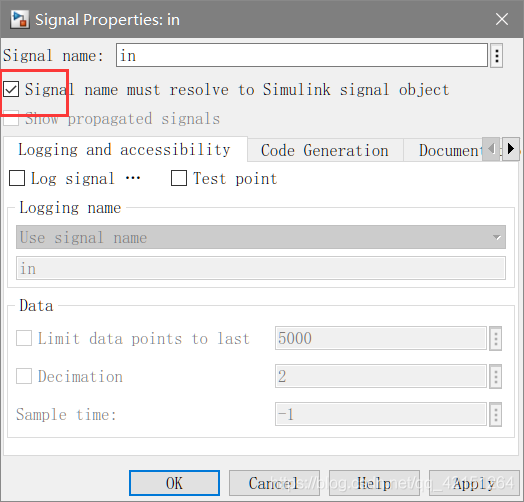
After marking, the signal sign will appear :
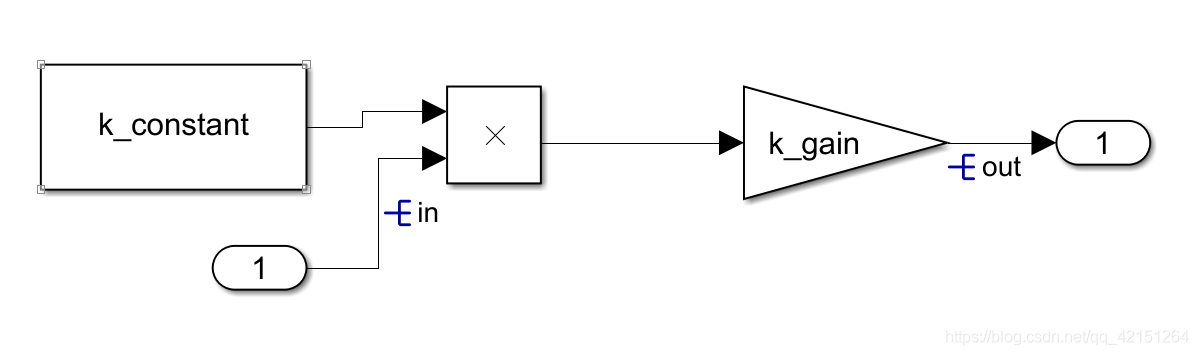
Then generate the code again :

It can be found that the readability is enhanced compared with that before .
notes :Storage Class There are also many data types in , You can try the data type by yourself .
5.4 Different Storage Class Generate differences
Signal The type of
1)Default(Custom): And Global Similar effect , Generate global variables .
2)BitField(Custom): You can generate customized structures ( The structure name can be customized ).
3)Volatile(Custom): You can generate customized header files and source files (.c And .h file ), And declare in this document Volatile Type variable .
4)Const(Custom): You can generate customized header files and source files (.c And .h file ), And declare in this document Const Type variable .
5)ConstVolatile(Custom): You can generate customized header files and source files (.c And .h file ), And declare in this document ConstVolatile Type variable .
6)ExportToFile(Custom): You can generate customized header files and source files (.c And .h file ), And declare variables in this file .
7)ImportFromFile(Custom): You can choose variables from user-defined files ( You need to give your own file )
8)FileScope(Custom): Static variables , Can only be accessed in the current file .
9)Struct(Custom): And BitField(Custom) The effect is the same , however BitField(Custom) Bits can be generated bianl( Boolean type ).
10)Reusable(Custom): Reuse type variables , All belong to Reusable(Custom) Variables of type will define only one variable .
Parameter Compare with Signal Multiple types
11)Define(Custom): Macro definition parameters
12)CompilerFlag: Generate a preprocessing statement .
#ifndef k3
#error error
#endif
There is still one left GetSet The type has no description ,GetSet Type needs to be given a GetFunction And SetFunction in .

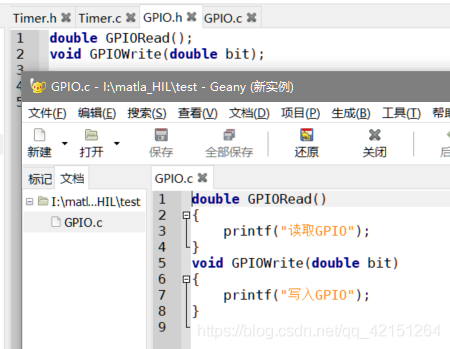
Here you can give a usage scenario , That is, read and write GPIO Corresponding value : Then you need to give GPIORead And GPIOWrite Function to read and write respectively GPIO Value . Because in DSP You need a function to read this function correctly , So you need to use methods to call , It's kind of similar here C++ Private properties in need to provide the same concept as interfaces for access .
Build the following block diagram from scratch :
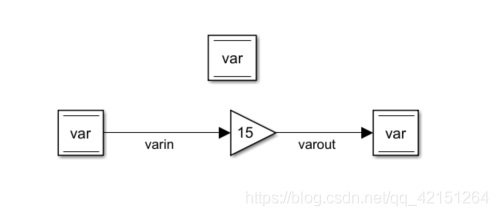
Of this block diagram var representative GPIO Value , You need to call statements and read and write ,var The type of is set as follows :

Store in the model directory GPIO.h And GPIO.c file :
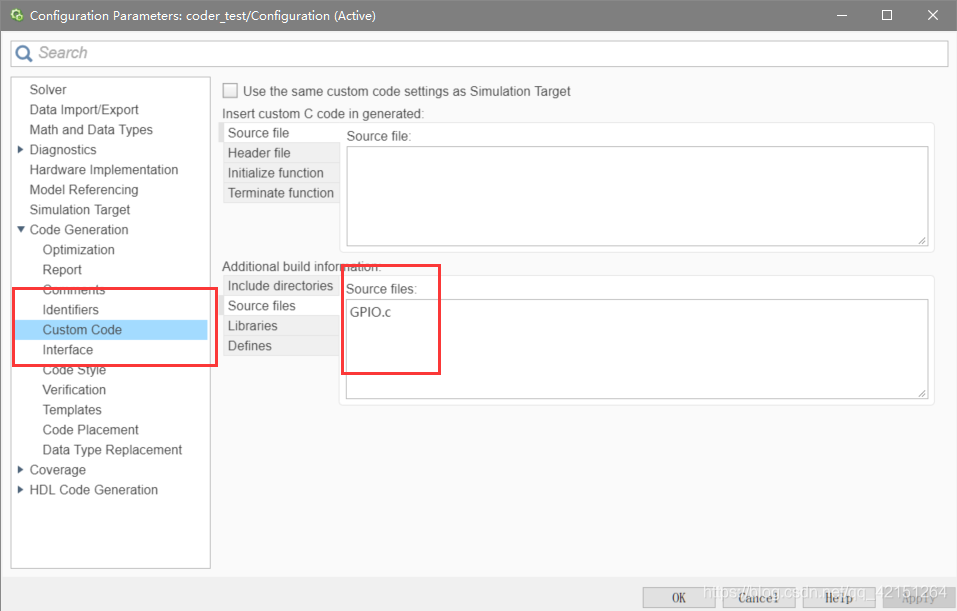
Then we need to pay attention to that it must be in Configuration Parameter Add a statement to , If you don't join, you will report an error. You can't find two functions . I read this official demos I know :
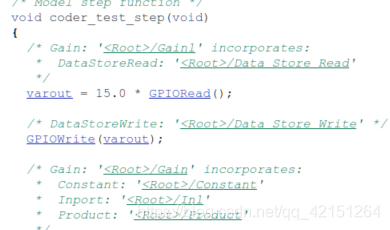
then DEBUG Just fine . You can see that the generated code will GPIO After reading the value of , Zoom in again 15 Times write back .
5.5 Data type alias
Simulink Macro definitions have been made for some data types in (rtwtypes.h In file ):
typedef double real_T;
typedef double time_T;
typedef unsigned char boolean_T;
typedef int int_T;
typedef unsigned int uint_T;
typedef unsigned long ulong_T;
typedef char char_T;
typedef unsigned char uchar_T;
typedef char_T byte_T;
In use , We can define type aliases ourselves , Increase code readability :
1) Configure after entering instructions

2)Data Scope It is divided into import and Export ,Base type You can choose to typedef Data type of , For example, here is the use of a Defined double type .
This is a type of substitution , Often we need to carry out multiple types of substitution :
stay Configuration Parameter Of Code Generation Under the Data Type Replacement Define :
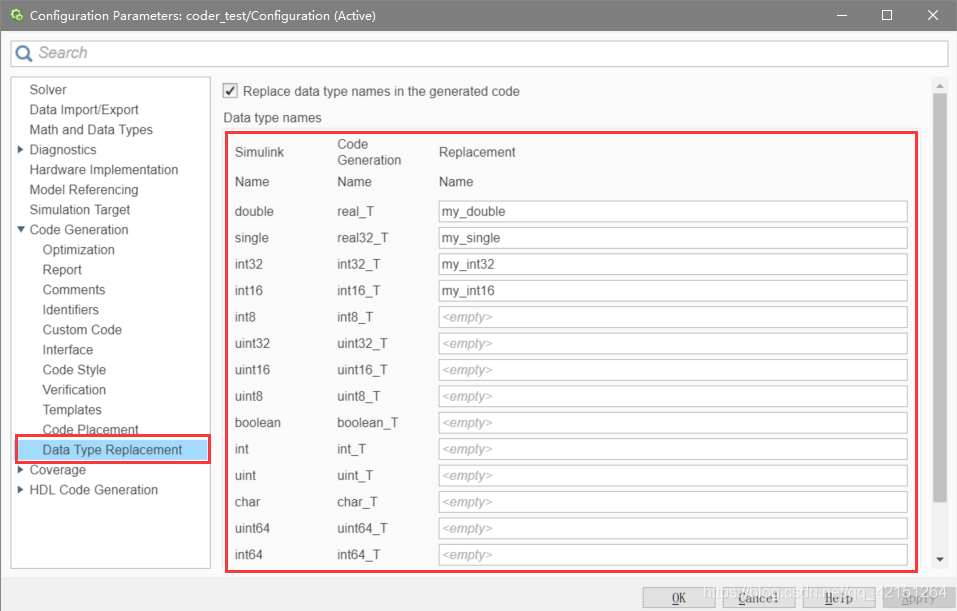
After definition, you still need to put these aliases in Workspace Defined in , Just like the first one :
// Model callback function

k_constant=Simulink.Parameter;
k_constant.Value=10;
k_constant.CoderInfo.StorageClass='ExportedGlobal';

k_gain=Simulink.Parameter;
k_gain.Value=1.5;
k_gain.CoderInfo.StorageClass='ExportedGlobal';

in=Simulink.Signal;
in.CoderInfo.StorageClass='ExportedGlobal';

out=Simulink.Signal;
out.CoderInfo.StorageClass='ExportedGlobal';

var=Simulink.Signal;
var.StorageClass='GetSet'
var.CoderInfo.CustomAttributes.HeaderFile='GPIO.h';
var.CoderInfo.CustomAttributes.GetFunction='GPIORead';
var.CoderInfo.CustomAttributes.SetFunction='GPIOWrite';

my_double=Simulink.AliasType;
my_double.BaseType='double';

my_single=Simulink.AliasType;
my_single.BaseType='single';

my_int32=Simulink.AliasType;
my_int32.BaseType='int32';

my_int16=Simulink.AliasType;
my_int16.BaseType='int16';
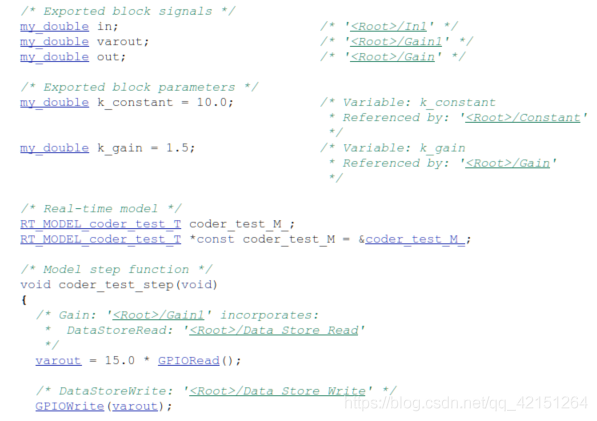
These can be quickly written in the callback function of the model by using scripts , Automatically write when the model is loaded . The generated code is as follows :
5.6 example (Clark Transformation )
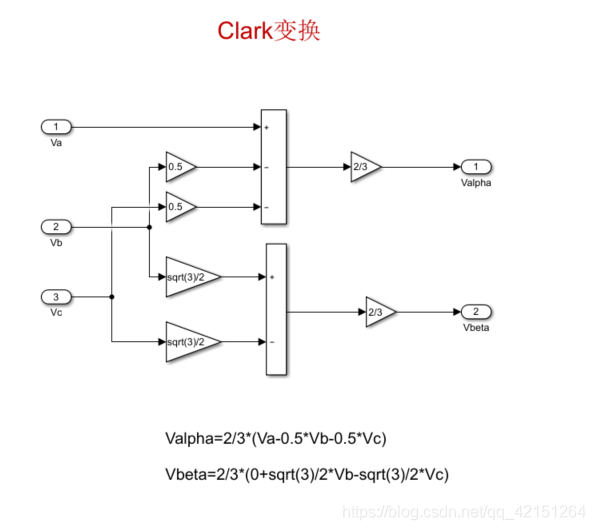
First, build the Clark Transform the model :
Input 50Hz Three phase AC test :
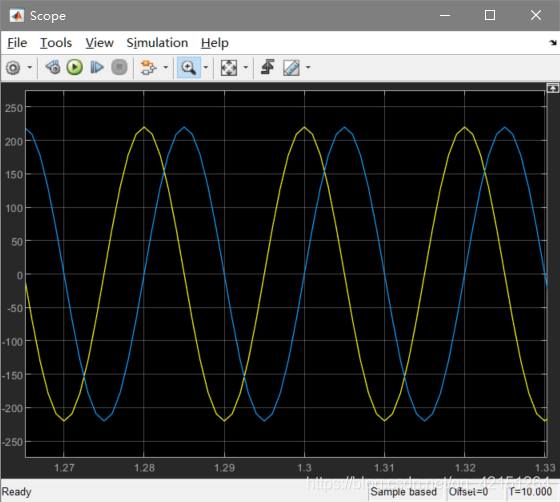
You can see that the output time difference is 0.005s, So the corresponding phase difference is 0.005/0.02*(2*pi)=90°. therefore Clark The algorithm meets the requirements , The following code generation .
First define the input and output of the signal line , The type set here is ExportedGlobal.

Then set the sub module , Check the setting page number Treat as atomic unit, Here is to make the whole module as an atom ( Have a sampling frequency ).

There are three options in the code generation interface :1)Inline 2)Nonreusable function( Non reusable ) 3)Reusable function( Can be reused )
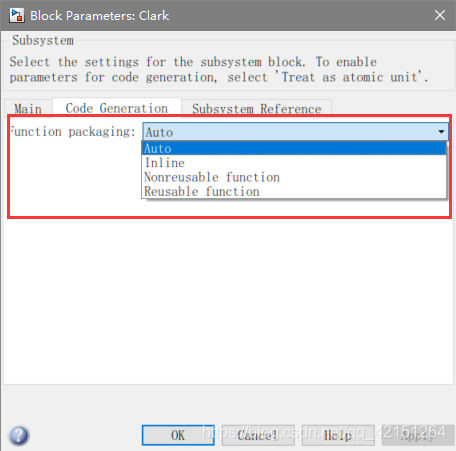
1)Inline Schema generation code :
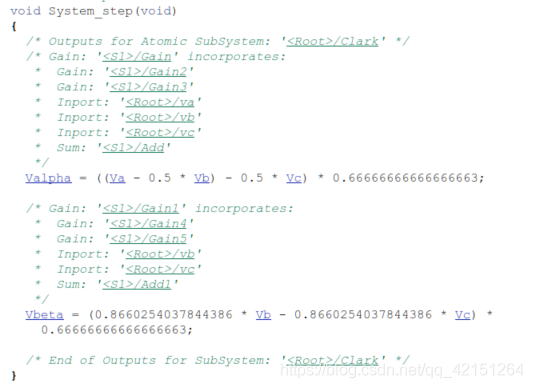
You can see that the code is directly generated in step Internal function , No encapsulation .
2)Nonreusable function Schema generation code , Set the following parameters :

Function interface Is to set whether the function is allowed to take parameters . Here, an error is reported in the generation process , Need to put Compact Change the mode to Modular.
Generate effect :
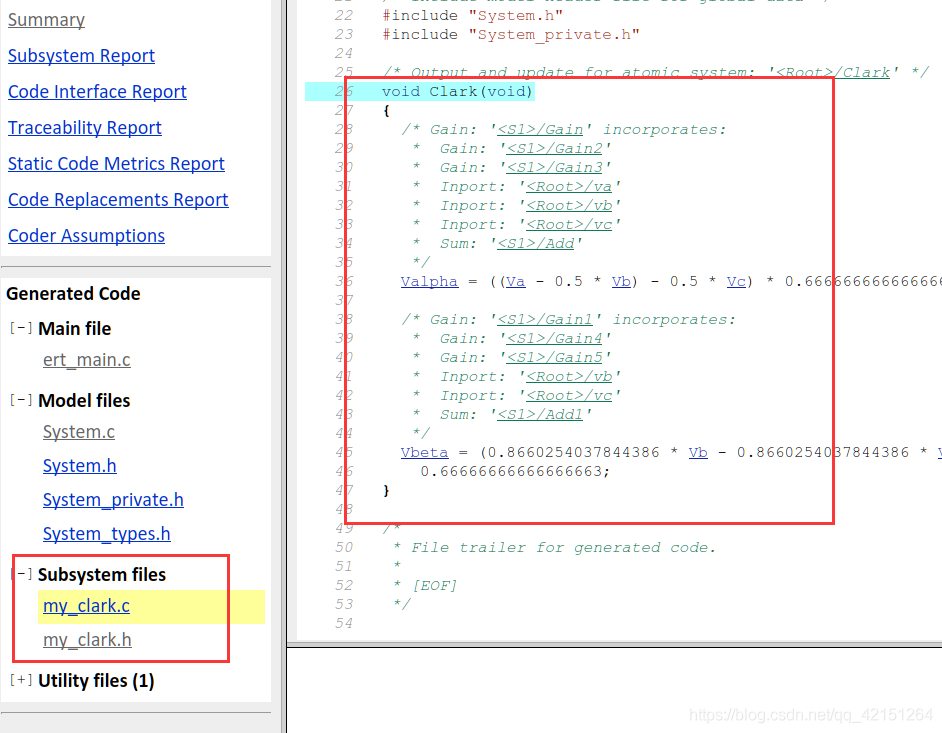

You can see Clark The module is packaged separately , But because it is a variable, the corresponding parameters are not generated , Change variables into model parameter variables , You can generate functions with parameters .
3)Reusable function Schema generation :
When a module needs to be in Simulink When used in , It has to be set to Reusable function Pattern to generate code , Otherwise you will report an error .
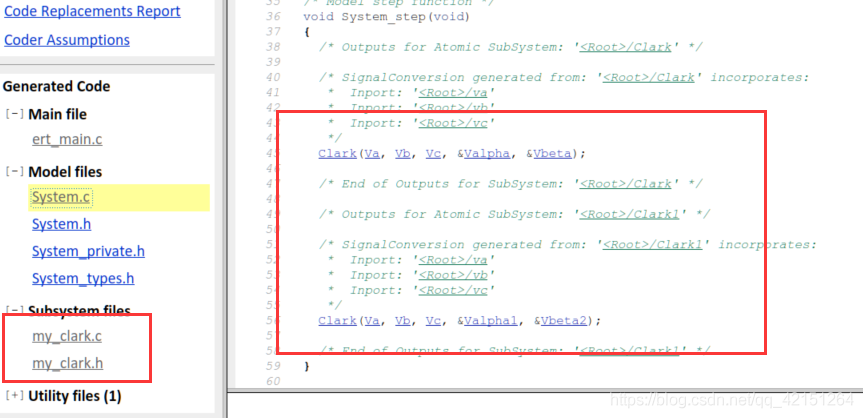
Don't use reusable function Multiple codes will be generated , It is not conducive to code reuse :

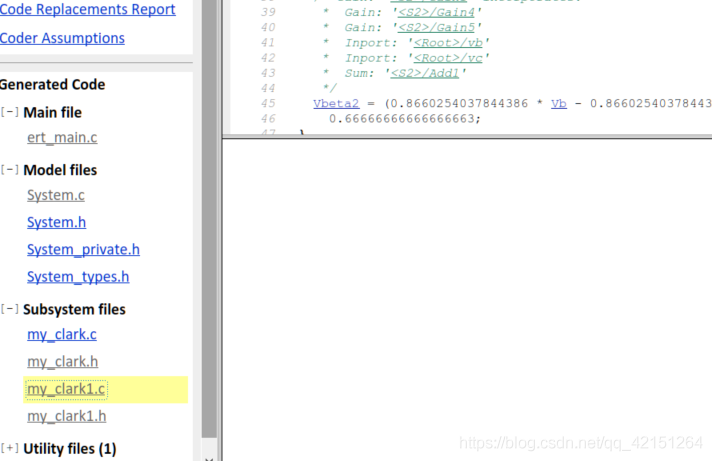
Used reusable function after , Will reuse a function file . This is in the process of code generation Need to be flexible .
5.7 With pretreatment C Code generation
#if
#endif
The above is the preprocessing statement .
Simulink Provides a module that can generate preprocessing code :Variant Model.
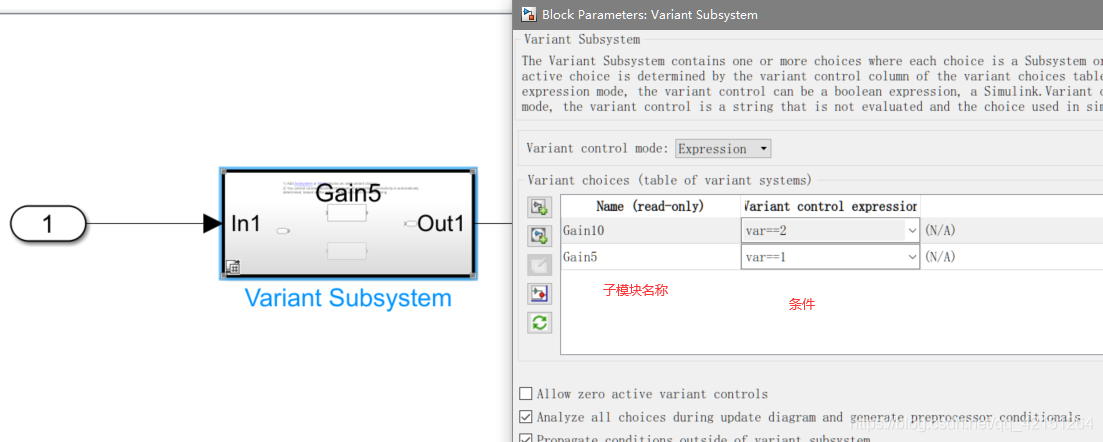
As shown in the figure below , You can edit it in the attribute interface of this module , there var The value of the variable can be in CommandWindow Assignment in . When given var=1 when , You can see the internal situation of the module ( Grey means that the condition cannot be fulfilled , The explanation is very clear out And in Do not connect to the module , The default connection has been made for the system ):

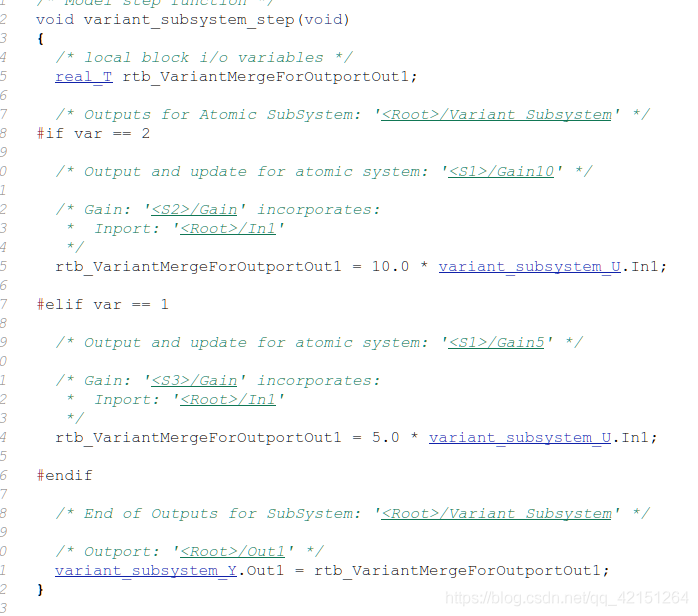
Then, when generating code , All sub modules must be set as atomic sub modules . The effect of generated code is shown in the following figure ( It has an obvious conditional compilation structure ):
5.8 Enumeration variable type creation
Matlab Not only does it support program oriented languages , It also supports object-oriented languages , The creation of enumeration type is the development using object-oriented language :
classdef week <Simulink.IntEnumType
    enumeration
        Sun(0)
        Mon(1)
        Tue(2)
        Wed(3)
        Thu(4)
        Fri(5)
        Sat(6)
    end
end
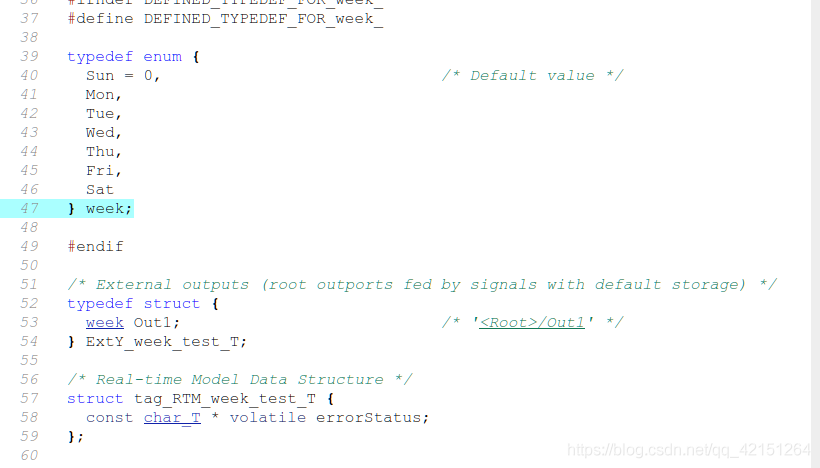
Organization m The script content is as above , Put it in a unified directory with the model , The enumeration type is defined week.
structure Simulink The model is shown in the figure below :
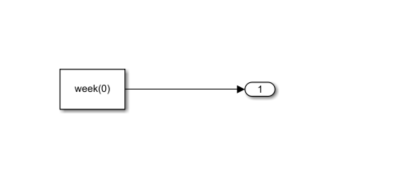
Generated code can be observed , Created enumeration type .Matlab The object-oriented language of is also relatively rich .
边栏推荐
- 一次聊天勾起的回忆
- Navicat remote connection MySQL reports an error 1045 - access denied for user 'root' @ '222.173.220.236' (using password: yes)
- Required request body is missing: (cross domain problem)
- Activity的创建和跳转
- Read 30 minutes before going to bed every day_ day4_ Files
- Alibaba / popular JSON parsing open source project fastjson2
- Beats (filebeat, metricbeat), kibana, logstack tutorial of elastic stack
- Say goodbye to 996. What are the necessary plug-ins in idea?
- Double non undergraduate students enter the factory, while I am still quietly climbing trees at the bottom (Part 1)
- PI control of three-phase grid connected inverter - off grid mode
猜你喜欢

三相并网逆变器PI控制——离网模式

Required request body is missing:(跨域问题)

Memories of a chat

JDBC review

每天睡觉前30分钟阅读_day4_Files

Supplier selection and prequalification of Oracle project management system

自定义Redis连接池

在SQL注入中,为什么union联合查询,id必须等于0

Microservice practice | Eureka registration center and cluster construction
YOLO物体识别,生成数据用到的工具
随机推荐
图像识别-数据清洗
Kinect DK obtains color RGB images in cv:: mat format (used in openpose)
VIM operation command Encyclopedia
Demand delineation executive summary
2837xd 代码生成——StateFlow(4)
自定义Redis连接池
Record the interesting process of using Xray for the first time
Say goodbye to 996. What are the necessary plug-ins in idea?
Redis 序列化 GenericJackson2JsonRedisSerializer和Jackson2JsonRedisSerializer的区别
Tools used for Yolo object recognition and data generation
Cmake command - Official Document
ZK configuration center -- configuration and use of config Toolkit
PI control of grid connected inverter (grid connected mode)
Methods of classfile
C语言之数据插入
2837xd 代码生成——总结篇
图像识别-数据标注
How to use pyqt5 to make a sensitive word detection tool
记录下对游戏主机配置的个人理解与心得
Difference between redis serialization genericjackson2jsonredisserializer and jackson2jsonredisserializer