当前位置:网站首页>Teach you how to write the first MCU program hand in hand
Teach you how to write the first MCU program hand in hand
2022-07-06 09:44:00 【Dafang teacher embedded】
Hand in hand to teach you how to write the first SCM program
\\\ Insert a : There are surprises at the end of the article ~///
51 The development environment of SCM is Keil Software .Keil Although the software is a paid software , But from uVision2 So far uVison4 All versions have cracked versions , You can find it on the Internet . I recommend you to use uVisong4 Cracked version , Benefits needless to say .Keil uVision4 The compressed package of the software includes installation and explanation , This article will not be repeated . Develop a single-chip program , Generally, we have to go through these steps : Construction project -> Building C file -> add to C File to project -> To write C Code -> Set the options for the purpose project -> Compile project generation HEX file -> take HEX Download the file to MCU . This article will teach you step by step to develop a LED Flashing simple and practical C51 Program . Let you from 0 Start learning and development 51 Single chip microcomputer . install Keil uVison4 after , The first operation appears as shown in the figure 1 The interface of , Count from top to bottom , And then the menu bar 、 The first toolbar 、 The second toolbar , Next, the white part on the left is the project file area ( Display file 、 function 、 Language templates and related books ), The gray part on the right is the text area ( Write source file ), At the bottom is the compilation information column ( Display relevant information generated during compilation ).
One . Construction project click “Project” A menu item , choose “New uVision Project?”, The create new Project dialog box pops up , Select the project placement location , Here I choose F disc , And create it in the root directory LED This folder , Used to place project files , Pictured 2:
open LED Folder , Then name the new project ( Can be taken at will ), Here I choose the name of the project “LED”, Pictured 3:
Click on “ preservation ” Button , Jump out of the device selection dialog , Pictured 4:
find Atmel Single chip microcomputer , choice AT89S52, At the same time, the basic information of the device is displayed in the Description column on the right , Pictured 5:
Click on “OK Button ,” Pop up the prompt dialog , Pictured 6:
The prompt dialog box asks you “ Whether or not to 8051 The specification startup code is copied to the project folder and added to the project ?”, Choose according to your needs , Generally, it is unnecessary , Here I choose “ no ”. here , You can see keil uVision4 There is a purpose folder in the project window on the left of the interface “Target 1”, Under it is a source file group folder “Suorce Group 1”, Pictured 7. here , The new project has been built , But it's just an empty project .
Two . Building C File and save C file
From the picture 7 You can see ,“Suorce Group 1” There are no files in this source folder . The next step is to create a C file . Click on “File” menu , choice “New”, A default file named “Text 1” A blank document of , Pictured 8:
Enter a blank space on the document , And then click “File” menu , choice “Save”, Jump out of the save dialog , Pictured 9, The input file name is “LED.c”, Click on “ preservation ” Button . This step requires attention C The file must be saved in the newly created project folder , Otherwise, an error will occur when compiling later .C The file name of the file is generally the same as the project name . The extension must be “.c”. This C The file is what you will write later C Source file of language source code , It is already in your project folder at this time .
3、 ... and . add to C File to project
although “LED.c” This file is already in your project folder , But it doesn't belong to your project documents , If you don't add it to the project , Its existence has no meaning for your project . The next step is to put C Add files to your project , Make it your project file . Right click in the left engineering window “Suorce Group 1” This source folder , choose “Add File to Group ‘Suorce Group 1’?”, The add source file dialog box pops up , Find the one just built “LED.c” file , Click on “Add” After button , Click again “Close” Button to exit , Don't click repeatedly
At this time, you can see “Suorce Group 1” There is another source file under this source file “LED.c”, meanwhile , The file name of the document area on the right has also changed .
Four . To write C Code
Write the following in the blank document area C Code :
///
#i nclude// Include header file
sbit led=P2^0;// Define bit variables led, Associate it with MCU pins P2.0
void Delayms(unsigned int t);// Declare the delay function
/
int main(void)// The main function (C Language program entry function )
{
while(1)
{
led=0;//P2.0 Pull it down , Lighten up LED
Delayms(500);// Call delay function , Time delay 500 millisecond
led=1;//P2.0 pull up , Extinguish LED
Delayms(500);// Call delay function , Time delay 500 millisecond
}
return 0;
}
//
void Delayms(unsigned int t)// Define the delay function
{
unsigned int i,j;
for(i=0;i
for(j=0;j/ About time delay 1 millisecond
}
///
This is a commonly used indicator flashing program , After writing , Don't compile immediately , Some settings must be made .
5、 ... and . Project option settings
This step is mainly to set the clock frequency and generate HEX Document these two . There are two ways to enter the project option : from “Project” Menu entry and directly click the toolbar quick button to enter . Here, use the toolbar quick button to enter , Click... On the second toolbar 7 Button (Target Opsions?, Jump out of the options dialog , The default tab is “Target”, Pictured 12, Set the crystal oscillator frequency as the crystal oscillator frequency used by your purpose board , Set here as 12.0; Click again “Output” tab , take “Create HEX File ” Check the box , This setting must not be ignored , Otherwise, your project will not HEX Document generation . Other options remain default . Finally, click “OK” Button , Finish setting options .
chart 12
6、 ... and . Compile project generation HEX file
Click the third button on the second toolbar (Rebuild), The project will enter the compilation link state ,“Build Output” Relevant compilation information will appear in the information bar , Pictured 13. From this information bar, you can know the size of the program , How many internal RAM And the outside RAM、 How many codes are generated 、 Whether to generate HEX file 、 How many errors and warnings are there . If there is an error , The purpose document will not be created , Only double click the error message , The cursor will jump to C The line number of the document error code or near the error code , It is convenient for you to check errors .
chart 13
7、 ... and . take HEX Download the file to MCU
Compiled C Code , Many files will be generated under the project folder , Two of these documents are the most important , One is with an extension of “.c” file “LED.c”, This is for the transplant program C Source file , It's the core of the program , Owning this file is equivalent to owning the whole program ; The other is with an extension of “.hex” The file of “LED.hex”, This is the file used to download the program . Both documents can be opened with Notepad .“LED.hex” The document is adopted Intel hex File format stores program code . When downloading the program, use the download software to open this hex file , Extract the program code from the file and write it into the program storage area of the MCU .
Introduction to single chip microcomputer -KEIL4 Software installation tutorial
We use the new version of uVision 4? KEIL development environment , The version used is a cracked version , For your further study . Such as business development , Please purchase genuine , Can get more keil Original software factory technical support . The software to be installed is as follows , One keil install ?
SugarlesS
stay keil_C51 Several methods of accurate delay in design
In the development process of practical single chip microcomputer application system , Due to the need of program function , Often write various delay programs , The delay duration varies from a few microseconds to a few seconds , For many C51 It is difficult for developers, especially beginners, to compile very accurate delay programs .
Colored eggs : Recently, a classmate asked me for information about SCM , I deliberately spent a few months , Sum up my 10 Years of product development experience , The data package almost covers C Language 、 Single chip microcomputer 、 Analog digital electricity 、 Schematic and PCB Design 、 MCU advanced programming and so on , Very suitable for beginners and advanced . in addition to , Then share with tears what I pressed at the bottom of the box 22 A hot open source project , Include source code + Schematic diagram +PCB+ documentation , It is not the kind of course that is sold in the market , I don't think more tutorials are necessarily a good thing ,10 Years ago, I taught myself fast , In addition to its own execution , There are few tutorials . Don't be shy to be a party , Wait for a little red dot . In the later stage, I will also set up some small circles for pure technical exchange , Let everyone know more big guys , Have a good circle , Your understanding of the industry must be at the forefront .
边栏推荐
- 嵌入式开发比单片机要难很多?谈谈单片机和嵌入式开发设计经历
- Mapreduce实例(七):单表join
- Research and implementation of hospital management inpatient system based on b/s (attached: source code paper SQL file)
- [Yu Yue education] Wuhan University of science and technology securities investment reference
- 基于B/S的医院管理住院系统的研究与实现(附:源码 论文 sql文件)
- 运维,放过监控-也放过自己吧
- 068. Find the insertion position -- binary search
- Webrtc blog reference:
- 嵌入式开发中的防御性C语言编程
- MySQL数据库优化的几种方式(笔面试必问)
猜你喜欢
Some thoughts on the study of 51 single chip microcomputer

MapReduce instance (IV): natural sorting
MapReduce working mechanism
Publish and subscribe to redis
【深度学习】语义分割-源代码汇总
Solve the problem of too many small files
基于B/S的影视创作论坛的设计与实现(附:源码 论文 sql文件 项目部署教程)
CAP理论
![《ASP.NET Core 6框架揭秘》样章发布[200页/5章]](/img/4f/5688c391dd19129d912a3557732047.jpg)
《ASP.NET Core 6框架揭秘》样章发布[200页/5章]
Workflow - activiti7 environment setup
随机推荐
嵌入式开发中的防御性C语言编程
Summary of May training - from a Guang
美团二面:为什么 Redis 会有哨兵?
Redis cluster
Global and Chinese market of linear regulators 2022-2028: Research Report on technology, participants, trends, market size and share
Mapreduce实例(八):Map端join
【深度学习】语义分割:论文阅读(NeurIPS 2021)MaskFormer: per-pixel classification is not all you need
Popularization of security knowledge - twelve moves to protect mobile phones from network attacks
Une grande vague d'attaques à la source ouverte
Vs All comments and uncomments
[deep learning] semantic segmentation: paper reading: (2021-12) mask2former
[Chongqing Guangdong education] reference materials for nine lectures on the essence of Marxist Philosophy in Wuhan University
Mapreduce实例(五):二次排序
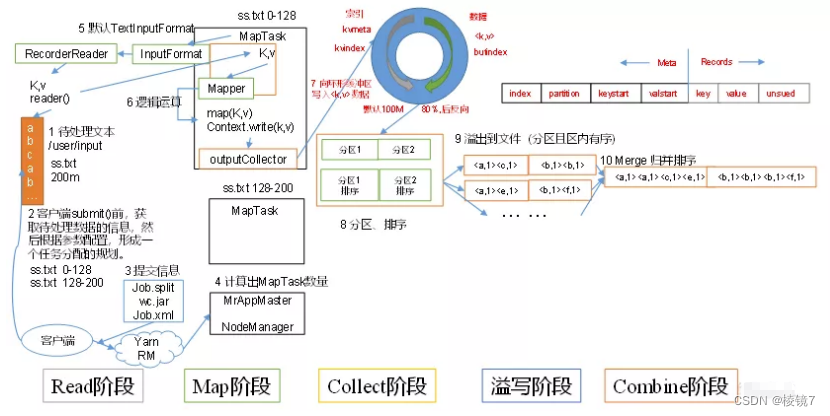
MapReduce working mechanism
[deep learning] semantic segmentation - source code summary
一文读懂,DDD落地数据库设计实战
Design and implementation of online shopping system based on Web (attached: source code paper SQL file)
Nc17 longest palindrome substring
Global and Chinese market of metallized flexible packaging 2022-2028: Research Report on technology, participants, trends, market size and share
Mapreduce实例(四):自然排序