当前位置:网站首页>Installation and use of image data crawling tool Image Downloader
Installation and use of image data crawling tool Image Downloader
2022-07-02 07:34:00 【wxplol】
List of articles
Installation package address : https://github.com/sczhengyabin/Image-Downloader
download :
- Mode one : open cmd, Input :
git clone https://github.com/sczhengyabin/Image-Downloader.git
- Mode two : open website

1、python install
The data crawling tool requires python>=3.5, Because it has been installed before python3.7, This step can be skipped
2、 download chromedriver And configuration
see chrome edition
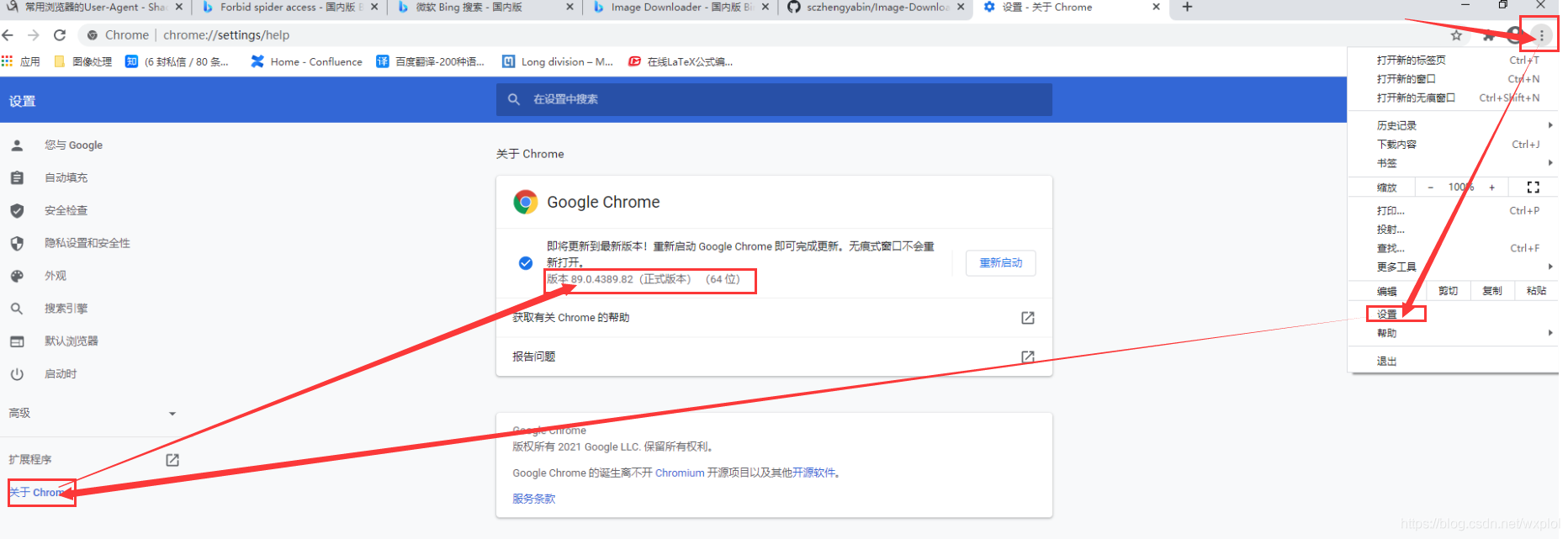
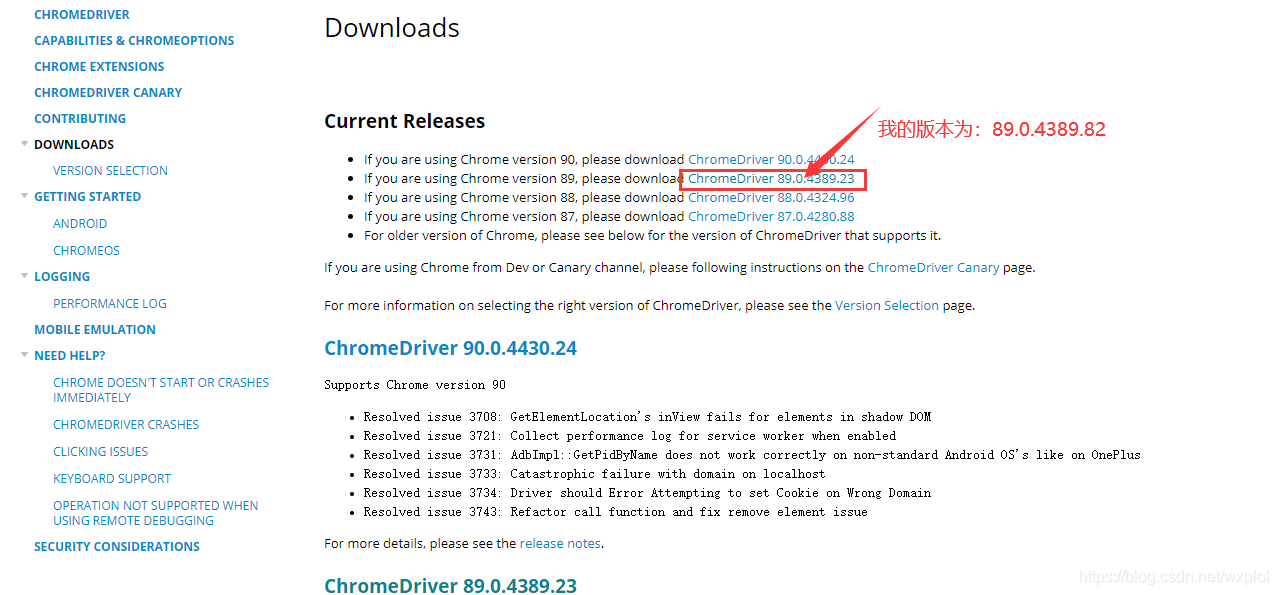
It can be seen that , my chrome Version is : edition 89.0.4389.82( Official version ) (64 position )Open download address , Download the corresponding driver
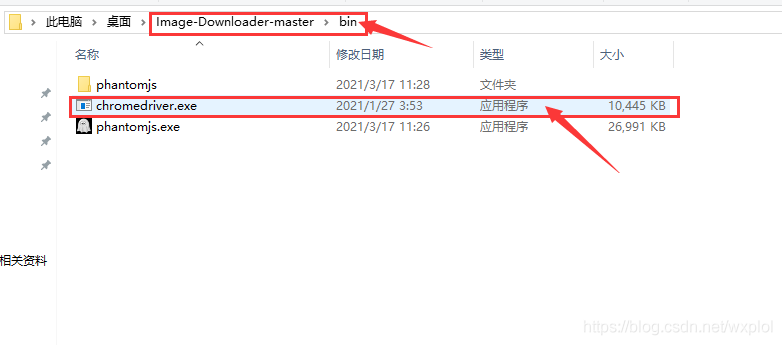
stay Image-Downloader Create in the tool root directory
bin, And will download driver Put it in this directory
3、 download phantomjs And configuration
- Download address
- Choose the latest windows Download the version
- When the download is complete phantomjs.exe copy to “ This project folder /bin/”, Or add other folders to PATH in
4、 Installation related python library
# Activate the environment
activate  Your environment name
# Get into Image-Downloader root directory
cd Image-Downloader-master
# Installation environment
pip3 install -r requirements.txt

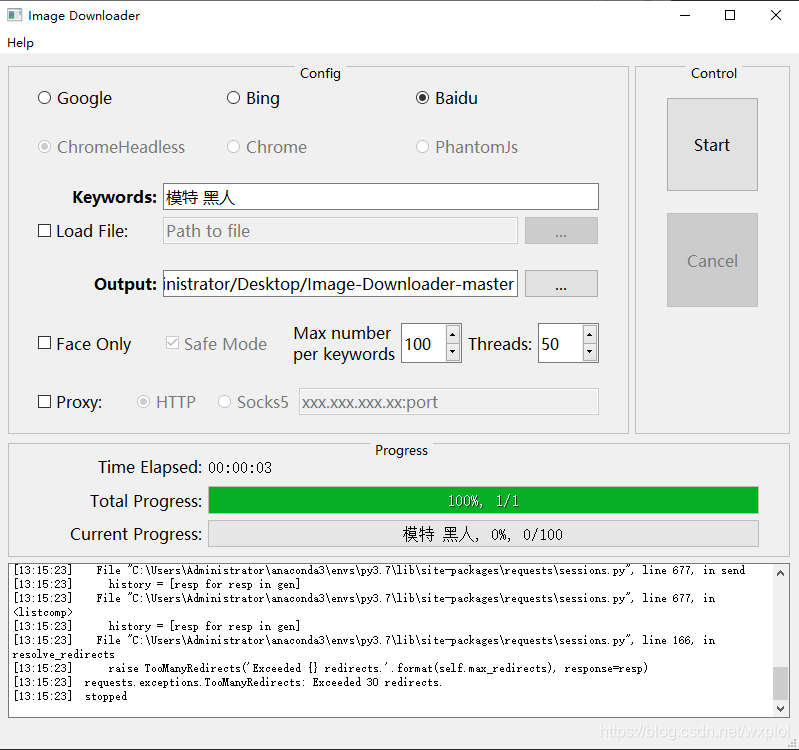
5、 Use
python image_downloader_gui.py
Reference material :
【cv project 】Image-Downloader Installation and use
边栏推荐
- Implement interface Iterable & lt; T>
- 基于onnxruntime的YOLOv5单张图片检测实现
- 【MEDICAL】Attend to Medical Ontologies: Content Selection for Clinical Abstractive Summarization
- Alpha Beta Pruning in Adversarial Search
- Module not found: Error: Can't resolve './$$_gendir/app/app.module.ngfactory'
- 华为机试题-20190417
- [tricks] whiteningbert: an easy unsupervised sentence embedding approach
- 【Torch】最简洁logging使用指南
- 【Torch】解决tensor参数有梯度,weight不更新的若干思路
- Faster-ILOD、maskrcnn_benchmark训练coco数据集及问题汇总
猜你喜欢
![[model distillation] tinybert: distilling Bert for natural language understanding](/img/c1/e1c1a3cf039c4df1b59ef4b4afbcb2.png)
[model distillation] tinybert: distilling Bert for natural language understanding

SSM学生成绩信息管理系统

JSP intelligent community property management system

Record of problems in the construction process of IOD and detectron2
Practice and thinking of offline data warehouse and Bi development
Point cloud data understanding (step 3 of pointnet Implementation)
離線數倉和bi開發的實踐和思考

自然辩证辨析题整理

超时停靠视频生成

@Transational踩坑
随机推荐
SSM实验室设备管理
Drawing mechanism of view (3)
基于onnxruntime的YOLOv5单张图片检测实现
Alpha Beta Pruning in Adversarial Search
聊天中文语料库对比(附上各资源链接)
Three principles of architecture design
常见CNN网络创新点
Oracle EBs and apex integrated login and principle analysis
深度学习分类优化实战
Practice and thinking of offline data warehouse and Bi development
mmdetection训练自己的数据集--CVAT标注文件导出coco格式及相关操作
Play online games with mame32k
PHP returns the corresponding key value according to the value in the two-dimensional array
Delete the contents under the specified folder in PHP
[Bert, gpt+kg research] collection of papers on the integration of Pretrain model with knowledge
【MEDICAL】Attend to Medical Ontologies: Content Selection for Clinical Abstractive Summarization
Faster-ILOD、maskrcnn_benchmark训练自己的voc数据集及问题汇总
Transform the tree structure into array in PHP (flatten the tree structure and keep the sorting of upper and lower levels)
ssm垃圾分类管理系统
使用MAME32K进行联机游戏