当前位置:网站首页>When opening the system window under UE4 shipping, the problem of crash is attached with the plug-in download address
When opening the system window under UE4 shipping, the problem of crash is attached with the plug-in download address
2022-07-07 15:42:00 【WhiteTian】
Original article , Reprint please indicate the source .
Shipping Next, open the system window and crash
Plug in download link
SelectDialog Plug in download link
Preface
If you encounter normal development (Debug/Develope) It's no problem to call the interface to open the system window , and Shipping If you break down directly , Let's see if it's the same problem .
Description of collapse phenomenon : call FDesktopPlatformModule::Get()->OpenFileDialog To open the interface under different systems , For example, you need to import the model at run time , Import pictures, videos, audio and other functions , You will use this function .
Here's the picture , I want to choose a computer in the program fbx Import the format model . stay dubug Under the normal , The bag that came out collapsed .
How to solve ? What's the reason ?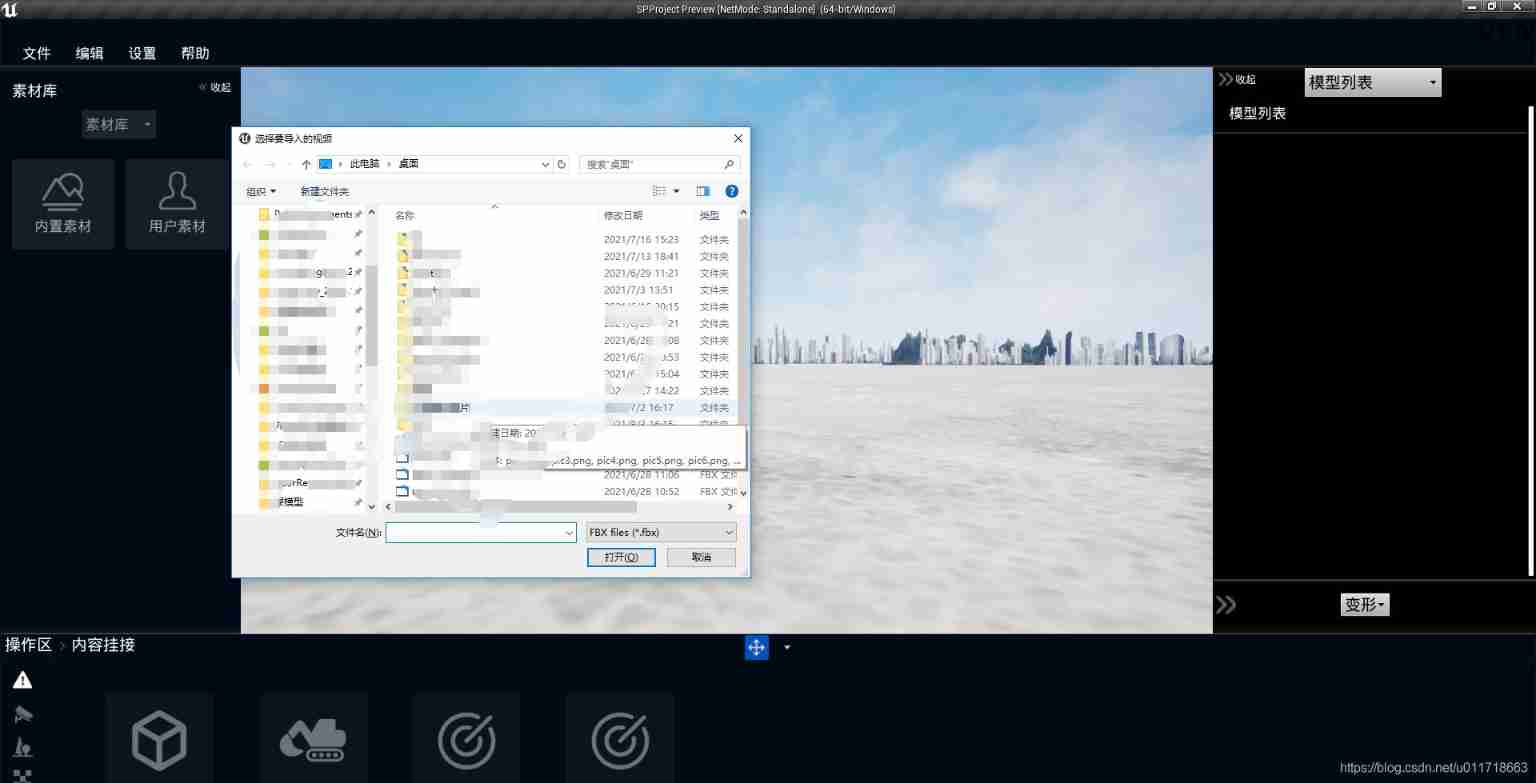
The code you call should be similar to the following (FDesktopPlatformModuleEx It's one of my packages shipping Plug in for next use .FDesktopPlatformModuleEx::Get())
/*  Open the system folder path   Parameters 1: File absolute path   Parameters 2: file type  TEXT("*.*")= All   Record : TEXT("FBX,JPG,BMP,PNG files|*.fbx;*.jpg;*.png;*.bmp"); TEXT("FBX Files|*.fbx"); TEXT("JPG,BMP,PNG files|*.jpg;*.png;*.bmp"); TEXT("(Image Files)|*.BMP;*.JPG;*.PNG;*.JPEG;)") */
	UFUNCTION(BlueprintCallable, Category = "OpenWindowsFile")
	static TArray<FString> OpenWindowsFiles(const FString& sTitle, const FString& sYourFullPath, const FString& sExtensionStr = TEXT("*.*"));
TArray<FString> URegionRiskReadLibrary::OpenWindowsFiles(const FString& sTitle, const FString& sYourFullPath, const FString& sExtensionStr)
{

	// List of files selected by the user
	TArray<FString> OpenFileNames;

	IDesktopPlatform* DesktopPlatform = FDesktopPlatformModuleEx::Get();
	if (DesktopPlatform)
	{

		void* ParentWindowHandle = GEngine->GameViewport->GetWindow()->GetNativeWindow()->GetOSWindowHandle();
		DesktopPlatform->OpenFileDialog(ParentWindowHandle, sTitle, sYourFullPath, TEXT(""), *sExtensionStr, EFileDialogFlags::Multiple, OpenFileNames);
	}
	return OpenFileNames;
}
The reason for the breakdown
Actually, we are shipping The following cannot be quoted Engine in Developer Contents of any module in the folder , This can only be Debug and Develope Next use .
PS:Engine in Developer It refers to the following figure Developer All modules in the folder .
All modules in this folder cannot be in shipping Under the use of , If used , Phenomenon is shipping Downfall , The corresponding supporting documents are not in the bag at all .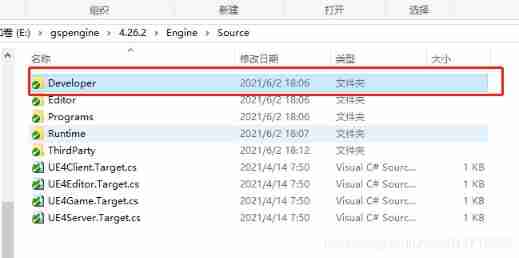
You should know what happened here , In fact, it is because you call to open the system window API It belongs to DesktopPlatform modular , Happen to happen DesktopPlatform This module is again Developer Within the scope of .
Solution
Actually, it's simple , That's the top Developer In the folder DesktopPlatform Module and what it uses Related modules ( stay Developer Range ) Copy out , Modify the class name and module name .
See here , I believe you will know how to solve similar problems if you encounter them again .
So I made a plug-in , Tested for 4.25 Each version and 4.26 Each version . Other versions have not been tested .
How does the plug-in work
1> Unzip it and put it into your project Plugins In the folder ;
2> In your build.cs There will be DesktopPlatform Module reference , Replace with DesktopPlatformEx Just name the module ;
3> Get rid of DesktopPlatform The header file contains ;
4> Remember when calling FDesktopPlatformModuleEx::Get(); Put... In your code FDesktopPlatformModule Replace with FDesktopPlatformModuleEx;
/*  Open the system folder path   Parameters 1: File absolute path   Parameters 2: file type  TEXT("*.*")= All   Record : TEXT("FBX,JPG,BMP,PNG files|*.fbx;*.jpg;*.png;*.bmp"); TEXT("FBX Files|*.fbx"); TEXT("JPG,BMP,PNG files|*.jpg;*.png;*.bmp"); TEXT("(Image Files)|*.BMP;*.JPG;*.PNG;*.JPEG;)") */
	UFUNCTION(BlueprintCallable, Category = "OpenWindowsFile")
	static TArray<FString> OpenWindowsFiles(const FString& sTitle, const FString& sYourFullPath, const FString& sExtensionStr = TEXT("*.*"));
TArray<FString> URegionRiskReadLibrary::OpenWindowsFiles(const FString& sTitle, const FString& sYourFullPath, const FString& sExtensionStr)
{

	// List of files selected by the user
	TArray<FString> OpenFileNames;

	IDesktopPlatform* DesktopPlatform = FDesktopPlatformModuleEx::Get();
	if (DesktopPlatform)
	{

		void* ParentWindowHandle = GEngine->GameViewport->GetWindow()->GetNativeWindow()->GetOSWindowHandle();
		DesktopPlatform->OpenFileDialog(ParentWindowHandle, sTitle, sYourFullPath, TEXT(""), *sExtensionStr, EFileDialogFlags::Multiple, OpenFileNames);
	}
	return OpenFileNames;
}
thank you , It's not easy to create , Great Xia, please stay … Move your lovely hands , To a Focus on Go bai
ღ( ´・ᴗ・` ) finger heart <( ̄︶ ̄)>
边栏推荐
- Typescript release 4.8 beta
- The significance of XOR in embedded C language
- The download button and debug button in keil are grayed out
- 【Markdown语法高级】让你的博客更精彩(四:设置字体样式以及颜色对照表)
- Starting from 1.5, build a microservice framework link tracking traceid
- Super signature principle (fully automated super signature) [Yun Xiaoduo]
- [quick start of Digital IC Verification] 29. Ahb-sramc (9) (ahb-sramc svtb overview) of SystemVerilog project practice
- Cocos makes Scrollview to realize the effect of zooming in the middle and zooming out on both sides
- 使用Scrapy框架爬取网页并保存到Mysql的实现
- [deep learning] semantic segmentation experiment: UNET network /msrc2 dataset
猜你喜欢
Keil5 does not support online simulation of STM32 F0 series
MySQL bit类型解析
![Super signature principle (fully automated super signature) [Yun Xiaoduo]](/img/b8/5bafbada054b335568e64c7e1ac6bb.jpg)
Super signature principle (fully automated super signature) [Yun Xiaoduo]
![[Data Mining] Visual Pattern Mining: Hog Feature + cosinus Similarity / K - means Clustering](/img/a4/7320f5d266308f6003cc27964e49f3.png)
[Data Mining] Visual Pattern Mining: Hog Feature + cosinus Similarity / K - means Clustering

Spin animation of Cocos performance optimization
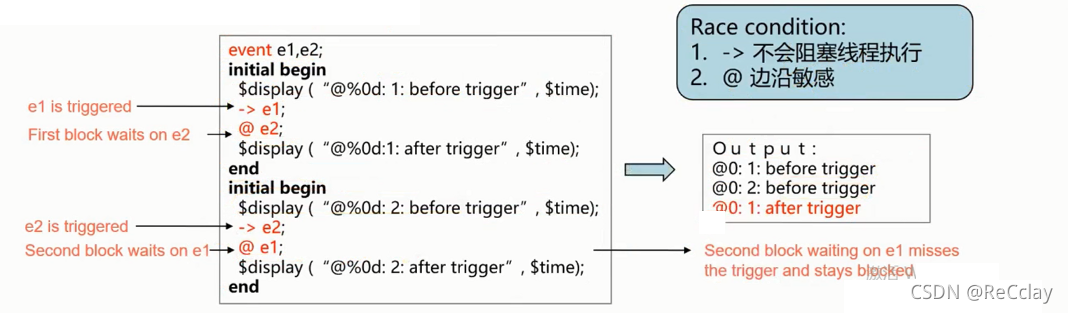
【数字IC验证快速入门】19、SystemVerilog学习之基本语法6(线程内部通信...内含实践练习)
![[quick start of Digital IC Verification] 23. AHB sramc of SystemVerilog project practice (3) (basic points of AHB protocol)](/img/e9/9e32e38e12e1fa71732c52b8ee0ab0.png)
[quick start of Digital IC Verification] 23. AHB sramc of SystemVerilog project practice (3) (basic points of AHB protocol)

Webgl texture

Mathematical modeling -- what is mathematical modeling

The difference between full-time graduate students and part-time graduate students!
随机推荐
Unity's ASE realizes cartoon flame
Write sequence frame animation with shader
一大波开源小抄来袭
Clang compile link ffmpeg FAQ
Ctfshow, information collection: web13
【数字IC验证快速入门】26、SystemVerilog项目实践之AHB-SRAMC(6)(APB协议基本要点)
How to release NFT in batches in opensea (rinkeby test network)
[quick start of Digital IC Verification] 26. Ahb-sramc of SystemVerilog project practice (6) (basic points of APB protocol)
A need to review all the knowledge, H5 form is blocked by the keyboard, event agent, event delegation
[server data recovery] data recovery case of raid failure of a Dell server
leetcode 241. Different ways to add parentheses design priority for operational expressions (medium)
jacoco代码覆盖率
Super signature principle (fully automated super signature) [Yun Xiaoduo]
What are PV and UV? pv、uv
【數字IC驗證快速入門】20、SystemVerilog學習之基本語法7(覆蓋率驅動...內含實踐練習)
最安全的证券交易app都有哪些
[quick start of Digital IC Verification] 22. Ahb-sramc of SystemVerilog project practice (2) (Introduction to AMBA bus)
Getting started with webgl (3)
有钱人买房就是不一样
./ Functions of configure, make and make install