当前位置:网站首页>OpenGL's distinction and understanding of VAO, VBO and EBO
OpenGL's distinction and understanding of VAO, VBO and EBO
2022-07-07 15:39:00 【Vegetable chicken on the road】
1.VBO
VBO Buffer objects for vertices , It is a memory buffer area opened up in the storage space of the graphics card , Used to store various attribute information of vertices , Such as vertex coordinates , Vertex normal vector , Vertex color data, etc . At the time of rendering , Can be directly from VBO Take out various attribute data of vertices .
So it can be interpreted as VBO Is a storage area in the video memory , You can keep a lot of vertex attribute information . And can open up many VBO, Every VBO stay OpenGL It has its unique identification in ID, This ID Corresponding to the specific VBO The video memory address of , Through this ID It can be used for specific VBO Access the data in the .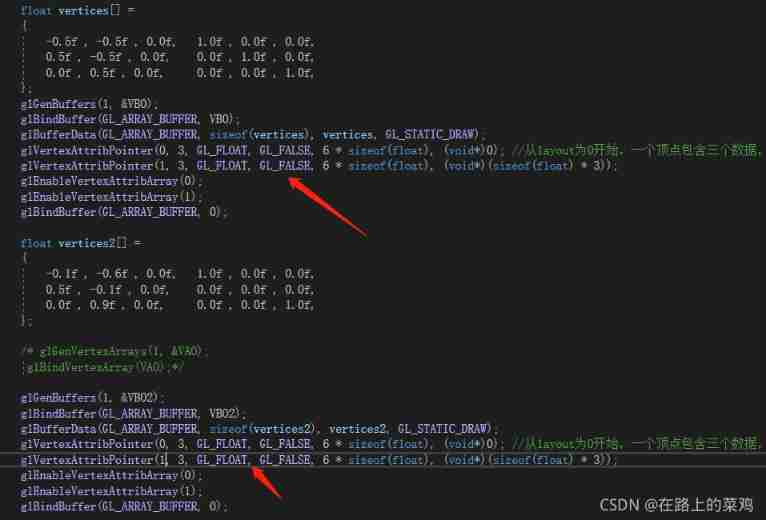
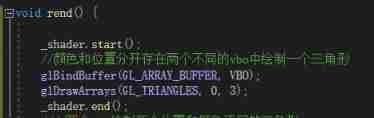
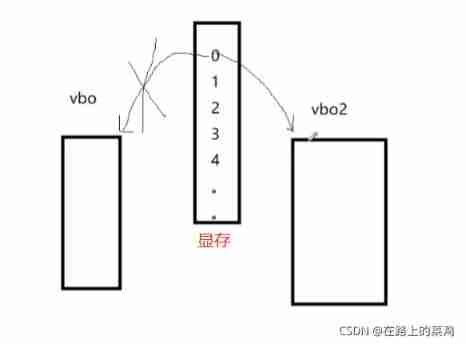
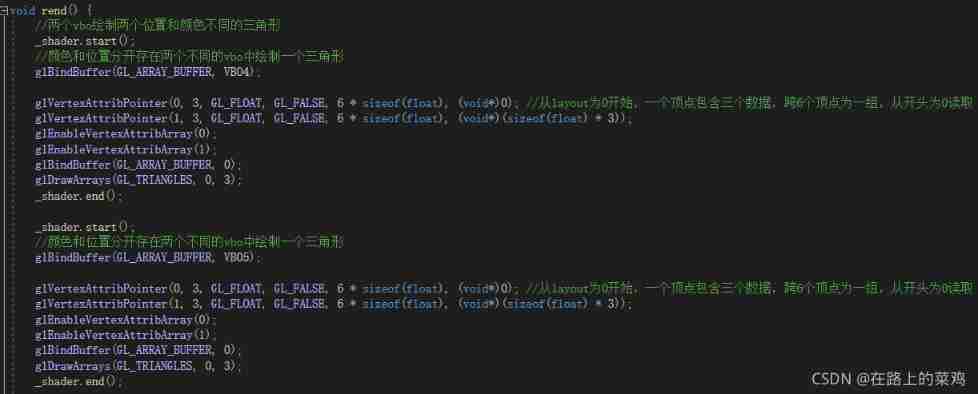
Pictured above , Define two vbo, We draw vbo Triangle under data , But what appears is vbo2 Lower triangle , Why? ?
because , Before we draw , The location in the video memory has been defined 0 Points to memory vbo, But then we show the location in the middle 0 Points to vbo2, So what we see is the last triangle .
glVertexAttribPointer(0, 3, GL_FLOAT, GL_FALSE, 6 * sizeof(float), (void*)0); // from layout by 0 Start , A vertex contains three data , Span 6 A set of vertices , Start with 0 Read
So how to solve this problem ?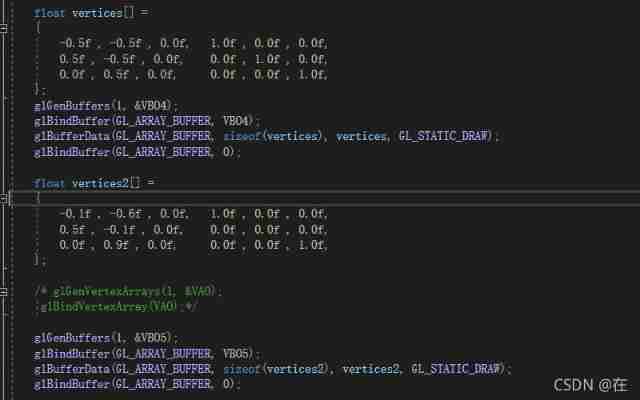
Above , We only need to specify a temporary memory location to draw when drawing , You can see that the drawn triangle is normal .
1.VAO
VAO Attributes of vertices are defined in , Each attribute has a specific read VBO Methods , It's equivalent to a VBO A collection of data objects , Use glVertexAttribPointer Settings for vertex attributes , So we know one vbo Which information should be specific . Pictured :
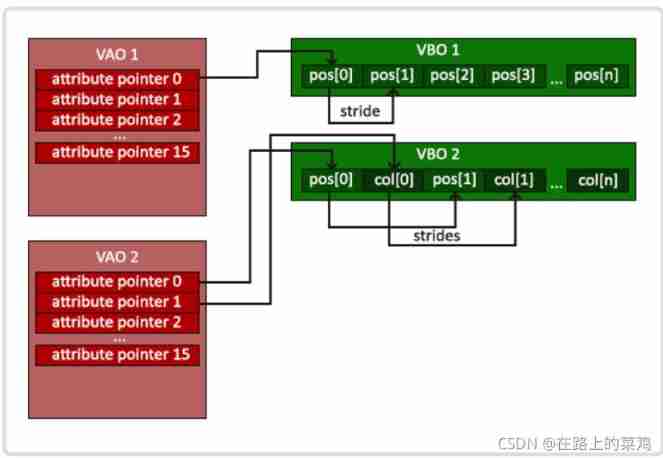
Here we can solve the above vbo When drawing two triangles , The last problem that always appears , The following code :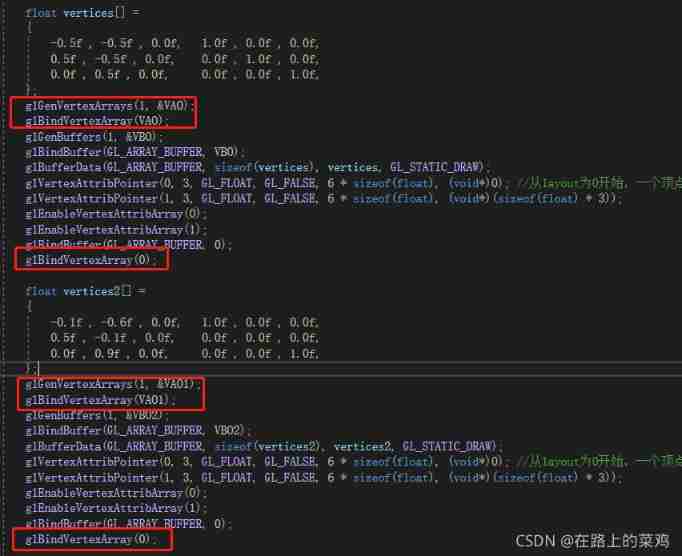
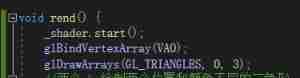
This is the time , What we see is , He draws the first triangle .
EBO
for instance : Suppose we draw a rectangle . We can draw two triangles to form a rectangle . So we need six vertex sets , And there will be two overlapping vertices ( Points in the lower left corner and upper right corner ). So when there are more vertices , There will be a lot of waste . So the best solution is to save each vertex only once , When we need to use these vertices , Only call the index of the vertex .
EBO The content stored in is the index of vertex position indices,EBO Follow VBO similar , It is also a memory buffer in video memory , It's just EBO Save the index of vertices .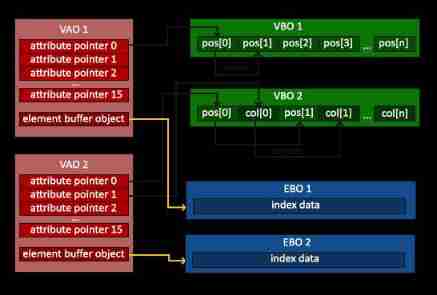
When used EBO When drawing a model by binding vertex indexes , Need to use glDrawElements instead of glDrawArrays: glDrawElements(GL_TRIANGLES, 6, GL_UNSIGNED_INT, 0);
- The first parameter specifies the mode to draw ;
- The second parameter specifies the number of vertices to paint ;
- The third parameter is the data type of the index ;
- The fourth parameter is optional EBO Medium offset setting .
as follows , Use EBO Draw a rectangle consisting of two triangles :
// Use EBO Draw a rectangle ( Two triangles )
#include <GL/glew.h>
#include <GL/freeglut.h>

void userInit();  // Custom initialization
void reshape(int w, int h);   // Repaint
void display(void);
void keyboardAction(unsigned char key, int x, int y);   // Keyboard exit event

GLuint eboId;//element buffer object Handle
GLuint vboId;//vertext buffer object Handle
GLuint vaoId;//vertext array object Handle

int main(int argc, char **argv)
{
	glutInit(&argc, argv);
	glutInitDisplayMode(GLUT_RGBA | GLUT_DOUBLE);
	glutInitWindowPosition(100, 100);
	glutInitWindowSize(512, 512);
	glutCreateWindow("Rectangle demo");

	// Use glew, You need to perform glewInit, Otherwise, an error will be reported during operation
	//glewInit Put it on glut After basic initialization, execute
	glewInit();

	// Custom initialization , Generate VAO,VBO,EBO
	userInit();

	// Redraw function
	glutReshapeFunc(reshape);
	glutDisplayFunc(display);
	// Register the keyboard key exit event
	glutKeyboardFunc(keyboardAction);
	glutMainLoop();
	return 0;
}

// Custom initialization function
void userInit()
{
	glClearColor(0.0, 0.0, 0.0, 0.0);

	// Create vertex data
	const GLfloat vertices[] = {
		-0.5f,-0.5f,0.0f,1.0f,
		0.5f,-0.5f,0.0f,1.0f,
		0.5f,0.5f,0.0f,1.0f,
		-0.5f,0.5f,0.0f,1.0f,
	};
	//  Index data
	GLshort indices[] = {
		0, 1, 3,  //  The first triangle
		1, 2, 3   //  The second triangle
	};

	// establish VAO object
	glGenVertexArrays(1, &vaoId);
	glBindVertexArray(vaoId);

	// establish VBO object , Copy the vertex array into a vertex buffer , for OpenGL Use
	glGenBuffers(1, &vboId);
	glBindBuffer(GL_ARRAY_BUFFER, vboId);
	glBufferData(GL_ARRAY_BUFFER, sizeof(vertices), vertices, GL_STATIC_DRAW);

	// establish EBO object
	glGenBuffers(1, &eboId);
	glBindBuffer(GL_ELEMENT_ARRAY_BUFFER, eboId);
	// Pass in EBO data
	glBufferData(GL_ELEMENT_ARRAY_BUFFER, sizeof(indices), indices, GL_STATIC_DRAW);

	// Explain how vertex data is processed
	glVertexAttribPointer(0, 4, GL_FLOAT, GL_FALSE, 0, 0);
	glEnableVertexAttribArray(0);

	// Unbundling VAO
	glBindVertexArray(0);
	// Unbundling EBO
	glBindBuffer(GL_ELEMENT_ARRAY_BUFFER, 0);
	// Unbundling VBO
	glBindBuffer(GL_ARRAY_BUFFER, 0);
}

// Resize window callback function
void reshape(int w, int h)
{
	glViewport(0, 0, (GLsizei)w, (GLsizei)h);
}

// Drawing callback functions
void display(void)
{
	glClear(GL_COLOR_BUFFER_BIT);
	// binding VAO
	glBindVertexArray(vaoId);
	// Draw a model
	glDrawElements(GL_TRIANGLES, 6, GL_UNSIGNED_SHORT, NULL);
	glutSwapBuffers();
}

// Keyboard key callback function
void keyboardAction(unsigned char key, int x, int y)
{
	switch (key)
	{
	case 033:  // Escape key
		exit(EXIT_SUCCESS);
		break;
	}
}
Divide a rectangle into triangles with six vertices , Respectively 0,1,2,1,2,3 Draw again 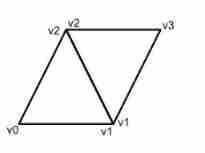
边栏推荐
- MySQL bit type resolution
- STM32F103C8T6 PWM驱动舵机(SG90)
- 【数字IC验证快速入门】22、SystemVerilog项目实践之AHB-SRAMC(2)(AMBA总线介绍)
- Guangzhou Development Zone enables geographical indication products to help rural revitalization
- Ctfshow, information collection: web9
- 避坑:Sql中 in 和not in中有null值的情况说明
- [server data recovery] data recovery case of raid failure of a Dell server
- #HPDC智能基座人才发展峰会随笔
- 2.Golang基础知识
- 什麼是數據泄露
猜你喜欢

Cocos uses custom material to display problems
With 8 modules and 40 thinking models, you can break the shackles of thinking and meet the thinking needs of different stages and scenes of your work. Collect it quickly and learn it slowly
![[quick start of Digital IC Verification] 25. AHB sramc of SystemVerilog project practice (5) (AHB key review, key points refining)](/img/78/29eb8581e9a8fb4c6c7e1e35ad7adc.png)
[quick start of Digital IC Verification] 25. AHB sramc of SystemVerilog project practice (5) (AHB key review, key points refining)

Ctfshow, information collection: web10
Ctfshow, information collection: web6

【服务器数据恢复】戴尔某型号服务器raid故障的数据恢复案例

2. Heap sort "hard to understand sort"
HPDC smart base Talent Development Summit essay
![[target detection] yolov5 Runtong voc2007 data set](/img/b3/b7f3d46075cb1782d772a24362003e.png)
[target detection] yolov5 Runtong voc2007 data set
知否|两大风控最重要指标与客群好坏的关系分析
随机推荐
Cocos makes Scrollview to realize the effect of zooming in the middle and zooming out on both sides
Points for attention in porting gd32 F4 series programs to gd32 F3 series
【数字IC验证快速入门】25、SystemVerilog项目实践之AHB-SRAMC(5)(AHB 重点回顾,要点提炼)
Connecting FTP server tutorial
unnamed prototyped parameters not allowed when body is present
MySQL bit type resolution
Steps to create P8 certificate and warehousing account
STM32F103C8T6 PWM驱动舵机(SG90)
什麼是數據泄露
15. Using the text editing tool VIM
[quick start of Digital IC Verification] 23. AHB sramc of SystemVerilog project practice (3) (basic points of AHB protocol)
Introduction of mongod management database method
Ctfshow, information collection: web7
Matlab experience summary
HW primary flow monitoring, what should we do
【搞船日记】【Shapr3D的STL格式转Gcode】
[original] all management without assessment is nonsense!
Comparable and comparator of sorting
Getting started with webgl (4)
[Data Mining] Visual Pattern Mining: Hog Feature + cosinus Similarity / K - means Clustering