当前位置:网站首页>Qt之QComboBox添加QCheckBox(下拉列表框插入复选框,含源码+注释)
Qt之QComboBox添加QCheckBox(下拉列表框插入复选框,含源码+注释)
2022-07-03 02:02:00 【lw只吃亿点.】
一、下拉列表框插入复选框示例图
下图为带复选框的下拉列表框示例图,其中包含添加项,选中项,勾选复选框等操作。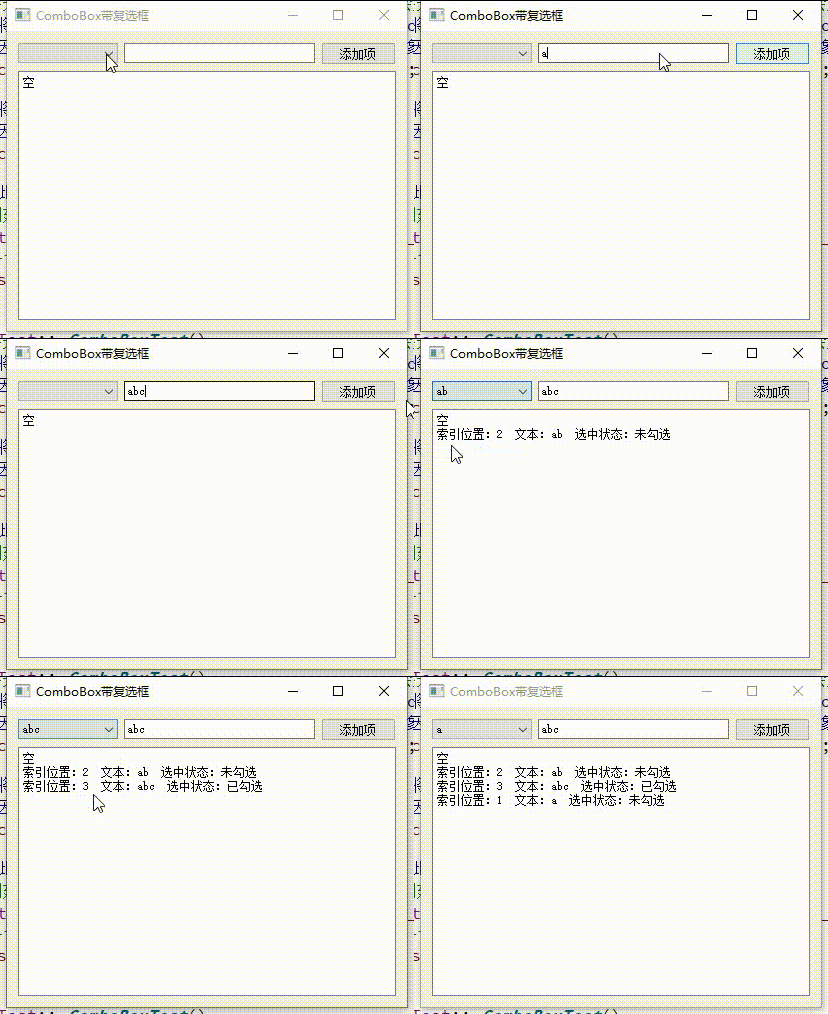
提示:不会使用Qt设计师设计界面的小伙伴点击这里
二、源码
ComboBoxTest.h
#ifndef COMBOBOXTEST_H
#define COMBOBOXTEST_H

#include <QWidget>
#include <QListWidget>

namespace Ui {

class ComboBoxTest;
}

class ComboBoxTest : public QWidget
{

    Q_OBJECT

public:
    explicit ComboBoxTest(QWidget *parent = nullptr);
    ~ComboBoxTest();

private slots:
    /** * @brief on_addBtn_clicked 添加item按钮点击槽函数 */
    void on_addBtn_clicked();

    /** * @brief on_comboBox_currentIndexChanged 下拉列表框切换选项槽函数 * @param index 切换后的index索引位置 */
    void on_comboBox_currentIndexChanged(int index);

private:
    Ui::ComboBoxTest    *ui;

    QListWidget         *m_listWidget;  // 下拉列表框的
};

#endif // COMBOBOXTEST_H
ComboBoxTest.cpp
#include "ComboBoxTest.h"
#include "ui_ComboBoxTest.h"

#include <QCheckBox>

ComboBoxTest::ComboBoxTest(QWidget *parent)
    : QWidget(parent)
    , ui(new Ui::ComboBoxTest)
{

    ui->setupUi(this);
    // 设置窗口标题
    this->setWindowTitle("ComboBox带复选框");

    // 创建QListWidget对象空间
    m_listWidget = new QListWidget;

    // 要先设置model,然后在设置view,我测试时反过来设置会崩掉哦
    //! 将comboBox的model对象设置为QListWidget对象的model
    //! 因为QListWidget继承QListView所以其存在model对象
    ui->comboBox->setModel(m_listWidget->model());

    //! 将comboBox的view对象设置为QListWidget对象
    //! 因为QListWidget继承QListView所以相当于View
    ui->comboBox->setView(m_listWidget);

    //! 此处添加一个空item用于当默认值
    // 创建QListWidgetItem对象并指定父对象
    QListWidgetItem *item = new QListWidgetItem(m_listWidget);
    // 将item添加到QListWidget对象中
    m_listWidget->addItem(item);
}

ComboBoxTest::~ComboBoxTest()
{

    //释放QListWidget、ui的存储空间
    delete m_listWidget;
    delete ui;
}

void ComboBoxTest::on_addBtn_clicked()
{

    // 获取要添加item上显示的文本
    QString text = ui->lineEdit->text();

    // 当文本为空时直接返回,不添加
    if(text.isEmpty())
    {

        return;
    }

    //! 创建复选框对象空间
    //! 创建时指定复选框的父对象,其父对象在释放时会将其中的子对象指针先释放
    QCheckBox *checkBox = new QCheckBox(m_listWidget);

    // 创建QListWidgetItem对象并传入文本和指定父对象
    QListWidgetItem *item = new QListWidgetItem(text, m_listWidget);
    //设置item文本居中
    item->setTextAlignment(Qt::AlignCenter);

    //将item添加到QListWidget对象中
    m_listWidget->addItem(item);
    //将复选框设置到item中
    m_listWidget->setItemWidget(item, checkBox);
}

void ComboBoxTest::on_comboBox_currentIndexChanged(int index)
{

    //获取当前索引位置的item
    QListWidgetItem *item = m_listWidget->item(index);
    //当获取的item为空时返回
    if(nullptr == item)
    {

        return;
    }

    //获取当前选项的文本
    QString itemStr = item->text();

    //获取当前选项所在复选框的widget对象
    QWidget *widget = m_listWidget->itemWidget(item);
    //将widget对象转换为checkBox对象
    QCheckBox *checkBox = dynamic_cast<QCheckBox *>(widget);
    //当获取的checkBox为空时返回
    if(nullptr == checkBox)
    {

        ui->textBrowser->append("空");
        return;
    }

    //根据checkBox的勾选状态获取文本
    QString checkBoxStr = checkBox->isChecked()? "已勾选": "未勾选";

    //组合text
    QString text = QString("索引位置:%1 文本:%2 选中状态:%3")
            .arg(index).arg(itemStr).arg(checkBoxStr);

    //将文本追加到文本栏中
    ui->textBrowser->append(text);
}
总结
在本文on_comboBox_currentIndexChanged获取到了复选框对象,可以在这里做出复选框应有的判断,或者在创建复选框时连接槽函数等操作;具体详解都在注释中,有意者细读哦。
友情提示——哪里看不懂可私哦,让我们一起互相进步吧
(创作不易,请留下一个免费的赞叭 谢谢 ^o^/)
注:文章为作者编程过程中所遇到的问题和总结,内容仅供参考,若有错误欢迎指出。
注:如有侵权,请联系作者删除
边栏推荐
- PyTorch 卷积网络正则化 DropBlock
- Huakaiyun | virtual host: IP, subnet mask, gateway, default gateway
- [fluent] hero animation (hero animation use process | create hero animation core components | create source page | create destination page | page Jump)
- Analyzing several common string library functions in C language
- Network security - cracking system passwords
- Y54. Chapter III kubernetes from introduction to mastery -- ingress (27)
- Problems encountered in small program development of dark horse shopping mall
- MySQL learning 03
- Coroutinecontext in kotlin
- 疫情当头,作为Leader如何进行团队的管理?| 社区征文
猜你喜欢

The technology boss is ready, and the topic of position C is up to you
![[shutter] top navigation bar implementation (scaffold | defaulttabcontroller | tabbar | tab | tabbarview)](/img/f1/b17631639cb4f0f58007b86476bcc2.gif)
[shutter] top navigation bar implementation (scaffold | defaulttabcontroller | tabbar | tab | tabbarview)

Machine learning notes (constantly updating...)
![[camera topic] complete analysis of camera dtsi](/img/cb/d42589fcf0610600c9dc8c7992d4d7.png)
[camera topic] complete analysis of camera dtsi
What are the differences between software testers with a monthly salary of 7K and 25K? Leaders look up to you when they master it

Visualisation de l'ensemble de données au format yolov5 (fichier labelme json)
全链路数字化转型下,零售企业如何打开第二增长曲线

stm32F407-------ADC
查询商品案例-页面渲染数据

His experience in choosing a startup company or a big Internet company may give you some inspiration
随机推荐
《上市风云》荐书——唯勇气最可贵
When the epidemic comes, how to manage the team as a leader| Community essay solicitation
File class (add / delete)
去除网页滚动条方法以及内外边距
Kotlin middle process understanding and Practice (II)
小程序开发黑马购物商城中遇到的问题
小程序開發的部分功能
stm32F407-------ADC
easyPOI
Use go language to realize try{}catch{}finally
Network security - Information Collection
全链路数字化转型下,零售企业如何打开第二增长曲线
How to find summer technical internship in junior year? Are you looking for a large company or a small company for technical internship?
ByteDance data Lake integration practice based on Hudi
What are MySQL locks and classifications
In the face of difficult SQL requirements, HQL is not afraid
[Yu Yue education] reference materials of chemical experiment safety knowledge of University of science and technology of China
Method of removing webpage scroll bar and inner and outer margins
DML Foundation
2022 financial product revenue ranking