当前位置:网站首页>Unity uses mesh to realize real-time point cloud (II)
Unity uses mesh to realize real-time point cloud (II)
2022-07-07 09:25:00 【heater404】
One 、 background
In the last one , We implemented static point cloud , And try directly in CPU The efficiency of point cloud discovery is very low . So this article , We will update the point cloud on ComputeShader in .
Two 、 Ideas
- Or custom mesh Create a point cloud model
- The vertex coordinates and colors in the point cloud model are ComputeShader Assignment in
- Customize UnlitShader In order to get ComputeShader Render the vertex coordinates and colors calculated in
3、 ... and 、 Realization
Customize mesh
By default , In a mesh At most, we can define 65535 vertices , If there are more vertices, we need to modify a parameter .Unity - Scripting API: IndexFormat (unity3d.com)
Let's create an empty game object , Then add MeshFilter and MeshRender Components . Then create a new script , This script is used to initialize the point cloud mesh Of .
[RequireComponent(typeof(MeshFilter), typeof(MeshRenderer))]
public class PointCloud : MonoBehaviour
{

    public const int Width = 640, Height = 480;

    private Vector3[] positions;
    private int[] indices;
    private Color[] colors;
    private Mesh mesh;
    // Use this for initialization
    void Start()
    {

        var totalPointNum = Width * Height;
        positions = new Vector3[totalPointNum];
        indices = new int[totalPointNum];
        colors = new Color[totalPointNum];
        for (int i = 0; i < totalPointNum; i++)
        {

            positions[i] = new Vector3(0, 0, 0);
            indices[i] = i;
            colors[i] = Color.red;
        }
        mesh = GetComponent<MeshFilter>().mesh;
        mesh.indexFormat = UnityEngine.Rendering.IndexFormat.UInt32;
        mesh.vertices = positions;
        mesh.colors = colors;
        mesh.SetIndices(indices, MeshTopology.Points, 0);
    }
}
mesh After defining it, we need to Render Shader Reassign the coordinates and colors of vertices in , This is a dynamic point cloud .
RenderShader
Shader "Unlit/PointCloudS"
{
	Properties
	{

	}
	SubShader
	{
		Tags { "RenderType"="Opaque" }
		LOD 100

		Pass
		{
			CGPROGRAM
			#pragma vertex vert
			#pragma fragment frag
			#include "UnityCG.cginc"

			struct v2f
            {
                float4 col : COLOR0;
                float4 vertex : SV_POSITION;
            };

            struct PointCloudData
            {
		        float3 pos;
		        float4 col;
            };

            StructuredBuffer<PointCloudData> PointCloudDataBuffer;

            v2f vert (uint id : SV_VertexID)
            {
                v2f o;
                o.vertex = UnityObjectToClipPos(float4(PointCloudDataBuffer[id].pos, 1));
                o.col = PointCloudDataBuffer[id].col;
                return o;
            }

            fixed4 frag (v2f i) : SV_Target
            {
                return i.col;
            }
			ENDCG
		}
	}
}
The more important thing is :
- Here we customize the coordinates and color data types of the point cloud top points , Also created corresponding buffer Used to receive data passed in by users .
- Vertex function (vert) The parameter in uses vertex index , So that we can buffer The corresponding data is found in
For convenience , Let's separate the structure .
Shader "Unlit/PointCloudS"
{
	Properties
	{

	}
	SubShader
	{
		Tags { "RenderType"="Opaque" }
		LOD 100

		Pass
		{
			CGPROGRAM
			#pragma vertex vert
			#pragma fragment frag
			#include "UnityCG.cginc"

			struct v2f
            {
                float4 col : COLOR0;
                float4 vertex : SV_POSITION;
            };

            StructuredBuffer<float3> PointPos;
            StructuredBuffer<float4> PointCol;

            v2f vert (uint id : SV_VertexID)
            {
                v2f o;
                o.vertex = UnityObjectToClipPos(float4(PointPos[id], 1));
                o.col = PointCol[id];
                return o;
            }

            fixed4 frag (v2f i) : SV_Target
            {
                return i.col;
            }
			ENDCG
		}
	}
}
So here's the problem , We are Shader As defined in buffer How to get the data of ???
to Buffer assignment
We know , Can pass Material Directly to the corresponding Shader Parameter assignment in .Unity Shader( to Shader Passing user data )_ The goal is :MVP-CSDN Blog
public class PointCloudCSHelper : MonoBehaviour
{

    public Material material;

    ComputeBuffer pointPosBuffer;
    ComputeBuffer pointColBuffer;
    int PointCloudPotNum {
     get {
     return PointCloud.Width * PointCloud.Height; } }

    void Start()
    {

        pointPosBuffer = new ComputeBuffer(PointCloudPotNum, 12);
        material.SetBuffer("PointPos", pointPosBuffer);

        pointColBuffer = new ComputeBuffer(PointCloudPotNum, 16);
        material.SetBuffer("PointCol", pointColBuffer);

        StartCoroutine(UpdatePointCloudData());
    }

    IEnumerator UpdatePointCloudData()
    {

        while (true)
        {

            // Simulation point cloud data update , Of course, this way will occupy CPU.
            Vector3[] pos = GetPositionsFromCsv(@"D:\SIF2610-Demo-Kits-DX-PreV1.06.210901\SnapShots\20210904\1145146883\PointCloud.csv");
            Color[] colors = GetColors(PointCloudPotNum);

            pointPosBuffer.SetData(pos);
            pointColBuffer.SetData(colors);
            yield return new WaitForSeconds(1);
        }
    }

    void OnDestroy()
    {

        pointPosBuffer.Release();
        pointPosBuffer.Dispose();

        pointColBuffer.Release();
        pointColBuffer.Dispose();
    }

    Vector3[] GetPositionsFromCsv(string path)
    {

        List<Vector3> pos = new List<Vector3>();
        using (StreamReader sr = new StreamReader(path))
        {

            while (!sr.EndOfStream)
            {

                var positions = sr.ReadLine().Split(',');

                pos.Add(new Vector3(float.Parse(positions[0]), float.Parse(positions[1]), float.Parse(positions[2])));
            }
        }

        return pos.ToArray();
    }

    private Color[] GetColors(int num)
    {

        Color[] colors = new Color[num];
        for (int i = 0; i < colors.Length; i++)
        {

            colors[i] = UnityEngine.Random.ColorHSV();
        }

        return colors;
    }
}
The code structure should also be very simple , Is to define first ComputeBuffer Then bind to Render Shader As stated in buffer, Finally, give buffer Assignment so Render Shader The value in will also be updated , Then the coordinates and colors of the vertices will also be updated .
But in the above example code , We updated some point cloud coordinates and colors randomly , This one will take up a little CPU. But in the actual project , We usually get coordinates and color data directly . But there will also be problems that you can't get coordinates or color data directly , We may need to make a simple calculation , But generally, the amount of point cloud data is relatively large , Even simple calculations will take up a lot CPU, So we can put it in GPU Middle computation , That is to say ComputeShader.
ComputeShader Computing big data
About ComputeShader You can see the introduction here :ComputeShader_ The goal is :MVP-CSDN Blog
// Each #kernel tells which function to compile; you can have many kernels
#pragma kernel UpdatePointCloud

// Create a RenderTexture with enableRandomWrite flag and set it
// with cs.SetTexture

RWStructuredBuffer<float3> PointPos;
RWStructuredBuffer<float4> PointCol;
float Time;

[numthreads(8,8,1)]
void UpdatePointCloud (uint3 gid : SV_GroupID, uint index : SV_GroupIndex)
{
     int pindex = gid.x *8*8*1 + index;
     PointPos[pindex]=float3(pindex/1000.0-50+ sin(Time) , 20 * cos(pindex)+10*sin(Time), 20 * sin(pindex)+10*sin(Time));
     PointCol[pindex]=float4((sin(Time) + 1)*0.5, (cos(Time) + 1)*0.5, abs(cos(Time) + sin(Time)), 1);
}
alike , We also applied for some here buffer, these buffer Used to receive from CPU Data coming in , Then do some simple calculations to get the final data .
public class PointCloudCSHelper : MonoBehaviour
{

    public ComputeShader shader;
    public Material material;

    ComputeBuffer pointPosBuffer;
    ComputeBuffer pointColBuffer;
    int PointCloudPotNum {
     get {
     return PointCloud.Width * PointCloud.Height; } }
    int kernel;
    uint x, y, z;
    void Start()
    {

        kernel = shader.FindKernel("UpdatePointCloud");

        pointPosBuffer = new ComputeBuffer(PointCloudPotNum, 12);
        shader.SetBuffer(kernel, "PointPos", pointPosBuffer);
        material.SetBuffer("PointPos", pointPosBuffer);

        pointColBuffer = new ComputeBuffer(PointCloudPotNum, 16);
        shader.SetBuffer(kernel, "PointCol", pointColBuffer);
        material.SetBuffer("PointCol", pointColBuffer);

        shader.GetKernelThreadGroupSizes(kernel, out x, out y, out z);

        StartCoroutine(UpdatePointCloudData());
    }

    IEnumerator UpdatePointCloudData()
    {

        while (true)
        {

            shader.SetFloat("Time", Time.time);
            shader.Dispatch(kernel, (int)(PointCloudPotNum / (x * y * z)), 1, 1);
            yield return new WaitForSeconds(1);
        }
    }

    void OnDestroy()
    {

        pointPosBuffer.Release();
        pointPosBuffer.Dispose();

        pointColBuffer.Release();
        pointColBuffer.Dispose();
    }
}
Here we will define ComputeBuffer Also related to ComputeShader in , Be careful ,RenderShader and ComputeShader Medium buffer Is the same , This buffer The value of is in ComputeShader Calculated in , then RenderShader Just call , Every update is also executed ComputeShader that will do , Re pass the value that needs to be updated GPU Calculate again in .
public class PointCloudCSHelper : MonoBehaviour
{

    public ComputeShader shader;
    public Material material;

    ComputeBuffer pointPosBuffer;
    ComputeBuffer pointColBuffer;
    int PointCloudPotNum {
     get {
     return PointCloud.Width * PointCloud.Height; } }
    int kernel;
    uint x, y, z;
    void Start()
    {

        kernel = shader.FindKernel("UpdatePointCloud");

        pointPosBuffer = new ComputeBuffer(PointCloudPotNum, 12);
        shader.SetBuffer(kernel, "PointPos", pointPosBuffer);
        material.SetBuffer("PointPos", pointPosBuffer);

        pointColBuffer = new ComputeBuffer(PointCloudPotNum, 16);
        shader.SetBuffer(kernel, "PointCol", pointColBuffer);
        material.SetBuffer("PointCol", pointColBuffer);

        shader.GetKernelThreadGroupSizes(kernel, out x, out y, out z);

        StartCoroutine(UpdatePointCloudData());
    }

    IEnumerator UpdatePointCloudData()
    {

        while (true)
        {

            shader.SetFloat("Time", Time.time);
            shader.Dispatch(kernel, (int)(PointCloudPotNum / (x * y * z)), 1, 1);
            yield return new WaitForSeconds(1);
        }
    }

    void OnDestroy()
    {

        pointPosBuffer.Release();
        pointPosBuffer.Dispose();

        pointColBuffer.Release();
        pointColBuffer.Dispose();
    }
}
effect
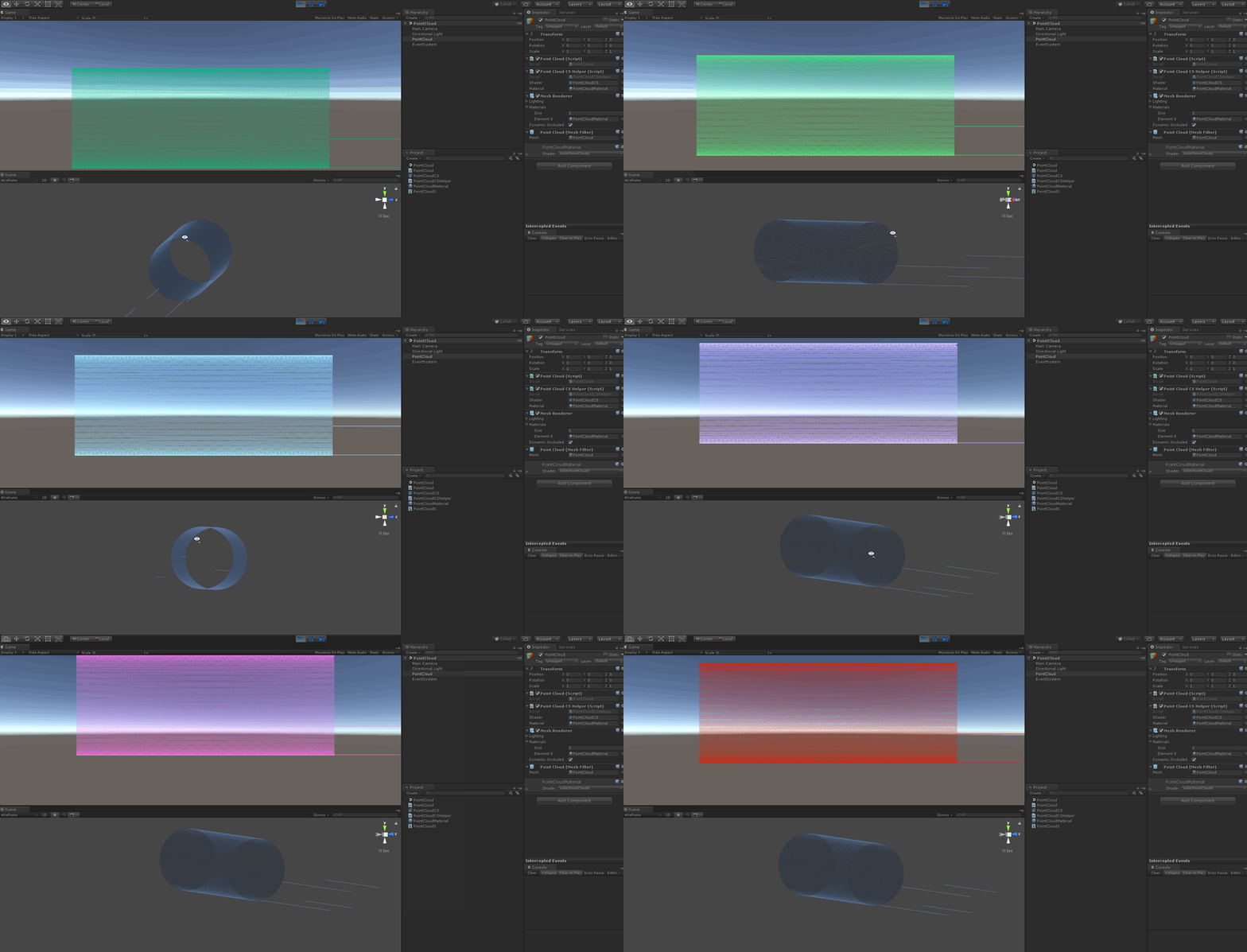
Project code :heater404/PointCloud (github.com)
To be done :
1、 Point cloud translation and rotation
边栏推荐
- [chaosblade: delete pod according to the tag, pod domain name access exception scenario, pod file system i/o failure scenario]
- JVM 垃圾回收 详细学习笔记(二)
- 【SVN】SVN是什么?怎么使用?
- PMP examination experience sharing
- Error: selenium common. exceptions. WebDriverException: Messag‘geckodriver‘ execute
- Final keyword
- 在EXCEL写VBA连接ORACLE并查询数据库中的内容
- PMP certificate preparation experience sharing
- Kubernetes cluster capacity expansion to add node nodes
- Pycharm importing third-party libraries
猜你喜欢

Mysql数据库-锁-学习笔记
Port multiplexing and re imaging
Systick tick timer
![Pytest+request+allure+excel interface automatic construction from 0 to 1 [five nails / flying Book notice]](/img/5f/a3e7ed3617f1fec024eaba086ddd2a.jpg)
Pytest+request+allure+excel interface automatic construction from 0 to 1 [five nails / flying Book notice]
Yapi test plug-in -- cross request
Colorbar of using vertexehelper to customize controls (II)
![Pytest+request+allure+excel interface automatic construction from 0 to 1 [familiar with framework structure]](/img/33/9fde4bce4866b988dd2393a665a48c.jpg)
Pytest+request+allure+excel interface automatic construction from 0 to 1 [familiar with framework structure]
Cesium load vector data
MySql数据库-事务-学习笔记
Several stages of PMP preparation study
随机推荐
Original collection of hardware bear (updated on May 2022)
Do you have any certificates with high gold content?
Connecting mobile phone with ADB
Cesium does not support 4490 problem solution and cesium modified source code packaging scheme
How does the project manager write the weekly summary and weekly plan?
C language pointer (Part 2)
Common short chain design methods
浏览器中如何让视频倍速播放
STM32 clock system
Netease Cloud Wechat applet
網易雲微信小程序
Mysql database transaction learning notes
【云原生】DevOps(一):DevOps介绍及Code工具使用
【Istio Network CRD VirtualService、Envoyfilter】
scrapy爬虫mysql,Django等
LeetCode每日一题(2316. Count Unreachable Pairs of Nodes in an Undirected Graph)
Mysql数据库-锁-学习笔记
Information Security Experiment 2: using x-scanner scanning tool
MySql数据库-事务-学习笔记
Unittest simple project