当前位置:网站首页>Allure -- common configuration items
Allure -- common configuration items
2022-07-02 10:23:00 【Lost ~ know to return】
allure-- Common configuration options
Parameterized dynamic update case name
- parametrize Add... To the parameter ids Realization : use ids When modifying the case title , Don't add @allure.title()
# conftest.py
# Hook function , Solve the problem of garbled console
def pytest_collection_modifyitems(items):
    """  When test case collection is complete , What will be collected item Of name and nodeid The Chinese language of is displayed on the console  """
    for item in items:
        item.name = item.name.encode('utf-8').decode('unicode_escape')
        item._nodeid = item.nodeid.encode('utf-8').decode('unicode_escape')
# coding:utf-8


# pytest Use case function
import os

import allure
import pytest

#  Test data

test_datas = [
    # {}  Put the test data ,
    # success: Expected results
    ({
    'username': 'zz', 'pwd': '123456'}, 'success'),
    ({
    'username': 'xu', 'pwd': '127654'}, 'failed'),
    ({
    'username': 'qb_10', 'pwd': '123456'}, 'success')
]


# @allure.title(' Login module ')
# @pytest.mark.parametrize('test_input, expeted', test_datas)
# def test_login(test_input, expeted):
# """ Test case login """
# print(' Get input data ')
# print(test_input['username'], test_input['pwd'])
# print(' Get the expected results ')
# print(expeted)
# print(' Sign in ')

#  Simulate a login interface
def login(username, pwd):
    """login"""
    print(' Enter the account :{}'.format(username))
    print(' Input password :{}'.format(pwd))

    #  return
    return {
    'code': 0, 'msg': 'success'}


# ids: effect , Change function name , Easy to view
# @allure.title(' Login module ')
@pytest.mark.parametrize('test_input, expeted', test_datas,
                         ids=[' Enter the correct account number A,  password ,  Sign in ',
                              ' Enter the correct account number B,  password ,  Sign in ',
                              ' Enter the correct account number C,  password ,  Sign in '
                              ]
                         )
def test_login(test_input, expeted):
    """ Test case login """
    result = login(test_input['username'], test_input['pwd'])
    #  Assertion
    assert result['msg'] == expeted


if __name__ == '__main__':
    pytest.main(['./test_ids.py', '--alluredir', './result2/', '--clean-alluredir'])
    os.system('allure generate ./result2/ -o ./report_2/ --clean')
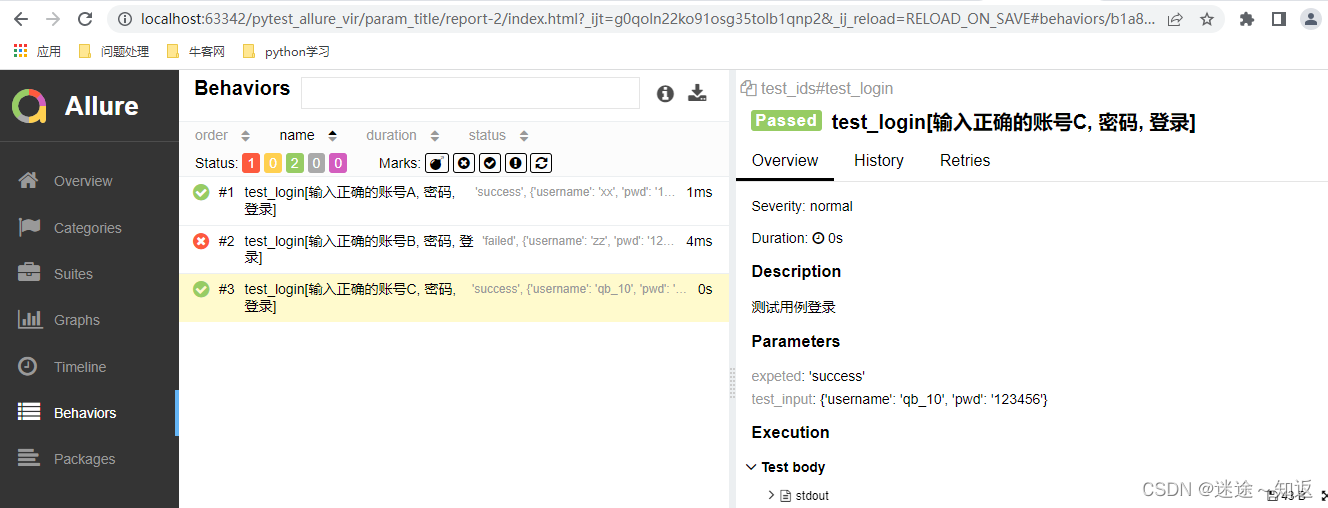
Parameterized use case name , Advanced , adopt @allure.title() Realization
# coding:utf-8


# pytest Use case function
import os

import allure
import pytest

#  Test data

test_datas = [
    # {}  Put the test data ,
    # success: Expected results
    ({
    'username': 'zz', 'pwd': '123456'}, 'success', ' Enter the correct account number , Password to login '),
    ({
    'username': 'xu', 'pwd': '127654'}, 'failed', ' Enter the correct account number , Password to login '),
    ({
    'username': 'qb_10', 'pwd': '123456'}, 'success', ' Enter the correct account number , Password to login ')
]


# @allure.title(' Login module ')
# @pytest.mark.parametrize('test_input, expeted', test_datas)
# def test_login(test_input, expeted):
# """ Test case login """
# print(' Get input data ')
# print(test_input['username'], test_input['pwd'])
# print(' Get the expected results ')
# print(expeted)
# print(' Sign in ')

#  Simulate a login interface
def login(username, pwd):
    """login"""
    print(' Enter the account :{}'.format(username))
    print(' Input password :{}'.format(pwd))

    #  return
    return {
    'code': 0, 'msg': 'success'}


@allure.title('{title}:{test_input}')
@pytest.mark.parametrize('test_input, expeted, title', test_datas)
def test_login(test_input, expeted, title):
    """ Test case login """
    result = login(test_input['username'], test_input['pwd'])
    #  Assertion
    assert result['msg'] == expeted


if __name__ == '__main__':
    pytest.main(['./test_b_title.py', '--alluredir', './result4/', '--clean-alluredir'])
    os.system('allure generate ./result4/ -o ./report4/ --clean')
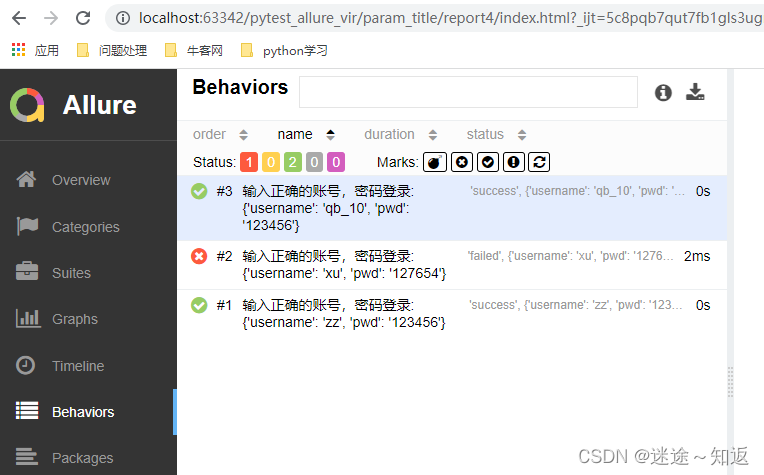
allure Clean up the last operation record
- allure The report can record the execution of each use case , It is convenient to track the success rate of use cases , Keep data in json In file
- There's a problem , When you delete or change the name of the use case in your code , Previous use case reports will still be recorded
pytest.main(['./test_b_title.py', '--alluredir', './result4/'])
Clean up historical data
pytest.main(['./test_b_title.py', '--alluredir', './result4/', '--clean-alluredir'])
- Output clean: Just let the report regenerate , The generated results will retain the previous use case execution records
os.system('allure generate ./result4/ -o ./report4/ --clean')
allure Dynamically generate use case titles
@allure.title Describe the use case Title
@allure.description Describe the details of the use case Use cases can be dynamically updated , Use allure.dynamic Method realization
# coding:utf-8
import os

import allure
import pytest

desc = '<font color="red"> request url:</font>{}<Br/>'\
       '<font color="red"> test result :</font>{}<Br/>'\
       '<font color="red"> Request method :</font>{}<Br/>'\
       '<font color="red"> The actual result :</font>{}<Br/>'\
       '<font color="red"> Wrong result :</font>{}<Br/>'\
       .format('http://www.baidu.com', 'pass', 'post', '200', '404')


@allure.description(' A brief description ')
def test_dynamic():
    """description"""
    assert 1 == 1
    allure.dynamic.description(desc)


@allure.title(' Update title ')
def test_dynamic_title():
    assert 2 + 2 == 4
    allure.dynamic.title(' When the assertion succeeds , The title will be modified ')


@allure.title(' Parameterized use case title , add to {param1} and {param2}')
@pytest.mark.parametrize('param1, param2, expected', [(1, 2, 3), (2, 2, 5)])
def test_with_parm_title(param1, param2, expected):
    assert param1 + param2 == expected
    allure.dynamic.title(' Change the title ')


if __name__ == '__main__':
    pytest.main(['./test_dynamic_allure.py', '--alluredir', './result/', '--clean-alluredir'])
    os.system('allure generate ./result/ -o ./report/ --clean')

Execution results 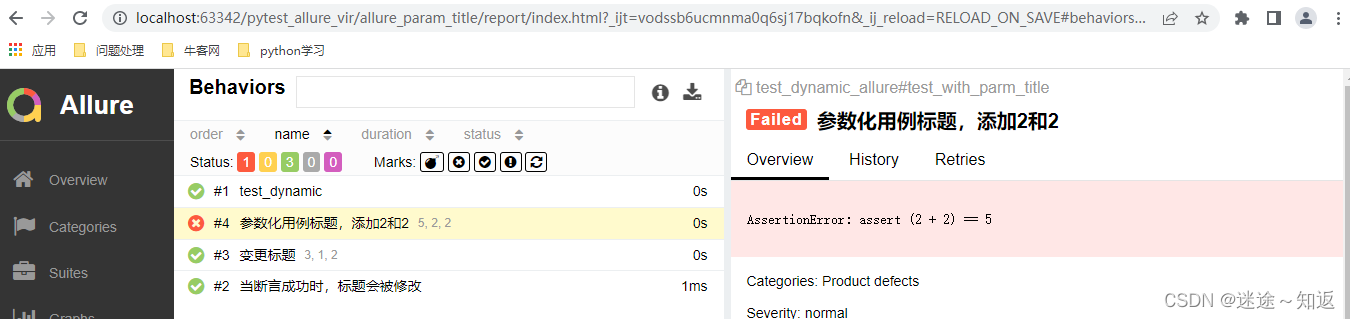
allure- Add environment information
stay result Add... To the catalog environment.properties
systemVersion=win10
pythonVersion=3.6.0
allureVersion=2.18.0
baseUrl=http:www.baidu.com
projectName=test
author=zz
email=[email protected].com
freind=Mr.ma
- Mode two : stay allure Of result Add a environment.xml
<environment>
    <parameter>
        <key>Browser</key>
        <value>Chrome</value>
    </parameter>
    <parameter>
<key>Browser.Version</key>
        <value>63.0</value>
    </parameter>
    <parameter>
        <key>Stand</key>
        <value>Production</value>
    </parameter>
</environment>
stay result In addition, create the above two files , then , Before generating the test report , Import the contents of the file 
if __name__ == '__main__':
    pytest.main(['./test_env.py', '--alluredir', './result/', '--clean-alluredir'])
    os.system('copy environment.properties result\\environment.properties')
    os.system('allure generate ./result/ -o ./report/ --clean')
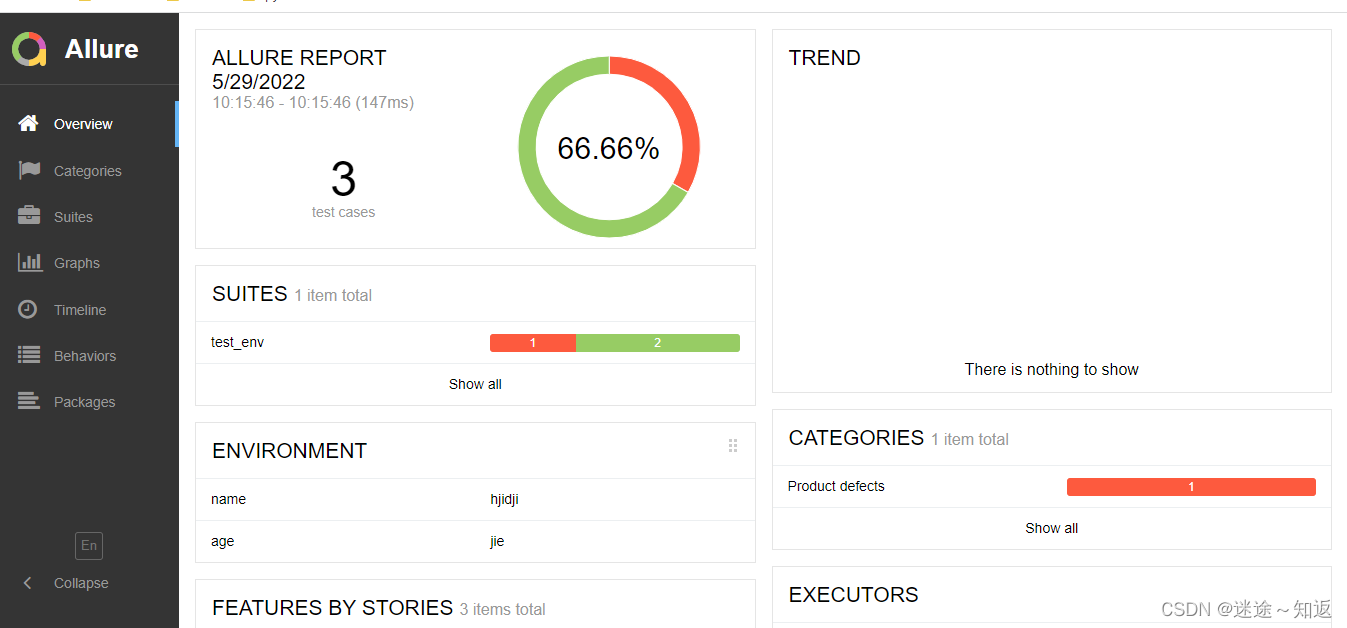
Screenshot of test case failure
# conftest Code
# coding:utf-8

import allure
import pytest
from selenium import webdriver


@pytest.fixture(scope='session')
def browser():
    print('browser init')
    global driver
    driver = webdriver.Chrome()
    yield driver
    driver.quit()
    print('browser quit')


"""  Decorator @pytest,hookimpl(hookwrapper=True) Equivalent to @pytest.mark.hookwrapper  effect : You can get the information of test cases , For example, the description of use case function   You can get the execution results of test cases ,yield, Return to one result object  """


@pytest.hookimpl(hookwrapper=True)
def pytest_runtest_makereport():
    #  You can get the execution results of test cases ,yield, Return to one result object
    out = yield
    """  Return one from result object (out) Get the test report of the call result , Return to one report object  report Object properties   Include when(setup,call,teardown Three values )、nodeid( The name of the test case )、 outcome( The execution result of the use case :passed,failed) """
    report = out.get_result()
    #  Just get the use cases call The execution results of the phase , It doesn't contain setup and teardown
    if report.when == 'call':
        #  Get use cases call The execution result is failure
        xfail = hasattr(report,"wasxfail")
        if(report.skipped and xfail) or (report.failed and not xfail):
            #  add to allure Report screenshots
            with allure.step(" Add failed screenshot .."):
                #  Use allure The self-contained method of adding attachments : The three parameters are : Source file 、 file name 、 file type
                allure.attach(driver.get_screenshot_as_png()," Screenshot of failure ",
                              allure.attachment_type.PNG)
Test code
# coding:utf-8
from time import sleep


def test_baidu_case01(browser):
    driver = browser
    driver.get("http://www.baidu.com")
    sleep(2)
    #  Locate the baidu search box , Then type the keyword
    driver.find_element_by_id('kw').send_keys(' Dog money ')
    sleep(2)
    #  Go to the search button , Click on the search
    driver.find_element_by_id('su').click()
    sleep(2)
    assert driver.title == "11 Dog money _ Baidu search "
Entry function
#!/usr/bin/env python
# -*- coding: utf-8 -*-
import os

import pytest


def run():
    pytest.main(['-v',
                 '--alluredir','./result','--clean-alluredir'])
    os.system('allure generate ./result/ -o ./report_allure/ --clean')


if __name__ == '__main__':
    run()
Running results 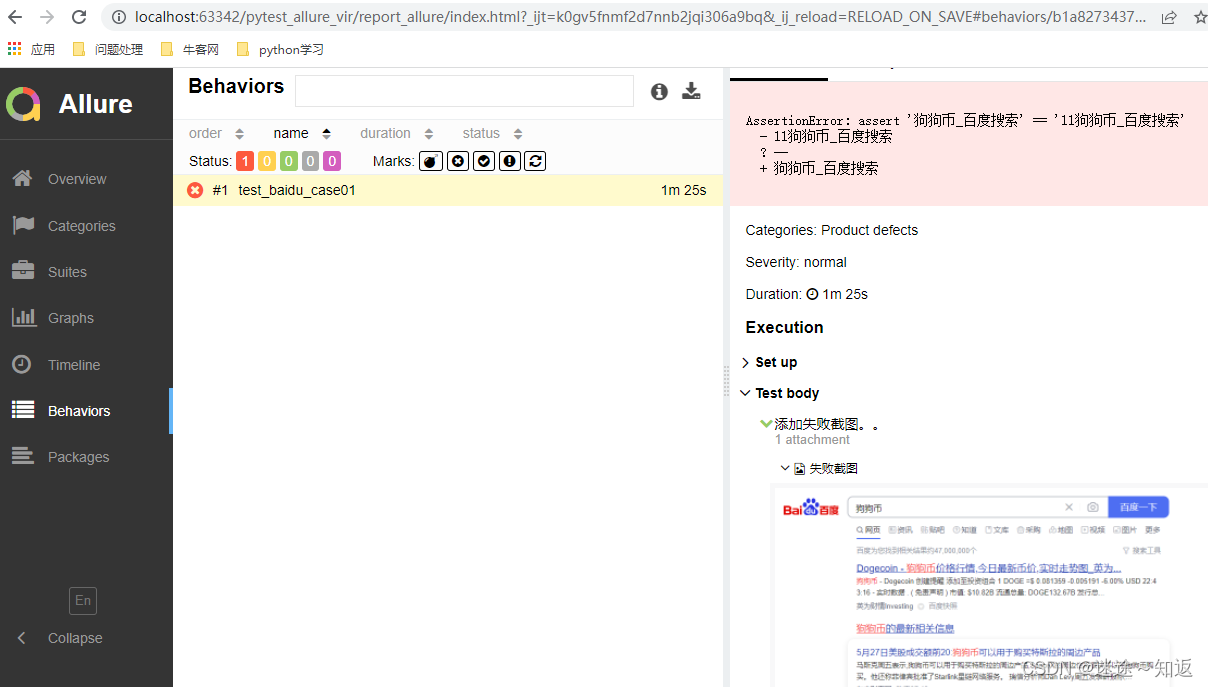
边栏推荐
- Vscode set JSON file to format automatically after saving
- 2837xd code generation module learning (2) -- ADC, epwm module, timer0
- Alibaba cloud SMS service
- Large neural networks may be beginning to realize: the chief scientist of openai leads to controversy, and everyone quarrels
- 【虚幻4】UMG组件的简介与使用(更新中...)
- 【JetBrain Rider】构建项目出现异常:未找到导入的项目“D:\VisualStudio2017\IDE\MSBuild\15.0\Bin\Roslyn\Microsoft.CSh
- 【避坑指南】使用UGUI遇到的坑:Text组件无法首行缩进两格
- Deep understanding of redis cache avalanche / cache breakdown / cache penetration
- [ue5] two implementation methods of AI random roaming blueprint (role blueprint and behavior tree)
- Mock Server基本使用方法
猜你喜欢

Beautiful and intelligent, Haval H6 supreme+ makes Yuanxiao travel safer

Following nym, the new project Galaxy token announced by coinlist is gal

Remember the use of add method once
ICLR 2022: how does AI recognize "things I haven't seen"?
阿里云Prometheus监控服务
【虚幻】按键开门蓝图笔记

虛幻AI藍圖基礎筆記(萬字整理)
2021-10-02
Leetcode -- the nearest common ancestor of 236 binary tree

虚幻材质编辑器基础——如何连接一个最基本的材质
随机推荐
【UE5】AI随机漫游蓝图两种实现方法(角色蓝图、行为树)
【虚幻】按键开门蓝图笔记
What wires are suitable for wiring on bread board?
Junit4运行mvn test 测试套件升级方案
[200 Shengxin literatures] 95 multiomics exploration TNBC
[ue5] blueprint making simple mine tutorial
【避坑指南】Unity3D项目接入腾讯Bugly工具时遇到的坑
【Unity3D】嵌套使用Layout Group制作拥有动态子物体高度的Scroll View
判断数组中是否存在重复元素
Mysql索引
Beautiful and intelligent, Haval H6 supreme+ makes Yuanxiao travel safer
Project practice, redis cluster technology learning (16)
合并有序数列
How does {} prevent SQL injection? What is its underlying principle?
Blender model import UE, collision settings
[IDL] Research
Project practice, redis cluster technology learning (IX)
Commutateur Multi - lentilles Blender
Blender camera surround motion, animation rendering, video synthesis
Blender volume fog