当前位置:网站首页>微服务入门:Gateway网关
微服务入门:Gateway网关
2022-07-04 08:36:00 【mm天天写bug】
文章目录
微服务入门:Gateway网关
一、为什么需要网关
Gateway相当于微服务中的守门员,它可以帮助我们完成:
- 身份验证和权限校验
- 服务路由和负载均衡
- 请求限流
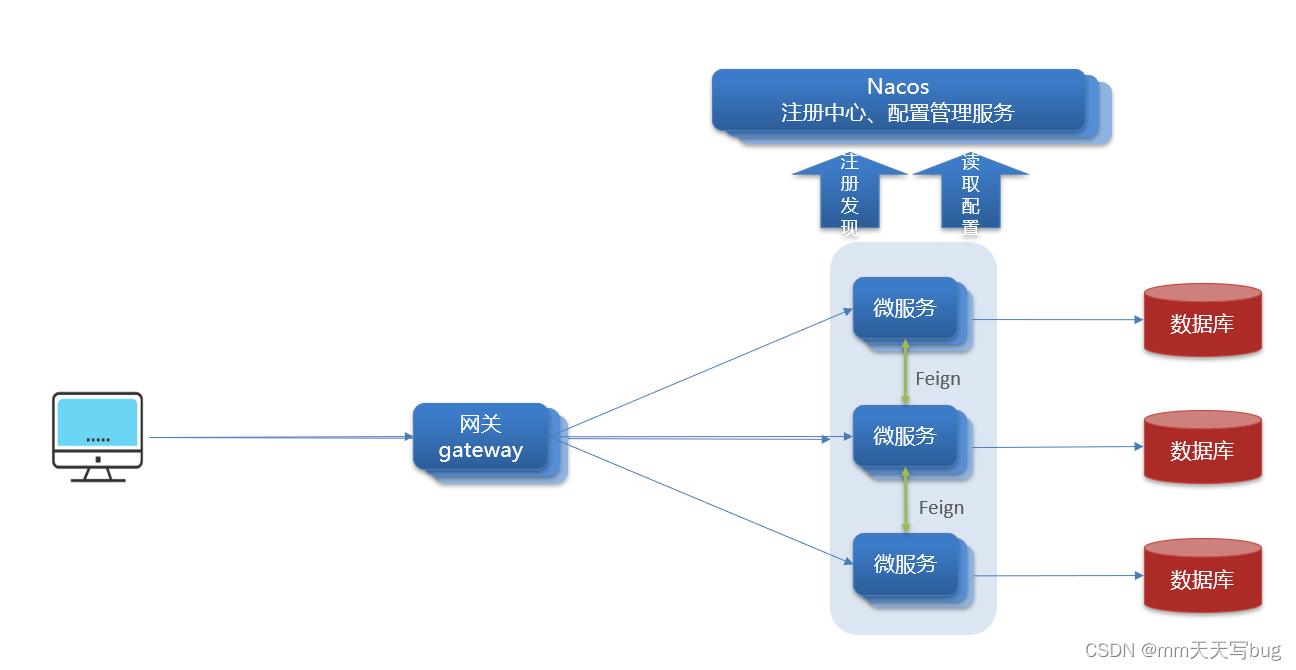
在SpringCloud中网关的实现有两种方式:
- gateway
- zuul
主要使用gateway,因为Zuul是基于Servlet实现的,属于阻塞式编程。
而SpringCloudGateway则是基于Spring5中提供的WebFlux,属于响应式编程的实现,具备更好的性能
二、搭建网关服务
搭建网关服务,首先我们需要创建一个Maven模块,建议选择一个空模块,不要用SpringBoot模板创建,不然会出现未知的错误(因为我第一次就是用SpringBoot模板创建的,然后出现了依赖导入不了的Bug)
创建完一个空的Maven项目之后,在pom.xml导入以下依赖
<!--nacos服务发现依赖-->
<dependency>
	<groupId>com.alibaba.cloud</groupId>
	<artifactId>spring-cloud-starter-alibaba-nacos-discovery</artifactId>
</dependency>

<!--引入gateway 网关-->
<dependency>
	<groupId>org.springframework.cloud</groupId>
	<artifactId>spring-cloud-starter-gateway</artifactId>
</dependency>
导入依赖后,手动添加GatewayApplication以及yml文件
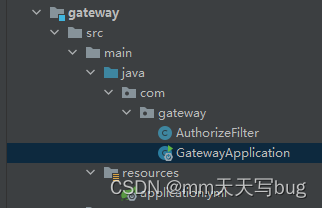
@SpringBootApplication
public class GatewayApplication {
    public static void main(String[] args) {
        SpringApplication.run(GatewayApplication.class,args);
    }
}
然后在yml配置网关和路由
路由配置包括:
1.路由id:路由的唯一标示
2.路由目标(uri):路由的目标地址,http代表固定地址,lb代表根据服务名负载均衡
3.路由断言(predicates):判断路由的规则,
4.路由过滤器(filters):对请求或响应做处理
server:
  port: 10010
spring:
  application:
    name: gateway #服务名称
  cloud:
    nacos:
      server-addr: localhost:8848 #nacos地址
    gateway:
      routes:
        - id: user-service # 路由id,自定义,只要唯一即可
          uri: lb://userservice # 路由的目标地址 lb就是负载均衡,后面跟服务名称
          predicates: # 路由断言,也就是判断请求是否符合路由规则的条件
            - Path=/user/** # 这个是按照路径匹配,只要以/user/开头就符合要求
        - id: order-service
          uri: lb://orderservice
          predicates:
            - Path=/order/**
如果我们向添加多个服务,那么则多写几个id即可
这样就完成了网关的搭建
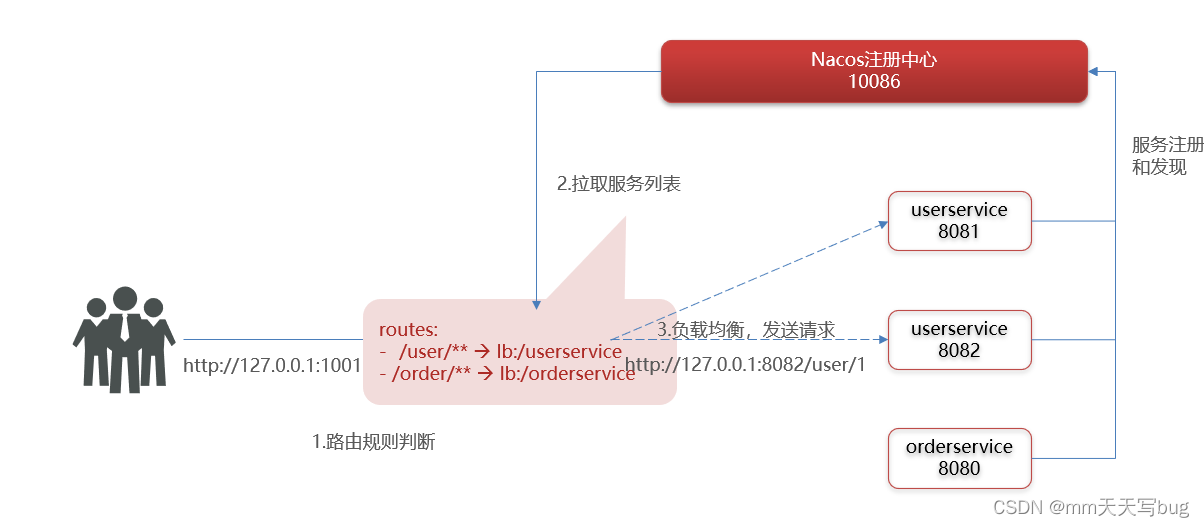
搭建完成的网关就会起到了守门员的作用,当我们请求/user/**这个url的时候,就会根据理由规则判断是哪一个服务,然后进行负载均衡接着发送请求。
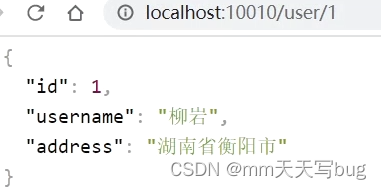
比如我们访问网关http://localhost:10010/user/1,然后符合/user/**规则,请求转发到uri:http://userservice/user/1,得到了结果:
三、路由断言工厂
在上述的yml配置中,可以看到有一个predicates
这个predicates就是路由断言,判断请求是否符合规则,符合规则则转发到路由目的地
在配置文件中写的断言规则只是字符串,这些字符串会被Predicate Factory读取并处理,转变为路由判断的条件
例如:Path=/user/**是按照路径匹配,这个规则是由org.springframework.cloud.gateway.handler.predicate.PathRoutePredicateFactory类来处理的
像这样的断言工厂在SpringCloudGateway还有十几个
| 名称 | 说明 | 示例 |
|---|---|---|
| After | 是某个时间点后的请求 | - After=2037-01-20T17:42:47.789-07:00[America/Denver] |
| Before | 是某个时间点之前的请求 | - Before=2031-04-13T15:14:47.433+08:00[Asia/Shanghai] |
| Between | 是某两个时间点之前的请求 | - Between=2037-01-20T17:42:47.789-07:00[America/Denver], 2037-01-21T17:42:47.789-07:00[America/Denver] |
| Cookie | 请求必须包含某些cookie | - Cookie=chocolate, ch.p |
| Header | 请求必须包含某些header | - Header=X-Request-Id, \d+ |
| Host | 请求必须是访问某个host(域名) | - Host=.somehost.org,.anotherhost.org |
| Method | 请求方式必须是指定方式 | - Method=GET,POST |
| Path | 请求路径必须符合指定规则 | - Path=/red/{segment},/blue/** |
| Query | 请求参数必须包含指定参数 | - Query=name, Jack或者- Query=name |
| RemoteAddr | 请求者的ip必须是指定范围 | - RemoteAddr=192.168.1.1/24 |
| Weight | 权重处理 |
四、路由过滤器
GatewayFilter是网关中提供的一种过滤器,可以对进入网关请求和微服务返回的响应做处理
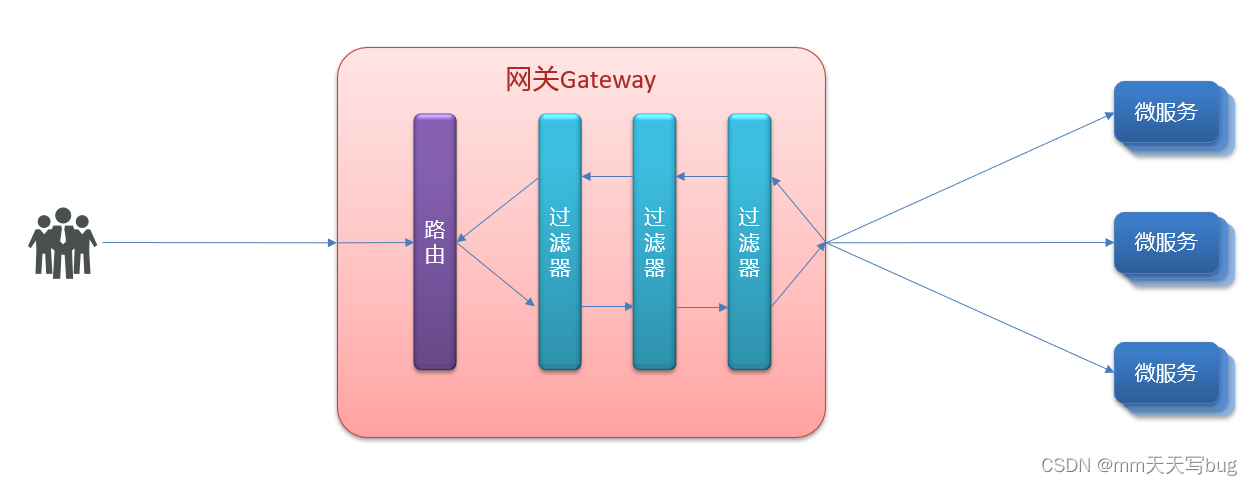
Spring提供了31中不同的路由过滤工厂,这里提供几种展示
| 名称 | 说明 |
|---|---|
| AddRequestHeader | 给当前请求添加一个请求头 |
| RemoveRequestHeader | 移除请求中的一个请求头 |
| AddResponseHeader | 给响应结果中添加一个响应头 |
| RemoveResponseHeader | 从响应结果中移除有一个响应头 |
| RequestRateLimiter | 限制请求的流量 |
4.1 添加过滤器GatewayFilter
在Gateway模块的yml添加过滤器
下面的案例就是添加请求头
server:
  port: 10010
spring:
  application:
    name: gateway #服务名称
  cloud:
    nacos:
      server-addr: localhost:8848 #nacos地址
    gateway:
      routes:
        - id: user-service # 路由id,自定义,只要唯一即可
          uri: lb://userservice # 路由的目标地址 lb就是负载均衡,后面跟服务名称
          predicates: # 路由断言,也就是判断请求是否符合路由规则的条件
            - Path=/user/** # 这个是按照路径匹配,只要以/user/开头就符合要求
          filters: #过滤器
            - AddRequestHeader=Truth,Itcast is freaking aowsome!
        - id: order-service
          uri: lb://orderservice
          predicates:
            - Path=/order/**
      default-filters: # 默认过滤器,会对所有的路由请求都生效
        - AddRequestHeader=Truth,Itcast is freaking aowsome!
filters是局部过滤器,如上代码所示,其只在user-service起作用
而default-filters是默认过滤器,在路由中的所有服务都起作用
4.2 全局过滤器GlobalFilter
全局过滤器的作用也是处理一切进入网关的请求和微服务响应,与GatewayFilter的作用一样。
区别在于GatewayFilter通过配置定义,处理逻辑是固定的。而GlobalFilter的逻辑需要自己写代码实现。
定义方式是实现GlobalFilter接口。
首先我们在Gateway模块添加一个Java类
// @Order(-1)
@Component
public class AuthorizeFilter implements GlobalFilter, Ordered {
    @Override
    public Mono<Void> filter(ServerWebExchange exchange, GatewayFilterChain chain) {
        //1.获取请求参数
        ServerHttpRequest request = exchange.getRequest();
        //2.获取所有的参数
        MultiValueMap<String, String> queryParams = request.getQueryParams();
        //3.获取Authorization参数
        String first = queryParams.getFirst("Authorization");
        //4.判断参数是否是admin
        if ("admin".equals(first)){
            //5.是则放行
            return chain.filter(exchange);
        }
        //6.设置状态码
        exchange.getResponse().setStatusCode(HttpStatus.UNAUTHORIZED);
        //7.拦截请求
        return exchange.getResponse().setComplete();
    }

    @Override
    public int getOrder() {
        return -1;
    }
}
这个类的主要是作用是实现了GlobalFilter,对发送来的请求判断Authorization参数是否为admin,如果是则放行,不是则设置状态码为401然后拦截请求
注意的是,这个拦截器需要用@Component注解给Spring托管
并且我们可以设置该拦截器的优先级(数字越小,优先级越大)
例如使用@Order(-1)设置优先级
也可以选择实现Ordered接口的getOrder方法,返回一个数字,那个数字就是决定拦截器的优先级的
4.3 过滤器的执行顺序
请求进入网关会碰到三类过滤器:当前路由的过滤器、DefaultFilter、GlobalFilter
请求路由后,会将当前路由过滤器和DefaultFilter、GlobalFilter,合并到一个过滤器链(集合)中,排序后依次执行每个过滤器
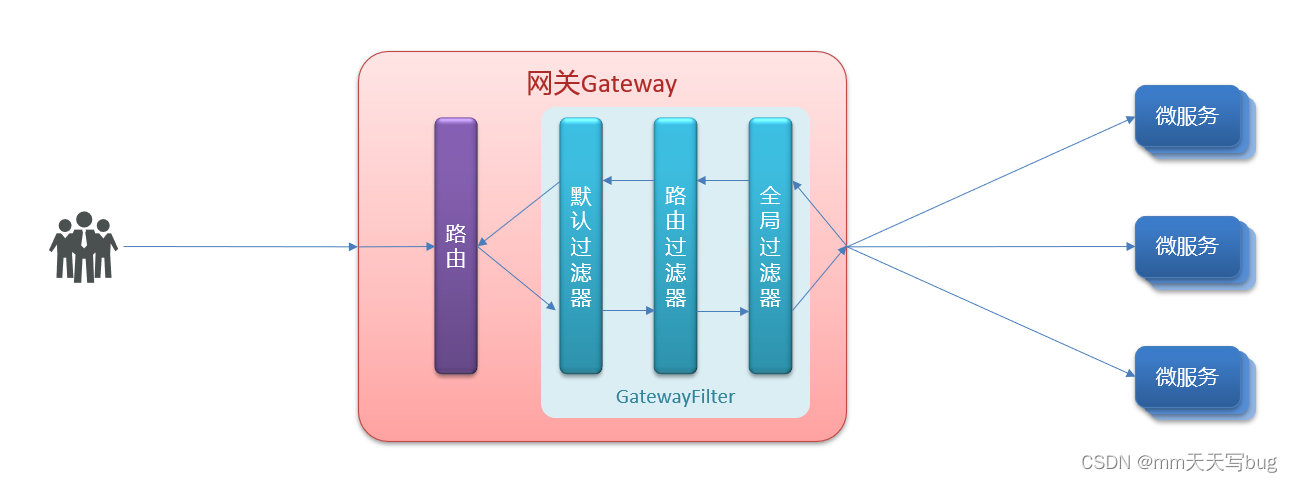
- 每一个过滤器都必须指定一个int类型的order值,order值越小,优先级越高,执行顺序越靠前。
- GlobalFilter通过实现Ordered接口,或者添加@Order注解来指定order值,由我们自己指定
- 路由过滤器和defaultFilter的order由Spring指定,默认是按照声明顺序从1递增。
- 当过滤器的order值一样时,会按照 defaultFilter > 路由过滤器 > GlobalFilter的顺序执行。
五、跨域问题解决
什么是跨域问题呢?
在之前开发SpringBoot+vue的项目的时候,如果没有进行跨域问题的解决,我用axios发送请求给后端就会报错
这是因为前端和后端的端口号不一样,浏览器禁止请求的发起者与服务端发生跨域ajax请求
所以跨域问题就是 浏览器禁止请求的发起者与服务端发生跨域ajax请求,请求被浏览器拦截的问题
除了端口不一样会产生跨域问题之外,如果域名不一样,也会导致跨域问题
解决方案:CORS
server:
  port: 10010
spring:
  application:
    name: gateway #服务名称
  cloud:
    nacos:
      server-addr: localhost:8848 #nacos地址
    gateway:
      globalcors: # 全局的跨域处理
        add-to-simple-url-handler-mapping: true # 解决options请求被拦截问题
        corsConfigurations:
          '[/**]':
            allowedOrigins: # 允许哪些网站的跨域请求
              - "http://127.0.0.1:5500"
              - "http://www.leyou.com"
            allowedMethods: # 允许的跨域ajax的请求方式
              - "GET"
              - "POST"
              - "DELETE"
              - "PUT"
              - "OPTIONS"
            allowedHeaders: "*" # 允许在请求中携带的头信息
            allowCredentials: true # 是否允许携带cookie
            maxAge: 360000 # 这次跨域检测的有效期
在gateway网关模块中配置以上配置,即可解决跨域问题
边栏推荐
- Educational Codeforces Round 115 (Rated for Div. 2)
- L1 regularization and L2 regularization
- Go zero micro service practical series (IX. ultimate optimization of seckill performance)
- PHP session variable passed from form - PHP
- C, Numerical Recipes in C, solution of linear algebraic equations, Gauss Jordan elimination method, source code
- [performance test] read JMeter
- Four essential material websites for we media people to help you easily create popular models
- @Role of pathvariable annotation
- C # implements a queue in which everything can be sorted
- Collections in Scala
猜你喜欢
Manjaro install wechat
FOC control
【Go基础】1 - Go Go Go
Unity-Text上标平方表示形式+text判断文本是否为空

墨者学院-phpMyAdmin后台文件包含分析溯源

How does Xiaobai buy a suitable notebook
SSRF vulnerability exploitation - attack redis
![[attack and defense world | WP] cat](/img/01/c5cacfdcca511d4b523611abca6eef.jpg)
[attack and defense world | WP] cat
Do you know about autorl in intensive learning? A summary of articles written by more than ten scholars including Oxford University and Google
根据数字显示中文汉字
随机推荐
Azure ad domain service (II) configure azure file share disk sharing for machines in the domain service
How to solve the problem that computers often flash
Four essential material websites for we media people to help you easily create popular models
Do you know about autorl in intensive learning? A summary of articles written by more than ten scholars including Oxford University and Google
snipaste 方便的截图软件,可以复制在屏幕上
C # implements a queue in which everything can be sorted
manjaro安装微信
Wechat has new functions, and the test is started again
Common components of flask
How to set multiple selecteditems on a list box- c#
ctfshow web255 web 256 web257
C#实现一个万物皆可排序的队列
Redis sentinel mechanism
没有Kubernetes怎么玩Dapr?
[CV] Wu Enda machine learning course notes | Chapter 9
How to get bytes containing null terminators from a string- c#
A single element in an ordered array
ZABBIX 5.0 monitoring client
Unity write word
The basic syntax of mermaid in typera