当前位置:网站首页>Pytorch yolov5 training custom data
Pytorch yolov5 training custom data
2022-07-05 18:23:00 【mtl1994】
pytorch yolov5 Training custom data
List of articles
Preface
Environmental Science
python: 3.9.7
torch: 1.10.2
labelimg: 1.8.6
#yolov5 https://github.com/ultralytics/yolov5
#pytorch https://pytorch.org/
#labelimg https://github.com/tzutalin/labelImg
paddleocr There are three models det testing cls Direction rec distinguish
One 、 Create an environment
install miniconda
https://blog.csdn.net/mtl1994/article/details/114968140Create an environment
#linux  It needs to be done first  source
conda create -n pytorch_yolov5 python=3.9.7  --channel https://mirrors.tuna.tsinghua.edu.cn/anaconda/pkgs/free/
Enter the environment after installation
conda activate pytorch_yolov5
Two 、 Installation environment
pytorch
# Select corresponding cuda/cpu edition
pip install torch torchvision torchaudio --extra-index-url https://download.pytorch.org/whl/cu113
yolov5
# Download source code
git clone https://github.com/ultralytics/yolov5  # clone
cd yolov5
# Installation dependency
python -m pip install -r requirements.txt -i https://pypi.tuna.tsinghua.edu.cn/simple/
Test it
import torch

# Model
model = torch.hub.load('ultralytics/yolov5', 'yolov5s')  # or yolov5n - yolov5x6, custom

# Images
img = 'https://ultralytics.com/images/zidane.jpg'  # or file, Path, PIL, OpenCV, numpy, list

# Inference
results = model(img)

# Results
results.print()  # or .show(), .save(), .crop(), .pandas(), etc.
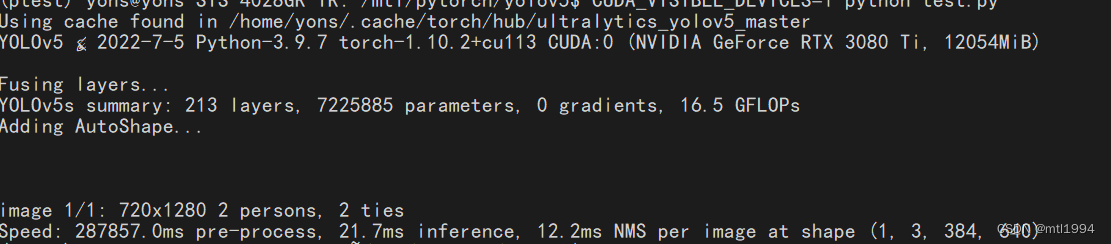
Choose a model
https://github.com/ultralytics/yolov5/releases
Model parameters
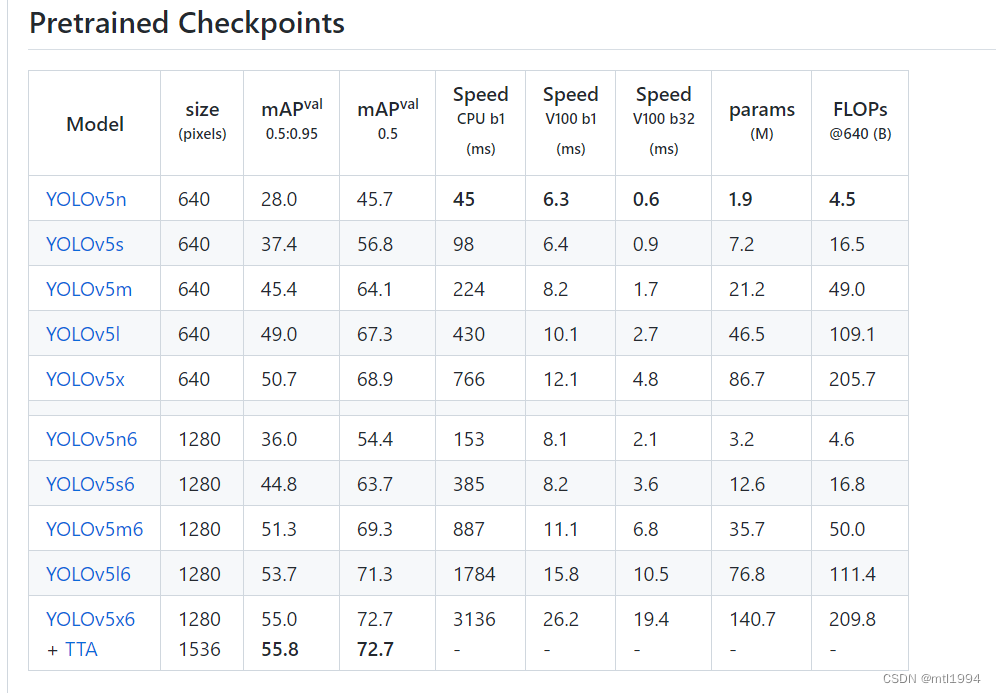
The model I use is
yolov5x
3、 ... and 、 Mark the picture
I use labelimg
# install
pip install labelimg
# open
labelimg
After marking, there will be two directories 、 A save picture 、 A deposit txt
Four 、 Training
1. Segmentation data
def make_datasets(txt_path, img_path, out="./out", split_rate=0.05):
    txt_dir = Path(txt_path)
    img_dir = Path(img_path)
    out_dir = Path(out)
    dataset = []

    train_label = out_dir / "labels/train2007/"
    train_image = out_dir / "images/train2007/"
    test_label = out_dir / "labels/test2007/"
    test_image = out_dir / "images/test2007/"
    train_label.mkdir(parents=True, exist_ok=True)
    train_image.mkdir(parents=True, exist_ok=True)
    test_label.mkdir(parents=True, exist_ok=True)
    test_image.mkdir(parents=True, exist_ok=True)

    """
     Filter empty txt
    """
    for item in txt_dir.rglob("*.txt"):
        if item.read_text() != "":
            dataset.append(item)
    """
     Split training set , Verification set
    """
    tv = random.sample(dataset, int(len(dataset) * split_rate))
    """
     Assembly data
    """

    print(len(dataset))
    for item in dataset:
        for jpg in  img_dir.rglob(item.stem + ".jpg"):
            if item in tv:
                print(jpg, test_image / jpg.name)
                # jpg.replace(test_image / jpg.name)
                shutil.copy(str(jpg), test_image / jpg.name)
                shutil.copy(str(item), test_label / item.name)

                # item.replace(test_label / item.name)
            else:
                print(jpg, train_image / jpg.name)
                # jpg.replace(train_image / jpg.name)
                # item.replace(train_label / item.name)
                shutil.copy(str(jpg), train_image / jpg.name)
                shutil.copy(str(item), train_label / item.name)
After execution , Directory structure 
2. Modify the training model yml
3. Start training
nohup python train.py --img 640 --batch 32 --epochs 600 --data voc.yaml --weights yolov5s.pt --device 0,1,2,3 &
The training results are saved in runs/train/ In the incremental running directory , for example runs/train/exp2,runs/train/exp3
5、 ... and 、 Trained models , With new data, we need to continue training
1. Use transfer learning
Designated during training weights by The output of the last training
6、 ... and 、 Common commands
1. Training
nohup python train.py --img 640 --batch 32 --epochs 600 --data wp_voc.yaml --weights runs/train/exp27/weights/best.pt --device 0,1,2,3 &
2. distinguish
python detect.py --weights runs/train/exp6/weights/best.pt --source ../datasets/infer/2022-2-24/
3. export onnx
python export.py --weights yolov5s.pt --img 640 --batch 1 # export at 640x640 with batch size 1
summary
边栏推荐
- Introduction to Resampling
- About Statistical Power(统计功效)
- 项目中遇到的问题 u-parse 组件渲染问题
- 瀚升优品app翰林优商系统开发功能介绍
- 写作写作写作写作
- 第十一届中国云计算标准和应用大会 | 华云数据成为全国信标委云计算标准工作组云迁移专题组副组长单位副组长单位
- Sibling components carry out value transfer (there is a sequence displayed)
- 【在优麒麟上使用Electron开发桌面应】
- EasyCVR接入设备开启音频后,视频无法正常播放是什么原因?
- The 10th global Cloud Computing Conference | Huayun data won the "special contribution award for the 10th anniversary of 2013-2022"
猜你喜欢

图片数据不够?我做了一个免费的图像增强软件

第十届全球云计算大会 | 华云数据荣获“2013-2022十周年特别贡献奖”
![Maximum artificial island [how to make all nodes of a connected component record the total number of nodes? + number the connected component]](/img/8b/a60fc36115580f018445e4c2a28a9d.png)
Maximum artificial island [how to make all nodes of a connected component record the total number of nodes? + number the connected component]
Sophon Base 3.1 推出MLOps功能,为企业AI能力运营插上翅膀

The 11th China cloud computing standards and Applications Conference | cloud computing national standards and white paper series release, and Huayun data fully participated in the preparation
Use JMeter to record scripts and debug

Memory management chapter of Kobayashi coding
About Estimation with Cross-Validation
vulnhub之darkhole_2

Introduction to the development function of Hanlin Youshang system of Hansheng Youpin app
随机推荐
Generate classes from XML schema
How to obtain the coordinates of the aircraft passing through both ends of the radar
Maximum artificial island [how to make all nodes of a connected component record the total number of nodes? + number the connected component]
【PaddleClas】常用命令
How to solve the error "press any to exit" when deploying multiple easycvr on one server?
Sophon CE社区版上线,免费Get轻量易用、高效智能的数据分析工具
matlab内建函数怎么不同颜色,matlab分段函数不同颜色绘图
小白入门NAS—快速搭建私有云教程系列(一)[通俗易懂]
The 10th global Cloud Computing Conference | Huayun data won the "special contribution award for the 10th anniversary of 2013-2022"
How can cluster deployment solve the needs of massive video access and large concurrency?
Sophon Base 3.1 推出MLOps功能,为企业AI能力运营插上翅膀
通过SOCKS代理渗透整个内网
个人对卷积神经网络的理解
About Statistical Power(统计功效)
The origin of PTS, DTS and duration of audio and video packages
Memory management chapter of Kobayashi coding
Can communication of nano
集群部署如何解决海量视频接入与大并发需求?
Multithreading (I) processes and threads
[utiliser Electron pour développer le Bureau sur youkirin devrait]