当前位置:网站首页>Druid 数据库连接池 详解
Druid 数据库连接池 详解
2022-07-06 11:22:00 【斯文~】
推荐阅读:JDBC详解
概述
1.数据库连接池是个容器,负责分配、管理数据库连接(Connection);
2.它允许应用程序重复使用一个现有的数据库连接,而不是再重新建立一个;
3.释放空闲时间超过最大空闲时间的数据库连接来避免因为没有释放数据库连接而引起的数据库连接遗漏;
可以类比线程池去理解。
优点
1.资源重用
2.提升系统响应速度
3.避免数据库连接遗漏
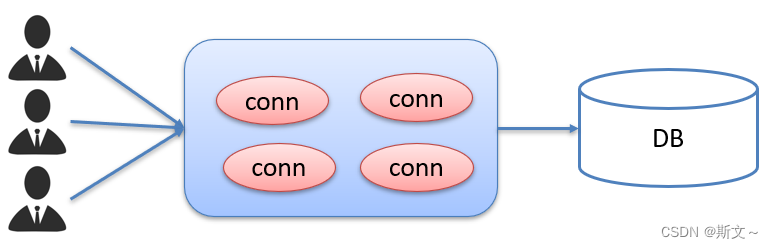
连接池是在一开始就创建好了一些连接(Connection)对象存储起来。用户需要连接数据库时,不需要自己创建连接,而只需要从连接池中获取一个连接进行使用,使用完毕后再将连接对象归还给连接池;这样就可以起到资源重用,也节省了频繁创建连接销毁连接所花费的时间,从而提升了系统响应的速度。
常见的数据库连接池: DBCP、C3P0、Druid
我们现在使用更多的是Druid,它的性能比其他两个会好一些。
Druid连接池是阿里巴巴开源的数据库连接池项目,功能强大,性能优秀,是Java语言最好的数据库连接池之一。
数据库连接池实现
标准接口:DataSource
官方(SUN) 提供的数据库连接池标准接口,由第三方组织实现此接口。该接口提供了获取连接的功能:Connection getConnection()
那么以后就不需要通过 DriverManager 对象获取 Connection 对象,而是通过连接池(DataSource)获取 Connection 对象。
Driud使用流程
1.导入jar包 druid-1.1.12.jar
2.定义配置文件 druid.properties
3.加载配置文件
4.获取数据库连接池对象
5.获取连接
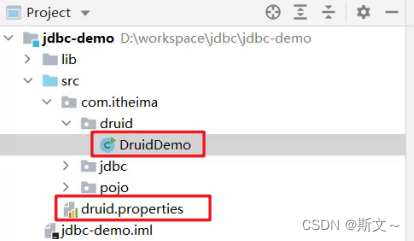
代码示例
配置文件druid.properties
driverClassName=com.mysql.jdbc.Driver
url=jdbc:mysql://127.0.0.1:3306/sd?useSSL=false&useServerPrepStmts=true
username=root
password=root
# 初始连接数
initialSize=5
# 最大连接数
maxActive=10
# 最大等待时间
maxWait=3000
Java代码
public static void main(String[] args) throws Exception {

        //1.导入jar包
        //2.定义配置文件
        //3. 加载配置文件
        Properties prop=new Properties();
        prop.load(new FileInputStream("C:\\Users\\斯文\\Desktop\\Java\\demo\\index\\src\\druid.properties"));

        //4. 获取连接池对象
        DataSource dataSource= DruidDataSourceFactory.createDataSource(prop);

        //5. 获取数据库连接 Connection
        Connection conn=dataSource.getConnection();

        //6.操作数据库
        String sql = "select * from st";
        Statement stmt=conn.createStatement();
        ResultSet rs = stmt.executeQuery(sql);
        while (rs.next()) {

            int id = rs.getInt("id");
            String name = rs.getString("name");
            int age = rs.getInt("age");
            System.out.println(id + " " + name + " " + age);
        }

    }
推荐阅读:JDBC详解
边栏推荐
- Reptiles have a good time. Are you full? These three bottom lines must not be touched!
- Pytorch common loss function
- Deep circulation network long-term blood pressure prediction [translation]
- Method of accessing mobile phone storage location permission under non root condition
- Graffiti intelligence is listed on the dual main board in Hong Kong: market value of 11.2 billion Hong Kong, with an annual revenue of 300 million US dollars
- 使用map函数、split函数一行键入多个元素
- Php+redis realizes the function of canceling orders over time
- 助力安全人才专业素养提升 | 个人能力认证考核第一阶段圆满结束!
- Some recruitment markets in Shanghai refuse to recruit patients with covid-19 positive
- 业务与应用同步发展:应用现代化的策略建议
猜你喜欢

About static type, dynamic type, ID, instancetype

业务与应用同步发展:应用现代化的策略建议

Don't miss this underestimated movie because of controversy!
![Noninvasive and cuff free blood pressure measurement for telemedicine [translation]](/img/56/8deaec18cd9f2cf49ff234b09b1283.png)
Noninvasive and cuff free blood pressure measurement for telemedicine [translation]
用于远程医疗的无创、无袖带血压测量【翻译】
Helm deploy etcd cluster

基于ppg和fft神经网络的光学血压估计【翻译】
Oracle advanced (IV) table connection explanation
The second day of rhcsa study
Simple understanding of MySQL database
随机推荐
Pytorch common loss function
Countdown 2 days | live broadcast preview of Tencent cloud message queue data import platform
ROS custom message publishing subscription example
Qlabel marquee text display
安装及管理程序
裕太微冲刺科创板:拟募资13亿 华为与小米基金是股东
pytorch常见损失函数
Summary of performance knowledge points
Optical blood pressure estimation based on PPG and FFT neural network [translation]
Interface test tool - postman
Unlock 2 live broadcast themes in advance! Today, I will teach you how to complete software package integration Issues 29-30
R language uses rchisq function to generate random numbers that conform to Chi square distribution, and uses plot function to visualize random numbers that conform to Chi square distribution
Digital "new" operation and maintenance of energy industry
Test technology stack arrangement -- self cultivation of test development engineers
Three years of Android development, Android interview experience and real questions sorting of eight major manufacturers during the 2022 epidemic
php+redis实现超时取消订单功能
A wearable arm device for night and sleeveless blood pressure measurement [translation]
Visual Studio Code启动时提示“Code安装似乎损坏。请重新安装。”、标题栏显示“不受支持”信息的解决办法
Mathematics in machine learning -- common probability distribution (XIII): Logistic Distribution
Noninvasive and cuff free blood pressure measurement for telemedicine [translation]