当前位置:网站首页>8. Custom mapping resultMap
8. Custom mapping resultMap
2022-08-04 05:30:00 【ape white】
8、自定义映射resultMap
搭建MyBatis框架
新建modules ----->resultMap
t_emp表:
SET NAMES utf8mb4;
SET FOREIGN_KEY_CHECKS = 0;

-- ----------------------------
-- Table structure for t_emp
-- ----------------------------
DROP TABLE IF EXISTS `t_emp`;
CREATE TABLE `t_emp`  (
  `emp_id` int(0) NOT NULL AUTO_INCREMENT,
  `emp_name` varchar(20) CHARACTER SET utf8mb4 COLLATE utf8mb4_0900_ai_ci NULL DEFAULT NULL,
  `age` int(0) NULL DEFAULT NULL,
  `gender` char(1) CHARACTER SET utf8mb4 COLLATE utf8mb4_0900_ai_ci NULL DEFAULT NULL,
  `dept_id` int(0) NULL DEFAULT NULL,
  PRIMARY KEY (`emp_id`) USING BTREE
) ENGINE = InnoDB CHARACTER SET = utf8mb4 COLLATE = utf8mb4_0900_ai_ci ROW_FORMAT = Dynamic;

-- ----------------------------
-- Records of t_emp
-- ----------------------------
INSERT INTO `t_emp` VALUES (1, '张三', 18, '男', 1);
INSERT INTO `t_emp` VALUES (2, '李四', 19, '男', 2);
INSERT INTO `t_emp` VALUES (3, '王五', 20, '女', 1);
INSERT INTO `t_emp` VALUES (4, '赵六', 21, '男', 3);

SET FOREIGN_KEY_CHECKS = 1;
t_dept表:
SET NAMES utf8mb4;
SET FOREIGN_KEY_CHECKS = 0;

-- ----------------------------
-- Table structure for t_dept
-- ----------------------------
DROP TABLE IF EXISTS `t_dept`;
CREATE TABLE `t_dept`  (
  `dept_id` int(0) NOT NULL AUTO_INCREMENT,
  `dept_name` varchar(20) CHARACTER SET utf8mb4 COLLATE utf8mb4_0900_ai_ci NULL DEFAULT NULL,
  PRIMARY KEY (`dept_id`) USING BTREE
) ENGINE = InnoDB CHARACTER SET = utf8mb4 COLLATE = utf8mb4_0900_ai_ci ROW_FORMAT = Dynamic;

-- ----------------------------
-- Records of t_dept
-- ----------------------------
INSERT INTO `t_dept` VALUES (1, 'A');
INSERT INTO `t_dept` VALUES (2, 'B');
INSERT INTO `t_dept` VALUES (3, 'C');
INSERT INTO `t_dept` VALUES (4, 'D');

SET FOREIGN_KEY_CHECKS = 1;
8.1、resultMap处理字段和属性的映射关系
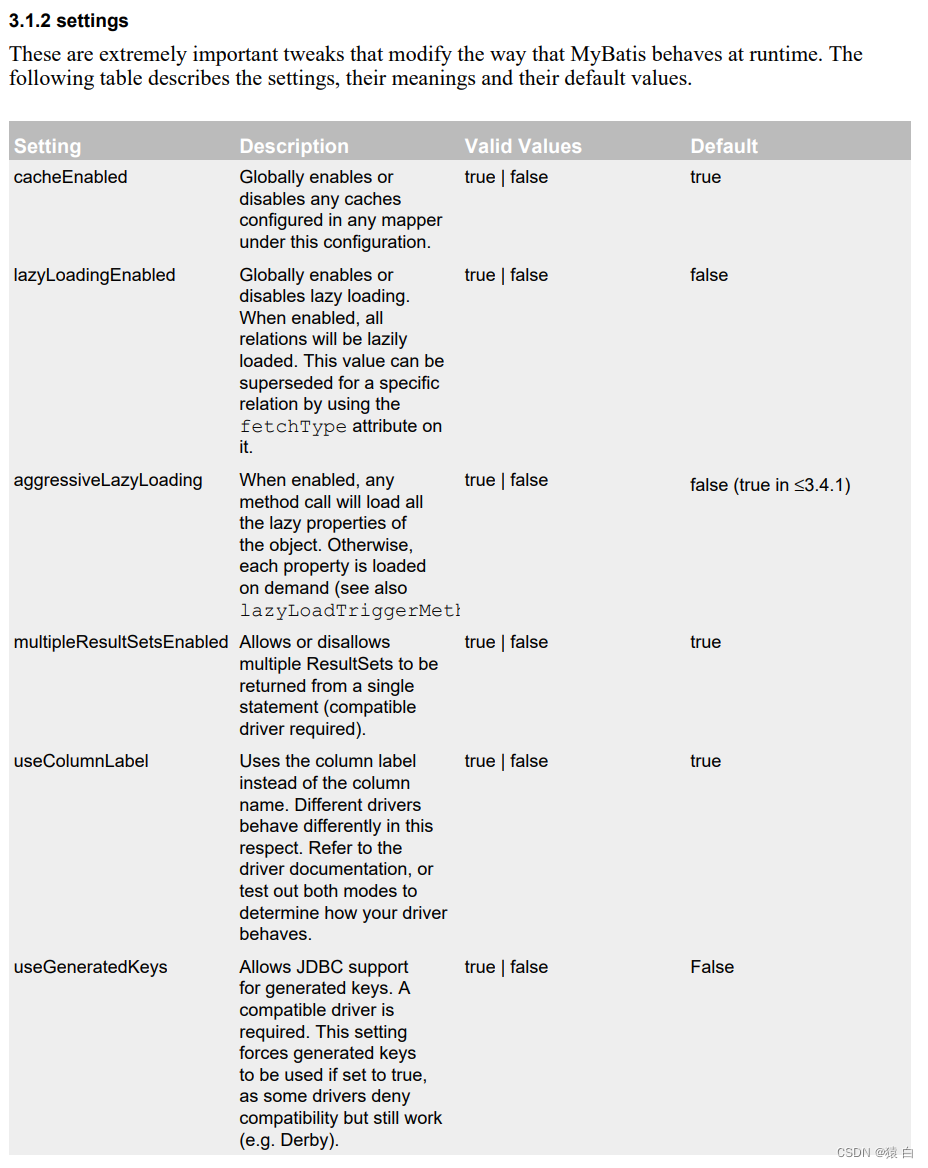
Use global configuration to deal with inconsistent field and property names
<settings>
        <!--将下划线映射为驼峰-->
        <setting name="mapUnderscoreToCamelCase" value="true"/>
    </settings>
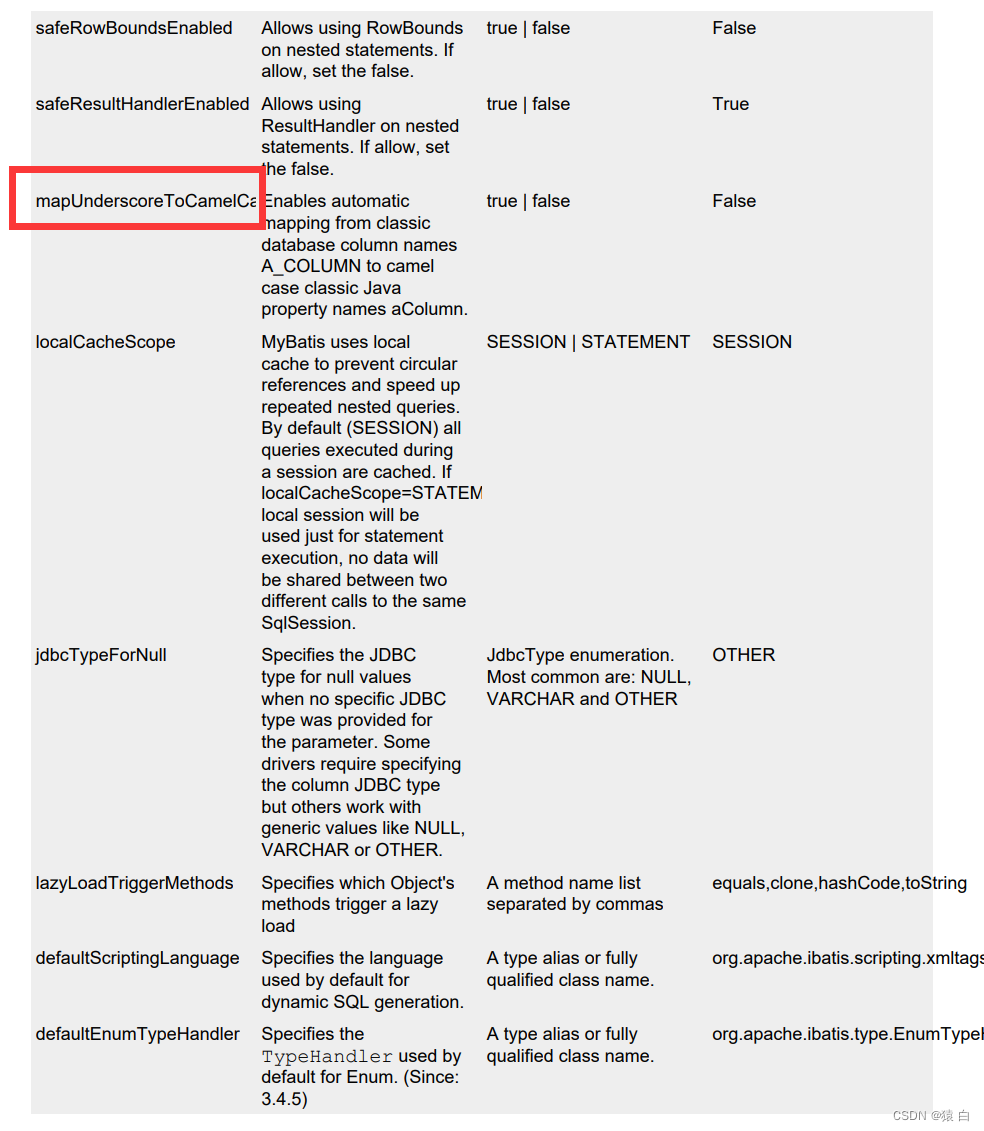
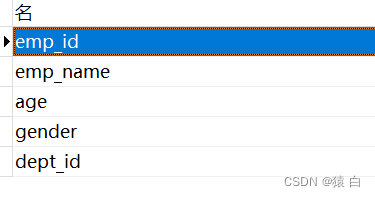
    private Integer empId;

    private String empName;

    private Integer age;

    private  String gender;
 <!--
        字段名和属性名不一致的情况,How to handle the mapping relationship
        1.为查询的字段设置别名,和属性名保持一致
        2.When the query field matchesMYSQL的要求使用_,while the property matchesjava的要求使用驼峰
        此时可以在mybatis的核心配置文件中设置一个全局配置,可以自动将下划线映射为驼峰
        emp_id:empId   emp_name:empName
    -->
    <!-- Emp getEmpById(@Param("empId") int empId);-->
    <select id="getEmpById" resultType="Emp">
        <!--select emp_id empId,emp_name empName,age,gender from t_emp where emp_id = #{
    empId}-->
        select * from t_emp where emp_id = #{
    empId}
    </select>
使用resultMapHandle the problem of inconsistent field names and attribute names
 <!--
        resultMap:设置自定义映射
        属性:
        id:表示自定义映射的唯一标识
        type:查询的数据要映射的实体类的类型
        子标签:
        id:设置主键的映射关系
        result:设置普通字段的映射关系
        association:设置多对一的映射关系(处理实体类类型的属性)
        collection:设置一对多的映射关系
        属性:
        property:设置映射关系中实体类中的属性名
        column:设置映射关系中表中的字段名


    -->
    <resultMap id="empResultMap" type="Emp">
        <id column="emp_id" property="empId"></id>
        <result column="emp_name" property="empName"></result>
        <result column="age" property="age"></result>
        <result column="gender" property="gender"></result>
    </resultMap>
    <select id="getEmpById" resultMap="empResultMap">
        select * from t_emp where emp_id = #{
    empId}
    </select>
8.2、多对一映射处理
8.2.1、级联方式处理映射关系
Emp中添加dept
private Dept dept;
    <resultMap id="getemptAndDeptByEmpId" type="emp">
       <id column="emp_id" property="empId"></id>
        <result column="emp_name" property="empName"></result>
        <result column="age" property="age"></result>
        <result column="gender" property="gender"></result>
        <result column="dept_id" property="dept.deptId"></result>
        <result column="dept_name" property="dept.deptName"></result>
    </resultMap>
    <!--    Emp getempAndDeptByEmpId(@Param("empId") Integer empId);-->
    <select id="getempAndDeptByEmpId" resultMap="getemptAndDeptByEmpId">
        select t_emp.*,t_dept.*
        from t_emp left join t_dept on
            t_emp.dept_id = t_dept.dept_id
        where t_emp.emp_id = #{
    empId}
    </select>
    @Test
    public void  testGetEmpAndDeptByEmpId(){

        SqlSession sqlSession = sqlSessionUtil.getSqlSession();
        EmpMapper mapper = sqlSession.getMapper(EmpMapper.class);
        Emp empById = mapper.getempAndDeptByEmpId(1);
        System.out.println(empById);
    }
8.2.2、使用association处理映射关系
    <!--
        assocation:Handle many-to-one-many mappings(处理实体类类型的属性)
        propertye:设置需要The attribute name of the attribute that handles the mapping
        javaType:Sets the type of property that needs to be processed
    -->
    <resultMap id="getemptAndDeptByEmpId" type="emp">
        <id column="emp_id" property="empId"></id>
        <result column="emp_name" property="empName"></result>
        <result column="age" property="age"></result>
        <result column="gender" property="gender"></result>
        <association property="dept" javaType="dept">
            <id column="dept_id" property="deptId"></id>
            <result column="dept_name" property="deptName"></result>
        </association>
    </resultMap>
8.2.3、分步查询
EmpMapper接口
    //分步查询(1)①查询员工信息
    Emp getempAndDeptByStepOne (@Param("empId") Integer empId);
DeptMapper接口
    //分步查询(2)②根据员工所对应的部门id查询部门信息
    Dept getEmpAndDeptByStepTwo(@Param("deptId") Integer deptId);
EmpMapper.xml
<!--
        proerty:设置㤇The attribute name of the attribute that handles the mapping
        Select:The settings need to be queried step by stepSQL的唯一标识
        column:将查询出的某个字段作为分步查询的SQL的条件
    -->
    <resultMap id="getemptAndDeptStepOne" type="emp">
        <id column="emp_id" property="empId"></id>
        <result column="emp_name" property="empName"></result>
        <result column="age" property="age"></result>
        <result column="gender" property="gender"></result>
        <association property="dept"
                     select="com.gao.mybatis.mapper.DeptMapper.getEmpAndDeptByStepTwo"
                     column="dept_id">

        </association>
    </resultMap>
    <!--Emp getempAndDeptByStepOne (@Param("empId") Integer empId);-->
    <select id="getempAndDeptByStepOne" resultMap="getemptAndDeptStepOne">
        select * from t_emp where emp_id = #{
    empId}
    </select>
DeptMapper.xml
    <!--Dept getEmpAndDeptByStepTwo(@Param("deptId") Integer deptId);-->
    <select id="getEmpAndDeptByStepTwo" resultType="dept">
        select * from t_dept where dept_id = #{
    deptId}
    </select>
测试
    @Test
    public void  testGetEmpAndDeptByStep(){

        SqlSession sqlSession = sqlSessionUtil.getSqlSession();
        EmpMapper mapper = sqlSession.getMapper(EmpMapper.class);
        Emp emp = mapper.getempAndDeptByStepOne(2);
        System.out.println(emp);
    }
延迟加载
分步查询的优点:可以实现延迟加载
但是必须在核心配置文件中设置全局配置信息:lazyLoadingEnabled:延迟加载的全局开关.当开启时,所有关联对象都会延迟加载aggressiveLazyLoading:当开启时,任何方法的调用都会加载该对象的所有属性.否则,每个属性会按需加载
此时就可以实现按需加载,获取的数据是什么,就只会执行相应的sql.此时可通过association和collection中的fetchType属性设置当前的分步查询是否使用延迟加载, fetchType=“lazy(延迟加载)|eager(立即加载)”
    <settings>
        <!--将下划线映射为驼峰-->
        <setting name="mapUnderscoreToCamelCase" value="true"/>
        <!--开启延迟加载-->
        <setting name="lazyLoadingEnabled" value="true"/>
        <!--按需加载-->
        <setting name="aggressiveLazyLoading" value="false"/>
    </settings>
测试:
    @Test
    public void  testGetEmpAndDeptByStep(){

        SqlSession sqlSession = sqlSessionUtil.getSqlSession();
        EmpMapper mapper = sqlSession.getMapper(EmpMapper.class);
        Emp emp = mapper.getempAndDeptByStepOne(2);
        System.out.println(emp.getEmpName());
    }
 <resultMap id="getemptAndDeptStepOne" type="emp">
        <id column="emp_id" property="empId"></id>
        <result column="emp_name" property="empName"></result>
        <result column="age" property="age"></result>
        <result column="gender" property="gender"></result>
        <association property="dept" fetchType="lazy"
                     select="com.gao.mybatis.mapper.DeptMapper.getEmpAndDeptByStepTwo"
                     column="dept_id">

        </association>
    </resultMap>
fetchType:在开启了延迟加载的环境中,通过该属性设置当前的分步查询是否使用延迟加载
        fetchType="lazy(延迟) | eager(立即加载)"
8.3、一对多映射处理
8.3.1、collection
Dept类增加属性:
private List<Emp> emps;
 //Query the information of the department and the employees in the department
    Dept getDeptAndEmpByDeptId(@Param("deptId") Integer deptId);
<!--
        处理一对多的映射关系:
        1.collection:处理一对多的映射关系(处理集合类型的属性)
        2.分步查询

        ofType:Sets the type of data stored in the properties of the collection type
    -->

    <resultMap id="deptAndEmpResultMap" type="dept">
        <id column="dept_id" property="deptId"></id>
        <result column="dept_name" property="deptName"></result>
        <collection property="emps" ofType="emp">
            <id column="emp_id" property="empId"></id>
            <result column="emp_name" property="empName"></result>
            <result column="age" property="age"></result>
            <result column="gender" property="gender"></result>
        </collection>
    </resultMap>
    <!--Dept getDeptAndEmpByDeptId(@Param("deptId") Integer deptId)-->
    <select id="getDeptAndEmpByDeptId" resultMap="deptAndEmpResultMap">
        select * from t_dept
            left join t_emp on
            t_dept.dept_id = t_emp.dept_id
            where t_dept.dept_id = #{
    deptId}
    </select>
测试
    @Test
    public void  testGetDeptAndEmpByDeptId(){

        SqlSession sqlSession = sqlSessionUtil.getSqlSession();
        DeptMapper mapper = sqlSession.getMapper(DeptMapper.class);
        Dept deptAndEmpByDeptId = mapper.getDeptAndEmpByDeptId(1);
        System.out.println(deptAndEmpByDeptId);
    }
8.3.2、分步查询
Dept
private List<Emp> emps;
DeptMapper
    //分步查询(1)Query the department and the employees in the department
    Dept getDeptAndEmpByStepOne(@Param("deptId") Integer deptId);
    <resultMap id="deptAndEmpResultMapStep" type="dept">
        <id column="dept_id" property="deptId"></id>
        <result column="dept_name" property="deptName"></result>
        <collection property="emps"
                    fetchType="eager"
                    select="com.gao.mybatis.mapper.EmpMapper.getDeptAndEmpByStepTwo"
                    column="dept_id">
        </collection>
    </resultMap>
    <!--Dept getDeptAndEmpByStepOne(@Param("deptId") Integer deptId);-->
    <select id="getDeptAndEmpByStepOne" resultMap="deptAndEmpResultMapStep">
        select * from t_dept where dept_id = #{
    deptId}
    </select>
EmpManner
 //分步查询(2)Query the department and the employees in the department
    List<Emp> getDeptAndEmpByStepTwo(@Param("deptId") Integer deptId);
!--List<Emp> getDeptAndEmpByStepTwo(@Param("deptId") Integer deptId);-->
    <select id="getDeptAndEmpByStepTwo" resultType="emp">
        select * from t_emp where dept_id = #{
    deptId};
    </select>
测试
    @Test
    public void  testGetDeptAndEmpByStep(){

        SqlSession sqlSession = sqlSessionUtil.getSqlSession();
        DeptMapper mapper = sqlSession.getMapper(DeptMapper.class);
        Dept deptAndEmpByStepOne = mapper.getDeptAndEmpByStepOne(1);
        System.out.println(deptAndEmpByStepOne);
    }
边栏推荐
- 你以为border-radius只是圆角吗?【各种角度】
- 心余力绌:企业面临的软件供应链安全困境
- 5个开源组件管理小技巧
- [Evaluation model] Topsis method (pros and cons distance method)
- C Expert Programming Chapter 4 The Shocking Fact: Arrays and Pointers Are Not the Same 4.3 What is a Declaration and What is a Definition
- Landing, the IFC, GFC, FFC concept, layout rules, forming method, use is analysed
- The idea setting recognizes the .sql file type and other file types
- 高性能高可靠性高扩展性分布式防火墙架构
- QT 如何识别文件的编码格式
- 如何打造一篇优秀的简历
猜你喜欢


随机推荐
数的划分之动态规划
word 公式编辑器 键入技巧 | 写数学作业必备速查表
OpenSSF 安全计划:SBOM 将驱动软件供应链安全
Bolb analysis of image processing (1)
C Expert Programming Chapter 5 Thinking about Linking 5.2 Advantages of Dynamic Linking
谷粒商城-基础篇(项目简介&项目搭建)
读者让我总结一波 redis 面试题,现在肝出来了
sql server如何得到本条记录与上一条记录的差异,即变动值
The 2022 PMP exam has been delayed, should we be happy or worried?
Dynamic programming of the division of numbers
leetcode 12. Integer to Roman numeral
腾讯136道高级岗面试题:多线程+算法+Redis+JVM
The idea setting recognizes the .sql file type and other file types
npm安装依赖报错npm ERR! code ENOTFOUNDnpm ERR! syscall getaddrinfonpm ERR! errno ENOTFOUND
[Evaluation model] Topsis method (pros and cons distance method)
What are the functions of mall App development?
leetcode 12. 整数转罗马数字
BFC、IFC、GFC、FFC概念理解、布局规则、形成方法、用处浅析
Cache pool of unity framework
深度学习环境配置