当前位置:网站首页>Newh3c - routing protocol (RIP, OSPF)
Newh3c - routing protocol (RIP, OSPF)
2022-07-04 08:13:00 【AiY..】
Overview of routing protocols
1、 Definition :
(1) Routing protocol : Routers are used to calculate 、 Protocol for maintaining network routing information , Working in the transport layer or application layer ——RIP、OSPF、BGP
(2) Routable protocol : A protocol that can be forwarded by a router , Working at the network layer ——IP
2、 Function of routing protocol :
The neighbors found out : The router actively introduces itself to other routers in the network segment by sending broadcast messages or to the designated router neighbors
Routing Exchange : Each router sends its known route related information to adjacent routers .
Routing calculation : Each router runs an algorithm , Calculate the final path .
Route maintenance : Routers maintain neighbor information by periodically sending protocol messages .
3、 Classification of routing protocols :
Divide according to the use position :
Internal gateway protocol (IGP): The routing protocol running inside the autonomous system ——RIP、OSPF、IS-IS
External gateway protocol (BGP): Routing protocols running between autonomous systems
Autonomous systems (AS) : A small unit that has the right to independently decide which routing protocol to adopt in this system . Generally, different metropolitan area networks are different AS, Different operators are also different AS
Divide according to the protocol algorithm :
Distance vector protocol (RIP): The measure is the number of hops
Link state protocol (OSPF、IS-IS): The measure is overhead
Path vector protocol (BGP): There are many measures
RIP
One 、RIP brief introduction ( Distance vector protocol )
1、 Definition : Routing information protocol , Based on distance vector algorithm ; be based on UDP port 520
Routing information protocol RIP: Distance vector protocol , Count hops ( Router on a straight line , Go through a router for one hop ), Maximum 15 jump ,16 Can't jump .30s to update 、180s non-existent 、240s Delete , Support equal cost load balancing and link redundancy .
2、RIP Initialization flow
- RIP After operation , From each interface participating in the protocol with radio broadcast Send routing requests in the form
- After receiving the routing request , Complete your routing table with radio broadcast Formal response
- After receiving the routing response , According to the calculation rules , Write the route to the routing table
- The routing information will spread hop by hop according to the sending direction
Two 、RIP Loop problem
1、 The reasons causing :
- Link failure , Causes the route to be removed from the table
- 30 The second update cycle has not yet arrived , Received the route just deleted from the neighbor in advance , Form a loop
2、 Anti ring mechanism
- Horizontal segmentation : Routing information received from an interface is not returned from that interface
- Poison Reverse : The routing information received from an interface is set to 16 Jump back
- Route poisoning : When the route fails , Marked as 16 jump , And tell the neighbors , Make neighbors delete routes in time
- Inhibit timer : In time , Do not receive route updates with the same or higher hops as the original route ( The routing information is invalid , In the play PD label )
- Trigger update : When the route fails , Don't wait for the update cycle , Issue route update immediately , To announce the error
- Maximum hops : Do not receive hops greater than 15 Hop route update
3、RIPv2
And RIPv1 The difference between : The message is sent in the form of multicast , Multicast address 224.0.0.9; The route update carries the subnet mask ; You can turn off automatic aggregation , Support for manual aggregation ; Support authentication
3、 ... and 、RIP experiment
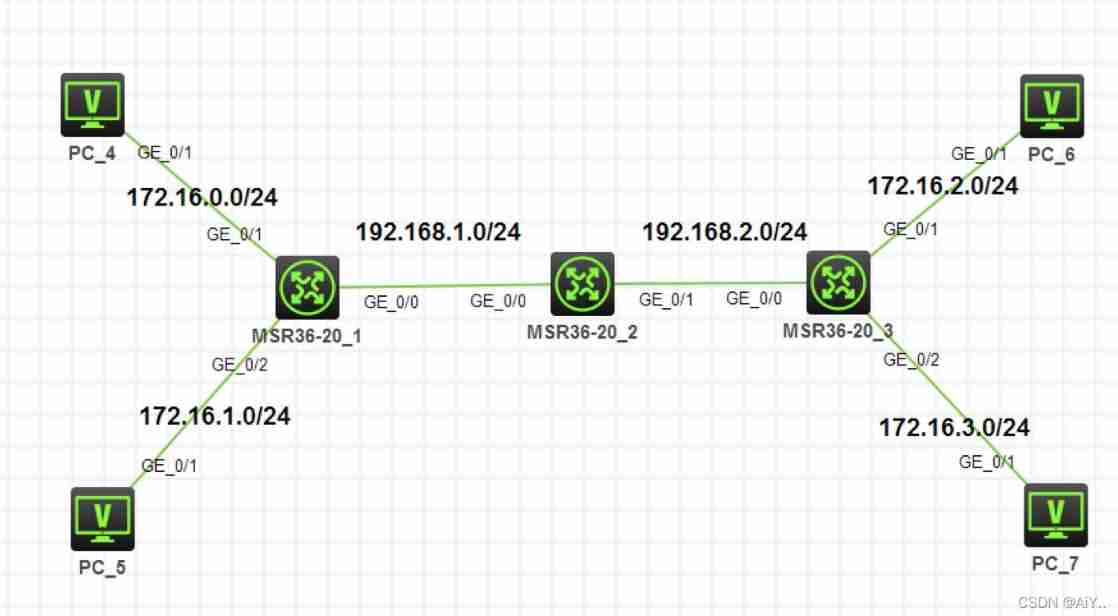
1、 To configure IP The address is omitted
2、 To configure RIP Realize the routing interworking of the whole network
analysis : Realize the whole network interworking , It means that every router should declare all local direct network segments .RIP Only the main class can be declared , With R1 For example , The two connected business network segments belong to the same B The subnet divided by the main network segment , So only announce once ; And in order not to cause a routing loop , Need to open RIP v2 edition , To support the VLSM;R3 Empathy
step 1: stay R1,R2,R3 Configuration of the above RIP v2, Turn off automatic aggregation , And announce all direct network segments
[R1]rip 1
[R1-rip-1]version 2
[R1-rip-1]undo summary
[R1-rip-1]network 172.16.0.0
[R1-rip-1]network 192.168.1.0
[R2]rip 1
[R2-rip-1]version 2
[R2-rip-1]undo summary
[R2-rip-1]network 192.168.1.0
[R2-rip-1]network 192.168.2.0
[R3]rip 1
[R3-rip-1]version 2
[R3-rip-1]undo summary
[R3-rip-1]network 172.16.0.0
[R3-rip-1]network 192.168.2.0
step 2: View the routing table on the router , I found that I have learned the detailed routing of the whole network ( Omitted in detail )
analysis : In the last step RIP Configuration complete , But what the router learns is the detailed route of each network segment . In the topology with huge network structure , Too many detailed routes will reduce the efficiency of router table lookup , Therefore, you need to configure routing aggregation to reduce the number of routes
RIP The aggregation methods of are divided into automatic aggregation and manual aggregation . Automatic aggregation is the aggregation of main network segments , In this topology, there will be a routing loop , So we can only make Aggregate manually
R1 Connected 2 The routes of business network segments can be aggregated into one 172.16.0.0/23,R3 Connected 2 The routes of business network segments can be aggregated into one 172.16.2.0/23, Configure manual aggregation on the outgoing interface of the respective route delivery
step 1: stay R1 Of g0/0 Interface configuration manual route aggregation
[R1-GigabitEthernet0/0]rip summary-address 172.16.0.0 23
step 2: stay R3 Of g0/0 Interface configuration manual route aggregation
[R3-GigabitEthernet0/0]rip summary-address 172.16.2.0 23
step 3: stay R2 View the routing table on the , I found that what I learned is R1 and R3 Published aggregate routes
Be careful : be based on RIP How it works , The old detailed route will be completely deleted from the routing table after a certain time delay
[R2]display ip routing-table

Destinations : 20       Routes : 20

Destination/Mask   Proto   Pre Cost        NextHop         Interface
……
172.16.0.0/23      RIP     100 1           192.168.1.1     GE0/0
172.16.2.0/23      RIP     100 1           192.168.2.3     GE0/1
……
Protocol message is not allowed in service network segment
analysis : be based on network The two meanings of the command ,R1 and R3 After announcing the directly connected business network segment , Will send to this network segment RIP Protocol message of . These protocol messages are completely meaningless , It will also consume network bandwidth , So you need to configure the silent interface
step 1: hold R1 Connecting to the service network segment g0/1 and g0/2 The interface is configured as a silent interface
[R1-rip-1]silent-interface g0/1
[R1-rip-1]silent-interface g0/2
step 2: hold R3 Connecting to the service network segment g0/1 and g0/2 The interface is configured as a silent interface
[R3-rip-1]silent-interface g0/1
[R3-rip-1]silent-interface g0/2
R1 and R2 You need to turn on the interface authentication to ensure the security of the protocol , The key is runtime
step 1: stay R1 Of g0/0 Interface configuration interface verification , secret key runtime
[R1-GigabitEthernet0/0]rip authentication-mode simple plain runtime
step 2: stay R2 Of g0/0 Interface configuration interface verification , The key must match R1 Agreement
[R2-GigabitEthernet0/0]rip authentication-mode simple plain runtime
explain : By resetting RIP Observe whether the process can learn the origin and judge whether the interface verification passes
OSPF
One 、RIP defects
- The maximum hops limit the size of the network
- It is impossible to judge the optimal path accurately by taking hops as a measure
- Routing update sends complete routing table and consumes network bandwidth
- Slow convergence ; The protocol will generate routing self loop
Two 、OSPF The basic principle
1、 brief introduction : Open shortest paths take precedence , Based on link state characteristics ;
OSPF Work directly on IP Layer above ,IP The agreement number is 89;OSPF Only propagate the routing information that the peer device does not have , The network converges rapidly , And effectively avoid the waste of network resources ;OSPF Send the protocol packet with multicast address
2、OSPF Initialization flow
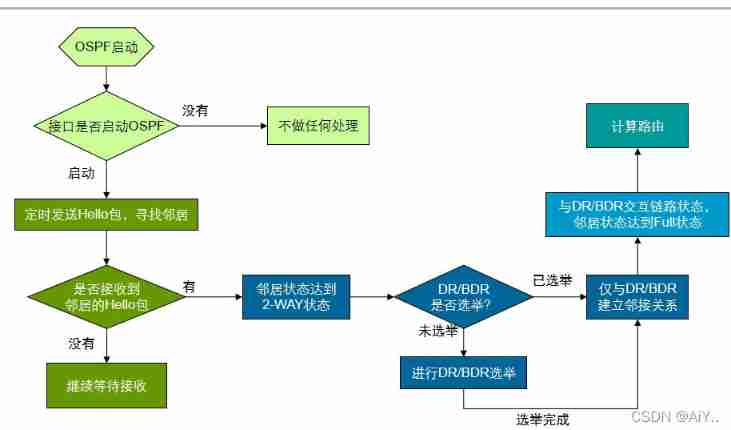
(1) Build neighbors and neighborhoods
- send out hello Message discovery and establishment Neighborhood , Multicast address 224.0.0.5
- requirement : Interface UP; The interface between the two sides IP The address is in the same network segment ; Both interfaces are in the same area
a、 The election DR( A representative )/BDR, establish Adjacency relations
b、DR/BDR The election :
1、 Reasons for the election `: In broadcast networks, routing information exchange is more High speed and order
2、 The scope of the election : On each broadcast link ( Each segment ) We need to elect one DR And a BDR
3、 Election rules : The higher the priority, the higher the priority ;Router-id Big priority
Router-id Identify the router :
The generation method :
- Manually configure a IPv4 The address of Router-id;( Manual configuration is recommended )
- Automatic election :1. At all loop returns (Loopback) The middle election IP The biggest address is Rid:2. Vote... In all physical interfaces IP The biggest address is Rid
(2) Link state information is exchanged between adjacent routers , Realize the link state database synchronization in the region
- Relevant concepts : Link status notification ( LSA): Used to describe the interface of a router 、 Information about routing entries ; Link state database (LSDB): Store locally owned LSA
- Workflow :
1. Send... To the adjacent router DD message , Notice local LSDB All in LSA Summary information of
2. received DD after , With the local LSDB contrast , Send... To the other party LSR message , Request to send locally required LSA The complete information of
3. received LSR after , Give each other what they need LSA The complete information is packaged into one LSU message , Send it to the other party
4. received LSU after , Reply to the other party LSAck message , Confirm
(3) Each router based on the local link state database , Calculate the optimal route to each destination network segment , Write to routing table
3、OSPF Subregion Management
(1) Partition reason : Speed up convergence ; Isolate network failures within the area
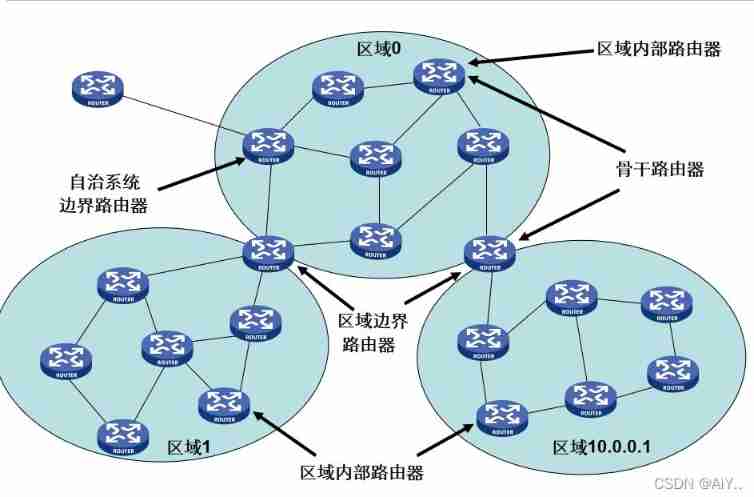
(2) Router role :
- ( Ordinary routers )IR: All interfaces are in common areas
- ( Backbone router )BR: All interfaces are in the backbone area
- ( Area border router )ABR: Connecting routers in different areas
- ( Autonomous system border router )ASBR: Routers that connect to external autonomous systems
(3) Area type :
- Backbone area : only 、 Area 0、 continuity Of
- Non backbone areas : Must be connected to the backbone area , Even if there is no direct wired connection in the non backbone area ( In order to prevent the formation of routing loops )
OSPF Workflow
OSPF Protocol partition management
3、 ... and 、OSPF experiment
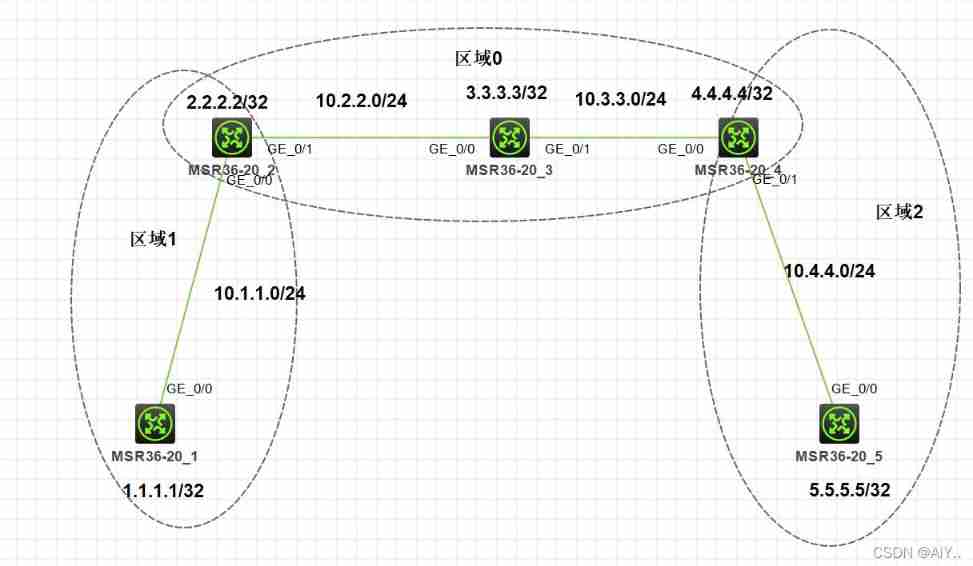
Key orders :
 Turn on OSPF process , Appoint Router-id, Get into OSPF Protocol view
[h3c]ospf 'process id' router-id 'rid'
 Enter area view
[h3c-ospf-1]area 'area id'
 Announce segment
// Mask wildcards (wild-mask):0 The corresponding parts need to match ,1 The corresponding part is not checked
[h3c-ospf-1-area 0.0.0.0]network 'ip address' 'wild-mask'
 Configure silent interface
[h3c-ospf-1]slient-interface 'interface id'
 modify OSPF Interface priority
[h3c-GigabitEthernet 0/0]ospf dr-pririty 'priority'
 Modify interface OSPF expenses
[h3c-GigabitEthernet 0/0]ospf cost 'cost'
 Reset OSPF process
<h3c>reset ospf 'process id' process
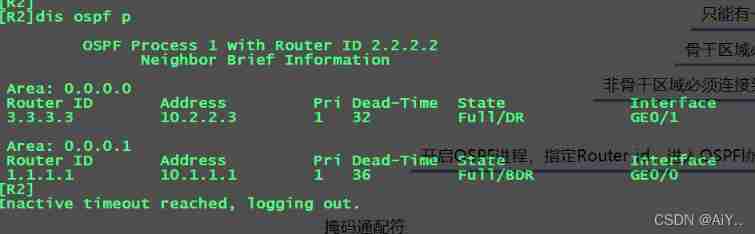
 see OSPF Neighborhood :
//FULL: Adjacency relations ;2-Way: Neighborhood
[h3c]display ospf peer
 see OSPF Link state database
[h3c]display ospf lsdb
 see OSPF route
[h3c]display ospf routing
边栏推荐
- 如何用MOS管来实现电源防反接电路
- AcWing 244. Enigmatic cow (tree array + binary search)
- 1. Kalman filter - the best linear filter
- Sports [running 01] a programmer's half horse challenge: preparation before running + adjustment during running + recovery after running (experience sharing)
- Activiti common operation data table relationship
- Difference between static method and non static method (advantages / disadvantages)
- 猜数字游戏
- Leetcode 146. LRU cache
- Take you to master the formatter of visual studio code
- Put a lantern on the website during the Lantern Festival
猜你喜欢
![[performance test] read JMeter](/img/c9/25a0df681c7ecb4a0a737259c882b3.png)
随机推荐
zabbix監控系統自定義監控內容
Li Kou today's question -1200 Minimum absolute difference
PHP session variable passed from form - PHP
C#,数值计算(Numerical Recipes in C#),线性代数方程的求解,Gauss-Jordan消去法,源代码
1、卡尔曼滤波-最佳的线性滤波器
How to use MOS tube to realize the anti reverse connection circuit of power supply
Activiti common operation data table relationship
JVM中堆概念
Ecole bio rushes to the scientific innovation board: the annual revenue is 330million. Honghui fund and Temasek are shareholders
Leetcode(215)——数组中的第K个最大元素
Scanf read in data type symbol table
Need help resetting PHP counters - PHP
谷歌官方回应:我们没有放弃TensorFlow,未来与JAX并肩发展
弈柯莱生物冲刺科创板:年营收3.3亿 弘晖基金与淡马锡是股东
L1-030 one gang one (15 points)
Azure ad domain service (II) configure azure file share disk sharing for machines in the domain service
1. Getting started with QT
Oracle stored procedures and functions
Difference between static method and non static method (advantages / disadvantages)
JVM -- class loading process and runtime data area