当前位置:网站首页>OpenCV3 6.2 低通滤波器的使用
OpenCV3 6.2 低通滤波器的使用
2022-07-02 06:28:00 【Villanelle#】
频域、频率的概念
观察图像强度值变化的频率的方法称为频域,观察灰度分布描述图像特征的方法称为空域。
图像中灰度强度值变化慢的区域产生低频率,而强度值变化快的区域产生高频率,频率分为垂直频率(垂直方向上的变化)和水平频率(水平方向上的变化)。
可以用傅里叶变换或余弦变换等方法显示图像的频率成分。
滤波器
滤波即选择性地提取图像某项方面的内容,可以放大图像中某些频段,同时滤掉其他频段的算子。
滤波器可以分为低通滤波器和高通滤波器,本节中主要介绍块滤波器(box filter)和高斯滤波器(gaussian filter)。
块滤波器
块滤波器cv::blur可以将每个函数的值替换成该像素邻域(矩形)的平均值。
块滤波器使用了邻域像素的加权累加值来替换像素值,所以这种滤波器是线性的,且块滤波器是一种均值滤波器,由于本例使用了5*5的内核,其内核可以写为:
| 1/25 | 1/25 | 1/25 | 1/25 | 1/25 |
|---|---|---|---|---|
| 1/25 | 1/25 | 1/25 | 1/25 | 1/25 |
| 1/25 | 1/25 | 1/25 | 1/25 | 1/25 |
| 1/25 | 1/25 | 1/25 | 1/25 | 1/25 |
| 1/25 | 1/25 | 1/25 | 1/25 | 1/25 |
利用线性滤波器将内核移动到图像 的每个像素上,并将对应像素乘以权重,在数学上称为卷积。
高斯滤波器
高斯滤波器cv::GaussianBlur也是线性滤波器,但与块滤波器不同,高斯滤波器像素对应的权重与它到中心像素之间的距离成正比,即正态分布函数。一维高斯函数的公式为: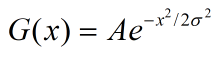
参数σ决定高斯函数曲线的形状,σ越大,函数曲线越扁平,即周围像素占的权重越小;σ越小,函数曲线越陡峭,即周围像素占的权重越大。
要在图像(二维空间)上应用二维高斯滤波器,只需在横向线条上应用一维高斯滤波器(过滤水平方向的频率),再在纵向线条上应用一维高斯滤波器(过滤竖直方向的频率)。原理是高斯滤波器是一种可分离滤波器,可以分为两个一维滤波器。
具体实现
cv::Mat image = cv::imread("boldt.jpg");
cv::Mat boxblur, gaussianblur;
cv::blur(image,   //原图像
         boxblur, //经过块滤波器滤波后的图像
         cv::Size(5, 5)); //尺寸定为5*5的滤波器
cv::GaussianBlur(image,          //原图像
                 gaussianblur,   //经过高斯滤波后的图像
                 cv::Size(5, 5), //尺寸定为5*5的滤波器
                 1.5,             //控制高斯曲线形状的参数sigmaX,sigmaX越大,附近像素占的比例越小
                 0);             //控制高斯曲线形状的参数sigmaY,如指定为0或不指定默认与sigmaX相同
cv::imshow("image", image);
cv::imshow("boxblur", boxblur);
cv::imshow("gaussianblur", gaussianblur);
效果展示


cv::blur函数的使用
函数签名
CV_EXPORTS_W void blur( InputArray src, OutputArray dst,
                        Size ksize, Point anchor = Point(-1,-1),
                        int borderType = BORDER_DEFAULT );
参数分别为:输入图像,输出图像,滤波器尺寸,初始点(默认为矩形中间点),边界的类型(一般默认)。
cv::GaussianBlur函数的使用
函数签名
CV_EXPORTS_W void GaussianBlur( InputArray src, OutputArray dst, Size ksize,
                                double sigmaX, double sigmaY = 0,
                                int borderType = BORDER_DEFAULT );
参数分别为:输入图像,输出图像,滤波器尺寸,x方向σ参数sigmaX,y方向σ参数sigmaY,边界的类型(一般默认)。
注:这里如只填sigmaX(或者sigmaY设为0)也可以,会默认sigmaY等于sigmaX。如果sigmaX和sigmaY都设为0,函数会自行判断最适合尺寸的σ值。
边栏推荐
- 针对tqdm和print的顺序问题
- [C # note] the data in DataGridView saved in WinForm is excel and CSV
- In the era of short video, how to ensure that works are more popular?
- Simply test the two different data transmission methods of content length and chunked
- It's great to save 10000 pictures of girls
- 图像增强的几个方法以及Matlab代码
- Apple added the first iPad with lightning interface to the list of retro products
- (15) Flick custom source
- 乐理基础(简述)
- 【MagNet】《Progressive Semantic Segmentation》
猜你喜欢

用MLP代替掉Self-Attention

乐理基础(简述)
Jetson nano installation tensorflow stepping pit record (scipy1.4.1)
![Open3d learning note 3 [sampling and voxelization]](/img/71/0b2ac5dfd538017de639e5651c7f46.png)
Open3d learning note 3 [sampling and voxelization]

Specification for package drawing
浅谈深度学习中的对抗样本及其生成方法
【Wing Loss】《Wing Loss for Robust Facial Landmark Localisation with Convolutional Neural Networks》
![[binocular vision] binocular stereo matching](/img/93/2e916038f0e7d0c7b3bf64f8dc1b4e.png)
[binocular vision] binocular stereo matching
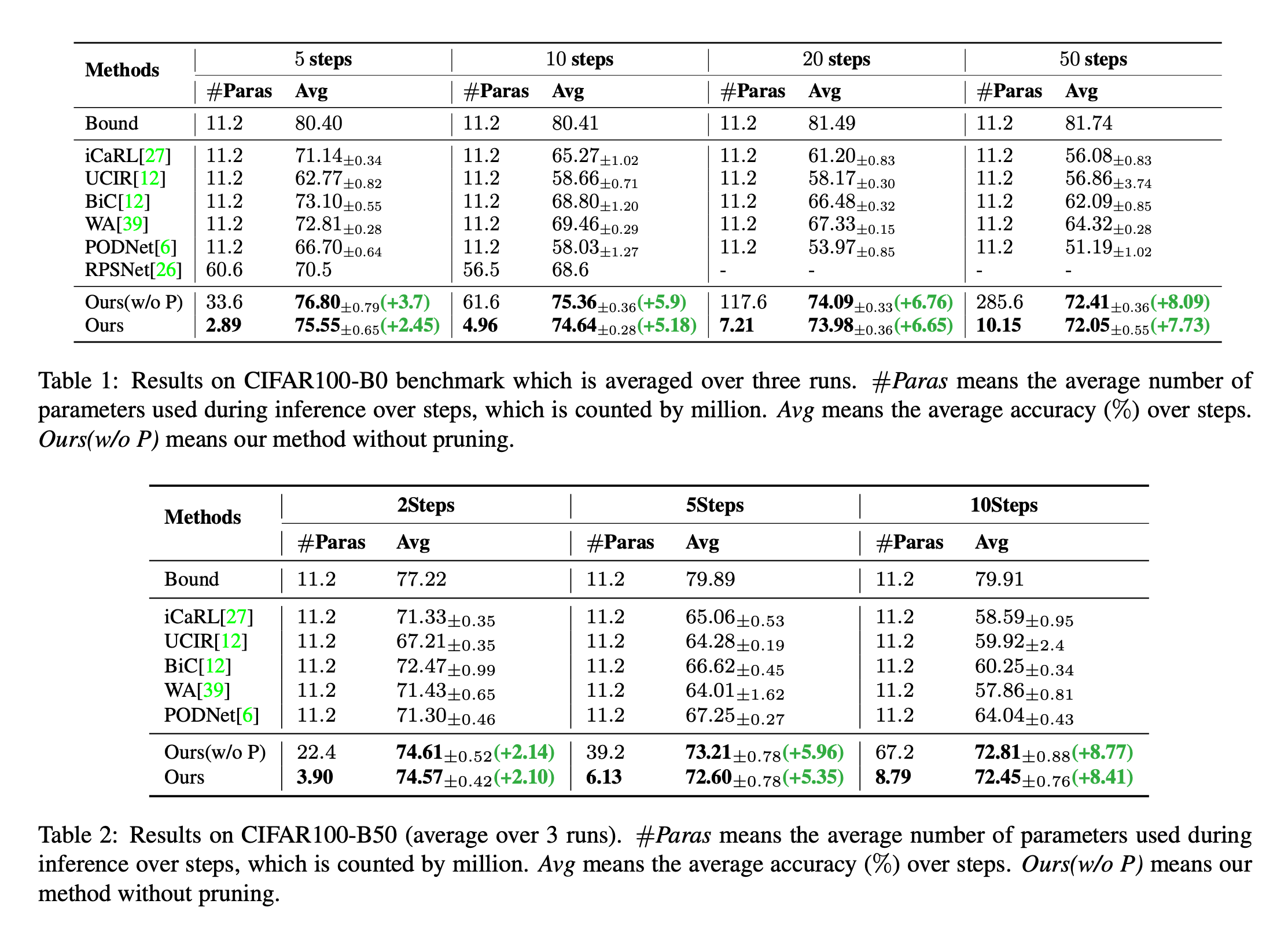
Dynamic extensible representation for category incremental learning -- der
用于类别增量学习的动态可扩展表征 -- DER
随机推荐
Real world anti sample attack against semantic segmentation
A brief analysis of graph pooling
学习写文章格式
Command line is too long
用MLP代替掉Self-Attention
Remplacer l'auto - attention par MLP
用于类别增量学习的动态可扩展表征 -- DER
Daily practice (19): print binary tree from top to bottom
MySQL优化
E-R画图明确内容
The hystrix dashboard reported an error hystrix Stream is not in the allowed list of proxy host names solution
联邦学习下的数据逆向攻击 -- GradInversion
Hystrix dashboard cannot find hystrix Stream solution
Global and Chinese market of medicine cabinet 2022-2028: Research Report on technology, participants, trends, market size and share
笔记本电脑卡顿问题原因
E-R draw clear content
SQL操作数据库语法
浅谈深度学习模型中的后门
【Sparse-to-Dense】《Sparse-to-Dense:Depth Prediction from Sparse Depth Samples and a Single Image》
最长等比子序列