当前位置:网站首页>保姆级教程:Azkaban执行jar包(带测试样例及结果)
保姆级教程:Azkaban执行jar包(带测试样例及结果)
2022-07-08 00:15:00 【天然玩家】
1 缘起
这个要从团队实时从kafka传输数据说起,
由于数据的实时性需求,决定使用Flink传输数据,
但是,直接使用公司的Flink平台,无法通过SQL拼接数据,
如with,
于是,决定使用java测试数据传输,
借助于Azkaban测试调度(只是测试Azkaban调度jar,实际没有使用这个方案),
于是,开始测试Azkaban调度jar,由于之前没有测试过Azkaban调度Java程序,
使用前先搜索了一番,一头雾水,都是片段式分享,
所有,我决定整理一篇完整的文章,填补空缺,供学习者参考,
真正做到从0到1完整实现Azkaban调度jar,并附带了测试的zip包,见具体的部分,有下载链接。
2 实战
以读取Redis集群数据为例,
文章所有配置,开箱即用,复制就行,一步一步来,必然会有正确的结果,
有任何问题,欢迎私信开聊,沟通。
2.1 Java部分
2.1.1 完整依赖:pom.xml
这里,为实现简单的功能,引入redis客户端,操作Redis;引入log4j2异步打印日志,
其中,日志需要配置输出,见后文。
为在使用Maven打包时将依赖的包同时打入jar,
添加了maven-assembly-plugin,其中,注意:需要配置属性descriptorRef值为jar-with-dependencies。
<?xml version="1.0" encoding="UTF-8"?>

<project xmlns="http://maven.apache.org/POM/4.0.0" xmlns:xsi="http://www.w3.org/2001/XMLSchema-instance" xsi:schemaLocation="http://maven.apache.org/POM/4.0.0 http://maven.apache.org/xsd/maven-4.0.0.xsd">
  <modelVersion>4.0.0</modelVersion>

  <groupId>com.monkey</groupId>
  <artifactId>exec-azkaban</artifactId>
  <version>1.0-SNAPSHOT</version>

  <name>exec-azkaban</name>
  <!-- FIXME change it to the project's website -->
  <url>http://www.example.com</url>

  <properties>
    <project.build.sourceEncoding>UTF-8</project.build.sourceEncoding>
    <maven.compiler.source>1.7</maven.compiler.source>
    <maven.compiler.target>1.7</maven.compiler.target>
    <junit.version>4.13.2</junit.version>
    <redis.version>3.5.1</redis.version>
    <java.slf4j2.version>2.11.1</java.slf4j2.version>
    <disruptor.version>3.4.4</disruptor.version>
  </properties>

  <dependencies>
    <dependency>
      <groupId>junit</groupId>
      <artifactId>junit</artifactId>
      <version>${junit.version}</version>
      <scope>test</scope>
    </dependency>

    <!-- https://mvnrepository.com/artifact/redis.clients/jedis -->
    <dependency>
      <groupId>redis.clients</groupId>
      <artifactId>jedis</artifactId>
      <version>${redis.version}</version>
    </dependency>

    <dependency>
      <groupId>org.apache.logging.log4j</groupId>
      <artifactId>log4j-core</artifactId>
      <version>${java.slf4j2.version}</version>
    </dependency>
    <dependency>
      <groupId>org.apache.logging.log4j</groupId>
      <artifactId>log4j-slf4j-impl</artifactId>
      <version>${java.slf4j2.version}</version>
    </dependency>

    <!-- https://mvnrepository.com/artifact/com.lmax/disruptor -->
    <dependency>
      <groupId>com.lmax</groupId>
      <artifactId>disruptor</artifactId>
      <version>${disruptor.version}</version>
    </dependency>
  </dependencies>

  <build>
    <plugins>
      <plugin>
        <groupId>org.apache.maven.plugins</groupId>
        <artifactId>maven-compiler-plugin</artifactId>
        <configuration>
          <source>8</source>
          <target>8</target>
          <encoding>UTF-8</encoding>
        </configuration>
      </plugin>
      <plugin>
        <!-- https://mvnrepository.com/artifact/org.apache.maven.plugins/maven-assembly-plugin -->
        <groupId>org.apache.maven.plugins</groupId>
        <artifactId>maven-assembly-plugin</artifactId>
        <version>3.3.0</version>
        <configuration>
          <descriptorRefs>
            <descriptorRef>jar-with-dependencies</descriptorRef>
          </descriptorRefs>
          <archive>
            <manifest>
              <mainClass>
                com.monkey.redisops.CtrGenerator
              </mainClass>
            </manifest>
          </archive>
        </configuration>
        <executions>
          <execution>
            <id>make-assembly</id>
            <phase>package</phase>
            <goals>
              <goal>single</goal>
            </goals>
          </execution>
        </executions>
      </plugin>
    </plugins>
  </build>
</project>
2.1.2 日志配置
日志配置位置:resources/log4j2.xml,日志组件会自动加载该配置文件。
<?xml version="1.0" encoding="UTF-8"?>
<Configuration status="info">
    <Appenders>
        <Console name="Console" target="SYSTEM_OUT">
            <PatternLayout pattern="%d{HH:mm:ss.SSS} [%t] %-5level %logger{36} - %msg%n" />
        </Console>
        <RollingFile name="RollingFile" fileName="logs/app.com.monkey.java_study.log" filePattern="logs/app-%d{yyyy-MM-dd HH}.com.monkey.java_study.log">
            <PatternLayout>
                <Pattern>%d %p %c{1.} [%t] %m%n</Pattern>
            </PatternLayout>
            <Policies>
                <SizeBasedTriggeringPolicy size="500MB"/>
            </Policies>
        </RollingFile>
    </Appenders>
    <Loggers>
        <AsyncLogger name="RollingFile2" level="trace" additivity="false">
            <appender-ref ref="Console"/>
        </AsyncLogger>
        <Root level="info">
            <AppenderRef ref="Console"/>
<!-- <AppenderRef ref="RollingFile"/>-->
        </Root>
    </Loggers>
</Configuration>
2.1.3 Redis集群连接配置
package com.monkey.config;

import com.monkey.enums.RedisAddressEnum;
import org.apache.commons.pool2.impl.GenericObjectPoolConfig;
import redis.clients.jedis.*;

import java.util.HashSet;
import java.util.Set;

/** * Redis连接池配置. * * @author xindaqi * @date 2022-06-27 11:39 */
public class RedisPoolConfig {


    public static JedisCluster getJedisCluster() {

        JedisPoolConfig jedisPoolConfig = new JedisPoolConfig();
        // Jedis池:最大连接数
        jedisPoolConfig.setMaxTotal(1);
        // Jedis池:最大空闲连接数
        jedisPoolConfig.setMaxIdle(10);
        // Jedis池:等待时间
        jedisPoolConfig.setMaxWaitMillis(3000);
        jedisPoolConfig.setTestOnBorrow(Boolean.TRUE);
        Set<HostAndPort> clusterNodes = new HashSet<>(6);
        clusterNodes.add(new HostAndPort("192.168.211.129", 9001));
        clusterNodes.add(new HostAndPort("192.168.211.129", 9002));
        clusterNodes.add(new HostAndPort("192.168.211.129", 9003));
        clusterNodes.add(new HostAndPort("192.168.211.129", 9004));
        clusterNodes.add(new HostAndPort("192.168.211.129", 9005));
        clusterNodes.add(new HostAndPort("192.168.211.129", 9006));

        return new JedisCluster(clusterNodes, jedisPoolConfig);
    }
}
2.1.4 操作Redis完整样例
操作Redis的测试如下,在main方法中调用操作Redis的方法,
为Azkaban执行做准备,因为,Azkaban本身也是Java开发的,
所以,可以理解,使用java -cp执行指定类的main方法。
package com.monkey.redisops;

import com.monkey.config.RedisPoolConfig;
import org.slf4j.Logger;
import org.slf4j.LoggerFactory;
import redis.clients.jedis.JedisCluster;

import java.util.Map;

/** * CTR生成器. * * @author xindaqi * @since 2022-07-04 14:42 */
public class CtrGenerator {


    private static final Logger logger = LoggerFactory.getLogger(CtrGenerator.class);

    public void readDataFromLocalCluster(String key) {

        try(JedisCluster jedis = RedisPoolConfig.getJedisCluster()) {

            String value = jedis.get(key);
            logger.info(">>>>>>>>Redis查询Hash数据:(key, value)->({}, {})", key, value);
        } catch(Exception ex) {

            logger.error(">>>>>>>>Error:", ex);
        }
    }

    public static void main(String[] args) {

        CtrGenerator ctrGenerator = new CtrGenerator();
        String key = "name";
        ctrGenerator.readDataFromLocalCluster(key);
    }
}
如上代码测试结果如下图所示,预期Azkaban也是这个结果。
2.1.5 Maven打包
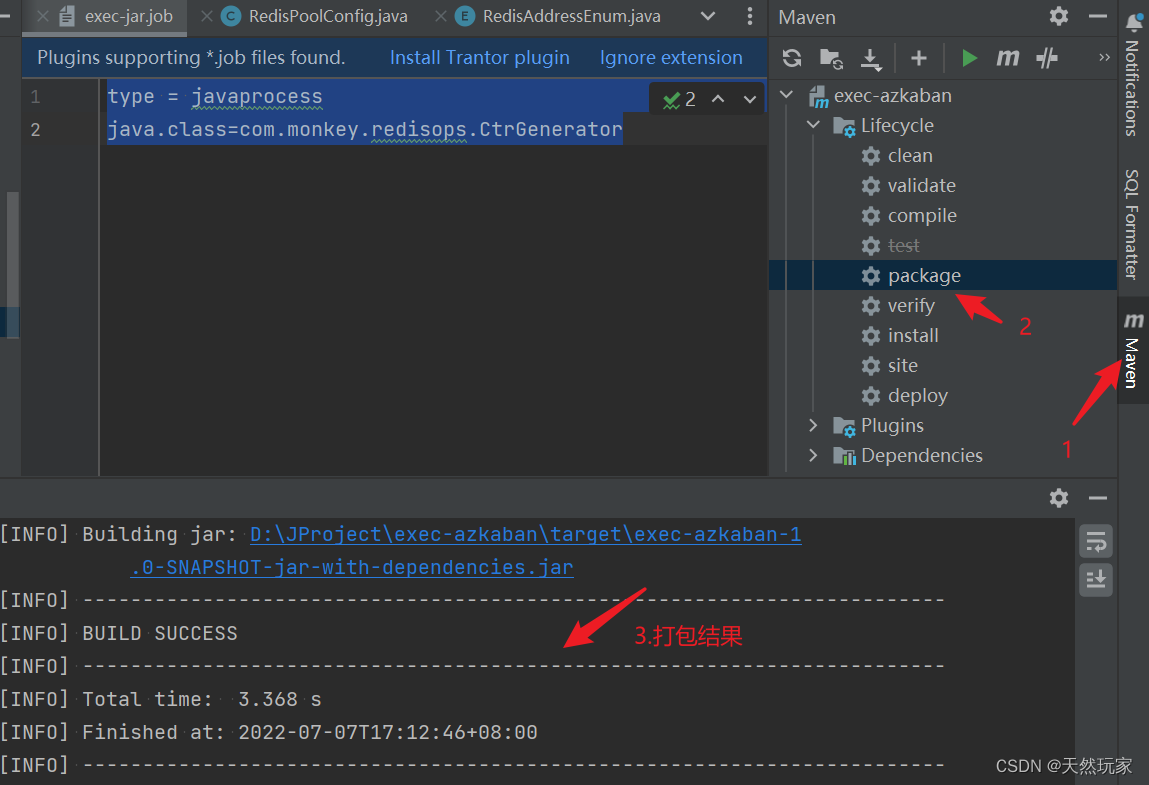
在target文件夹中生成jar包,如下图所示,
这里需要注意的是:在Azkaban中执行时,必须使用带依赖的完整jar包,
这里的名称后缀为:jar-with-dependencies。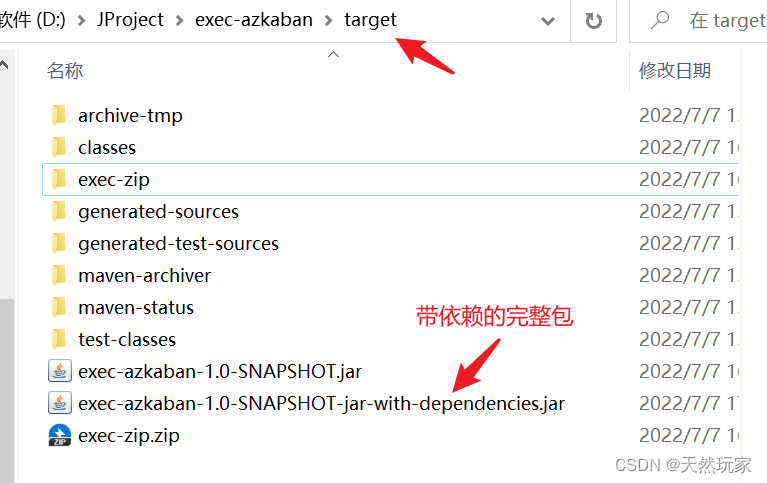
2.2 Azkaban部分
如果是自己手动搭建Azkaban,可参考:实战讲解Ubuntu20.04部署Azkaban4.0.0(带测试结果)
入门教程:Azkaban4.0.0配置任务:独立任务和依赖任务
2.2.1 配置job
这里只配置type和java类,不配置虚拟机参数,如Xms,Xmx。
exex-jar.job
type = javaprocess
java.class=com.monkey.redisops.CtrGenerator
| 序号 | 属性 | 描述 |
|---|---|---|
| 1 | type | 执行任务类型,javaprocess |
| 2 | java.class | 需要执行main方法的类全限定名 |
完善的配置:
exec-jar-flow.job
nodes:
  - name: exec-java
    type: javaprocess
    config:
      Xms: 50M
      Xmx: 100M
      java.class: com.monkey.redisops.CtrGenerator
2.2.2 构建压缩包
将job和jar放在同一个文件夹中,如exec-zip文件夹,如下图所示。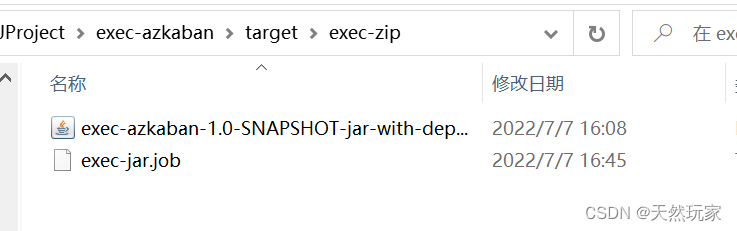
将文件夹压缩为zip,上传到Azkaban。
使用exec-jar.job的完整压缩包-【Free】:https://download.csdn.net/download/Xin_101/85948044
使用exec-jar-flow.job的完整压缩包-【Free】:https://download.csdn.net/download/Xin_101/85948058
2.2.3 Azkaban创建项目

2.2.4 上传zip

2.2.5 执行任务
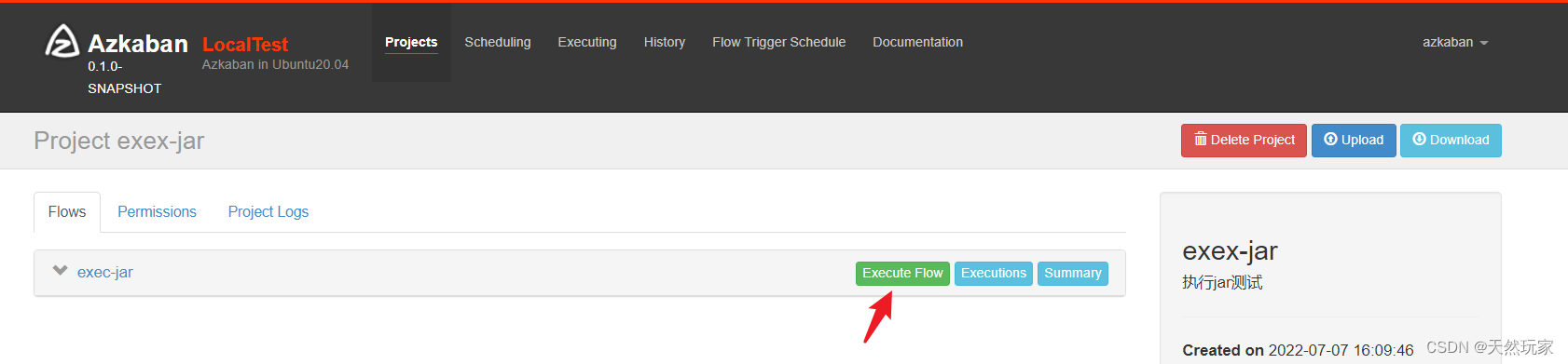


2.2.6 Azkaban执行结果
Azkaban的执行结果如下图所示,由结果可知,正常执行jar包中的程序,与上文的测试结果是一致的。
3 小结
核心:
(1)Azkaban执行jar包:jar包中必须包含程序正常执行的所有依赖包,这也要求打包时必须将依赖打到jar包中;
(2)执行jar包的job类型为:javaprocess;
(3)配置执行main函数的类全限定名,用于执行main方法;
(4)Azkaban执行jar包通过:java -cp完成;
(5)可以通过job配置虚拟机参数。
4 分析
由执行结果可知,截图如下,
Azkaban执行的命令,通过cp指定jar包路径和执行的类全限定名,并配置了默认的虚拟机参数:Xms为64M,Xmx为256M。
07-07-2022 16:47:00 CST exec-jar INFO - Command: java -Djava.library.path=null '-Dazkaban.flowid=exec-jar' '-Dazkaban.execid=89' '-Dazkaban.jobid=exec-jar' -Xms64M -Xmx256M -cp exec-azkaban-1.0-SNAPSHOT-jar-with-dependencies.jar com.monkey.redisops.CtrGenerator
当然,可以通过job文件指定虚拟机参数,如下:
nodes:
  - name: exec-java
    type: javaprocess
    config:
      Xms: 50M
      Xmx: 100M
      java.class: com.monkey.redisops.CtrGenerator
执行结果如下图所示,由结果可知,自定义的虚拟机参数生效。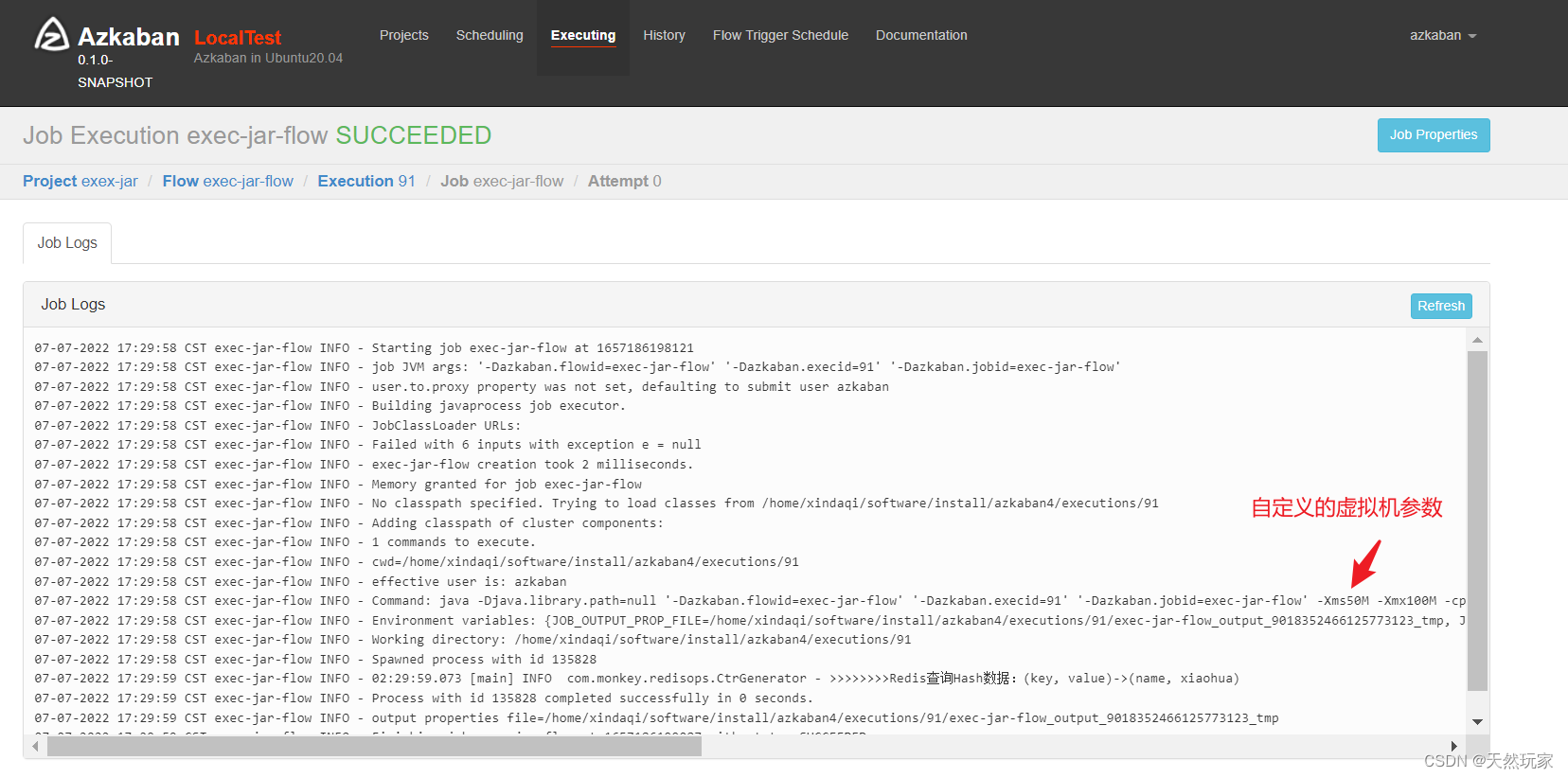
边栏推荐
- qt-使用自带的应用框架建立--hello world--使用min GW 32bit
- common commands
- How does Matplotlib generate multiple pictures in turn & only save these pictures without displaying them in the compiler
- 剑指 Offer II 041. 滑动窗口的平均值
- Tencent game client development interview (unity + cocos) double bombing social recruitment 6 rounds of interviews
- php 获取音频时长等信息
- QML fonts use pixelsize to adapt to the interface
- LeetCode 练习——剑指 Offer 36. 二叉搜索树与双向链表
- ROS problems (topic types do not match, topic datatype/md5sum not match, MSG XXX have changed. rerun cmake)
- Matlab code on error analysis (MAE, MAPE, RMSE)
猜你喜欢

能力贡献 GBASE三大解决方案入选“金融信创生态实验室-金融信创解决方案(第一批)”
The solution of frame dropping problem in gnuradio OFDM operation
Understanding of prior probability, posterior probability and Bayesian formula

第七章 行为级建模
PB9.0 insert OLE control error repair tool
Graphic network: uncover the principle behind TCP's four waves, combined with the example of boyfriend and girlfriend breaking up, which is easy to understand
Redis集群

Urban land use distribution data / urban functional zoning distribution data / urban POI points of interest / vegetation type distribution
STM32GPIO口的工作原理
About snake equation (2)
随机推荐
子矩阵的和
Gnuradio3.9.4 create OOT module instances
Matlab code about cosine similarity
云原生应用开发之 gRPC 入门
How to make enterprise recruitment QR code?
ArrayList源码深度剖析,从最基本的扩容原理,到魔幻的迭代器和fast-fail机制,你想要的这都有!!!
ANSI / nema- mw- 1000-2020 magnetic iron wire standard Latest original
项目经理有必要考NPDP吗?我告诉你答案
鼠标事件-事件对象
液压旋转接头的使用事项
批次管控如何实现?MES系统给您答案
Urban land use distribution data / urban functional zoning distribution data / urban POI points of interest / vegetation type distribution
Scalar / vector / matrix derivation method
Guojingxin center "APEC investment +": some things about the Internet sector today | observation on stabilizing strategic industrial funds
小金额炒股,在手机上开户安全吗?
The numerical value of the number of figures thought of by the real-time update of the ranking list
Euler Lagrange equation
About snake equation (1)
Voice of users | understanding of gbase 8A database learning
Understanding of expectation, variance, covariance and correlation coefficient