当前位置:网站首页>图片上色项目 —— Deoldify
图片上色项目 —— Deoldify
2022-07-06 09:13:00 【zkkkkkkkkkkkkk】
目录
一、拉取Deoldify项目代码
git地址:https://github.com/jantic/DeOldify
二、下载预训练模型
2.1、步骤
1)在项目根目录创建models文件夹
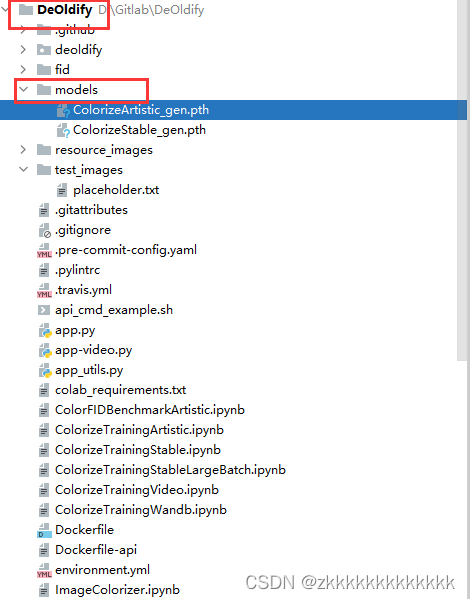
2)下载预训练模型文件,将三个文件上传至models目录
三、图片上色
from deoldify import device
from deoldify.device_id import DeviceId
from deoldify.visualize import *
from pathlib import Path
import os
os.environ['KMP_DUPLICATE_LIB_OK'] = "TRUE"

import warnings
warnings.filterwarnings("ignore", category=UserWarning, message=".*?Your .*? set is empty.*?")


#choices:  CPU, GPU0...GPU7
device.set(device=DeviceId.GPU0)
plt.style.use('dark_background')
torch.backends.cudnn.benchmark=True


render_factor=35
result_path = None


p = Path('D:\\Gitlab\\DeOldify\\test_images')
all_file_path = []
count = 0
for file_name in p.rglob('*.jpg'):
    all_file_path.append(file_name)
    count+=1
for file_name in p.rglob('*.png'):
    all_file_path.append(file_name)
    count+=1
for file_name in p.rglob('*.jppeg'):
    all_file_path.append(file_name)
    count+=1

print(f"遍历待上色文件夹结束,共有{count}个图片文件\n")


# 遍历图片,上色
for img_file_path in all_file_path:
    # arctan
    colorizer = get_image_colorizer(artistic=True)
    img_file_name = str(img_file_path).split('\\')[-1]
    print(f"开始处理{img_file_name}")
    colorizer.plot_transformed_image(path=img_file_path, render_factor=render_factor, compare=True)
    print(f"{img_file_name}处理结束")
    print("\n")

# 结束
print("图片上色程序结束")
四、视频上色
from deoldify import device
from deoldify.device_id import DeviceId

from deoldify.visualize import *
plt.style.use('dark_background')

import warnings
warnings.filterwarnings("ignore", category=UserWarning, message=".*?Your .*? set is empty.*?")


#choices:  CPU, GPU0...GPU7
device.set(device=DeviceId.GPU0)
colorizer = get_video_colorizer()

#NOTE:  Max is 44 with 11GB video cards.  21 is a good default
render_factor=21
result_path = None

file_name_ext =  'D:\\Gitlab\\DeOldify\\test_video\\test1.mp4'


colorizer.colorize_from_file_name(file_name_ext, render_factor=render_factor)边栏推荐
- Armv8-a programming guide MMU (2)
- Invalid default value for 'create appears when importing SQL_ Time 'error reporting solution
- 解决扫描不到xml、yml、properties文件配置
- [ahoi2009]chess Chinese chess - combination number optimization shape pressure DP
- C language advanced pointer Full Version (array pointer, pointer array discrimination, function pointer)
- 【博主推荐】C#生成好看的二维码(附源码)
- MySQL23-存储引擎
- MySQL 29 other database tuning strategies
- API learning of OpenGL (2003) gl_ TEXTURE_ WRAP_ S GL_ TEXTURE_ WRAP_ T
- 【博主推荐】C# Winform定时发送邮箱(附源码)
猜你喜欢
LeetCode #461 汉明距离

csdn-Markdown编辑器
Idea import / export settings file

A trip to Macao - > see the world from a non line city to Macao
MySQL 29 other database tuning strategies
【博主推荐】C#MVC列表实现增删改查导入导出曲线功能(附源码)
CSDN-NLP:基于技能树和弱监督学习的博文难度等级分类 (一)
Water and rain condition monitoring reservoir water and rain condition online monitoring
CSDN question and answer module Title Recommendation task (II) -- effect optimization
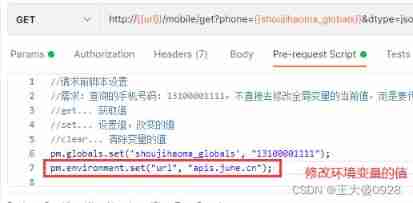
Postman uses scripts to modify the values of environment variables
随机推荐
MySQL19-Linux下MySQL的安装与使用
C语言标准的发展
npm一个错误 npm ERR code ENOENT npm ERR syscall open
CSDN博文摘要(一) —— 一个简单的初版实现
[C language foundation] 04 judgment and circulation
MySQL21-用户与权限管理
CSDN问答标签技能树(五) —— 云原生技能树
[ahoi2009]chess Chinese chess - combination number optimization shape pressure DP
Ansible实战系列一 _ 入门
Ubuntu 20.04 安装 MySQL
Mysql21 user and permission management
Breadth first search rotten orange
CSDN问答模块标题推荐任务(一) —— 基本框架的搭建
Win10: how to modify the priority of dual network cards?
Copie maître - esclave MySQL, séparation lecture - écriture
Postman Interface Association
How to find the number of daffodils with simple and rough methods in C language
【博主推荐】C#生成好看的二维码(附源码)
Mysql28 database design specification
API learning of OpenGL (2003) gl_ TEXTURE_ WRAP_ S GL_ TEXTURE_ WRAP_ T