当前位置:网站首页>Nuxtjs快速上手(Nuxt2)
Nuxtjs快速上手(Nuxt2)
2022-07-06 09:21:00 【玲小叮当】
nuxtjs快速上手(nuxt2)
提示:本篇文章是博主观看b站up主前端aka老师视频学习整理的文章
视频指路:《CMS全栈项目》系列九:Nuxt+ElementUI
nuxtjs官网(nuxt2):NuxtJS
文章目录
前言
提示:本篇文章为nuxt2:
本篇文章可以带你快速搭建一个简单的Nuxt.js项目,Nuxt.js 是基于 Vue.js 的通用应用框架,Nuxt.js 预设了利用 Vue.js 开发 服务端渲染(SSR) 的应用所需要的各种配置,文章简要叙述 Nuxt.js 的基础功能,可以快速上手Nuxt!
提示:以下是本篇文章正文内容,下面案例可供参考
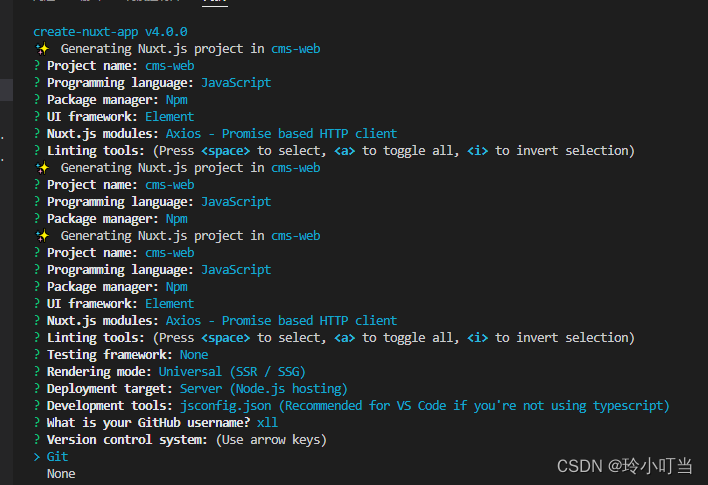
一、快速生成nuxt项目
运行 create-nuxt-app
确保安装了 npx (npx 在 NPM 版本 5.2.0 默认安装了):
npx create-nuxt-app <项目名>
或者用 yarn :
yarn create nuxt-app <项目名>
二、nuxtjs配置IP与端口
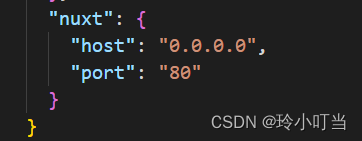
开发中经常会遇到端口被占用或者指定IP的情况。我们需要在根目录下的 package.json 里对 config 项进行配置。比如现在我们想把IP配置成 127.0.0.1 ,端口设置 8080。
{

    ...,
    "config": {

        "nuxt": {

          "host": "127.0.0.1",
          "port": "8080"
        }
        //或者
        "nuxt": {

          "host": "0.0.0.0",
          "port": "80"
        }
    }
}
三、在nuxt中使用less
- 安装
less和 指定版本的less-loader
npm install less less-[email protected]7.0.0 --save-dev
- 全局样式文件
- 在
static目录中创建base.less文件,用来写全局样式。然后打开nuxt.config.js并找到css:
css: [
    'element-ui/lib/theme-chalk/index.css',
        '~/static/base.less'	// 全局样式添加在此处
],
- 组件内样式
<style scoped lang="less">
@bgColor: #f00;
.el-container {

  width: 100%;
  height: 100%;

  .el-main {

    color: @bgColor;
    height: 100%;
    padding: 0;
  }
}
</style>
四、nuxtjs中项目清除默认样式
- 打开 reset-css 的
npm网站,随便拿一条链接:
/* http://meyerweb.com/eric/tools/css/reset/ v5.0.1 | 20191019 License: none (public domain) */

html, body, div, span, applet, object, iframe, h1, h2, h3, h4, h5, h6, p, blockquote, pre, a, abbr, acronym, address, big, cite, code, del, dfn, em, img, ins, kbd, q, s, samp, small, strike, strong, sub, sup, tt, var, b, u, i, center, dl, dt, dd, menu, ol, ul, li, fieldset, form, label, legend, table, caption, tbody, tfoot, thead, tr, th, td, article, aside, canvas, details, embed, figure, figcaption, footer, header, hgroup, main, menu, nav, output, ruby, section, summary, time, mark, audio, video {

	margin: 0;
	padding: 0;
	border: 0;
	font-size: 100%;
	font: inherit;
	vertical-align: baseline;
}
/* HTML5 display-role reset for older browsers */
article, aside, details, figcaption, figure, footer, header, hgroup, main, menu, nav, section {

	display: block;
}
/* HTML5 hidden-attribute fix for newer browsers */
*[hidden] {

    display: none;
}
body {

	line-height: 1;
}
menu, ol, ul {

	list-style: none;
}
blockquote, q {

	quotes: none;
}
blockquote:before, blockquote:after, q:before, q:after {

	content: '';
	content: none;
}
table {

	border-collapse: collapse;
	border-spacing: 0;
}
- 粘贴代码到
reset.css, 放到static目录下,并在nuxt.config.js引入:
head: {

  ...,
   link: [
     {
     rel: 'icon', type: 'image/x-icon', href: '/favicon.ico' },
     {
     rel: 'stylesheet', type: 'text/css', href: '/reset.css' }	// 引入
   ]
 },
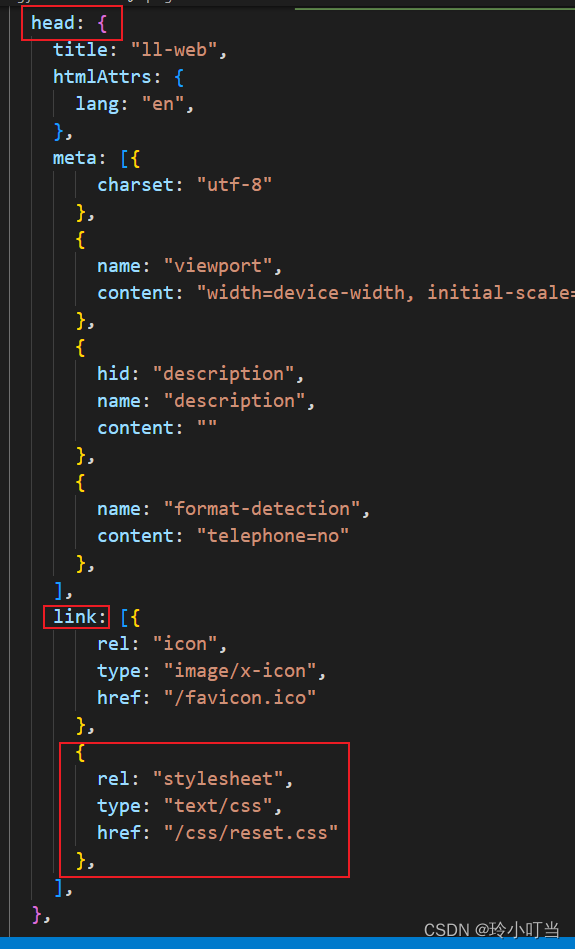
3. 同样,你也可以放到该文件中的css对象里,以数组项形式存在。
五、nuxtjs中使用asyncData实现SSR
Nuxt可以在asyncData和created中做axios请求。但在created中做请求,渲染出来的数据不会出现在html中,导致无法实现SEO优化,而使用asyncData做请求,则html会被渲染出来,从而实现SSR。不是异步asyncData中不能获取vue的this,所以必须return,template中可直接花括号调用,与使用data数据一致
// 页面中使用asyncData可以实现SSR渲染,但赋值是直接 return {data}
async asyncData() {

  let result = await BannerApi();
   if (result.errCode === 0) {

     let banner = result.data;
     return {
     banner };
   }
 },
export default {

  asyncData({
      params,query }) {

    return axios.get(`https://my-api/posts/${
      params.id}`).then(res => {

      return {
     title: res.data.title }
    })
  }
}
六、路由
在page页面中新建vue组件,路由 自动生成 同文件名一致的路由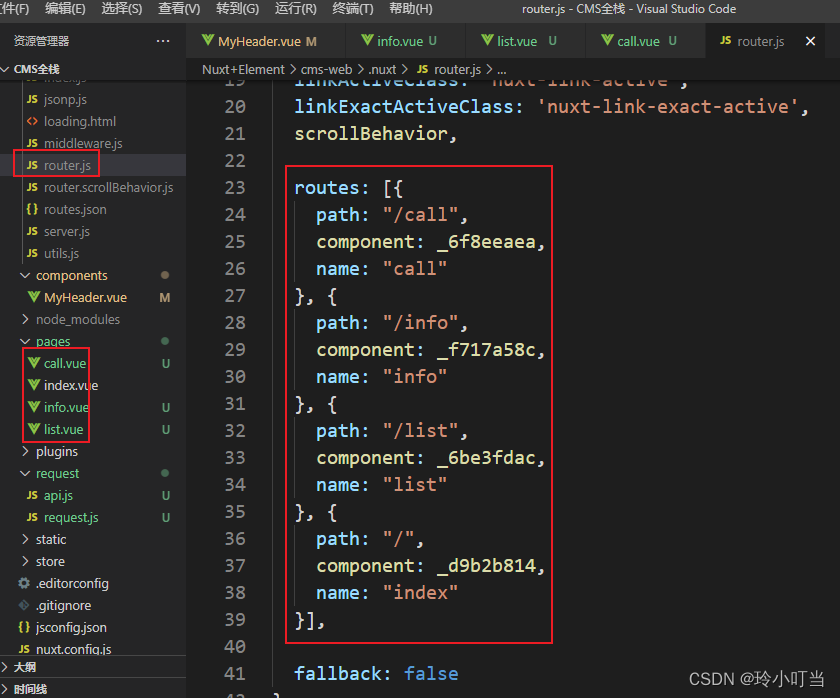
6.1 动态嵌套子路由
- 可以通过
vue-router的子路由创建Nuxt.js应用的嵌套路由。 - 创建内嵌子路由,你需要添加一个
Vue文件,同时添加一个与该文件同名的目录用来存放子视图组件。 - Warning: 别忘了在父组件(.vue文件) 内增加
<nuxt-child/>用于显示子视图内容。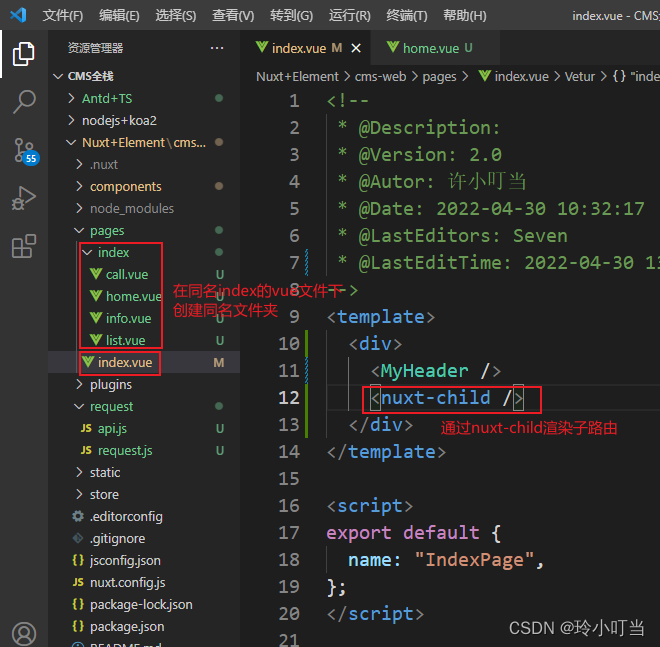
七、Nuxt解决跨域
- 安装
proxy
npm i @nuxtjs/proxy -D
- 在
nuxt.config.js中添加:
module.exports = {

  ...,
  modules: [
    '@nuxtjs/axios',
    '@nuxtjs/proxy'
  ],
  axios: {

    proxy: true,
    prefix: '/',
    credentials: true
  },
  proxy: {

    '/api/': {

      target: 'http://127.0.0.1:9000/web', // 目标服务器ip
      pathRewrite: {

        '^/api/': '/',
        changeOrigin: true
      }
    }
  }
}
axios的baseURL的话使用/api即可
八、Nuxt.js重定向路由方式
8.1 方式1
通过 nuxt.config.js 设置,在 nuxt.config.js 文件添加下面的配置。redirect 表示重定向的路由。
router: {

    extendRoutes(routes, resolve) {

      routes.push({

        path: '/',
        redirect: '/film'
      })
    }
  }
8.2 方式2
通过中间件文件,在目录中的middleware添加一个名为:redirect.js的文件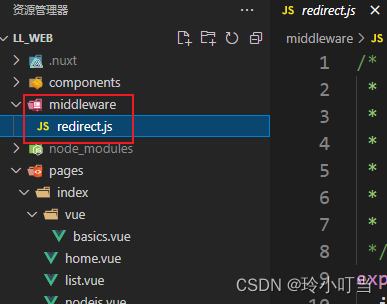
- 在
redirect.js中写入以下代码,其中path和redirect的路由自己定义。
export default function ({
      isHMR, app, store, route, params, error, redirect, }) {

  if (isHMR) return; //用来判断热更新
  // 页面均放在_lang文件夹下,即lang为动态路由参数;
  /* if (!params.lang) { //此写法会出现路由重定向次数过多的问题; return redirect('/' + defaultLocale + '' + route.fullPath)} */
  if (route.fullPath == "/") {

    return redirect("/home");
  }
  if (route.fullPath == '/vue') {

    return redirect('/vue/basics')
  }
}
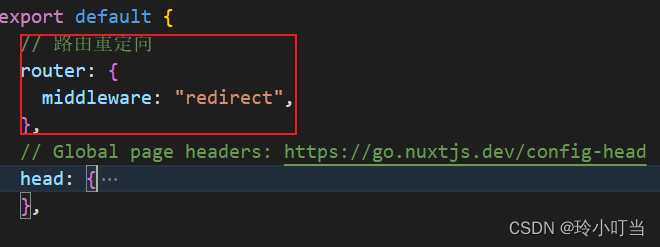
- 最后需要在
nuxt.config.js文件中添加
router: {
    middleware: 'redirect'}
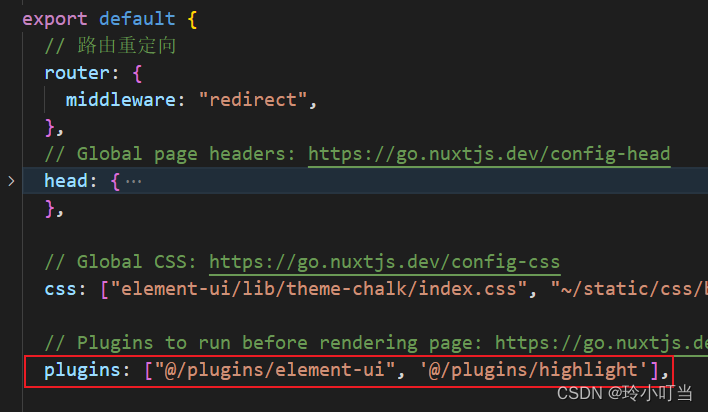
九、nuxt中使用vue插件
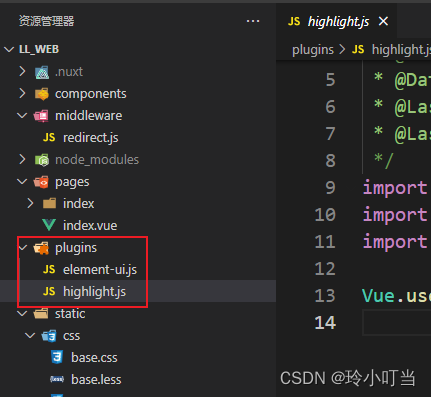
- 在
plugins目录下面创建一个xxx.js
import Vue from 'vue'
import VueHighlightJS from 'vue-highlightjs' // 告诉Vue 要使用插件 vue-highlightjs
import 'highlight.js/styles/atom-one-dark.css'

Vue.use(VueHighlightJS)
2. 在nuxt.config.js中配置:
export default {

  plugins: ['~/plugins/xxx']
}
总结
提示:这里对文章进行总结:
例如:以上就是今天要讲的 Nuxtjs 内容,本文只是简单介绍了 Nuxtjs 的一些使用,可以让你快速上手 Nuxt,当然 Nuxt 里边还有好多强大的功能,大家可以去官网再详细看看。
边栏推荐
- hashCode()与equals()之间的关系
- Comparison between FileInputStream and bufferedinputstream
- 1.C语言初阶练习题(1)
- 3.C语言用代数余子式计算行列式
- Write a program to simulate the traffic lights in real life.
- [during the interview] - how can I explain the mechanism of TCP to achieve reliable transmission
- 2.C语言初阶练习题(2)
- 一段用蜂鸣器编的音乐(成都)
- C语言实现扫雷游戏(完整版)
- 魏牌:产品叫好声一片,但为何销量还是受挫
猜你喜欢
Mortal immortal cultivation pointer-1

This time, thoroughly understand the MySQL index
Custom RPC project - frequently asked questions and explanations (Registration Center)
There is always one of the eight computer operations that you can't learn programming

Application architecture of large live broadcast platform
9.指针(上)

2. Preliminary exercises of C language (2)
View UI plus released version 1.2.0 and added image, skeleton and typography components
Questions and answers of "signal and system" in the first semester of the 22nd academic year of Xi'an University of Electronic Science and technology
1.初识C语言(1)
随机推荐
Pit avoidance Guide: Thirteen characteristics of garbage NFT project
Share a website to improve your Aesthetics
C language Getting Started Guide
优先队列PriorityQueue (大根堆/小根堆/TopK问题)
【九阳神功】2017复旦大学应用统计真题+解析
[modern Chinese history] Chapter 6 test
抽象类和接口的区别
[graduation season · advanced technology Er] goodbye, my student days
[面试时]——我如何讲清楚TCP实现可靠传输的机制
[the Nine Yang Manual] 2016 Fudan University Applied Statistics real problem + analysis
C language to achieve mine sweeping game (full version)
The latest tank battle 2022 - full development notes-3
Inaki Ading
一段用蜂鸣器编的音乐(成都)
【九阳神功】2020复旦大学应用统计真题+解析
凡人修仙学指针-1
2.C语言矩阵乘法
Change vs theme and set background picture
5. Download and use of MSDN
Wei Pai: the product is applauded, but why is the sales volume still frustrated