当前位置:网站首页>Deep dive kotlin synergy (19): flow overview
Deep dive kotlin synergy (19): flow overview
2022-07-03 03:59:00 【RikkaTheWorld】
Series eBook : Portal
Flow It means A data flow for asynchronous computing .Flow The interface itself allows only those flowing elements to be collected , This means that each element only reaches the end of the flow , We'll deal with them (Flow Of collect Similar to a collection forEach).
interface Flow<out T> {

    suspend fun collect(collector: FlowCollector<T>)
}
You can see , collect yes Flow The only member function in . Other functions are defined as extension functions . This is related to Iterable or Sequence similar , They all have iterator As a member function .
interface Iterable<out T> {

    operator fun iterator(): Iterator<T>
}

interface Sequence<out T> {

    operator fun iterator(): Iterator<T>
}
flow vs Other ways of representing data
For the use of RxJava or Reactor For people who , The concept of flow should be their most familiar , But for other unfamiliar people , A better explanation may be needed .
Suppose you need a function to return multiple values , If these values are provided at the same time , We will use things like List and Set Such a collection .
fun allUsers(): List<User> =
    api.getAllUsers().map {
     it.toUser() }
The essence here is List and Set Represents a fully computed set . Processing these values takes time , So we need to wait for all the values to be processed , Then you can get them .
fun getList(): List<Int> = List(3) {

    Thread.sleep(1000)
    "User$it"
}

fun main() {

    val list = getList()
    println("Function started")
    list.forEach {
     println(it) }
}
// (3 sec)
// Function started
// User0
// User1
// User2
If the elements appear one after another , One method we will use is Sequence.
fun getSequence(): Sequence<String> = sequence {

    repeat(3) {

        Thread.sleep(1000)
        yield("User$it")
    }
}
fun main() {

    val list = getSequence()
    println("Function started")
    list.forEach {
     println(it) }
}
// Function started
// (1 sec)
// User0
// (1 sec)
// User1
// (1 sec)
// User2
When the calculation may be CPU intensive ( For example, calculate complex results ) Or blocked ( Such as reading files ) When , Sequence is a suitable data flow for on-demand calculation . however , You have to know Terminal operation of the sequence ( Such as forEach) It won't hang , So any Hang in the sequence builder means blocking the waiting thread to process this value . Is that why sequence In the scope of the builder , In addition to the SequenceScope Functions called on the receiver (yield and yieldAll) Outside , You cannot use any pending functions .
fun getSequence(): Sequence<String> = sequence {

    repeat(3) {

        delay(1000) //  There is a compilation error
        yield("User$it")
    }
}
This mechanism is introduced to prevent the sequence from being misused . for example , Someone may want to use paging from Http Port to get a list of all users , Until you receive blank data .
Even if the above example can be compiled , It won't be right , Because of terminal operation ( Such as forEach) The thread will be blocked instead of suspended , This may cause unexpected thread blocking .
//  Don't do this , We should use  Flow  Instead of  Sequence
fun allUsersSequence(
    api: UserApi
): Sequence<User> = sequence {

    var page = 0
    do {

        val users = api.takePage(page++) //  Hang up , So compilation error
        yieldAll(users)
    } while (!users.isNullOrEmpty())
}
I hope you've learned that thread blocking can be dangerous , Will lead to unexpected situations , To make this clearer , Take a look at the following example , We use Sequence, So it's forEach It's a blocking operation . That's why a coroutine started on the same thread waits , The execution of one process will block the execution of another process :
fun getSequence(): Sequence<String> = sequence {

    repeat(3) {

        Thread.sleep(1000)
        //  Even if it can be used here  delay(1000) , The result is the same
        yield("User$it")
    }
}

suspend fun main() {

    withContext(newSingleThreadContext("main")) {

        launch {

            repeat(3) {

                delay(100)
                println("Processing on coroutine")
            }
        }
        val list = getSequence()
        list.forEach {
     println(it) }
    }
}
// (1 sec)
// User0
// (1 sec)
// User1
// (1 sec)
// User2
// Processing on coroutine
// (0.1 sec)
// Processing on coroutine
// (0.1 sec)
// Processing on coroutine
under these circumstances , We should use Flow instead of Sequence. It fully supports synergy . Its builder and operation can be suspended , And support structured concurrency and appropriate exception handling . We will explain these in the next chapter . But now let's see how it helps this case .
fun getFlow(): Flow<String> = flow {

    repeat(3) {

        delay(1000)
        emit("User$it")
    }
}

suspend fun main() {

    withContext(newSingleThreadContext("main")) {

        launch {

            repeat(3) {

                delay(100)
                println("Processing on coroutine")
            }
        }
        val list = getFlow()
        list.collect {
     println(it) }
    }
}
// (0.1 sec)
// Processing on coroutine
// (0.1 sec)
// Processing on coroutine
// (0.1 sec)
// Processing on coroutine
// (1 - 3 * 0.1 = 0.7 sec)
// User0
// (1 sec)
// User1
// (1 sec)
// User2
Flow It should be used for data flows that need to use coroutines . for example , It can be used to generate a from API Page by page user flow . for example , If we call allUserFlow(api).first(), We will get to the first page ; If we call allUserFlow(api).toList() , We will get all the data ; If we call allUserFlow(api).find { it.id == id }, We will always pull the page data , Until we find the page we want to find .
fun allUsersFlow(
    api: UserApi
): Flow<User> = flow {

    var page = 0
    do {

        val users = api.takePage(page++) //  Hang up
        emitAll(users)
    } while (!users.isNullOrEmpty())
}
Flow Characteristics of
Flow Terminal operation of ( Such as collect) A collaboration will be suspended , Instead of blocking threads . They also support other coroutine functions , For example, exception handling .Flow Processing can be cancelled , And it can support structured concurrency externally . flow The builder will not hang , No scope is required .
The following example shows CoroutineName How context is passed from the collection to flow In the builder . It also shows that ,launch The cancellation of will also lead to flow The processing of is cancelled .
//  Be careful , This function will not hang , And you don't need any  CoroutineScope
fun usersFlow(): Flow<String> = flow {

    repeat(3) {

        delay(1000)
        val ctx = currentCoroutineContext()
        val name = ctx[CoroutineName]?.name
        emit("User$it in $name")
    }
}

suspend fun main() {

    val users = usersFlow()
    withContext(CoroutineName("Name")) {

        val job = launch {

            // collect  It's suspended
            users.collect {
     println(it) }
        }
        launch {

            delay(2100)
            println("I got enough")
            job.cancel()
        }
    }
}
// (1 sec)
// User0 in Name
// (1 sec)
// User1 in Name
// (0.1 sec)
// I got enough
Flow Nomenclature
- Flow Need to start somewhere , It usually starts with a flow builder , From different objects or from some helper Function to , The most important options are explained in the next chapter
- Flow The last operation on is called terminal operation , This is very important , Because it is usually the only suspended function , Or you need the operation of the scope of the collaboration . A typical terminal operation is
collect. However , There are other terminal operations , I will explain in the following chapters - Between start operation and terminal operation , We may have intermediate operations , Each operation modifies the flow in some way , We will be in Flow Life cycle of and Handle Flow Learn different intermediate operations in the chapter of
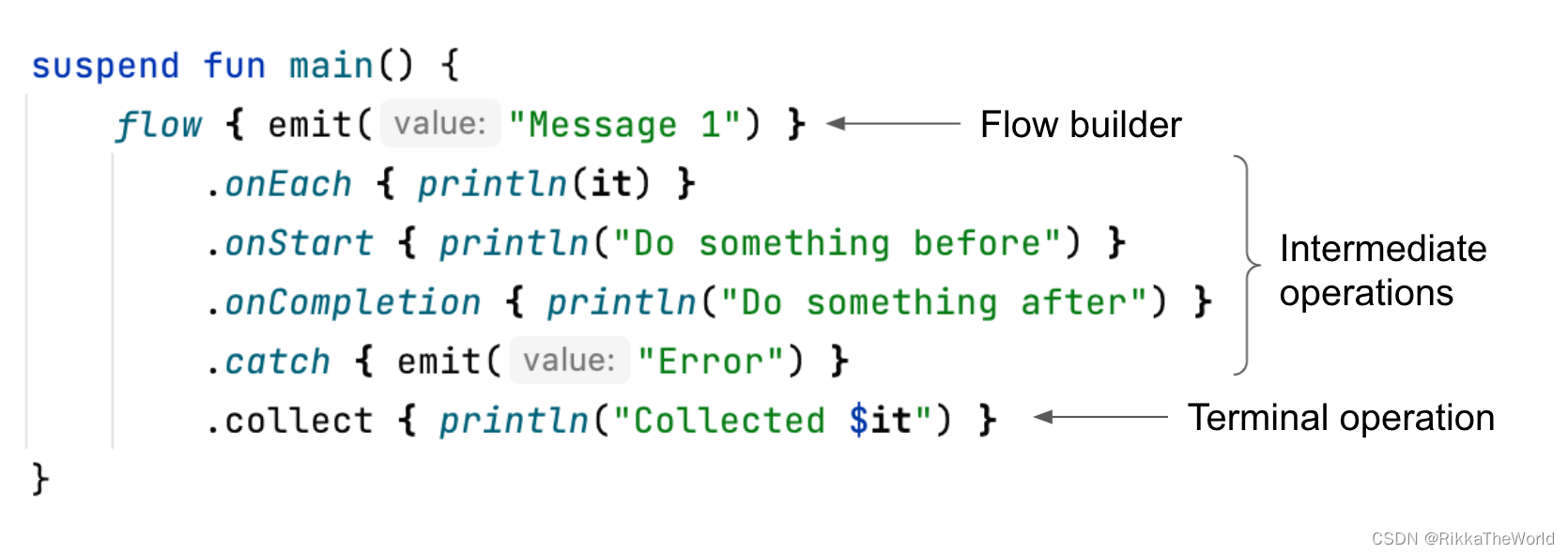
The actual cases
Practice shows , What we need more often is flow, instead of channel. If request data flow , We usually want to request on demand . If you need to observe something , For example, changes in the database or from UI Perception of components , You may want every observer to receive these events . When no one wants to observe , You should also stop listening . This is why in all these cases , Use flow It's better than using channel Better ( Although in some cases , We mix the two ).
flow The most typical uses include :
- Receive from Server Messages sent in the connectivity channel , Such as WebSocket、 Notice, etc
- Observe the user's actions , Such as text change or click
- Receive updates of other information from sensors or devices , Such as position or direction
- Observe the changes in the database
Here's how we use Room Library to observe SQL Database changes :
@Dao
interface MyDao {

@Query("SELECT * FROM somedata_table")
    fun getData(): Flow<List<SomeData>>
}
Let's look at some examples , See how to use it flow To deal with from API Response flow for . First , Suppose you implement the chat function , The message passes Server Channel and notification sending . Treat two data sources as a stream , Combine them together , Then use this flow to update the view , It's very convenient . Another example might be to use it to provide better and better response results . for example , When we're in SkyScanner When searching for the best flight on , Some quotations will arrive soon , But over time , There will be more and better quotations to reach , therefore , You will see better and better results . This is also used flow A good example of .

In addition to these circumstances , For different concurrent processing , flow It is also a useful tool . for example , Suppose you have a list of sellers , You need to get the quotation of each seller . We already know we can use async Implement this in set processing :
suspend fun getOffers(
    sellers: List<Seller>
): List<Offer> = coroutineScope {

    sellers
        .map {
     seller ->
            async {
     api.requestOffers(seller.id) }
        }
        .flatMap {
     it.await() }
}
The above method is correct in many cases , But it has one drawback : When the seller list is large , Sending so many requests at once is not good for us or the server . Of course , This can be done by limiting frequency or current in the server , But we also want to control it on the client , So we can use Flow. under these circumstances , To limit the number of concurrent calls to 20 individual , We can use flaotMapMerge, And set the maximum concurrent number concurrency It is amended as follows 20:
suspend fun getOffers(
    sellers: List<Seller>
): List<Offer> = sellers
    .asFlow()
    .flatMapMerge(concurrency = 20) {
     seller ->
        suspend {
     api.requestOffers(seller.id) }.asFlow()
    }
    .toList()
Yes Flow Not a collection , Let's talk about concurrency 、 Context 、 Exceptions, etc. for more control . We will explore these features in the next chapter , This is it. ( In my experience ) flow The most useful place . I hope after we introduce all the different functions of it , You can clearly understand this .
Last , Because I prefer the style of responsive programming , Some teams prefer to use response flows rather than suspend functions . This style is in Android It's very popular on TV , among RxJava It's very mainstream , But now Flow Usually considered a better choice .
As you can see ,flow There are quite a few use cases . In some projects , They will be widely used , In other projects , They are only used occasionally . But I hope you know it's useful , It's worth learning .
summary
In this chapter , We introduced Flow The concept of . It expresses support for the process ( Different sequences ) Asynchronous data flow . In quite a few use cases ,flow It is useful to .
边栏推荐
- Ffmpeg download and installation tutorial and introduction
- [brush questions] most elements (super water king problem)
- Ffmpeg one / more pictures synthetic video
- CEPH Shangwen network xUP Nange that releases the power of data
- QSAR model establishment script based on pytoch and rdkit
- Is pytorch difficult to learn? How to learn pytorch well?
- 2022-07-02:以下go语言代码输出什么?A:编译错误;B:Panic;C:NaN。 package main import “fmt“ func main() { var a =
- Commands related to the startup of redis under Linux server (installation and configuration)
- Role of JS No
- pytorch项目怎么跑?
猜你喜欢
leetcode:297. 二叉树的序列化与反序列化
China Mobile Internet of things oneos and onenet were selected in the list of 2021 Internet of things demonstration projects

Wechat applet + Alibaba IOT platform + Hezhou air724ug build a serverless IOT system (III) -- wechat applet is directly connected to Alibaba IOT platform aliiot

Appium自动化测试框架
简易版 微信小程序开发之页面跳转、数据绑定、获取用户信息、获取用户位置信息

在 .NET 6 项目中使用 Startup.cs

2022 tea master (intermediate) examination questions and analysis and tea master (intermediate) practical examination video

Nodejs Foundation: shallow chat URL and querystring module
Recursion: one dimensional linked lists and arrays
105. Detailed introduction of linkage effect realization of SAP ui5 master detail layout mode
随机推荐
How to download pytorch? Where can I download pytorch?
Esp32 series (3): GPIO learning (take simple GPIO input and output, ADC, DAC as examples)
基于Pytorch和RDKit的QSAR模型建立脚本
leetcode:297. 二叉树的序列化与反序列化
2022-07-02: what is the output of the following go language code? A: Compilation error; B:Panic; C:NaN。 package main import “fmt“ func main() { var a =
TCP, the heavyweight guest in tcp/ip model -- Kuige of Shangwen network
编译文件时报错:错误: 编码GBK的不可映射字符
CVPR 2022 | 大连理工提出自校准照明框架,用于现实场景的微光图像增强
Bisher - based on SSM pet adoption center
[brush questions] connected with rainwater (one dimension)
Hutool动态添加定时任务
MySQL MAC download and installation tutorial
The 10th China Cloud Computing Conference · China Station: looking forward to the trend of science and technology in the next decade
[mathematical logic] predicate logic (predicate logic basic equivalent | eliminate quantifier equivalent | quantifier negative equivalent | quantifier scope contraction expansion equivalent | quantifi
Arlo's thinking about himself
nodejs基础:浅聊url和querystring模块
DAPP for getting started with eth
[mathematical logic] propositional logic (judgment of the correctness of propositional logic reasoning | formal structure is eternal truth - equivalent calculus | deduction from premise - logical reas
Web session management security issues
IPv6 transition technology-6to4 manual tunnel configuration experiment -- Kuige of Shangwen network