当前位置:网站首页>Qt 一个简单的word文档编辑器
Qt 一个简单的word文档编辑器
2022-07-05 23:34:00 【Mr.codeee】
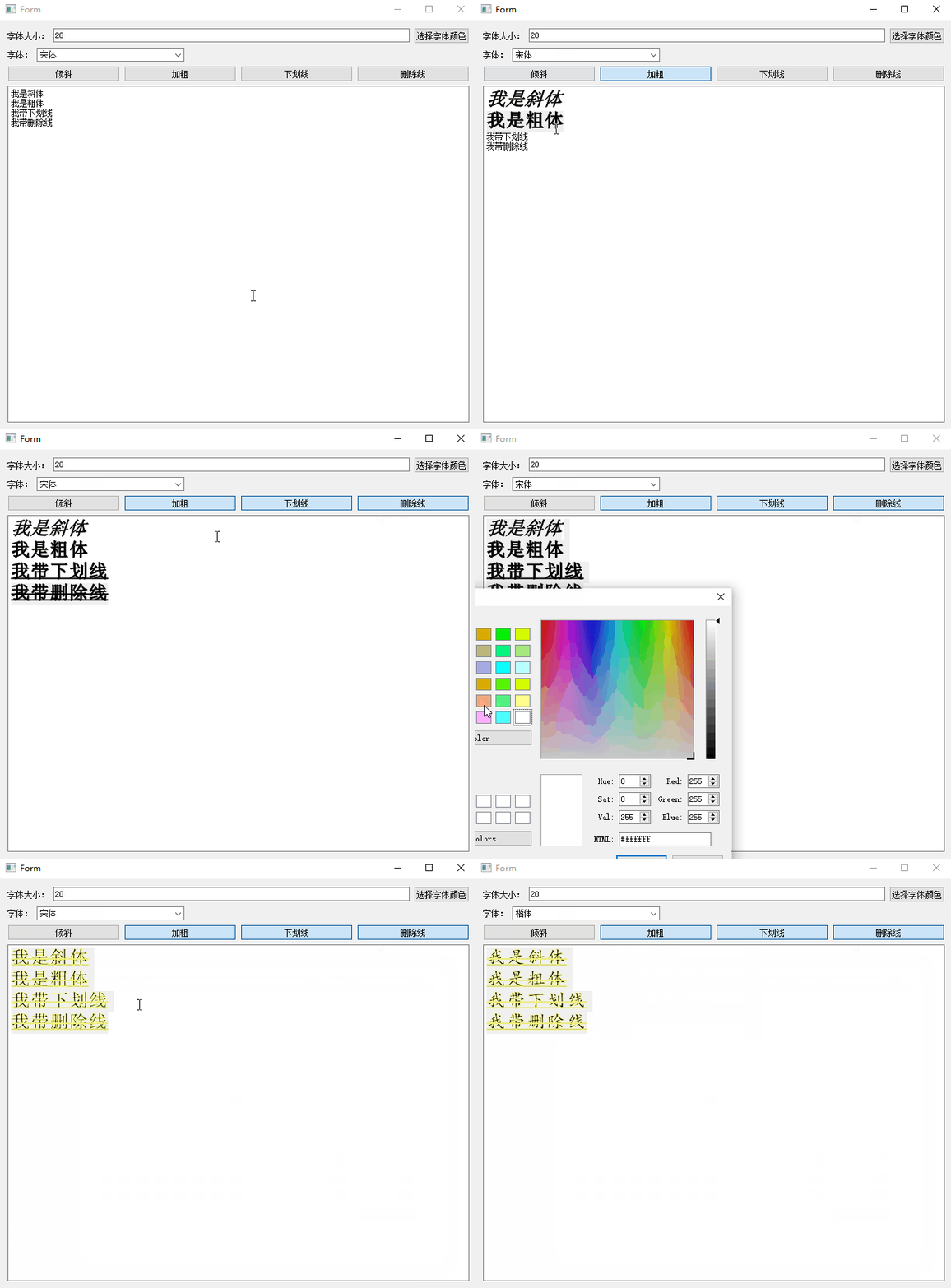
1.先看效果图
可以设置文字的属性、文字颜色、字体类型。以下示例仅供参考,有的地方还是不完善。
2.需要用到的类
QFontComboBox是一个让用户选择字体的组合框。组合框中填充了按字母顺序排列的字体族名称列表。
常用方法:
获取当前的字体
QFont currentFont() const
还有一个信号,当字体发生改变时,发送信号。
void currentFontChanged(const QFont &font)
2.2颜色对话框:QColorDialog
常用方法:
获取当前选择的颜色
QColor currentColor() const
2.3QTextCharFormat
QTextCharFormat类为QTextDocument中的字符提供格式化信息。换句话说,我们要设置鼠标选中字体的属性,就需要使用这个类。
本例子中使用的方法:
| void setFont(const QFont &font) | 设置字体 |
| void setFontItalic(bool italic) | 设置是否斜体 |
| void setFontStrikeOut(bool strikeOut) | 设置删除线 |
| void setFontUnderline(bool underline) | 设置下划线 |
3.源码
为了方便,我定义了5个全局变量
bool isBold = false;    //是否粗体
bool isUnderLine = false; //是否下划线
bool isDelLine = false; //是否删除线
bool isLean = false; //是否斜体

QColor color(Qt::black); //字体颜色
设置斜体、粗体等按钮可选中,因为默认是不可选中的,我们需要绑定可选中的信号。
    ui->btnBold->setCheckable(true);
    ui->btnDelLine->setCheckable(true);
    ui->btnLean->setCheckable(true);
    ui->btnUnderline->setCheckable(true);
绑定按钮的信号
void clicked(bool checked = false)
#include "WTextEdit.h"
#include "ui_WTextEdit.h"
#include <QColorDialog>
#include <QTextDocument>
#include <QTextCursor>
#include <QTextCharFormat>
#include <QFont>
#include <QBrush>

bool isBold = false;    //是否粗体
bool isUnderLine = false; //是否下划线
bool isDelLine = false; //是否删除线
bool isLean = false; //是否斜体

QColor color(Qt::black); //字体颜色

WTextEdit::WTextEdit(QWidget *parent) :
    QWidget(parent),
    ui(new Ui::WTextEdit)
{
    ui->setupUi(this);

    ui->btnBold->setCheckable(true);
    ui->btnDelLine->setCheckable(true);
    ui->btnLean->setCheckable(true);
    ui->btnUnderline->setCheckable(true);
}

WTextEdit::~WTextEdit()
{
    delete ui;
}


void WTextEdit::on_btnBold_clicked(bool checked)
{
    isBold = checked;
    updateText();
}

void WTextEdit::on_btnLean_clicked(bool checked)
{
    isLean = checked;
    updateText();
}

void WTextEdit::on_btnUnderline_clicked(bool checked)
{
    isUnderLine = checked;
    updateText();
}

void WTextEdit::on_btnDelLine_clicked(bool checked)
{
    isDelLine = checked;
    updateText();
}

void WTextEdit::updateText()
{
    QFont font = ui->fontComboBox->currentFont();
    font.setBold(isBold);
    font.setPointSize(ui->lineEdit->text().toInt());

    QTextCharFormat format;
    format.setFont(font);
    format.setFontItalic(isLean);
    format.setFontStrikeOut(isDelLine);
    format.setFontUnderline(isUnderLine);

    QPen pen;
    pen.setColor(color);    //设置字体颜色
    format.setTextOutline(pen);

    ui->textEdit->textCursor().setCharFormat(format);
}

void WTextEdit::on_btnColor_clicked()
{
    QColorDialog dialog;
    dialog.exec();


    color = dialog.currentColor();
    updateText();
}

void WTextEdit::on_lineEdit_textChanged(const QString &arg1)
{
    updateText();
}

void WTextEdit::on_fontComboBox_currentFontChanged(const QFont &f)
{
    updateText();
}
边栏推荐
- It is proved that POJ 1014 module is optimized and pruned, and some recursion is wrong
- el-cascader的使用以及报错解决
- 开源crm客户关系统管理系统源码,免费分享
- How to insert data into MySQL database- How can I insert data into a MySQL database?
- CIS基准测试工具kube-bench使用
- 总结了 800多个 Kubectl 别名,再也不怕记不住命令了!
- [SQL] SQL expansion languages of mainstream databases (T-SQL, pl/sql, pl/pgsql)
- Laser slam learning record
- 用列表初始化你的vector&&initializer_list简介
- 424. The longest repeated character after replacement ●●
猜你喜欢
MySQL replace primary key delete primary key add primary key
Neural structured learning 4 antagonistic learning for image classification

4点告诉你实时聊天与聊天机器人组合的优势
Dynamic planning: robbing families and houses
Online yaml to CSV tool
20. Migrate freetype font library

总结了 800多个 Kubectl 别名,再也不怕记不住命令了!
GFS分布式文件系統
Data analysis - Thinking foreshadowing
98. 验证二叉搜索树 ●●
随机推荐
CIS benchmark tool Kube bench
In C#, why can't I modify the member of a value type instance in a foreach loop?
698. 划分为k个相等的子集 ●●
15 MySQL-存储过程与函数
[Yu Yue education] NC machining technology reference materials of Shaanxi University of science and technology
JVM details
Fiddler Everywhere 3.2.1 Crack
Cwaitabletimer timer, used to create timer object access
idea 连接mysql ,直接贴配置文件的url 比较方便
Comparison of parameters between TVs tube and zener diode
TVS管 与 稳压二极管参数对比
Redis高可用——主从复制、哨兵模式、集群
保研笔记四 软件工程与计算卷二(8-12章)
White hat talks about web security after reading 2
开源crm客户关系统管理系统源码,免费分享
98. Verify the binary search tree ●●
yate.conf
Neural structured learning - Part 2: training with natural graphs
Spire Office 7.5.4 for NET
Rasa 3.x 学习系列-Rasa 3.2.1 新版本发布