当前位置:网站首页>Threejs Part 2: vertex concept, geometry structure
Threejs Part 2: vertex concept, geometry structure
2022-07-03 16:20:00 【Nanchen_ forty-two】
ThreeJS Second articles : Vertex concept 、 Geometry structure
One 、 Vertex position data parsing and rendering
The focus of this lesson is to establish the concept of vertex . If you establish the concept of vertex , So for your in-depth understanding and learning Three.js Very helpful .
( One )、JavaScript Typed array
( Two )、 Custom Geometry
Can be called directly BoxGeometry Directly create a cube geometry , call SphereGeometry Create a sphere geometry .
The following code passes Threejs Engine BufferGeometry and BufferAttribute Two API Customized a geometry with six vertex data .
var scene = new THREE.Scene();
var geometry = new THREE.BufferGeometry(); // Create a Buffer Type geometry object
var vertices = new Float32Array([
  0,
  0,
  0, // The vertices 1 coordinate
  50,
  0,
  0, // The vertices 2 coordinate
  0,
  100,
  0, // The vertices 3 coordinate
  0,
  0,
  10, // The vertices 4 coordinate
  0,
  0,
  100, // The vertices 5 coordinate
  50,
  0,
  10, // The vertices 6 coordinate
]);
//  Create an attribute buffer object
var attribue = new THREE.BufferAttribute(vertices, 3); //3 One for a group , Representing a vertex xyz coordinate
//  Set up the geometry attributes The location of the property
geometry.attributes.position = attribue;
//  Trigonometry ( grid ) Rendering mode
var material = new THREE.MeshBasicMaterial({

  color: 0x0000ff, // Triangle color
  side: THREE.DoubleSide, // You can see it on both sides
}); // Material object
var mesh = new THREE.Mesh(geometry, material); // Mesh model objects Mesh
// Point source
scene.add(mesh); // Grid models are added to the scene
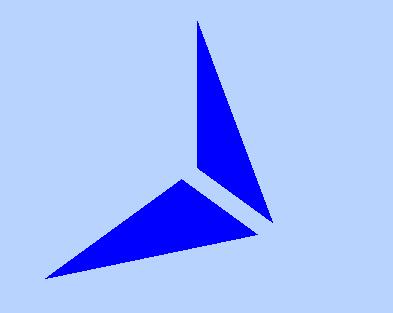
( 3、 ... and )、 Point model Points
Three points render triangles as a group
//  Point rendering mode
var material = new THREE.PointsMaterial({

  color: 0xff0000,
  size: 10.0, // Point object pixel size
}); // Material object
var points = new THREE.Points(geometry, material); // Point model object
scene.add(points); // Point objects are added to the scene
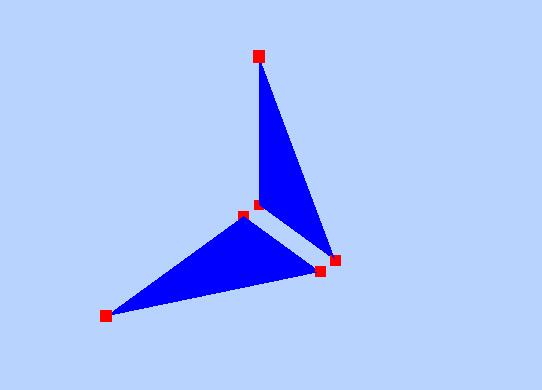
( Four )、 Line model Line
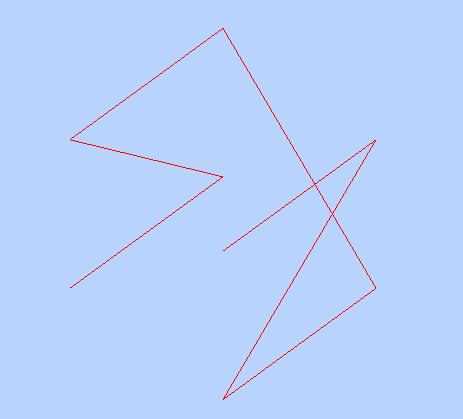
You can connect the points above
//  Line rendering mode
var material = new THREE.LineBasicMaterial({

  color: 0xff0000, // line color
}); // Material object
var line = new THREE.Line(geometry, material); // Line model object
scene.add(line); // Line objects are added to the scene

( 5、 ... and )、 The essence of geometry
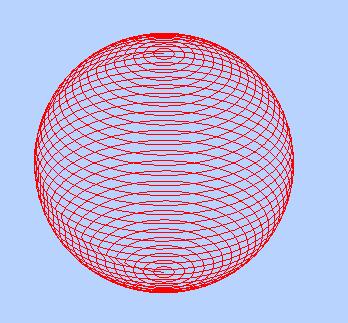
A cube mesh model , Yes 6 Face to face , At least two triangles on each face form a rectangular plane , Each triangle consists of three vertices , For the sphere mesh model , It is also through triangles to spell out a sphere , The more triangles , The closer the mesh model surface is to the sphere .
Rectangular vertex line
        var scene = new THREE.Scene();
        var geometry = new THREE.BoxGeometry(100, 100, 100);
        var material = new THREE.PointsMaterial({

            color: 0xff0000,
            size: 10.0 // Point object pixel size
        }); // Material object
        // var mesh = new THREE.Mesh(geometry, material); // Mesh model objects Mesh
        var line = new THREE.Line(geometry, material);// Line model object
        scene.add(line);
Sphere vertex line
        var scene = new THREE.Scene();
        var geometry = new THREE.BoxGeometry(100, 100, 100);
        var material = new THREE.PointsMaterial({

            color: 0xff0000,
            size: 10.0 // Point object pixel size
        }); // Material object
        // var mesh = new THREE.Mesh(geometry, material); // Mesh model objects Mesh
        var line = new THREE.Line(geometry, material);// Line model object
        scene.add(line);
Two 、 Vertex color data interpolation calculation
( One )、 Vertex color data interpolation calculation
This section introduces the vertex color of geometry
Vertex one has a coordinate data , Then he also has the corresponding vertex color data … And so on
( Two )、 Set a color for each vertex
        var scene = new THREE.Scene();
        var geometry = new THREE.BufferGeometry(); // Declare a buffer geometry object

        // Type array creates vertex positions position data
        var vertices = new Float32Array([
            0, 0, 0, // The vertices 1 coordinate
            50, 0, 0, // The vertices 2 coordinate
            0, 100, 0, // The vertices 3 coordinate

            0, 0, 10, // The vertices 4 coordinate
            0, 0, 100, // The vertices 5 coordinate
            50, 0, 10, // The vertices 6 coordinate
        ]);
        //  Create an attribute buffer object
        var attribue = new THREE.BufferAttribute(vertices, 3); //3 One for a group , As a vertex xyz coordinate
        //  Set up the geometry attributes Location of attributes position attribute
        geometry.attributes.position = attribue;
        // Type array creates vertex colors color data
        var colors = new Float32Array([
            1, 0, 0, // The vertices 1 Color
            0, 1, 0, // The vertices 2 Color
            0, 0, 1, // The vertices 3 Color

            1, 1, 0, // The vertices 4 Color
            0, 1, 1, // The vertices 5 Color
            1, 0, 1, // The vertices 6 Color
        ]);
        //  Set up the geometry attributes The color of the attribute color attribute
        geometry.attributes.color = new THREE.BufferAttribute(colors, 3); //3 One for a group , Represents the color data of a vertex RGB
        // Material object
        var material = new THREE.PointsMaterial({

            //  Render the model using vertex color data , There is no need to define color attribute
            // color: 0xff0000,
            vertexColors: THREE.VertexColors, // Based on the vertex color
            size: 10.0 // Point object pixel size
        });
        //  Point rendering mode   Point model object Points
        var points = new THREE.Points(geometry, material); // Point model object
        scene.add(points); // Point objects are added to the scene
        var axisHelper = new THREE.AxisHelper(250);
        scene.add(axisHelper);

( 3、 ... and )、 Material properties .vertexColors
Through the color attribute of the material color Set the model color , This case is not set like this , Instead, you set the material properties .vertexColors.
var material = new THREE.PointsMaterial({
  //  Render the model using vertex color data , There is no need to define color attribute
  // color: 0xff0000,
  vertexColors: THREE.VertexColors, // Based on the vertex color
  size: 10.0 // Point object pixel size
});
About the properties of materials .vertexColors You can see Material file Introduce , attribute .vertexColors The default value of is THREE.NoColors, This means that the color rendering effect of the model depends on the material properties .color, If the material properties .vertexColors Is set to THREE.VertexColors,threejs The vertex color data of the geometry is used when rendering the model geometry.attributes.color.
( Four )、 Color interpolation
        var scene = new THREE.Scene();
        var geometry = new THREE.BufferGeometry(); // Declare a buffer geometry object
        // Type array creates vertex positions position data
        var vertices = new Float32Array([
            0, 0, 0, // The vertices 1 coordinate
            50, 0, 0, // The vertices 2 coordinate
            0, 100, 0, // The vertices 3 coordinate

            0, 0, 10, // The vertices 4 coordinate
            0, 0, 100, // The vertices 5 coordinate
            50, 0, 10, // The vertices 6 coordinate
        ]);
        //  Create an attribute buffer object
        var attribue = new THREE.BufferAttribute(vertices, 3); //3 One for a group , As a vertex xyz coordinate
        //  Set up the geometry attributes Location of attributes position attribute
        geometry.attributes.position = attribue;
        // Type array creates vertex colors color data
        var colors = new Float32Array([
            1, 0, 0, // The vertices 1 Color
            0, 1, 0, // The vertices 2 Color
            0, 0, 1, // The vertices 3 Color

            1, 1, 0, // The vertices 4 Color
            0, 1, 1, // The vertices 5 Color
            1, 0, 1, // The vertices 6 Color
        ]);
        //  Set up the geometry attributes The color of the attribute color attribute
        geometry.attributes.color = new THREE.BufferAttribute(colors, 3);
        // Material object
        var material = new THREE.PointsMaterial({

            vertexColors: THREE.VertexColors,
            size: 10.0 // Point object pixel size
        });
        //  Point rendering mode   Point model object Points
        var line = new THREE.Line(geometry, material);// Line model object
        scene.add(line);
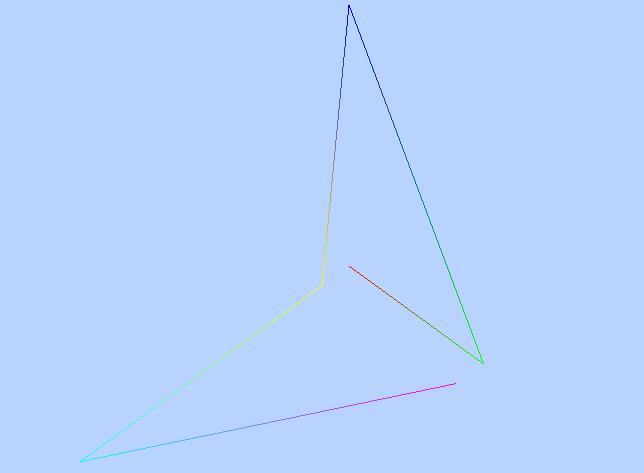
The reason for the gradient is Threejs Through the ground floor WebGL When rendering, the color data of vertices will be interpolated . Color interpolation calculation is simple , For example, the endpoint of a straight line 1 Set to red , Endpoint 2 Set it to blue , The whole line will appear from the point 1 To the red dot 2 Blue color gradient , For mesh models Mesh for , That is, the three vertices of the triangle set a color respectively , The area pixels inside the triangle will be interpolated according to the colors of the three vertices .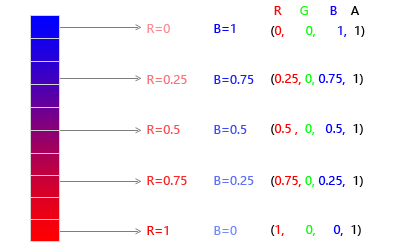
边栏推荐
- Hibernate的缓存机制/会话级缓存机制
- Nine ways to define methods in scala- Nine ways to define a method in Scala?
- Nifi from introduction to practice (nanny level tutorial) - flow
- How to use AAB to APK and APK to AAB of Google play apps on the shelves
- Low level version of drawing interface (explain each step in detail)
- 高等数学(第七版)同济大学 习题2-1 个人解答
- “用Android复刻Apple产品UI”(3)—优雅的数据统计图表
- How to thicken the brush in the graphical interface
- Detailed explanation of four modes of distributed transaction (Seata)
- 面试官:JVM如何分配和回收堆外内存
猜你喜欢
TCP congestion control details | 3 design space

Interviewer: how does the JVM allocate and recycle off heap memory
![[statement] about searching sogk1997 and finding many web crawler results](/img/1a/8ed3ca0030ea227adcd95e8b306aca.png)
[statement] about searching sogk1997 and finding many web crawler results
Mongodb installation and basic operation

【Proteus仿真】74HC595+74LS154驱动显示16X16点阵

"Remake Apple product UI with Android" (2) -- silky Appstore card transition animation
First knowledge of database

深入理解 SQL 中的 Grouping Sets 语句
Embedded development: seven reasons to avoid open source software

拼夕夕二面:说说布隆过滤器与布谷鸟过滤器?应用场景?我懵了。。
随机推荐
Is it safe to open an account with flush?
“用Android复刻Apple产品UI”(2)——丝滑的AppStore卡片转场动画
深入理解 SQL 中的 Grouping Sets 语句
Cocos Creator 2.x 自动打包(构建 + 编译)
PHP二级域名session共享方案
Jmeter线程组功能介绍
Three dimensional reconstruction of deep learning
TCP擁塞控制詳解 | 3. 設計空間
Develop team OKR in the way of "crowdfunding"
nifi从入门到实战(保姆级教程)——flow
Extraction of the same pointcut
First!! Is lancet hungry? Official documents
EditText request focus - EditText request focus
Getting started with Message Oriented Middleware
Is it safe to open an account with tongdaxin?
Deep understanding of grouping sets statements in SQL
MB10M-ASEMI整流桥MB10M
拼夕夕二面:说说布隆过滤器与布谷鸟过滤器?应用场景?我懵了。。
Qt插件之自定义插件构建和使用
Advanced Mathematics (Seventh Edition) Tongji University exercises 2-1 personal solutions