当前位置:网站首页>Binder通信过程及ServiceManager创建过程
Binder通信过程及ServiceManager创建过程
2022-07-05 12:52:00 【51CTO】
Binder通信过程
1.首先,一个进程使用 BINDER_SET_CONTEXT_MGR 命令通过 Binder 驱动将自己注册成为 ServiceManager
2.Server 通过驱动向 ServiceManager 中注册 Binder(Server 中的 Binder 实体),表明可以对外提供服务。驱动为这个 Binder 创建位于内核中的实体节点以及 ServiceManager 对实体的引用,将名字以及新建的引用打包传给 ServiceManager,ServiceManger 将其填入查找表。
3.Client 通过名字,在 Binder 驱动的帮助下从 ServiceManager 中获取到对 Binder 实体的引用,通过这个引用就能实现和 Server 进程的通信。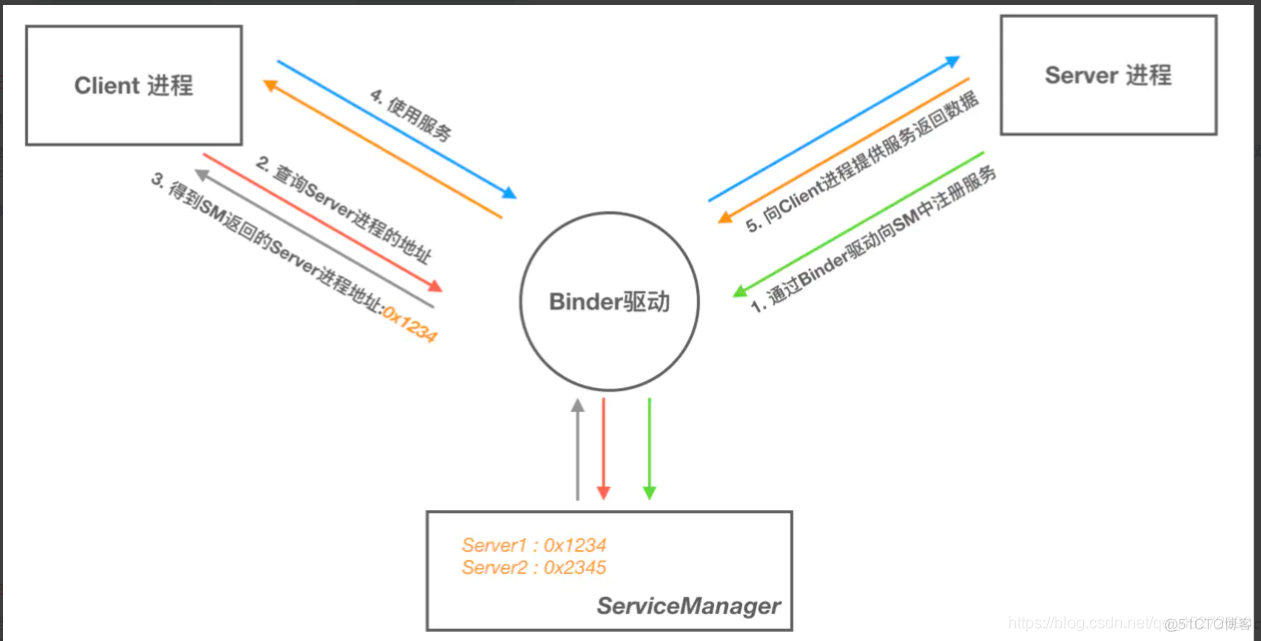
Binder通信的代理模式
当 A 进程想要获取 B 进程中的 object 时,驱动并不会真的把 object 返回给 A,而是返回了一个跟 object 看起来一模一样的代理对象 objectProxy,这个 objectProxy 具有和 object 一摸一样的方法,但是这些方法并没有 B 进程中 object 对象那些方法的能力,这些方法只需要把把请求参数交给驱动即可。对于 A 进程来说和直接调用 object 中的方法是一样的。
当 Binder 驱动接收到 A 进程的消息后,发现这是个 objectProxy 就去查询自己维护的表单,一查发现这是 B 进程 object 的代理对象。于是就会去通知 B 进程调用 object 的方法,并要求 B 进程把返回结果发给自己。当驱动拿到 B 进程的返回结果后就会转发给 A 进程,一次通信就完成了。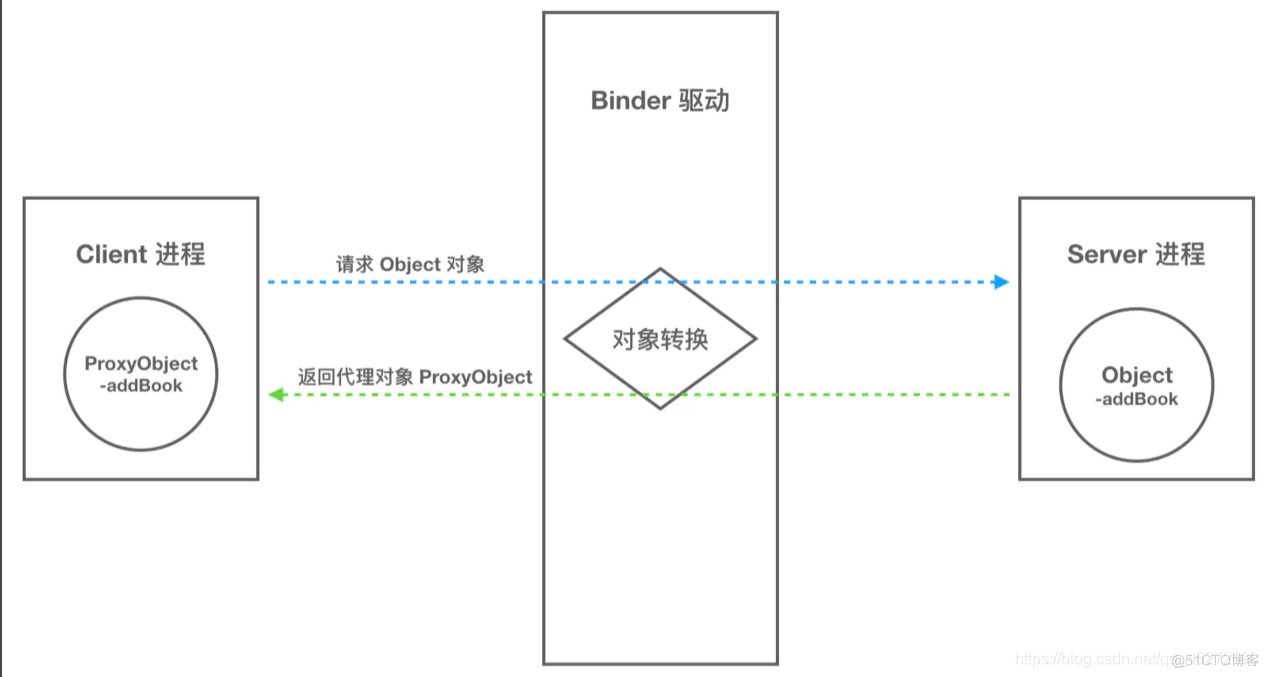
ServiceManager进程启动
1.ServiceManager成为Binder管理者
首先在android系统开始启动时通过init.rc启动了servicemanager(Native进程)可执行文件进程,系统真正的ServieManager管理最终通过Native进程servicemanager来完成。接下来分析在main函数中做了那些事情: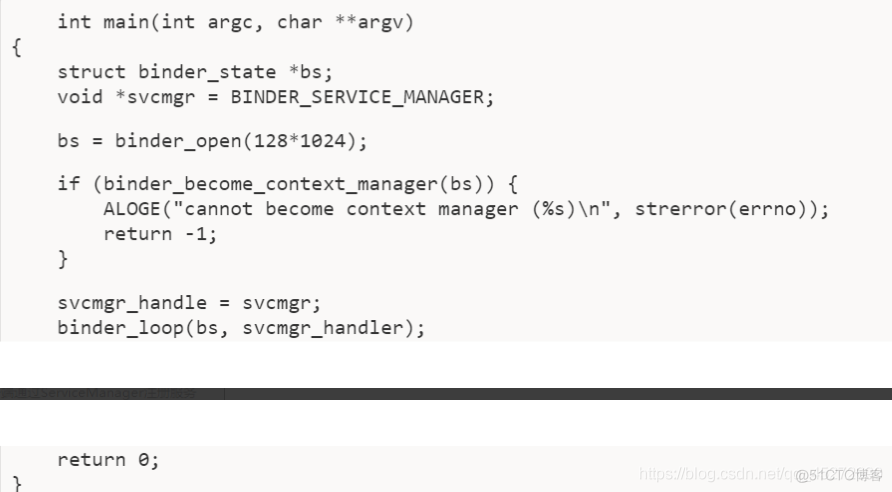
1.binder_open(128*1024)通过打开/dev/binder设备节点返回fd文件描述符,通过mmap最终实现对binder驱动128K大小的内存映射
2.binder_become_context_manager(bs)通过ioctl往设备节点发送BINDER_SET_CONTEXT_MGR命令通知Binder驱动为servicemanager创建特殊不变的0句柄实体binder_node:binder_context_mgr_node
3.Binder_loop(bs,svcmgr_handler)通过iotcl发送BINDER_WRITE_READ命令并携带BC_ENTER_LOOPER请求命令告知Binder驱动创建了binder主线程并使binder驱动创建与之对应的binder_thread结构体存储到binder_proc中,并通过for循环进入循环读取binder驱动返回信息的循环流程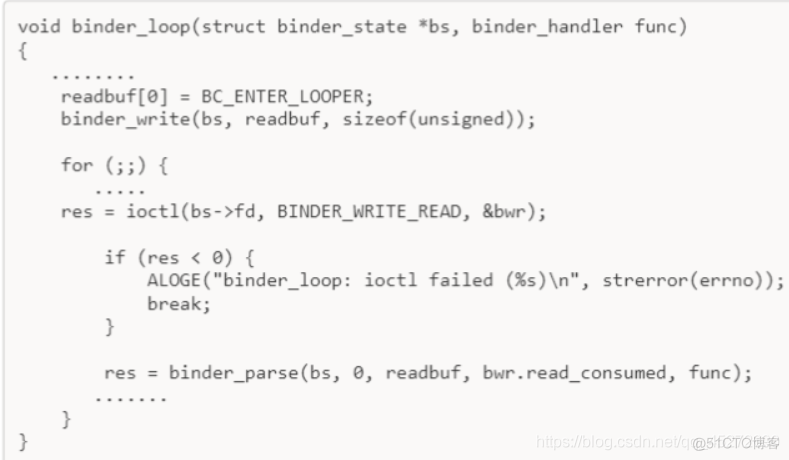
ServiceManager(native进程)最终通过获取binder驱动设备节点fd地址,与binder驱动内存映射(虚拟内存与物理内存映射),开启binder主体线程循环读取binder驱动返回的消息而成为服务端;
成为服务端后能够不断接收来自客户端(服务端 与客户端在此统称为客户端)的binder请求通信,ServiceManager(native进程)完成其他服务的注册并保存binder驱动创建的binder句柄值与服务名称字符串,保证客户端通过字符串获取其他服务引用句柄;因而ServiceManager(native进程)为binder管理者(服务注册与获取的桥梁)。
2.客户端通过ServiceManager获取服务
用户进程需要和ServiceManager(native进程)进程通信,ServiceManager进程接收到请求后去响应
1.用户进程第一步先实例化ServiceManager Binder Proxy代理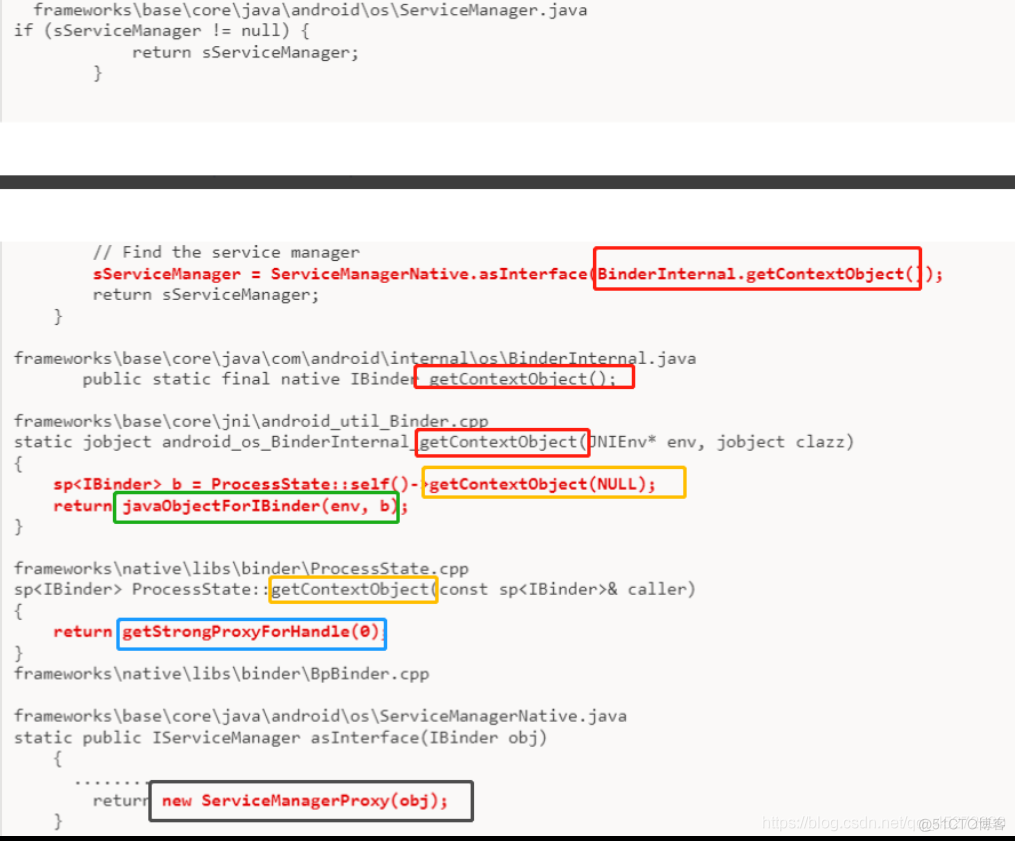
通过BinderInternal.getContextObject()调用获取到句柄值为0的BpBinder native对象,最终通过javaObjectForIbinder()函数的jni转换为BinderProxy类对象其实就是填充了这个类的mObject对象也就是ServiceManager Binder对象的引用封装对象,所以SMN才能通过asInterface完成代理Proxy的实例化
边栏推荐
- insmod 提示 Invalid module format
- ABAP editor in SAP segw transaction code
- 【云原生】Nacos中的事件发布与订阅--观察者模式
- The Research Report "2022 RPA supplier strength matrix analysis of China's banking industry" was officially launched
- MySQL giant pit: update updates should be judged with caution by affecting the number of rows!!!
- Yyds dry goods inventory # solve the real problem of famous enterprises: move the round table
- RHCSA7
- [cloud native] event publishing and subscription in Nacos -- observer mode
- 实现 1~number 之间,所有数字的加和
- 由扫地增而引起的小叙
猜你喜欢



随机推荐
自然语言处理系列(一)入门概述
跨平台(32bit和64bit)的 printf 格式符 %lld 输出64位的解决方式
【云原生】Nacos中的事件发布与订阅--观察者模式
实现 1~number 之间,所有数字的加和
Overflow toolbar control in SAP ui5 view
Flutter 绘制波浪移动动画效果,曲线和折线图
STM32 and motor development (from architecture diagram to documentation)
How to realize batch sending when fishing
LeetCode20.有效的括号
同事半个月都没搞懂selenium,我半个小时就给他整明白!顺手秀了一波爬淘宝的操作[通俗易懂]
CVPR 2022 | single step 3D target recognizer based on sparse transformer
Default parameters of function & multiple methods of function parameters
从外卖点单浅谈伪需求
Write macro with word
Laravel document reading notes -mews/captcha use (verification code function)
OpenHarmony应用开发之Navigation组件详解
Word document injection (tracking word documents) incomplete
uni-app开发语音识别app,讲究的就是简单快速。
Halcon template matching actual code (I)
初次使用腾讯云,解决只能使用webshell连接,不能使用ssh连接。