当前位置:网站首页>mips uclibc 交叉编译ffmpeg,支持 G711A 编解码
mips uclibc 交叉编译ffmpeg,支持 G711A 编解码
2022-07-07 03:30:00 【xhoufei2010】
1 说明
使用 ffmpeg 源码,进行交叉编译,支持 H264 和 G711A 编码支持
2 环境说明
硬件环境: mips 架构芯片
软件环境: Linux 任意版本
3 原理
(1)下载 ffmpeg 源码,从官网下载
(2) 修改源码,增加对 G711A (PCM_ALAW)支持
(3)使用交叉编译,对 ffmpeg 裁剪,最终控制在2M 以内
4 操作步骤
4.1 下载 ffmpeg 源码
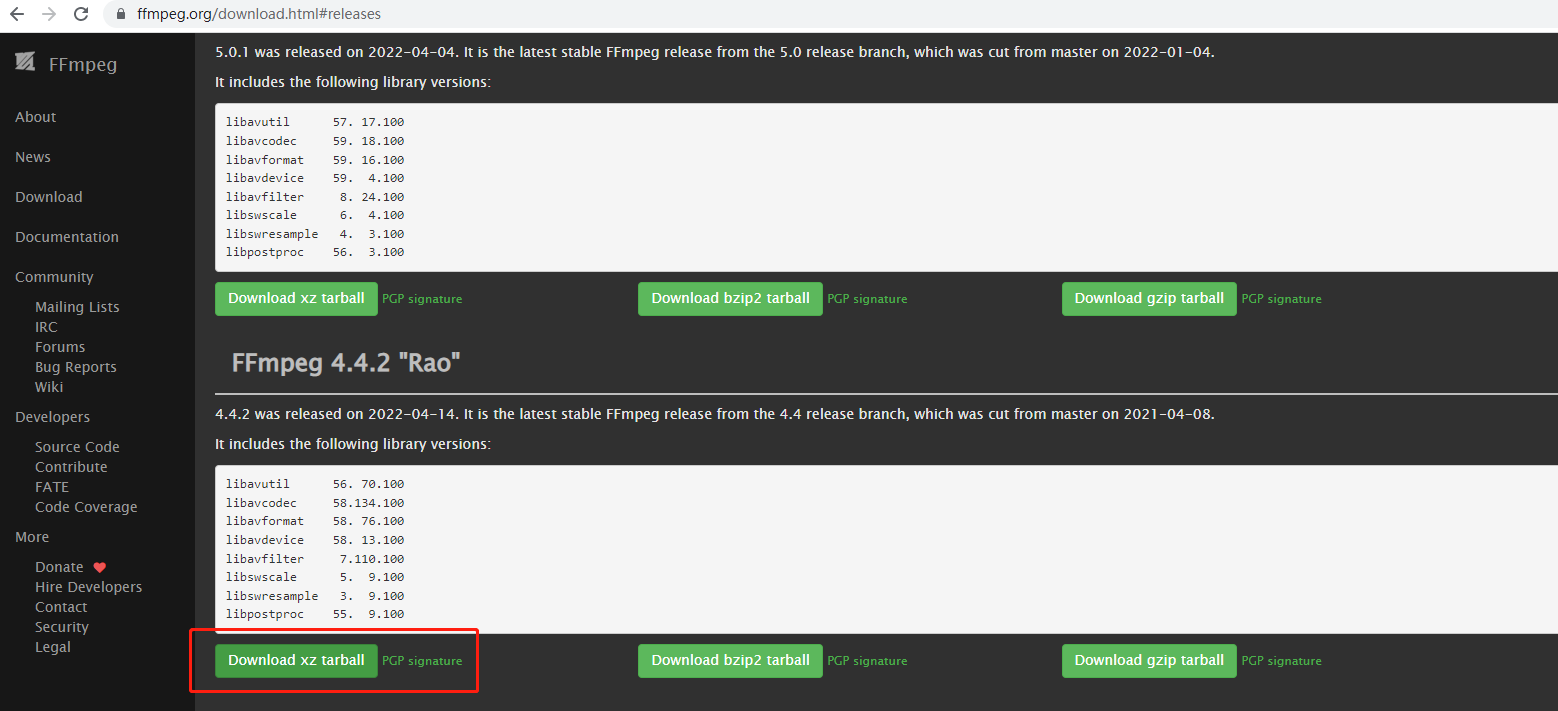
从 ffmpeg 官网下载源码包,网址如下:
https://ffmpeg.org/download.html#releases
本人使用的是 ffmpeg-4.4.2 版本
https://ffmpeg.org/releases/ffmpeg-4.4.2.tar.xz
4.2 修改源码,增加uclibc 的支持,解决sys/auxv.h: No such file or directory
如果直接编译,会提示错误
libavutil/mips/cpu.c:26:22: fatal error: sys/auxv.h: No such file or directory
修改请参考如下补丁:
diff --git a/libavutil/mips/cpu.c b/libavutil/mips/cpu.c
index 59619d54de..c5da77b22b 100644
--- a/libavutil/mips/cpu.c
+++ b/libavutil/mips/cpu.c
@@ -19,7 +19,8 @@
 #include "libavutil/cpu.h"
 #include "libavutil/cpu_internal.h"
 #include "config.h"
-#if defined __linux__ || defined __ANDROID__
+#include <features.h>
+#if (defined __linux__ || defined __ANDROID__) && !defined(__UCLIBC__)
 #include <stdint.h>
 #include <stdio.h>
 #include <string.h>
@@ -28,7 +29,7 @@
 #include "libavutil/avstring.h"
 #endif

-#if defined __linux__ || defined __ANDROID__
+#if (defined __linux__ || defined __ANDROID__) && !defined(__UCLIBC__)

 #define HWCAP_LOONGSON_CPUCFG (1 << 14)

@@ -105,7 +106,7 @@  static int cpu_flags_cpuinfo(void)

 int ff_get_cpu_flags_mips(void)
 {

-#if defined __linux__ || defined __ANDROID__
+#if (defined __linux__ || defined __ANDROID__) && !defined(__UCLIBC__)
     if (cpucfg_available())
         return cpu_flags_cpucfg();
     else
4.3 增加 G711A 格式支持
修改 ffmpeg-4.4.2/libavformat/movenc.c 文件,参考如下补丁包修改即可,也可以直接打补丁
本补丁包针对于 ffmpeg-4.4.2 版本,其他版本请参考代码修改调整代码的位置
--- ffmpeg-4.4.2/libavformat/movenc.c	2022-04-15 04:13:38.000000000 +0800
+++ ffmpeg-4.4.2_new/libavformat/movenc.c	2022-05-18 02:28:02.335515063 +0800
@@ -1190,12 +1190,18 @@ static int mov_write_audio_tag(AVFormatC
                 track->par->codec_id == AV_CODEC_ID_ALAC ||
                 track->par->codec_id == AV_CODEC_ID_OPUS) {

                 avio_wb16(pb, track->par->channels);
+            } else if (track->par->codec_id == AV_CODEC_ID_PCM_ALAW) {

+                avio_wb16(pb, track->par->channels > 0 ?
+                              track->par->channels : 1);
             } else {

                 avio_wb16(pb, 2);
             }
             if (track->par->codec_id == AV_CODEC_ID_FLAC ||
                 track->par->codec_id == AV_CODEC_ID_ALAC) {

                 avio_wb16(pb, track->par->bits_per_raw_sample);
+            } else if (track->par->codec_id == AV_CODEC_ID_PCM_ALAW) {

+                avio_wb16(pb, track->par->bits_per_coded_sample > 0 ?
+                              track->par->bits_per_coded_sample : 16);
             } else {

                 avio_wb16(pb, 16);
             }
@@ -7208,6 +7214,7 @@ static const AVCodecTag codec_mp4_tags[]
     {
     AV_CODEC_ID_VP9,             MKTAG('v', 'p', '0', '9') },
     {
     AV_CODEC_ID_AV1,             MKTAG('a', 'v', '0', '1') },
     {
     AV_CODEC_ID_AAC,             MKTAG('m', 'p', '4', 'a') },
+    {
     AV_CODEC_ID_PCM_ALAW,        MKTAG('a', 'l', 'a', 'w') },
     {
     AV_CODEC_ID_ALAC,            MKTAG('a', 'l', 'a', 'c') },
     {
     AV_CODEC_ID_MP4ALS,          MKTAG('m', 'p', '4', 'a') },
     {
     AV_CODEC_ID_MP3,             MKTAG('m', 'p', '4', 'a') },
4.4 交叉编译,并进行裁剪
./configure \
--prefix=$(pwd)/output \
--enable-cross-compile --arch=mips --target-os=linux \
--cross-prefix=mips-linux-uclibc-gnu- --cc=mips-linux-uclibc-gnu-gcc-5.4.0 \
--disable-everything \
--disable-mipsfpu --disable-yasm \
--disable-autodetect \
--disable-avdevice \
--disable-avfilter \
--disable-msa \
--disable-debug \
--disable-protocols --enable-protocol=file \
--disable-demuxers --enable-demuxer=mov \
--disable-muxers --enable-muxer=mp4 --enable-muxer=mov \
--disable-decoders --enable-decoder=pcm_alaw --enable-decoder=h264  --enable-decoder=mpeg4 \
--disable-encoders --enable-encoder=pcm_s16le \
--disable-bsfs --enable-bsf=h264_mp4toannexb \
--disable-static --enable-shared \
--enable-small
说明:
–prefix=$(pwd)/output 设置安装目录
–enable-cross-compile --arch=mips --target-os=linux 配置为 mips 架构
–cross-prefix=mips-linux-uclibc-gnu- --cc=mips-linux-uclibc-gnu-gcc-5.4.0 交叉编译工具链和GCC编译器设置
–disable-everything 关闭多余的项目,减少编译库大小,这个根据个人情况而定
–disable-mipsfpu --disable-yasm 关闭mipsfpu ,不关闭编译报错
–disable-autodetect 关闭 autodetect ,减小库提及
–disable-avdevice 关闭 avdevice,嵌入式设备不需要
–disable-avfilter 关闭 avfilter,项目不需要
–disable-msa 关闭 msa ,项目不需要
–disable-debug \ 关闭 debug ,减小体积
–disable-protocols --enable-protocol=file 协议仅仅支持文件协议,可以支持文件的封装和解封装
–disable-demuxers --enable-demuxer=mov 支持对 mov 格式文件的分离,本人项目使用MP4格式,demuxers 没有 MP4 选项,但是 Mov 格式兼容 mp4
–disable-muxers --enable-muxer=mp4 --enable-muxer=mov
支持mp4文件合并,用于打包 Mp4文件
–disable-decoders --enable-decoder=pcm_alaw --enable-decoder=h264 --enable-decoder=mpeg4
解码器只开启 pcm_alaw (g711a) h264 mpeg4 这3种格式
–disable-encoders --enable-encoder=pcm_s16le
编码器只开启 pcm_s16le 格式,因为本人项目需要对音频重采样为 PCM 16K,所以需要使用编码器
–disable-bsfs --enable-bsf=h264_mp4toannexb
bsfs 开启 h264,用于h264文件解码,必选
–disable-static --enable-shared
使能动态库编译方式
–enable-small
让文件编译更小
编译文件库大小最终裁剪之后,如图4-2所示: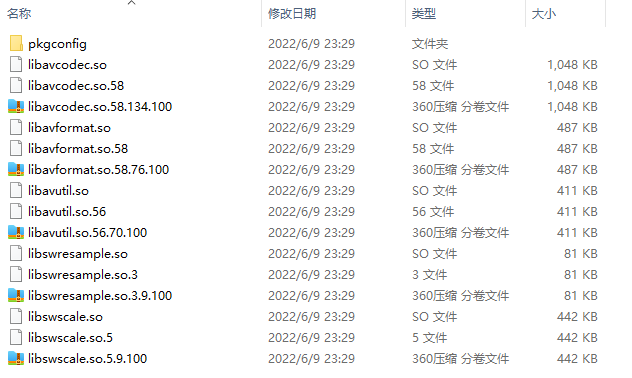
5 视频格式介绍:
合成文件: h264+g711a --> mp4 ,其中 h264和g711a采用mips 芯片自带的硬件编码器,所以ffmeg 没有编译对应的编码器
解码: mp4—> h264 + pcm,将 h264 和 pcm 解码
不同项目采用的编码格式不一样,需要修改为自己适合的配置参数,如果不清楚配置参数,可以使用
./configure --help
查看
如果需要 pcm 转为 g711a, 可参考其他博客,进行转码
https://blog.csdn.net/jenie/article/details/106298846
边栏推荐
- transform-origin属性详解
- from . onnxruntime_ pybind11_ State Import * noqa ddddocr operation error
- . Net 5 fluentftp connection FTP failure problem: this operation is only allowed using a successfully authenticated context
- Please answer the questions about database data transfer
- How to do sports training in venues?
- MySQL view bin log and recover data
- 詳解機器翻譯任務中的BLEU
- 异步组件和Suspense(真实开发中)
- $refs: get the element object or sub component instance in the component:
- How can flinksql calculate the difference between a field before and after update when docking with CDC?
猜你喜欢
弹性布局(一)
Maze games based on JS
Leetcode t1165: log analysis
How DHCP router works

How can clothing stores make profits?

. Net core accesses uncommon static file types (MIME types)
Nesting and splitting of components
Release notes of JMeter version 5.5
SQLMAP使用教程(四)实战技巧三之绕过防火墙
Precise space-time travel flow regulation system - ultra-high precision positioning system based on UWB
随机推荐
Advantages of using net core / why
Master-slave replication principle of MySQL
弹性布局(二)
SolidWorks GB Library (steel profile library, including aluminum profile, aluminum tube and other structures) installation and use tutorial (generating aluminum profile as an example)
Anr principle and Practice
Brand · consultation standardization
数据资产管理与数据安全国内外最新趋势
Communication of components
2018年江苏省职业院校技能大赛高职组“信息安全管理与评估”赛项任务书第一阶段答案
Basic process of network transmission using tcp/ip four layer model
Get the city according to IP
MOS管参数μCox得到的一种方法
Asynchronous components and suspend (in real development)
Kuboard无法发送邮件和钉钉告警问题解决
. Net 5 fluentftp connection FTP failure problem: this operation is only allowed using a successfully authenticated context
Introduction to abnova's in vitro mRNA transcription workflow and capping method
2018年江苏省职业院校技能大赛高职组“信息安全管理与评估”赛项任务书
Esxi attaching mobile (Mechanical) hard disk detailed tutorial
Precise space-time travel flow regulation system - ultra-high precision positioning system based on UWB
Torefs API and toref API