当前位置:网站首页>PV静态创建和动态创建
PV静态创建和动态创建
2022-07-07 17:03:00 【傻啦猫@[email protected]】
NFS(Network File System)
在使用Kubernetes的过程中,我们经常会用到存储。存储的最大作用,就是使容器内的数据实现持久化保存,防止删库跑路的现象发生。而要实现这一功能,就离不开网络文件系统。kubernetes通过NFS网络文件系统,将每个节点的挂载数据进行同步,那么就保证了pod被故障转移等情况,依然能读取到被存储的数据。
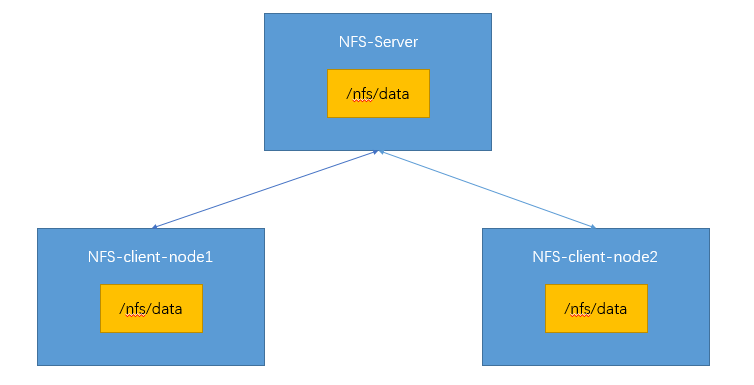
一、安装NFS
在kubernetes集群内安装NFS。
所有节点执行
yum install -y nfs-utils
nfs主节点执行
echo "/nfs/data/ *(insecure,rw,sync,no_root_squash)" > /etc/exports  # 暴露了目录/nfs/data/,`*`表示所有节点都可以访问。
mkdir -p /nfs/data
systemctl enable rpcbind --now
systemctl enable nfs-server --now
# 配置生效
exportfs -r
# 检查验证
[[email protected] ~]# exportfs
/nfs/data      <world>
[[email protected] ~]#
nfs从节点执行
# 展示172.31.0.2有哪些目录可以挂载
showmount -e 172.31.0.2  # ip改成自己的主节点ip

mkdir -p /nfs/data
# 将本地目录和远程目录进行挂载
mount -t nfs 172.31.0.2:/nfs/data /nfs/data
二、验证
# 写入一个测试文件
echo "hello nfs server" > /nfs/data/test.txt

通过这些步骤,我们可以看到NFS文件系统已经安装成功。172.31.0.2作为系统的主节点,暴露了/nfs/data,其他从节点的/nfs/data和主节点的/nfs/data进行了挂载。在kubernetes集群内,可以任意选取一台服务器作为server,其他服务器作为client。
PV&PVC
PV:持久卷(Persistent Volume),将应用需要持久化的数据保存到指定位置。
PVC:持久卷申明(Persistent Volume Claim),申明需要使用的持久卷规格。
Pod中的数据需要持久化保存,保存到哪里呢?当然是保存到PV中,PV所在的位置,就是我们上面说到的NFS文件系统。那么如何使用PV呢?就是通过PVC。就好比PV是存储,PVC就是告诉PV,我要开始使用你了。
PV的创建一般分为两种,静态创建和动态创建。静态创建就是提前创建好很多PV,形成一个PV池,按照PVC的规格要求选择合适的进行供应。动态创建则不事先创建,而是根据PVC的规格要求,要求什么规格的就创建什么规格的。从资源的利用角度来讲,动态创建要更好一些。
一、静态创建PV
创建数据存放目录。
# nfs主节点执行
[[email protected] data]# pwd
/nfs/data
[[email protected] data]# mkdir -p /nfs/data/01
[[email protected] data]# mkdir -p /nfs/data/02
[[email protected] data]# mkdir -p /nfs/data/03
[[email protected] data]# ls
01  02  03
[[email protected] data]#
创建PV,pv.yml
apiVersion: v1
kind: PersistentVolume
metadata:
  name: pv01-10m
spec:
  capacity:
    storage: 10M
  accessModes:
    - ReadWriteMany
  storageClassName: nfs
  nfs:
    path: /nfs/data/01
    server: 172.31.0.2
---
apiVersion: v1
kind: PersistentVolume
metadata:
  name: pv02-1gi
spec:
  capacity:
    storage: 1Gi
  accessModes:
    - ReadWriteMany
  storageClassName: nfs
  nfs:
    path: /nfs/data/02
    server: 172.31.0.2
---
apiVersion: v1
kind: PersistentVolume
metadata:
  name: pv03-3gi
spec:
  capacity:
    storage: 3Gi
  accessModes:
    - ReadWriteMany
  storageClassName: nfs
  nfs:
    path: /nfs/data/03
    server: 172.31.0.2
[[email protected] ~]# kubectl apply -f pv.yml
persistentvolume/pv01-10m created
persistentvolume/pv02-1gi created
persistentvolume/pv03-3gi created
[[email protected] ~]# kubectl get persistentvolume
NAME       CAPACITY   ACCESS MODES   RECLAIM POLICY   STATUS      CLAIM   STORAGECLASS   REASON   AGE
pv01-10m   10M        RWX            Retain           Available           nfs                     45s
pv02-1gi   1Gi        RWX            Retain           Available           nfs                     45s
pv03-3gi   3Gi        RWX            Retain           Available           nfs                     45s
[[email protected] ~]#
三个文件夹对应三个PV,大小分别为10M、1Gi、3Gi,这三个PV形成一个PV池。
创建PVC,pvc.yml
kind: PersistentVolumeClaim
apiVersion: v1
metadata:
  name: nginx-pvc
spec:
  accessModes:
    - ReadWriteMany
  resources:
    requests:
      storage: 200Mi
  storageClassName: nfs
[[email protected] ~]# kubectl apply -f pvc.yml
persistentvolumeclaim/nginx-pvc created
[[email protected] ~]# kubectl get pvc,pv
NAME                              STATUS   VOLUME     CAPACITY   ACCESS MODES   STORAGECLASS   AGE
persistentvolumeclaim/nginx-pvc   Bound    pv02-1gi   1Gi        RWX            nfs            14m

NAME                        CAPACITY   ACCESS MODES   RECLAIM POLICY   STATUS      CLAIM               STORAGECLASS   REASON   AGE
persistentvolume/pv01-10m   10M        RWX            Retain           Available                       nfs                     17m
persistentvolume/pv02-1gi   1Gi        RWX            Retain           Bound       default/nginx-pvc   nfs                     17m
persistentvolume/pv03-3gi   3Gi        RWX            Retain           Available                       nfs                     17m
[[email protected] ~]#
可以发现使用200Mi的PVC,会在PV池中绑定最佳的1Gi大小的pv02-1gi的PV去使用,状态为Bound。后面创建Pod或Deployment的时候,使用PVC即可将数据持久化保存到PV中,而且NFS的任意节点可以同步。
二、动态创建PV
配置动态供应的默认存储类,sc.yml
# 创建了一个存储类
apiVersion: storage.k8s.io/v1
kind: StorageClass
metadata:
  name: nfs-storage
  annotations:
    storageclass.kubernetes.io/is-default-class: "true"
provisioner: k8s-sigs.io/nfs-subdir-external-provisioner
parameters:
  archiveOnDelete: "true"  ## 删除pv的时候,pv的内容是否要备份

---
apiVersion: apps/v1
kind: Deployment
metadata:
  name: nfs-client-provisioner
  labels:
    app: nfs-client-provisioner
  # replace with namespace where provisioner is deployed
  namespace: default
spec:
  replicas: 1
  strategy:
    type: Recreate
  selector:
    matchLabels:
      app: nfs-client-provisioner
  template:
    metadata:
      labels:
        app: nfs-client-provisioner
    spec:
      serviceAccountName: nfs-client-provisioner
      containers:
        - name: nfs-client-provisioner
          image: registry.cn-hangzhou.aliyuncs.com/lfy_k8s_images/nfs-subdir-external-provisioner:v4.0.2
          # resources:
          #    limits:
          #      cpu: 10m
          #    requests:
          #      cpu: 10m
          volumeMounts:
            - name: nfs-client-root
              mountPath: /persistentvolumes
          env:
            - name: PROVISIONER_NAME
              value: k8s-sigs.io/nfs-subdir-external-provisioner
            - name: NFS_SERVER
              value: 172.31.0.2 ## 指定自己nfs服务器地址
            - name: NFS_PATH
              value: /nfs/data  ## nfs服务器共享的目录
      volumes:
        - name: nfs-client-root
          nfs:
            server: 172.31.0.2
            path: /nfs/data
---
apiVersion: v1
kind: ServiceAccount
metadata:
  name: nfs-client-provisioner
  # replace with namespace where provisioner is deployed
  namespace: default
---
kind: ClusterRole
apiVersion: rbac.authorization.k8s.io/v1
metadata:
  name: nfs-client-provisioner-runner
rules:
  - apiGroups: [""]
    resources: ["nodes"]
    verbs: ["get", "list", "watch"]
  - apiGroups: [""]
    resources: ["persistentvolumes"]
    verbs: ["get", "list", "watch", "create", "delete"]
  - apiGroups: [""]
    resources: ["persistentvolumeclaims"]
    verbs: ["get", "list", "watch", "update"]
  - apiGroups: ["storage.k8s.io"]
    resources: ["storageclasses"]
    verbs: ["get", "list", "watch"]
  - apiGroups: [""]
    resources: ["events"]
    verbs: ["create", "update", "patch"]
---
kind: ClusterRoleBinding
apiVersion: rbac.authorization.k8s.io/v1
metadata:
  name: run-nfs-client-provisioner
subjects:
  - kind: ServiceAccount
    name: nfs-client-provisioner
    # replace with namespace where provisioner is deployed
    namespace: default
roleRef:
  kind: ClusterRole
  name: nfs-client-provisioner-runner
  apiGroup: rbac.authorization.k8s.io
---
kind: Role
apiVersion: rbac.authorization.k8s.io/v1
metadata:
  name: leader-locking-nfs-client-provisioner
  # replace with namespace where provisioner is deployed
  namespace: default
rules:
  - apiGroups: [""]
    resources: ["endpoints"]
    verbs: ["get", "list", "watch", "create", "update", "patch"]
---
kind: RoleBinding
apiVersion: rbac.authorization.k8s.io/v1
metadata:
  name: leader-locking-nfs-client-provisioner
  # replace with namespace where provisioner is deployed
  namespace: default
subjects:
  - kind: ServiceAccount
    name: nfs-client-provisioner
    # replace with namespace where provisioner is deployed
    namespace: default
roleRef:
  kind: Role
  name: leader-locking-nfs-client-provisioner
  apiGroup: rbac.authorization.k8s.io
这里注意ip修改为自己的,而且镜像仓库地址已换成阿里云的,防止镜像下载不下来。
[[email protected] ~]# kubectl apply -f sc.yml
storageclass.storage.k8s.io/nfs-storage created
deployment.apps/nfs-client-provisioner created
serviceaccount/nfs-client-provisioner created
clusterrole.rbac.authorization.k8s.io/nfs-client-provisioner-runner created
clusterrolebinding.rbac.authorization.k8s.io/run-nfs-client-provisioner created
role.rbac.authorization.k8s.io/leader-locking-nfs-client-provisioner created
rolebinding.rbac.authorization.k8s.io/leader-locking-nfs-client-provisioner created
[[email protected] ~]#
确认配置是否生效
[[email protected] ~]# kubectl get sc
NAME                    PROVISIONER                                   RECLAIMPOLICY   VOLUMEBINDINGMODE   ALLOWVOLUMEEXPANSION   AGE
nfs-storage (default)   k8s-sigs.io/nfs-subdir-external-provisioner   Delete          Immediate           false                  6s
[[email protected] ~]#
动态供应测试,pvc.yml
kind: PersistentVolumeClaim
apiVersion: v1
metadata:
  name: nginx-pvc
spec:
  accessModes:
    - ReadWriteMany
  resources:
    requests:
      storage: 200Mi
[[email protected] ~]# kubectl apply -f pvc.yml
persistentvolumeclaim/nginx-pvc created
[[email protected] ~]# kubectl get pvc
NAME        STATUS   VOLUME                                     CAPACITY   ACCESS MODES   STORAGECLASS   AGE
nginx-pvc   Bound    pvc-7b01bc33-826d-41d0-a990-8c1e7c997e6f   200Mi      RWX            nfs-storage    9s
[[email protected] ~]# kubectl get pv
NAME                                       CAPACITY   ACCESS MODES   RECLAIM POLICY   STATUS   CLAIM               STORAGECLASS   REASON   AGE
pvc-7b01bc33-826d-41d0-a990-8c1e7c997e6f   200Mi      RWX            Delete           Bound    default/nginx-pvc   nfs-storage             16s
[[email protected] ~]#
pvc声明需要200Mi的空间,那么便创建了200Mi的pv,状态为Bound,测试成功。后面创建Pod或Deployment的时候,使用PVC即可将数据持久化保存到PV中,而且NFS的任意节点可以同步。
小结
这样就能明白了,NFS、PV和PVC为kubernetes集群提供了数据存储支持,应用被任意节点部署,那么之前的数据依然能够读取到。
本文由 mdnice 多平台发布
版权声明
本文为[傻啦猫@[email protected]]所创,转载请带上原文链接,感谢
https://blog.csdn.net/weixin_45842494/article/details/125630114
边栏推荐
- App capture of charles+drony
- 【剑指 Offer】59 - I. 滑动窗口的最大值
- 链式二叉树的基本操作(C语言实现)
- 微信网页调试8.0.19换掉X5内核,改用xweb,所以x5调试方式已经不能用了,现在有了解决方案
- SD_ DATA_ SEND_ SHIFT_ REGISTER
- 高考填志愿规则
- Antisamy: a solution against XSS attack tutorial
- 国内的软件测试会受到偏见吗
- 如何选择合适的自动化测试工具?
- Is AI more fair than people in the distribution of wealth? Research on multiplayer game from deepmind
猜你喜欢
Static routing configuration
Comparison and selection of kubernetes Devops CD Tools
![Learn open62541 -- [67] add custom enum and display name](/img/98/e5e25af90b3f98c2be11d7d21e5ea6.png)
Learn open62541 -- [67] add custom enum and display name

Antisamy: a solution against XSS attack tutorial
I feel cheated. Wechat tests the function of "size number" internally, and two wechat can be registered with the same mobile number

微服务远程Debug,Nocalhost + Rainbond微服务开发第二弹
In the first half of 2022, I found 10 books that have been passed around by my circle of friends
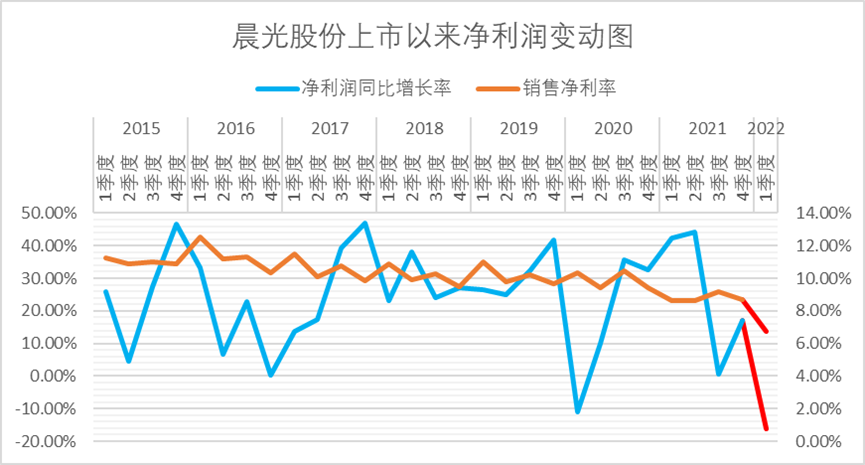
如何给“不卖笔”的晨光估值?
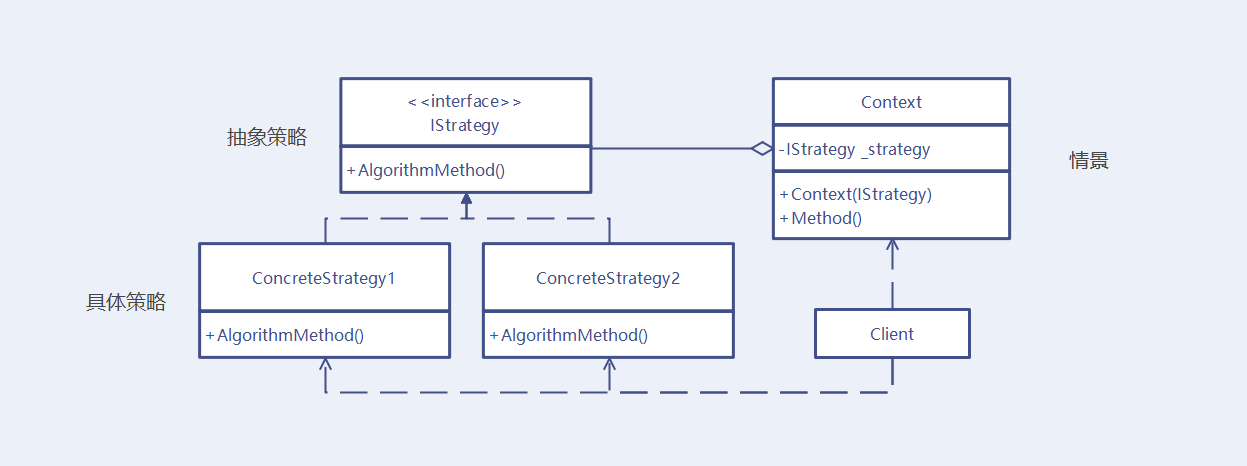
Policy mode - unity
Redis
随机推荐
Big Ben (Lua)
2022上半年朋友圈都在传的10本书,找到了
The performance and efficiency of the model that can do three segmentation tasks at the same time is better than maskformer! Meta & UIUC proposes a general segmentation model with better performance t
【剑指 Offer】59 - I. 滑动窗口的最大值
testing and SQA_动态白盒測试[通俗易懂]
Borui data was selected in the 2022 love analysis - Panoramic report of it operation and maintenance manufacturers
SD_ DATA_ RECEIVE_ SHIFT_ REGISTER
Initial experience of cache and ehcache "suggestions collection"
国内的软件测试会受到偏见吗
App capture of charles+postern
Redis的发布与订阅
Reuse of data validation framework Apache bval
【软件测试】从企业版BOSS直聘,看求职简历,你没被面上是有原因的
App capture of charles+drony
微服务远程Debug,Nocalhost + Rainbond微服务开发第二弹
For friends who are not fat at all, nature tells you the reason: it is a genetic mutation
前首富,沉迷种田
Policy mode - unity
[Tawang methodology] Tawang 3W consumption strategy - U & a research method
RISCV64