当前位置:网站首页>Wenet: E2E speech recognition tool for industrial implementation
Wenet: E2E speech recognition tool for industrial implementation
2022-07-05 04:29:00 【Wang Xiaoxi WW】
WeNet: Industrial oriented E2E Speech recognition tools
List of articles
One 、WeNet Build a speech recognition platform
1、 Reference material
2、 Quickly build WeNet platform
Reference resources WeNet Chinese document
Download the official pre training model , And start the docker service , Load model , Provide websocket Speech recognition service of the Protocol .
wget https://wenet-1256283475.cos.ap-shanghai.myqcloud.com/models/aishell2/20210618_u2pp_conformer_libtorch.tar.gz
tar -xf 20210618_u2pp_conformer_libtorch.tar.gz
model_dir=$PWD/20210618_u2pp_conformer_libtorch
docker run --rm -it -p 10086:10086 -v $model_dir:/home/wenet/model wenetorg/wenet-mini:latest bash /home/run.sh
Note:
there
$PWD = "/home/wenet/model".Make sure Pre training model file The storage location of should be correct , Namely decompress in
$PWDNext , Execute the following commandmodel_dir=$PWD/20210618_u2pp_conformer_libtorchAssign variables , Otherwise it will be reported :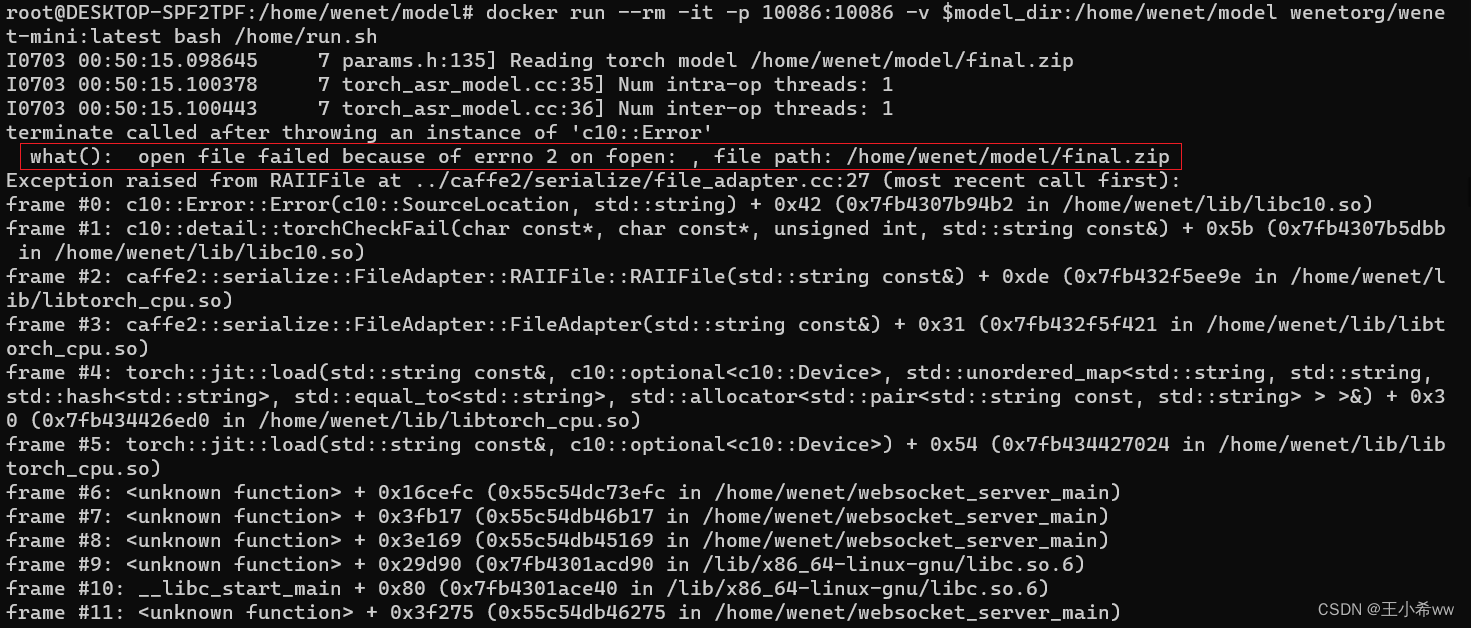
Real time recognition
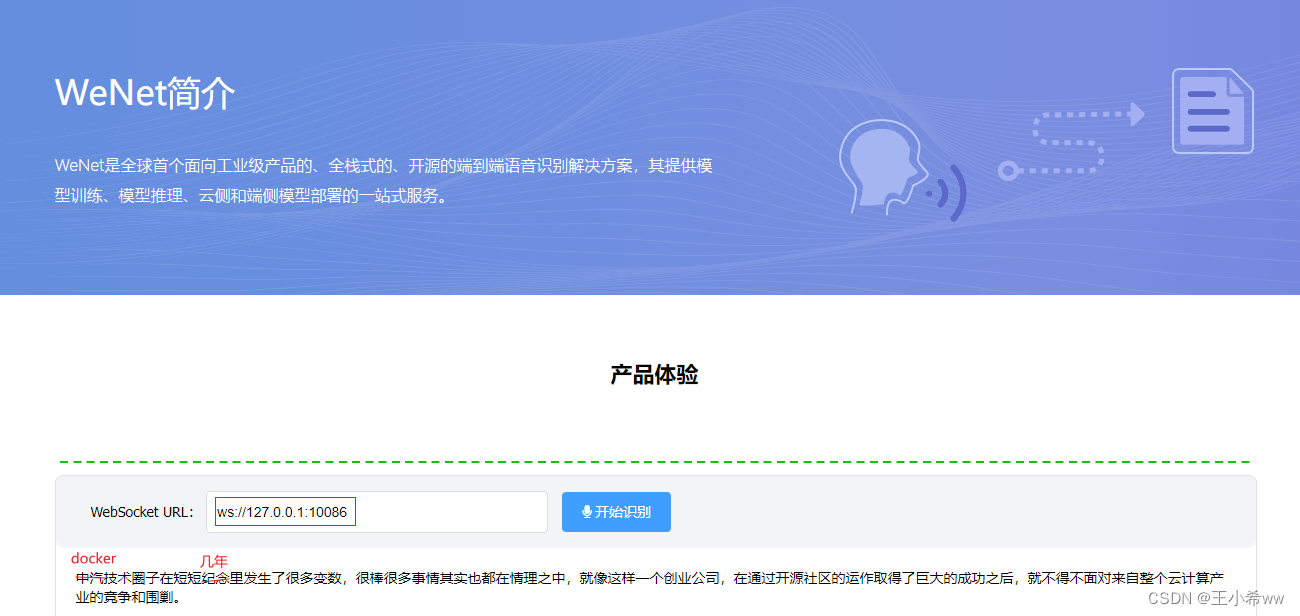
Open the file using the browser **index.html, stay WebSocket URL Fill in the ws://127.0.0.1:10086 ( If in windows Pass through wsl2** function docker, Then use ws://localhost:10086) , Allow browser pop-up requests to use microphones , Real time speech recognition through microphone .
Use here wsl2 Under the docker demonstrate : If you are close to the microphone , The false detection rate is relatively low .
Two 、WeNet Realize reasoning ( Can't use... For the time being onnx cpu Version reasoning )
Note:
If only wenet/bin/recognize.py, Use libTorch Model reasoning , Can be in windows Build an environment in , Refer to for the specific construction process WeNet Official website
If you want to use wenet/bin/recognize_onnx.py Reasoning , Need to download first ctc_encoder, Pay attention here pypi Upper ctc_encoder Only 2020 Version of (WeNet1.0), And current WeNet3.0 Version inconsistency , So we need to go to https://github.com/Slyne/ctc_decoder Download and compile . Due to compilation swig_encoder You need to use bash command , So try to linux Running in the system , Use here WSL + ubuntu As a solution .
Actually windows install git You can execute bash command , It's just that it's being installed here
wget.exe,swig.exe,git cloneCorresponding package(kenlm,ThreadPool) after , For downloaded openfst-1.6.3, Even in VC It's complete.hfile , Unable to compile successfully .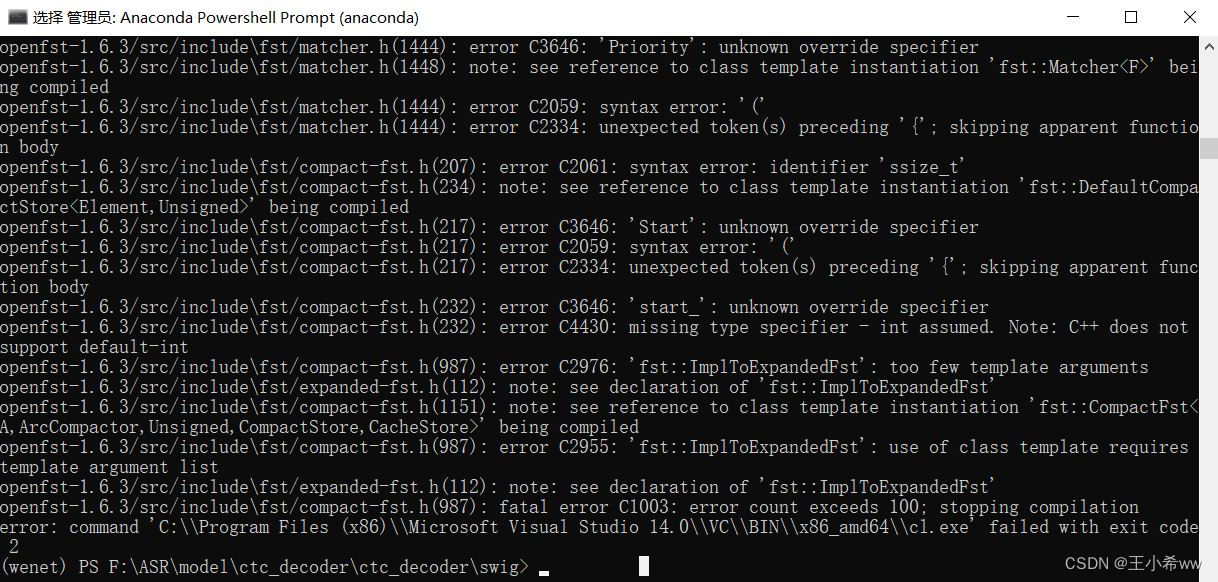
1、 build WeNet Environmental Science
Here, due to trying to use onnx The reasoning model , Therefore use WSL + ubuntu As a solution
WSL + Docker Desktop Use tutorial reference WSL Ubuntu + Docker Desktop build python Environmental Science
On completion WSL and Docker Desktop After installation ,WeNet The environment configuration steps are as follows :
Instantiation anaconda Containers
docker run -it --name="anaconda" -p 8888:8888 continuumio/anaconda3 /bin/bashIf you quit , It can be restarted anaconda Containers
# restart
docker start anaconda
docker exec -it anaconda /bin/bash
stay base Environmental Science The configuration wenet Environmental Science ( Do not create virtual environments , After convenience, it is packaged into an image , for pycharm Use )
take WSL Medium wenet Project copy to docker In the container ( Suppose that WSL Of
/home/usrThere are wenet project )docker cp /home/usr/wenet/requirements.txt 9cf7b3c196f3:/home/ #9cf7b3c196f3 by anaconda Containers idGet into anaconda In container , stay
/home/Use pip Install all packages (conda Source modification reference ubuntu Replace conda Source )pip install -r requirements.txt -i https://pypi.tuna.tsinghua.edu.cn/simple conda install pytorch=1.10.0 torchvision torchaudio=0.10.0 cudatoolkit=11.1 -c pytorch -c conda-forgedownload ctc_encoder project ( Give Way conformer It can be used in speech recognition beam_search Method )
ctc_encoder The official website is as follows :https://github.com/Slyne/ctc_decoder.
because
github clonestay ubuntu It may not work well , So in windows Intoswig/setup.sh:#!/usr/bin/env bash if [ ! -d kenlm ]; then git clone https://github.com/kpu/kenlm.git echo -e "\n" fi if [ ! -d openfst-1.6.3 ]; then echo "Download and extract openfst ..." wget http://www.openfst.org/twiki/pub/FST/FstDownload/openfst-1.6.3.tar.gz --no-check-certificate tar -xzvf openfst-1.6.3.tar.gz echo -e "\n" fi if [ ! -d ThreadPool ]; then git clone https://github.com/progschj/ThreadPool.git echo -e "\n" fi echo "Install decoders ..." # python3 setup.py install --num_processes 10 python3 setup.py install --user --num_processes 10After installing the necessary packages ( stay
git bashUse in setup.sh The command ,wget,swig Direct installation exe that will do ), The overall document structure is as follows ( There are four more files ):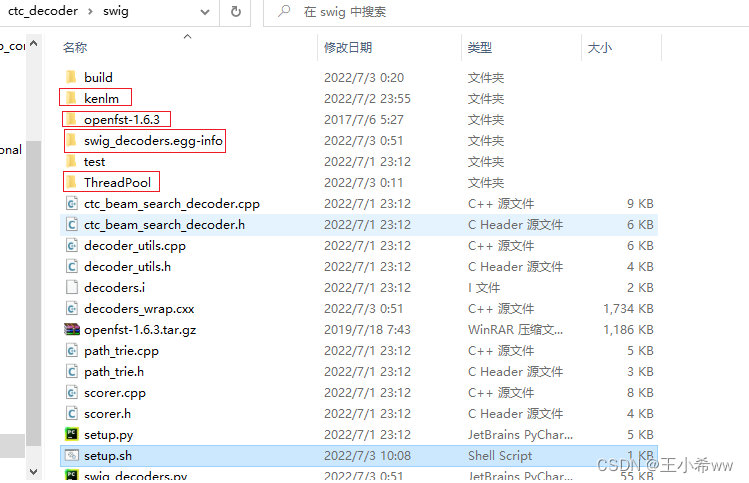
Then put the complete ctc_encoder Copied to the anaconda In the container , Just compile it .
compile ctc_encoder:
Let's say that now anaconda In the container ,ctc_encoder The project in
/homeUnder the table of contents , Get into swig After folder , functionbash setup.shYou can compile ( It needs to be done firstapt install gcc,apt install g++)To configure onnx,onnxruntime Environmental Science
pip install onnx==1.9.0 -i https://pypi.tuna.tsinghua.edu.cn/simple
pip install onnxruntime==1.9.0 -i https://pypi.tuna.tsinghua.edu.cn/simple
take Docker The runtime container is packaged as an image
take anaconda The environment of the container runtime is packaged into an image , to pycharm Professional Edition calls , Reference resources Pycharm Use docker Environment development in container
#OPTIONS explain :
# -a : The author of the image submitted ;
# -c : Use Dockerfile Command to create a mirror ;
# -m : Instructions for submission ;
# -p : stay commit when , Pause container .

#2b1ad7022d19 by anaconda When the container is running id
docker commit -a "wangxiaoxi" -m "wenet_env" 2b1ad7022d19  wenet_env:v1
2、 model training
Reference resources Tutorial on AIShell
3、 be based on libTorch Model reasoning
download aishell2 sample The dataset goes on wenet Model reasoning , The official website is as follows : Hill shell
download WeNet Pre training model of ( download Checkpoint model - conformer)
Put the test data set and pre training model under the project path , such as :
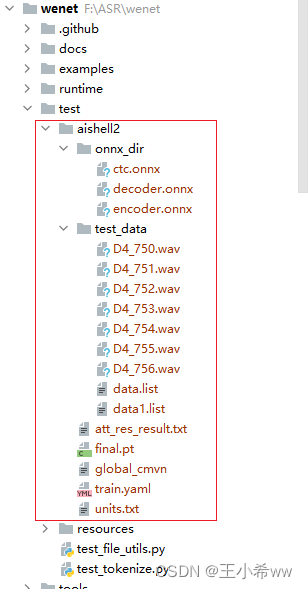
modify train.yaml Medium cmvn_file The location of ( If you use docker In container python Environmental Science , Relative paths are recommended )
cmvn_file: ../../test/aishell2/global_cmvn # Use relative path here
take aishell2 The dataset is modified to wenet data format
{
    "key": "D4_753", "wav": "../../test/aishell2/test_data/D4_750.wav", "txt": ""}
{
    "key": "D4_754", "wav": "../../test/aishell2/test_data/D4_751.wav", "txt": ""}
{
    "key": "D4_755", "wav": "../../test/aishell2/test_data/D4_752.wav", "txt": ""}
{
    "key": "D4_753", "wav": "../../test/aishell2/test_data/D4_753.wav", "txt": ""}
{
    "key": "D4_754", "wav": "../../test/aishell2/test_data/D4_754.wav", "txt": ""}
{
    "key": "D4_755", "wav": "../../test/aishell2/test_data/D4_755.wav", "txt": ""}
{
    "key": "D4_756", "wav": "../../test/aishell2/test_data/D4_756.wav", "txt": ""}
Use wenet/bin/recognize.py, Enter the following command
python recognize
--config=../../test/aishell2/train.yaml \
--dict=../../test/aishell2/units.txt \
--checkpoint=../../test/aishell2/final.pt \
--result_file=../../test/aishell2/att_res_result.txt \
--test_data=../../test/aishell2/test_data/data.list \
The output is as follows :
Namespace(batch_size=16, beam_size=10, bpe_model=None, checkpoint='../../test/aishell2/final.pt', config='../../test/aishell2/train.yaml', connect_symbol='', ctc_weight=0.0, data_type='raw', decoding_chunk_size=-1, dict='../../test/aishell2/units.txt', gpu=-1, mode='attention', non_lang_syms=None, num_decoding_left_chunks=-1, override_config=[], penalty=0.0, result_file='../../test/aishell2/att_res_result.txt', reverse_weight=0.0, simulate_streaming=False, test_data='../../test/aishell2/test_data/data1.list')
2022-07-04 15:54:22,441 INFO Checkpoint: loading from checkpoint ../../test/aishell2/final.pt for CPU
F:\ASR\wenet\wenet\transformer\asr_model.py:266: UserWarning: __floordiv__ is deprecated, and its behavior will change in a future version of pytorch. It currently rounds toward 0 (like the 'trunc' function NOT 'floor'). This results in incorrect rounding for negative values. To keep the current behavior, use torch.div(a, b, rounding_mode='trunc'), or for actual floor division, use torch.div(a, b, rounding_mode='floor').
  best_hyps_index = best_k_index // beam_size
2022-07-04 15:54:27,189 INFO D4_753  Minning Marketing Service Department of people's insurance group of China
2022-07-04 15:54:27,189 INFO D4_755  Chinatelecom minning town cooperation business office
2022-07-04 15:54:27,189 INFO D4_754  Minning Town Health Center
2022-07-04 15:54:27,189 INFO D4_756  Minning town passenger station
2022-07-04 15:54:27,189 INFO D4_753  Episode 61
2022-07-04 15:54:27,189 INFO D4_755  Episode 63
2022-07-04 15:54:27,189 INFO D4_754  Episode 62
4、WeNet export onnx Model
Reference resources ONNX backend on WeNet
Download here first WeNet Pre training model of ( download Checkpoint model - conformer), Then use wenet/bin/export_onnx_cpu.py, Set the following parameters , Can be libtorch Of pt File conversion to onnx file
python export_onnx_cpu.py
 --config F:/ASR/model/20210618_u2pp_conformer_libtorch_aishell2/train.yaml \
 --checkpoint F:/ASR/model/20210618_u2pp_conformer_libtorch_aishell2/final.pt \
 --chunk_size 16 \
 --output_dir F:/ASR/model/20210618_u2pp_conformer_libtorch_aishell2/onnx_dir \
 --num_decoding_left_chunks -1
If onnx Export succeeded , The following will be generated in the output folder 3 File :encoder.onnx,ctc.onnx, decoder.onnx.
5、 Use recognize_onnx Reasoning ( Unresolved )
Reference resources https://github.com/wenet-e2e/wenet/pull/761.
To download conformer Weight file for model (checkpoint model),https://wenet.org.cn/wenet/pretrained_models.html
After decompressing the weight file , The folder directory is as follows
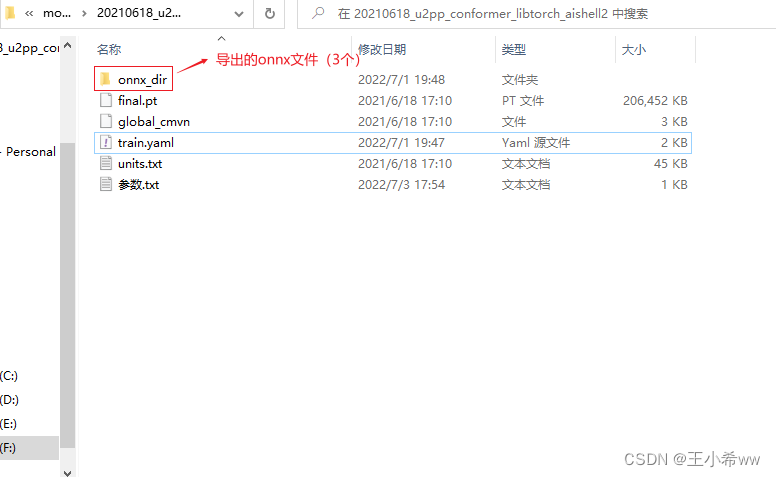
modify train.yaml Medium cmvn_file The location of
#cmvn_file: F:/ASR/model/20210618_u2pp_conformer_libtorch_aishell2/global_cmvn
cmvn_file: ../../test/aishell2/global_cmvn     # Use relative path here
convert to wenet Of json data format : Suppose there are audio files D4_750.wav, The format is converted as follows json Format , Reference resources https://wenet.org.cn/wenet/tutorial_librispeech.html?highlight=test_data#stage-0-prepare-training-data
{
    "key": "D4_753", "wav": "../../test/aishell2/test_data/D4_750.wav", "txt": " The purchase restriction that has the greatest inhibitory effect on the transaction of the real estate market "}
Then run :
python3 wenet/bin/recognize_onnx.py --config=20210618_u2pp_conformer_exp/train.yaml --test_data=raw_wav/test/data.list --gpu=0 --dict=20210618_u2pp_conformer_exp/words.txt --mode=attention_rescoring --reverse_weight=0.4 --ctc_weight=0.1 --result_file=./att_res_result.txt --encoder_onnx=onnx_model/encoder.onnx --decoder_onnx=onnx_model/decoder.onnx
Be careful It is best to use relative paths here , Because it uses docker Inside python Environmental Science , If you use windows The absolute path under , This will cause the following errors . Solution ideas refer to https://github.com/microsoft/onnxruntime/issues/8735( Anyway, I can't solve it )
{
    FileNotFoundError}[Errno 2] No such file or directory: 'F:/ASR/model/20210618_u2pp_conformer_libtorch_aishell2/train.yaml'
Use here export_onnx_cpu Derived onnx Model , Use recognize_onnx Reasoning
encoder_ort_session=onnxruntime.InferenceSession(encoder_outpath, providers=['CPUExecutionProvider']);
ort_inputs = {

    encoder_ort_session.get_inputs()[0].name: feats.astype('float32'),
    encoder_ort_session.get_inputs()[1].name: feats_lengths.astype('int64'),
    encoder_ort_session.get_inputs()[2].name: np.zeros((12,4,0,128)).astype('float32'),
    encoder_ort_session.get_inputs()[3].name: np.zeros((12,1,256,7)).astype('float32')
}
encoder_ort_session.run(None, ort_inputs)
Will throw an error
{
    Fail}[ONNXRuntimeError] : 1 : FAIL : Non-zero status code returned while running Slice node. Name:'Slice_49' Status Message: slice.cc:153 FillVectorsFromInput Starts must be a 1-D array
Should be cuda and onnxruntime Version inconsistency results in , Reference resources OnnxRunTime encounter FAIL : Non-zero status code returned while running BatchNormalization node.
It turned out recognize_onnx It's right export_onnx_gpu.py Infer from the derived model , instead of export_onnx_cpu.py. To use export_onnx_gpu.py Still have to install nividia_docker and onnxruntime_gpu, Otherwise, an error will be reported :
/opt/conda/lib/python3.9/site-packages/onnxruntime/capi/onnxruntime_inference_collection.py:53: UserWarning: Specified provider 'CUDAExecutionProvider' is not in available provider names.Available providers: 'CPUExecutionProvider'
  warnings.warn("Specified provider '{}' is not in available provider names."
Traceback (most recent call last):
  File "/opt/project/wenet/bin/export_onnx_gpu.py", line 574, in <module>
    onnx_config = export_enc_func(model, configs, args, logger, encoder_onnx_path)
  File "/opt/project/wenet/bin/export_onnx_gpu.py", line 334, in export_offline_encoder
    test(to_numpy([o0, o1, o2, o3, o4]), ort_outs)
NameError: name 'test' is not defined
It won't take this effort here , etc. wenet Perfect the project .
边栏推荐
- Raki's notes on reading paper: soft gazetteers for low resource named entity recognition
- 10 programming habits that web developers should develop
- A application wakes up B should be a fast method
- 2022-2028 global and Chinese FPGA prototype system Market Research Report
- Un réveil de l'application B devrait être rapide
- windows下Redis-cluster集群搭建
- SPI read / write flash principle + complete code
- Realize the attention function of the article in the applet
- PHP reads the INI file and writes the modified content
- A solution to the problem that variables cannot change dynamically when debugging in keil5
猜你喜欢
小程序中实现文章的关注功能
Moco is not suitable for target detection? MsrA proposes object level comparative learning target detection pre training method SOCO! Performance SOTA! (NeurIPS 2021)...
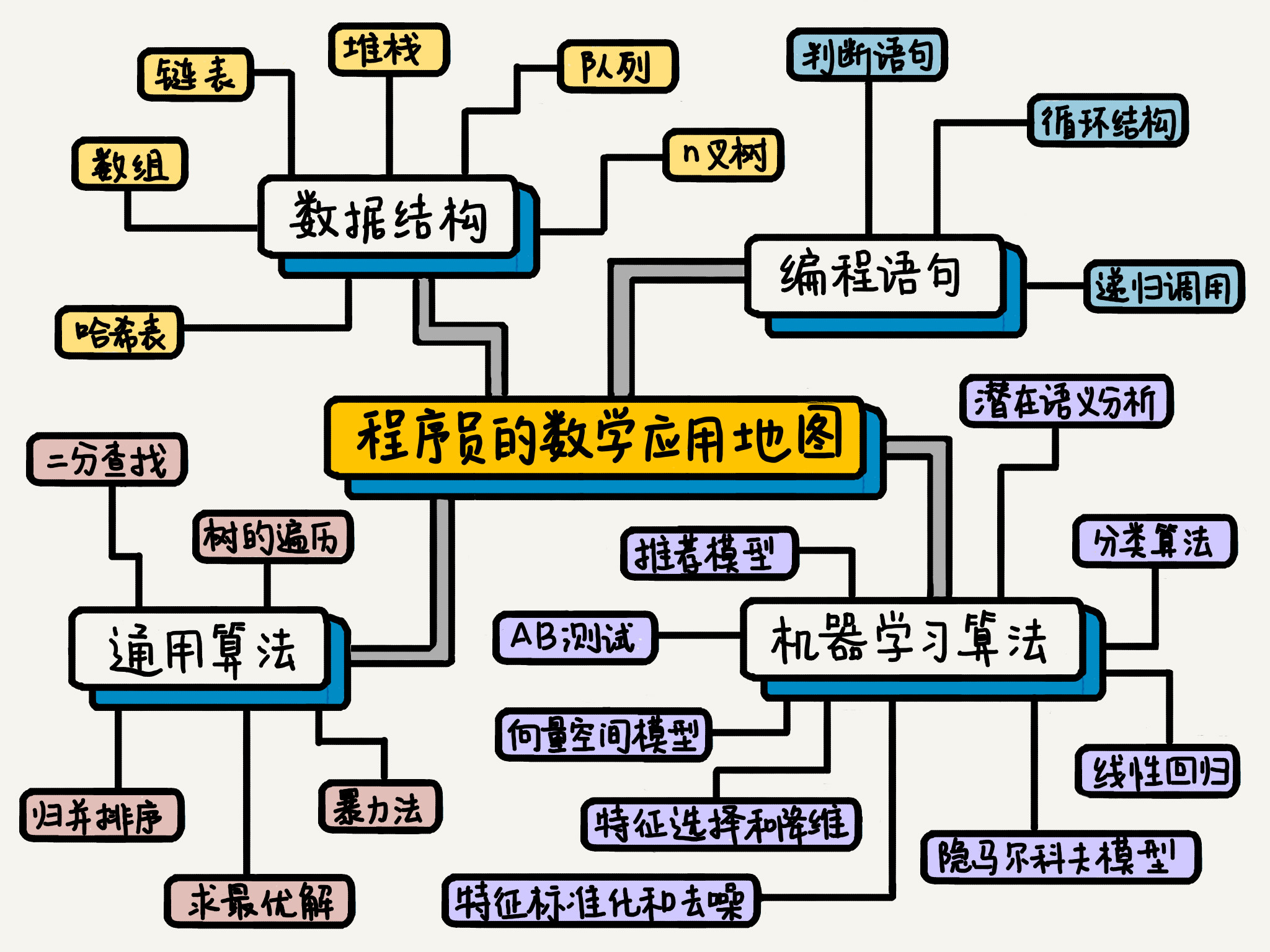
程序员应该怎么学数学

Aperçu en direct | Services de conteneurs ACK flexible Prediction Best Practices
About the prompt loading after appscan is opened: guilogic, it keeps loading and gets stuck. My personal solution. (it may be the first solution available in the whole network at present)

首席信息官如何利用业务分析构建业务价值?

Technical tutorial: how to use easydss to push live streaming to qiniu cloud?
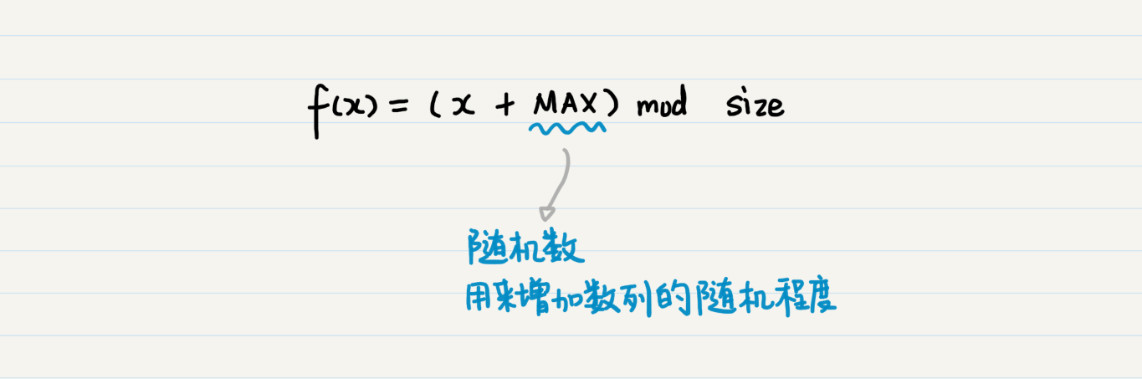
取余操作是一个哈希函数

How to realize real-time audio and video chat function

Learning notes 8
随机推荐
[uniapp] system hot update implementation ideas
TPG x AIDU|AI领军人才招募计划进行中!
Machine learning -- neural network
A应用唤醒B应该快速方法
包 类 包的作用域
WeNet:面向工业落地的E2E语音识别工具
Sequelize. JS and hasmany - belongsto vs hasmany in serialize js
[untitled]
指针函数(基础)
Practice | mobile end practice
[phantom engine UE] realize the animation production of mapping tripod deployment
官宣!第三届云原生编程挑战赛正式启动!
线上故障突突突?如何紧急诊断、排查与恢复
PHP reads the INI file and writes the modified content
Interview related high-frequency algorithm test site 3
All in one 1413: determine base
Realize the attention function of the article in the applet
SPI read / write flash principle + complete code
概率论与数理统计考试重点复习路线
【虛幻引擎UE】實現UE5像素流部署僅需六步操作少走彎路!(4.26和4.27原理類似)