当前位置:网站首页>Redis之Jedis如何使用
Redis之Jedis如何使用
2022-07-05 03:35:00 【亿速云】
Redis之Jedis如何使用
这篇文章主要讲解了“Redis之Jedis如何使用”,文中的讲解内容简单清晰,易于学习与理解,下面请大家跟着小编的思路慢慢深入,一起来研究和学习“Redis之Jedis如何使用”吧!

1.Jedis的介绍
Jedis = Java + Redis
Redis不仅可以使用命令来操作,现在基本上主流的语言都有API支持,比如Java、C#、C++、PHP、Node.js、Go等。在官方网站里列一些Java的客户端,有Jedis、Redisson、Jredis、JDBC-Redis等其中官方推荐使用Jedis和Redisson。
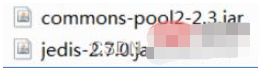
使用Jedis操作redis需要导入jar包如下:
2.Jedis基本操作
2.1Jedis对象常用API
注:每个方法就是redis中的命令名,方法的参数就是命令的参数
方法 | 功能 |
new Jedis(host, port) | 创建Jedis的连接,参数:主机名,端口号6379 |
set(key,value) | 添加一个字符串的键和值 |
get(key) | 得到指定键的值 |
del(key) | 删除指定键和值 |
hset(key,field,value) | 添加一个hash类型的键-字段-值 |
hget(key,field) | 通过hash键-字段得到它的值 |
lpush(key,values) | 从左边添加一个list类型的键和元素 |
lpop(key) | 从左边弹出一个元素 |
rpop(key) | 从右边弹出一个元素 |
close() | 关闭连接 |
2.2Jedis的基本操作
操作步骤:
创建Jedis对象,指定服务器地址和端口号
向服务器写入
set字符串类型的数据,person=张三
lpush添加list类型的数据,cities=珠海,深圳,广州
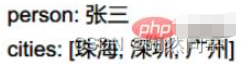
从服务器中读取上面的数据打印输出
get得到字符串的值
lrange得到list所有的列表元素
关闭Jedis对象,释放资源
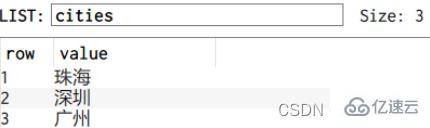
通过客户端查看数据库中是否有数据
控制台输出:
数据库中
代码:
package com.itheima.jedis;import redis.clients.jedis.Jedis;import java.util.List;/** * 使用Jedis向redis中添加string和list,读取它们的值 */public class Demo1 { public static void main(String[] args) { //创建Jedis连接对象 Jedis jedis = new Jedis("localhost", 6379); //添加string类型 jedis.set("person", "张三"); //添加list类型 jedis.lpush("cities", "广州","上海","东莞"); //读取string类型 String person = jedis.get("person"); //读取list类型 List<String> cities = jedis.lrange("cities", 0, -1); //输出到控制器上 System.out.println("person:" + person); System.out.println("cities:" + cities); //关闭连接对象 jedis.close(); }}3.Jedis连接池的使用
3.1Jedis连接池的基本概念
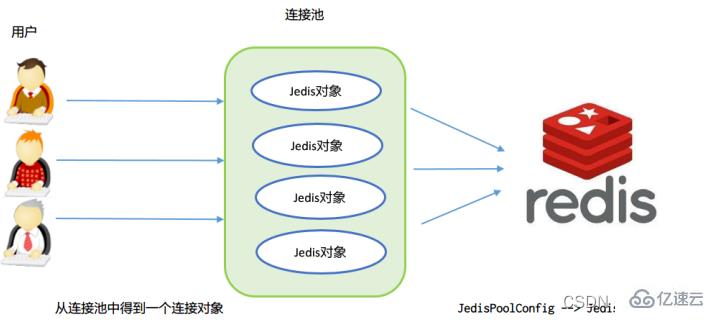
jedis连接资源的创建与销毁是很消耗程序性能,所以jedis为我们提供了jedis的连接池技术,jedis
连接池在创建时初始化一些连接对象存储到连接池中,使用jedis连接资源时不需要自己创建jedis对
象,而是从连接池中获取一个资源进行redis的操作。使用完毕后,不需要销毁该jedis连接资源,
而是将该资源归还给连接池,供其他请求使用。
3.2Jedis连接池API
JedisPoolConfig配置类 | 功能说明 |
JedisPoolConfig() | 创建一个配置对象,使用无参构造方法就可以了 |
void setMaxTotal() | 设置连接池最大的连接数 |
void setMaxWaitMillis() | 设置得到连接对象Jedis最长等待时间 |
JedisPool连接池类 | 说明 |
JedisPool(配置对象,服务器名,端口号) | 创建连接池 参数1:上面的配置对象,参数2:服务器名,参数3:6379 |
Jedis getResource() | 从连接池中得到一个Jedis连接对象 |
void close() | 连接池关闭方法,通常不关闭连接池 |
3.3JedisPool的基本使用
需求:
使用连接池优化jedis操作
开发步骤
创建连接池配置对象,设置最大连接数10,设置用户最大等待时间2000毫秒
通过配置对象做为参数,创建连接池对象
从连接池里面获取jedis连接对象,执行redis命令。
执行redis命令sadd写入set集合类型的数据:students=白骨精,孙悟空,猪八戒
执行redis命令smembers读取集合中的数据
输出读取的数据
关闭连接对象(通常连接池不关闭)
运行效果
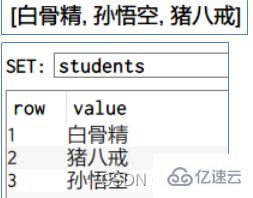
执行代码
package com.itheima.jedis;import redis.clients.jedis.Jedis;import redis.clients.jedis.JedisPool;import redis.clients.jedis.JedisPoolConfig;import java.util.Set;/** * 创建Jedis连接池 */public class Demo2 { public static void main(String[] args) { //1) 创建连接池配置对象,设置最大连接数10,设置用户最大等待时间2000毫秒 JedisPoolConfig config = new JedisPoolConfig(); config.setMaxTotal(10); config.setMaxWaitMillis(2000); //2) 通过配置对象做为参数,创建连接池对象 JedisPool pool = new JedisPool(config, "localhost", 6379); //3) 从连接池里面获取jedis连接对象,执行redis命令。 Jedis jedis = pool.getResource(); //4) 执行redis命令sadd写入set集合类型的数据:students=白骨精,孙悟空,猪八戒 jedis.sadd("students", "白骨精", "孙悟空", "猪八戒"); //5) 执行redis命令smembers读取集合中的数据 Set<String> students = jedis.smembers("students"); //6) 输出读取的数据 System.out.println(students); //7) 关闭连接对象(通常连接池不关闭) jedis.close(); pool.close(); }}4.案例:编写jedis连接池工具类
4.1相应API的学习
java.util.ResourceBundle类是专门用于:读取类路径下Properties配置文件的类
java.util.ResourceBundle类 | 功能 |
static ResourceBundle getBundle("配置基名") | 通过自己的静态方法创建ResourceBundle对象 参数:放在src下.properties文件。参数中不用写扩展名,只要有主名就可以了 |
String getString("键名") | 通过键得到值 |
案例:得到druid.properties中的url属性
package com.itheima.jedis;import java.util.ResourceBundle;/** * 读取属性文件 */public class Demo3 { public static void main(String[] args) { //得到资源绑定对象 ResourceBundle bundle = ResourceBundle.getBundle("druid"); System.out.println(bundle.getString("url")); }}4.2连接池工具类的实现
需求:
实现连接池工具类,通过工具类得到Jedis连接对象,配置参数写在属性文件中
调用工具类,对Redis数据库进行操作
执行效果:

实现步骤:
在src目录下创建连接池的工具类: jedis.properties
创建静态成员变量JedisPool对象
在静态代码块中,读取src下的配置文件,得到ResourceBundle对象
得到上面的四个参数,其中host是字符串类型,其它参数要转成整数类型
实例化配置对象,实例化连接池对象
编写静态方法getJedis()返回Jedis对象
创建hash对象:键employee,添加字段名:name,值:NewBoy;字段名: salary,值:3000
使用hgetall读取hash对象输出
关闭jedis对象
jedis.properties配置文件
# 主机名host=localhost# 端口号port=6379# 最大连接数maxTotal=20# 最长等待时间maxWaitMillis=3000
JedisUtils.java
package com.itheima.utils;import redis.clients.jedis.Jedis;import redis.clients.jedis.JedisPool;import redis.clients.jedis.JedisPoolConfig;import java.util.ResourceBundle;/** * 连接池工具类 */public class JedisUtils { //创建一个连接对象 private static JedisPool pool; static { //创建连接池的配置对象 JedisPoolConfig config = new JedisPoolConfig(); //设置最大连接数和最长等待时间 ResourceBundle bundle = ResourceBundle.getBundle("jedis"); //得到配置文件中的属性值 String host = bundle.getString("host"); int port = Integer.parseInt(bundle.getString("port")); int maxTotal = Integer.parseInt(bundle.getString("maxTotal")); int maxWaitMillis = Integer.parseInt(bundle.getString("maxWaitMillis")); //设置配置对象的参数 config.setMaxTotal(maxTotal); config.setMaxWaitMillis(maxWaitMillis); //创建连接池对象 pool = new JedisPool(config, host, port); } /** * 得到redis连接对象 * @return */ public static Jedis getJedis() { return pool.getResource(); }}使用工具类:
package com.itheima.jedis;import com.itheima.utils.JedisUtils;import redis.clients.jedis.Jedis;import java.util.Map;/** * 使用工具类 */public class Demo4 { public static void main(String[] args) { //从工具类中得到Jedis对象 Jedis jedis = JedisUtils.getJedis(); //创建hash对象:键employee,添加字段名:name,值:NewBoy;字段名: salary,值:3000 jedis.hset("employee", "name","NewBoy"); jedis.hset("employee", "salary","3000"); //使用hgetall读取hash对象输出 Map<String, String> employee = jedis.hgetAll("employee"); System.out.println(employee); //关闭jedis对象 jedis.close(); }}感谢各位的阅读,以上就是“Redis之Jedis如何使用”的内容了,经过本文的学习后,相信大家对Redis之Jedis如何使用这一问题有了更深刻的体会,具体使用情况还需要大家实践验证。这里是亿速云,小编将为大家推送更多相关知识点的文章,欢迎关注!
边栏推荐
- Qrcode: generate QR code from text
- How can we truncate the float64 type to a specific precision- How can we truncate float64 type to a particular precision?
- 有個疑問 flink sql cdc 的話可以設置並行度麼, 並行度大於1會有順序問題吧?
- UE4 DMX和grandMA2 onPC 3.1.2.5的操作流程
- 【软件逆向-基础知识】分析方法、汇编指令体系结构
- 英语必备词汇3400
- [groovy] string (string injection function | asBoolean | execute | minus)
- Daily question 2 12
- Smart pointer shared_ PTR and weak_ Difference of PTR
- 汇编-入门
猜你喜欢
Anchor free series network yolox source code line by line explanation Part 2 (a total of 10, ensure to explain line by line, after reading, you can change the network at will, not just as a participan
Zero foundation uses paddlepaddle to build lenet-5 network
Sqoop installation
C file in keil cannot be compiled
![[groovy] groovy environment setup (download groovy | install groovy | configure groovy environment variables)](/img/99/bb05b6c48a9e70ca7ff77733d954b9.jpg)
[groovy] groovy environment setup (download groovy | install groovy | configure groovy environment variables)
Share the newly released web application development framework based on blazor Technology
KVM virtualization
About MySQL database connection exceptions

This + closure + scope interview question

Clickhouse物化视图
随机推荐
Talk about the SQL server version of DTM sub transaction barrier function
Why do some programmers change careers before they are 30?
Linux Installation redis
What is the most effective way to convert int to string- What is the most efficient way to convert an int to a String?
[105] Baidu brain map - Online mind mapping tool
[groovy] string (string type variable definition | character type variable definition)
花了2晚,拿到了吴恩达@斯坦福大学的机器学习课程证书
Jd.com 2: how to prevent oversold in the deduction process of commodity inventory?
51 independent key basic experiment
How to define a unified response object gracefully
[groovy] loop control (number injection function implements loop | times function | upto function | downto function | step function | closure can be written outside as the final parameter)
Basic knowledge of tuples
Easy processing of ten-year futures and stock market data -- Application of tdengine in Tongxinyuan fund
[Chongqing Guangdong education] 2777t green space planning reference questions of National Open University in autumn 2018
端口,域名,协议。
MySQL winter vacation self-study 2022 11 (10)
JWT漏洞复现
Clean up PHP session files
Devtools的簡單使用
Pat grade a 1119 pre- and post order traversals (30 points)