当前位置:网站首页>pytorch之数据类型tensor
pytorch之数据类型tensor
2022-07-06 17:17:00 【远方的旅行者】
处理数据(Torch)
Tensor是一种特殊的数据结构,在Pytorch中,就是用Tensor来编码模型的输入、输出以及模型的参数的。
所以你可以认为如果要用pytorch,任何数据都要转为tensor。
数据初始化
方法一:torch.tensor
功能: 构建常规tensortorch.tensor(data, *, dtype=None, device=None, requires_grad=False, pin_memory=False)
data:初始化tensor的数据,可以是列表(list)、元组(tuple)、numpy的数组ndarray、数字标量和其他类型等。
dtype:指定tensor的数据类型,通常数据类型又如下几种
| dtype | 数据类型描述 |
|---|---|
| torch.float16 or torch.half | 16位浮点型 |
| torch.float32 or torch.float | 32位浮点型 |
| torch.float64 or torch.double | 64位浮点型 |
| torch.uint8 | 8位无符号整型 |
| torch.int8 | 8位有符号整型 |
| torch.int16 or torch.short | 16位有符号整型 |
| torch.int32 or torch.int | 32位有符号整型 |
| torch.int64 or torch.long | 64位有符号整型 |
| torch.bool | bool类型 |
| torch.complex64 or torch.cfloat | 64位复数 |
以上是常用的一些数据类型,如果没有指定这个参数,那么torch会根据data自动推断数据类型,所以如果data里面的数据类型是统一的,就可以,那么大可忽略dtype,让它自动推断。
device:指定数据在什么地方运行,要么是cpu要么是gpu
| 指定运行设备 | 关键字 |
|---|---|
| cpu | ‘cpu’ |
| gpu | ‘cuda:index’ |
如果你的电脑上有多个gpu,那么就可以通过index指定,当然你也可以直接写一个cuda
接下来再讲一下指定设备的方法,通常会有两种方法来指定设备
方式1:定义一个devicedata = [[1,2],[3,4]] cpu_device = torch.device('cuda') tensor_data = torch.tensor(data,device=cpu_device)
方式2:直接指定data = [[1,2],[3,4]] tensor_data = torch.tensor(data,device='cuda')
requires_grad:bool类型,用于指定数据是否可以进行梯度更新,在进行模型训练的过程中,可以将其设置为True,这样进行反向梯度的时候,可以进行参数更新。
pin_memory:bool类型,为True的时候,将tensor分配到固定内存中。要注意的是,这个参数只在device为cpu下才有用。
`
完整例子
torch.tensor([[0.11111, 0.222222, 0.3333333]],dtype=torch.float64,device=torch.device(‘cuda:0’))**方法二:torch.sparse_coo_tensor**
功能:初始化 构建一个稀疏tensor
torch.sparse_coo_tensor(indices, values, size=None, *, dtype=None, device=None, requires_grad=False)
`
在讲解这个函数的参数之前,先了解一下这个函数构建稀疏矩阵的原理,先贴一张网上大佬们画的图,比较生动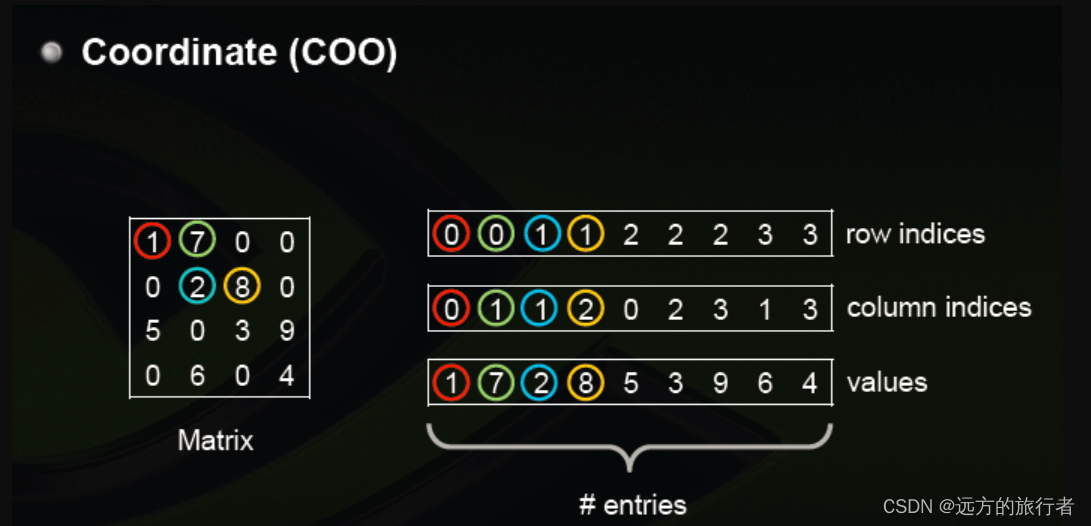
从图中可以看出,左边是一个稀疏矩阵,但是可以通过,右边的数据表示。第一行表示非零数据所在的行,第二行表示非零数据所在的列,第三行表示具体位置的数据大小。
带着这个基础的设计理念,就可以解释每一个参数的意义了
参数说明:
indices:指定非零元素的位置,也就是上图中右边的第一行和第二行。它可以是list,tuple,ndarray,一个整数
values:具体位置上的非零的值,它的顺序是一行一行的算的,第一行的非零值在前,然后顺序排在后面。
size:指定矩阵大小,也就是上图左边矩阵的大小,可以是list或者tuple
dtype:指定数据类型,参考上面的tensor
device :指定设备,参考上面的tensor
requires_grad:指定数据是否可以进行梯度更新,参考上面的tensor
具体例子
将上图例子实现如下i = torch.tensor([[0,0,1,1,2,2,2,3,3],[0,1,1,2,0,2,3,1,3]]) v = torch.tensor([1,7,2,8,5,3,9,6,4],dtype=torch.float32) spar_tensor = torch.sparse_coo_tensor(i,v,size = [4,4],dtype=torch.float64,device=torch.device('cpu'))
方法三:tensor.asarray
功能:初始化,类似于复制功能torch.asarray(obj, *, dtype=None, device=None, copy=None, requires_grad=False)
参数说明:
obj:可以是tensor,numpy array等类型
copy: bool类型,如果为True时,就是copy了一份数据,如果是false,则是引用了一份,改变一个数据,另一个会跟着改变。
device:指定设备
requires_grad :指定是否支持求梯度
具体例子a = torch.tensor([1,2,3]) b = torch.asarray(a) c = torch.asarray(a,copy=True,dtype=torch.float32,device = 'cpu')
方法四:torch.as_strided
功能:创建一个视图,方便观察具体位置的数据torch.as_strided(input, size, stride, storage_offset=0)
参数说明:
input:tensor,输入的原始tensor
size:定义输出的数据大小,可以是tuple或者int
stride:指定视图的步幅,这个参数其实还比较抽象,它的功能是没隔多少在input上采集数据,可以是tuple或者int。
storage_offset:采集数据的起始位置,通常为int。
具体例子
`
x = torch.randn(3, 3)
t = torch.as_strided(x, (2, 2), (1, 1))
x,t
(tensor([[-0.0215, 0.3483, -1.4443],
[-0.3040, 1.3200, 2.0977],
[ 0.7380, 1.0222, -0.6579]]),
tensor([[-0.0215, 0.3483],
[ 0.3483, -1.4443]]))
`
方法五:torch.from_numpy
功能:从ndarray中初始化tensortorch.from_numpy(ndarray)
其余方法:
torch.zeros :创建0矩阵
torch.zeros_like :创建0矩阵,通过输入的tensor矩阵的形状创建相同形状的0矩阵tensor
torch.ones : 创建1矩阵
torch.ones_like :创建1矩阵,通过输入的tensor矩阵的形状创建相同形状的1矩阵tensor
torch.range: 和numpy的range类似,只是返回值是tensor
torch.arange: 和numpy的arange类似,只是返回值是tensor
torch.linspace:和numpy的linspace类似,只是返回值是tensor
torch.eye::创建为1的对角矩阵
torch.empty:定义一个空的tensor,等于定义一个变量
torch.empty_like:类似torch.ones_like
torch.full:创建一个指定值填充的tensor矩阵
torch.full_like:类似torch.ones_like
tensor的索引、切片、连接、变异操作
torch.adjoint:用于复数操作,对tensor共轭之后然后转置
torch.argwhere:返回tensor非零值的位置索引
torch.cat:拼接tensor
torch.chunk:将tensor均等拆分
torch.column_stac:可以理解为先转置,然后按列行拼接
torch.tensor_split:拆分tensor
torch.hsplit:类似torch.tensor_split
torch.hstack:垂直拼接tensor
torch.select:返回一个切片的tensor
torch.squeeze:压缩为tensor为1的维度
torch.transpose:tensor不同维度的数据交换,所以如果是二维数据,当是二维时,交换后就是转置。
torch.t: 转置,和torch.transpose类似
torch.take:取得tensor对应位置的值,然后返回新的tensor
torch.unsqueeze:增加tensor的维度
数学操作
torch.acos:计算tensor的反余弦
torch.cos:余弦操作
torch.sin:正弦操作
torch.tan:正切操作
torch.add:加操作
torch.sub:减操作
torch.mul:tensor对应位置相乘
torch.mm:tensor矩阵相乘
torch.div:除操作
torch.pow:幂运算
torch.exp:指数操作
torch.log:log操作
torhc.sqrt:求根号操作
torch.ceil:向上取整
torch.floor:向下取整
torch.abs:返回tensor绝对值
torch.neg:tensor取反
torch.frac:获取小数部分
torch.imag:取复数虚部
torch.real:取复数实部
torch.round:四舍五入取整
torch.trunc:去掉小数点
torch.deg2rad:角度转为幅度
torch.rad2deg:幅度转为角度
torch.clip:同torch.clamp,将一个数组大小限定在一个范围内,大于最大值的,用最大值代替,小于最小值的用最小值代替
torch.argmax:取不同维度的最大值的索引
torch.argmin:取不同维度的最小值的索引
torch.amax:取不同维度的最大值
torch.amin:取不同维度的最小值
torch.aminmax:取不同维度的最大值和最小值
torch.all:是否所有值都为true
torch.any:是否有任何一个为true
torch.max:求所有值的最大值
torch.min:求所有值的最小值
torch.mean:求均值
torch.nanmean:求非空值的均值
torch.median:求中位数
torch.nanmedian:求非空值的中位数
torch…mode:找出众数和众数出现的最后一个索引位置
torch.nansum:将非零值求和
torch.sum:求和
torch.prod:值相乘
torch.std:均方差
torch.unique:求唯一值
torch.var:求方差
torch.argsort:返回按维度排序后的索引
torch.eq:比较对应位置是否相等
torch.equal:比较所有值为啥
torch.ge:对应位置大于等于
torch.gt:对应位置大于
torch.le:对应位置小于等于
torch.lt:对应位置小于
torch.ne:对应位置不等于操作
torch.isin:包含关系
torch.sort:排序操作
torch.topk:求topK
边栏推荐
- Mongodb client operation (mongorepository)
- Part VI, STM32 pulse width modulation (PWM) programming
- Configuring OSPF basic functions for Huawei devices
- from .cv2 import * ImportError: libGL.so.1: cannot open shared object file: No such file or direc
- Batch obtain the latitude coordinates of all administrative regions in China (to the county level)
- 【批處理DOS-CMD命令-匯總和小結】-字符串搜索、查找、篩選命令(find、findstr),Find和findstr的區別和辨析
- Return to blowing marshland -- travel notes of zhailidong, founder of duanzhitang
- Advanced learning of MySQL -- basics -- multi table query -- external connection
- stm32F407-------DAC数模转换
- [user defined type] structure, union, enumeration
猜你喜欢
![[user defined type] structure, union, enumeration](/img/a5/d6bcfb128ff6c64f9d18ac4c209210.jpg)
[user defined type] structure, union, enumeration
Distributed cache

随时随地查看远程试验数据与记录——IPEhub2与IPEmotion APP

「精致店主理人」青年创业孵化营·首期顺德场圆满结束!

pyflink的安装和测试
【批處理DOS-CMD命令-匯總和小結】-字符串搜索、查找、篩選命令(find、findstr),Find和findstr的區別和辨析
【JVM调优实战100例】05——方法区调优实战(下)

C9高校,博士生一作发Nature!
Dell筆記本周期性閃屏故障

Article management system based on SSM framework
随机推荐
Mujoco finite state machine and trajectory tracking
新手如何入门学习PostgreSQL?
Chapter II proxy and cookies of urllib Library
随时随地查看远程试验数据与记录——IPEhub2与IPEmotion APP
Mujoco second order simple pendulum modeling and control
5种不同的代码相似性检测,以及代码相似性检测的发展趋势
[牛客] B-完全平方数
Part 7: STM32 serial communication programming
Learn self 3D representation like ray tracing ego3rt
深度学习之线性代数
Dell筆記本周期性閃屏故障
[software reverse - solve flag] memory acquisition, inverse transformation operation, linear transformation, constraint solving
Let's talk about 15 data source websites I often use
Js+svg love diffusion animation JS special effects
Deeply explore the compilation and pile insertion technology (IV. ASM exploration)
【YoloV5 6.0|6.1 部署 TensorRT到torchserve】环境搭建|模型转换|engine模型部署(详细的packet文件编写方法)
一行代码实现地址信息解析
Web project com mysql. cj. jdbc. Driver and com mysql. jdbc. Driver differences
Periodic flash screen failure of Dell notebook
equals()与hashCode()