当前位置:网站首页>MPLS experiment
MPLS experiment
2022-07-05 06:26:00 【Lucky_ Lu0】
One 、 Experimental content
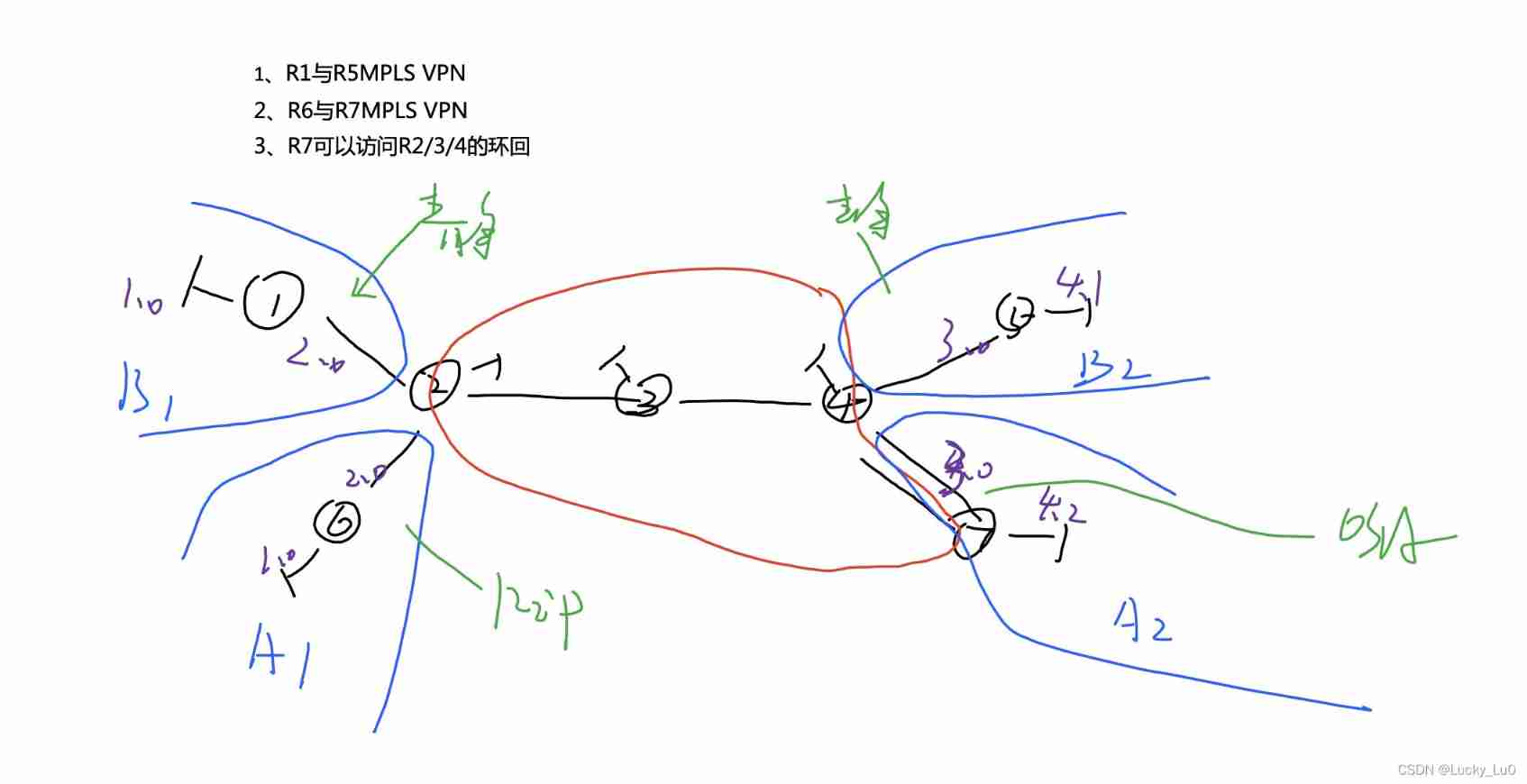
Two 、 The topology

3、 ... and 、 To configure
1. Configure the public network part ip
r2
[r2]int g 0/0/2
[r2-GigabitEthernet0/0/2]ip add 23.1.1.1 24

[r2]int lo0
[r2-LoopBack0]ip add 2.2.2.2 24
r3
[r3]int g 0/0/0
[r3-GigabitEthernet0/0/0]ip add 23.1.1.2 24

[r3]int lo0
[r3-LoopBack0]ip add 3.3.3.3 24

[r3]int g 0/0/1
[r3-GigabitEthernet0/0/1]ip add 34.1.1.1 24
r4
[r4]int lo0
[r4-LoopBack0]ip add 4.4.4.4 24

[r4]int g 0/0/0
[r4-GigabitEthernet0/0/0]ip add 34.1.1.2 24

[r4]int g 0/0/2
[r4-GigabitEthernet0/0/2]ip add 47.1.1.1 24
r7
[r7]int g 0/0/0
[r7-GigabitEthernet0/0/0]ip add 47.1.1.2 24
2. Use ospf Make the public network part communicate
r2
[r2]ospf 1	router-id 2.2.2.2
[r2-ospf-1]area 0
[r2-ospf-1-area-0.0.0.0]network 23.1.1.1 0.0.0.0
[r2-ospf-1-area-0.0.0.0]network 2.2.2.2 0.0.0.0
r3
[r3]ospf 1 	router-id 3.3.3.3
[r3-ospf-1]area 0
[r3-ospf-1-area-0.0.0.0]network 23.1.1.2 0.0.0.0
[r3-ospf-1-area-0.0.0.0]network 3.3.3.3 0.0.0.0
[r3-ospf-1-area-0.0.0.0]network 34.1.1.1 0.0.0.0
r4
[r4]ospf 1 router-id 4.4.4.4
[r4-ospf-1]area 0
[r4-ospf-1-area-0.0.0.0]network 34.1.1.2 0.0.0.0
[r4-ospf-1-area-0.0.0.0]network 4.4.4.4 0.0.0.0
[r4-ospf-1-area-0.0.0.0]network 47.1.1.1 0.0.0.0
r7
[r7]ospf 1 router-id 7.7.7.7
[r7-ospf-1]area 0
[r7-ospf-1-area-0.0.0.0]network 47.1.1.2 0.0.0.0
because r7 The client side. , There is no need to r7 send out hello package , So we need to restrain g0/0/2 Interface , Again r7 Write a default route to r4,r7 You can access r2/3/4
[r4-ospf-1]silent-interface g0/0/2
[r7]ip route-static 0.0.0.0  0 47.1.1.1
3. stay r2/3/4 On the configuration mpls
r2
[r2]mpls lsr-id 2.2.2.2
[r2]mpls
[r2-mpls]mpls ldp
[r2-mpls-ldp]int g 0/0/2
[r2-GigabitEthernet0/0/2]mpls
[r2-GigabitEthernet0/0/2]mpls ldp
r3
[r3]mpls lsr-id 3.3.3.3
[r3]mpls
[r3-mpls]mpls ldp
[r3-GigabitEthernet0/0/0]int g 0/0/1
[r3-GigabitEthernet0/0/0]mpls
[r3-GigabitEthernet0/0/0]mpls ldp
r4
[r4]mpls lsr-id 4.4.4.4
[r4]mpls
[r4-mpls]mpls ldp
[r4-mpls-ldp]int g 0/0/0
[r4-GigabitEthernet0/0/0]mpls
[r4-GigabitEthernet0/0/0]mpls ldp
Check mpls My neighbor table , Build neighbors normally

4. stay r2 Do on vrf Space
[r2]ip vpn-instance b1
[r2-vpn-instance-b1]ipv4-family
[r2-vpn-instance-b1-af-ipv4]route-distinguisher 1:1
[r2-vpn-instance-b1-af-ipv4]vpn-target 1:1
[r2-vpn-instance-b1-af-ipv4]q
[r2]ip vpn
[r2]ip vpn-instance a1
[r2-vpn-instance-a1]ipv4-family
[r2-vpn-instance-a1-af-ipv4]route-distinguisher 2:2
[r2-vpn-instance-a1-af-ipv4]vpn-target 2:2
Bind the two interfaces to b1a1 Space , Configure interface ip
[r2]int g 0/0/0
[r2-GigabitEthernet0/0/0]ip binding vpn-instance b1
[r2-GigabitEthernet0/0/0]ip add 192.168.2.2 24
[r2-GigabitEthernet0/0/0]q

[r2]int g 0/0/1
[r2-GigabitEthernet0/0/1]ip binding vpn-instance a1
[r2-GigabitEthernet0/0/1]ip add 192.168.2.2 24
start-up r2 Of bgp
[r2]bgp 1
[r4-bgp] router-id 2.2.2.2
[r2-bgp]peer 4.4.4.4 as-number 1
[r2-bgp]peer 4.4.4.4 connect-interface lo0
[r2-bgp]ipv4
[r2-bgp]ipv4-family vpnv4
[r2-bgp-af-vpnv4]peer 4.4.4.4 enable
5. stay r4 Do on vrf Space
[r4]ip vpn-instance b2
[r4-vpn-instance-b2]route-distinguisher 1:1
[r4-vpn-instance-b2-af-ipv4]vpn-target 1:1

[r4]ip vpn-instance a2
[r4-vpn-instance-a2]route-distinguisher 2:2
[r4-vpn-instance-a2-af-ipv4]vpn-target 2:2
take r4 The two interfaces on are bound to b2 a2 On , To configure ip
[r4]int g 0/0/1
[r4-GigabitEthernet0/0/1]ip binding vpn-instance b2
[r4-GigabitEthernet0/0/1]ip add 192.168.3.2 24

[r4-GigabitEthernet0/0/1]int g 4/0/0
[r4-GigabitEthernet4/0/0]ip binding vpn-instance a2
[r4-GigabitEthernet4/0/0]ip add 192.168.3.2 24
start-up r4 Of bgp
[r4]bgp 1
[r4-bgp]router-id 4.4.4.4
[r4-bgp]peer 2.2.2.2 as-number 1
[r4-bgp]peer 2.2.2.2 connect-interface lo0
[r4-bgp]ipv4-family vpnv4
[r4-bgp-af-vpnv4]peer 2.2.2.2 enable
Configure private network ip
r1
[r1]int g 0/0/0
[r1-GigabitEthernet0/0/0]ip add 192.168.2.1 24

[r1]int lo0
[r1-LoopBack0]ip add 192.168.1.1 24
r6
[r6]int lo0
[r6-LoopBack0]ip add 192.168.1.2 24

[r6]int g 0/0/0
[r6-GigabitEthernet0/0/0]ip add 192.168.2.1 24
r5
[r5]int g 0/0/0
[r5-GigabitEthernet0/0/0]ip add 192.168.3.1 24

[r5]int lo0
[r5-LoopBack0]ip add 192.168.4.1 24
r7
[r7]int lo0
[r7-LoopBack0]ip add 192.168.4.2 24

[r7]int g 0/0/2
[r7-GigabitEthernet0/0/2]ip add 192.168.3.1 24
6. Use rip The agreement declares r6 Direct connection network segment
[r6]rip 1
[r6-rip-1]version 2
[r6-rip-1]network 192.168.1.0
[r6-rip-1]network 192.168.2.0
Declare r2 And r6 Direct connection network segment ( Declare the interface vpn Space )
[r2]rip 1 vpn-instance a1
[r2-rip-1]version 2
[r2-rip-1]network 192.168.2.0
Use ospf Declare r7 The direct network segment of
[r7]ospf 1 router-id 7.7.7.7
[r7-ospf-1]area 0
[r7-ospf-1-area-0.0.0.0]network 192.168.3.0 0.0.0.255
[r7-ospf-1-area-0.0.0.0]network 192.168.4.0 0.0.0.255
stay r4 To announce , because r4 There's already one on the table ospf, Therefore, the protocol process number cannot be one , Declare vpn Space
[r4]ospf 2 vpn-instance a2
[r4-ospf-2]area 0
[r4-ospf-2-area-0.0.0.0]network 192.168.3.0 0.0.0.255
7. stay r2 Use two-way republishing on
Get into rip Of VPN Space import bgp
[r2]rip 1 vpn-instance a1
[r2-rip-1]import-route bgp
Get into bgpVPN Space import rip
[r2]bgp 1
[r2-bgp]ipv4-family vpn-instance a1
[r2-bgp-a1]import-route rip
stay r4 Two way republishing on
Get into ospfvpn Space import bgp
[r4]ospf 2 vpn-instance a2
[r4-ospf-2]import-route bgp
Get into bgpVPN Space import ospf
[r4]bgp 1
[r4-bgp]ipv4-family vpn-instance a2
[r4-bgp-a2]import-route ospf 2
see r6 Routing table

r6 Learned r7 Upper 3.1 and 4.2 route
see r7

r7 I also learned r6 Of 1.0 and 2.0 route
8. stay b1 and b2 Use static routing
First, in the r1 Write two static
[r1]ip route-static 192.168.3.0 24 192.168.2.2
[r1]ip route-static 192.168.4.0 24 192.168.2.2
stay r2vpn Space plus a route , Point to 1.0
[r2]ip route-static vpn-instance b1 192.168.1.0 24 192.168.2.1
Get into r2bgpVPN Space handle r2 Go to r1 Static and direct route import bgp
[r2]bgp 1
[r2-bgp]ipv4-family vpn-instance b1
[r2-bgp-b1]import-route static
[r2-bgp-b1]import-route direct
see r4vpn Space routing table

You can see r4vpn Space has learned 1.0 and 2.0 The routing
stay r4VPN Space plus a route to 4.0
[r4]ip route-static vpn-instance b2 192.168.4.0 24 192.168.3.1
stay r5 Write two static routes
[r5]ip route-static 192.168.1.0 24 192.168.3.2
[r5]ip route-static 192.168.2.0 24 192.168.3.2
Get into r4bgp Of vpn Space import r4 Go to r5 Direct static routing
[r4]bgp 1
[r4-bgp]ipv4-family vpn-instance b2
[r4-bgp-b2]import-route static
[r4-bgp-b2]import-route direct
see r2VPN Space routing table

r2VPN Space also learned 3.0 and 4.0 The routing
Use r1 visit 3.0
<r1>ping 192.168.3.1
  PING 192.168.3.1: 56  data bytes, press CTRL_C to break
    Reply from 192.168.3.1: bytes=56 Sequence=1 ttl=252 time=70 ms
    Reply from 192.168.3.1: bytes=56 Sequence=2 ttl=252 time=30 ms
    Reply from 192.168.3.1: bytes=56 Sequence=3 ttl=252 time=40 ms
    Reply from 192.168.3.1: bytes=56 Sequence=4 ttl=252 time=30 ms
    Reply from 192.168.3.1: bytes=56 Sequence=5 ttl=252 time=40 ms
Successful visit
边栏推荐
- 高斯消元 AcWing 884. 高斯消元解异或线性方程组
- SQL三种连接:内连接、外连接、交叉连接
- MPLS experiment
- LeetCode 1200. Minimum absolute difference
- Game theory acwing 892 Steps Nim game
- 1.14 - assembly line
- MySQL advanced part 2: optimizing SQL steps
- Liunx starts redis
- How to generate an image from text on fly at runtime
- [leetcode] day95 effective Sudoku & matrix zeroing
猜你喜欢
Single chip computer engineering experience - layered idea

Alibaba's new member "Lingyang" officially appeared, led by Peng Xinyu, Alibaba's vice president, and assembled a number of core department technical teams

MySQL advanced part 2: SQL optimization
Paper reading report
Sorting out the latest Android interview points in 2022 to help you easily win the offer - attached is the summary of Android intermediate and advanced interview questions in 2022

confidential! Netease employee data analysis internal training course, white whoring! (attach a data package worth 399 yuan)
Interval problem acwing 906 Interval grouping
AE tutorial - path growth animation

博弈论 AcWing 894. 拆分-Nim游戏

4.Oracle-重做日志文件管理
随机推荐
时间很快,请多做有意义的事情
MySQL advanced part 1: index
Gaussian elimination acwing 884 Gauss elimination for solving XOR linear equations
4.Oracle-重做日志文件管理
How to make water ripple effect? This wave of water ripple effect pulls full of retro feeling
4. Object mapping Mapster
Leetcode heap correlation
Daily question 1189 Maximum number of "balloons"
AE tutorial - path growth animation
Operator priority, one catch, no doubt
1.14 - assembly line
How to set the drop-down arrow in the spinner- How to set dropdown arrow in spinner?
Leetcode-6108: decrypt messages
__ builtin_ Popcount() counts the number of 1s, which are commonly used in bit operations
Single chip computer engineering experience - layered idea
求组合数 AcWing 887. 求组合数 III
Leetcode divide and conquer / dichotomy
International Open Source firmware Foundation (osff) organization
Niu Mei's math problems
What is socket? Basic introduction to socket