当前位置:网站首页>如何獲取GC(垃圾回收器)的STW(暫停)時間?
如何獲取GC(垃圾回收器)的STW(暫停)時間?
2022-07-05 09:56:00 【dotNET跨平臺】
前言
在現代的容器化和微服務應用中,因為分布式的環境和錯綜複雜的調用關系,APM(Application Performance Monitoring 應用性能監控)顯得尤為重要,它通過采集應用程序各種指標和請求鏈路,讓你知道系統當前的狀態和值得優化的點,另外能幫助你發現應用程序的异常,幫助你更方便的定比特問題。
對於.NET這樣帶GC(Garbage Collector 垃圾回收器)的平臺來說,GC的指標也尤為重要,采集可以幫助我們分析內存泄漏、優化系統性能等等。在公司內部已經可以采集比較全面的.NET GC指標,如下圖所示。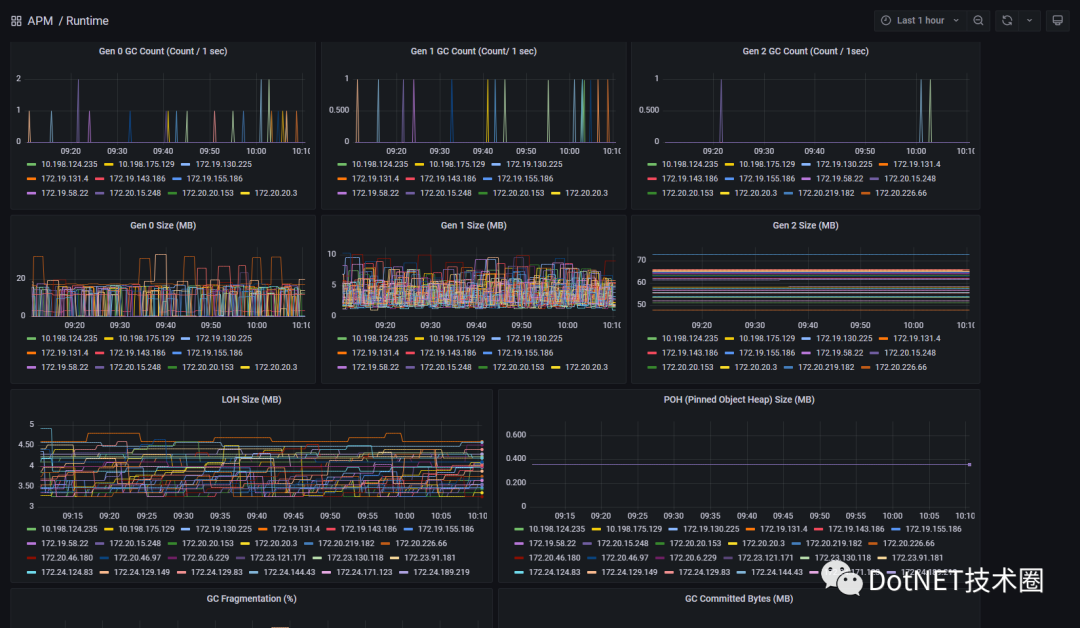
在絕大多數場景它能滿足要求,但是如果遇到某時某刻P95延時突然增大,异步任務突然超時,我們想排查這些异常是否因為GC的STW Time(Stop The World Time 指GC運行過程中所有線程被掛起的時間)過長導致的,就沒有辦法了,因為目前沒有采集這些指標。
所以本文就帶大家了解一下,如何采集.NET GC STW Time。
方法
如.NET內存性能分析指南中提到的一樣,.NET Runtime在運行過程中會發布很多事件,這些事件代錶了當前Runtime的運行狀態,同樣GC在運行過程中也會發布很多事件,我們可以使用PerfView工具來收集這樣的一些事件。下面是WorkStationGC發生GC時的一個事件序列。
Microsoft-Windows-DotNETRuntime/GC/SuspendEEStart //開始暫停托管線程運行Microsoft-Windows-DotNETRuntime/GC/SuspendEEStop //暫停托管線程完成Microsoft-Windows-DotNETRuntime/GC/Start // GC開始回收Microsoft-Windows-DotNETRuntime/GC/Stop // GC回收結束Microsoft-Windows-DotNETRuntime/GC/RestartEEStart //恢複之前暫停的托管線程Microsoft-Windows-DotNETRuntime/GC/RestartEEStop //恢複托管線程運行完成PS: 所有的事件都可以在.NET文檔官方中找到,非常的全面。
而SuspendEEStart(暫停托管線程運行)到RestartEEStop(恢複托管線程運行完成)中經過的時間就是STW Time,我們只需要記錄這兩個事件的差值,就可以知道本次GC STW的時間有多長。
BGC的過程比WorkStationGC複雜的很多,但是一樣是測量這兩個事件花費的時間來采集STW Time,本文不做過多介紹。
使用EventSource采集
那麼我們知道通過計算哪兩個指標的差值來獲得STW時間,那麼應該如何通過代碼來采集呢?
這裏就需要知道EventSource和EventListener兩個類,顧名思義我們可以通過EventSource來發布事件,使用EventListener來監聽事件,在本文中我們也主要使用EventListener來收集GC事件,對於這EventSource類的使用大家可以看下面給出的微軟文檔鏈接,這裏不做過多介紹。
EventSource
EventListener
我們來看一看如何使用EventListener類監聽GC事件,代碼如下所示:
using System.Diagnostics.Tracing;

// 開啟GC事件監聽  var gc = new GcStwMetricsCollector();
// 創建一些對象  var array = Enumerable.Range(0, 1000).Select(s => (decimal)s).ToArray();
// 手動執行GC  GC.Collect();
Console.ReadLine();

public class GcStwMetricsCollector : EventListener  {
    // GC關鍵字
    private const int GC_KEYWORD = 0x0000001;
    // 我們要關注的GC事件
    private const int GCSuspendEEBegin = 9;
    private const int GCRestartEEEnd = 3;

    private EventSource? _eventSource;
    public void Stop()
    {
        if (_eventSource == null)
            return;

        DisableEvents(_eventSource);
    }

    protected override void OnEventSourceCreated(EventSource eventSource)
    {
        _eventSource = eventSource;
        // GC 事件在 Microsoft-Windows-DotNETRuntime 名稱空間下   if (eventSource.Name.Equals("Microsoft-Windows-DotNETRuntime"))
        {
            // 啟用事件,事件級別為Informational, 只監聽GC事件
            EnableEvents(eventSource, EventLevel.Informational, (EventKeywords) (GC_KEYWORD));
        }
    }

    private long _currentStwStartTime = 0;
    protected override void OnEventWritten(EventWrittenEventArgs e)
    {
        switch (e.EventId)
        {
            // 凍結托管線程開始,記錄當前時間
            case GCSuspendEEBegin:
                _currentStwStartTime = e.TimeStamp.Ticks;
                break;
            // 恢複托管線程結束,計算當前時間與凍結托管線程開始時間的差值
            case GCRestartEEEnd:
                if (_currentStwStartTime > 0)
                {
                    var ms = TimeSpan.FromTicks(e.TimeStamp.Ticks - _currentStwStartTime).TotalMilliseconds;
                    _currentStwStartTime = 0;
                    // 輸出結果
                    Console.WriteLine($"STW: {ms}ms");
                }
                break;
        }
    }
}運行結果:
STW: 0.2568ms至於GC事件對應的枚舉值,大家可以在我上文中給出的文檔中找到。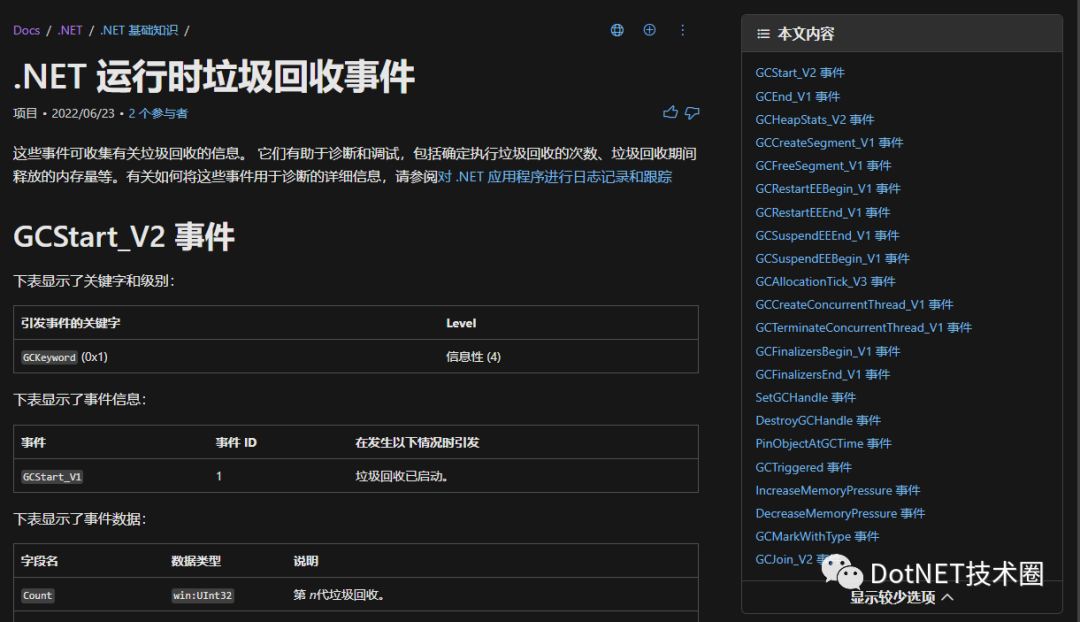
.NET7新API
在實現這個需求時,我注意到.NET7有一個新的issue,直接提供了一個API,讓我們可以獲取到總的GC STW Time,我把重點的信息摘抄和翻譯了一下。
背景和動機
今天我們已經在GetGCMemoryInfo 公開了獲取GC處理時間和暫停時間的百分比值的API。
具體來說是通過GCMemoryInfo的PauseTimePercentage字段。
這個很有用,但是如果我只想要一個分子(即:程序運行以來總的GC暫停時間)。現在沒有辦法獲取到。
API 提案
我建議在System.GC上添加一個下面這樣的API:
TimeSpan System.GC.GetTotalPauseDuration()它會返回GC總的暫停時間。
API 使用
TimeSpan start = System.GC.GetTotalPauseDuration();// ... Perform some work ...TimeSpan end= System.GC.GetTotalPauseDuration();
Console.WriteLine(end - start + " was spent pausing in GC");using System.Diagnostics.Tracing;
// 開啟GC事件監聽 var gc = new GcStwMetricsCollector();
// 創建一些對象 var array = Enumerable.Range(0, 1000).Select(s => (decimal)s).ToArray();
// 手動執行GC GC.Collect();
Console.WriteLine($"API STW:{GC.GetTotalPauseDuration().TotalMilliseconds}ms");
Console.ReadLine();// 省略上文中一樣的代碼API STW: 0.223ms
Event STW: 0.296msAPI統計的應該會更加准確,我們通過事件來獲取多多少少有一點額外的開銷,不過誤差在可接受的範圍內。
總結
上文中提到了兩種方式來獲取.NET GC STW Time,我們只需要稍加改造,就可以將STW監控的功能加入APM中,如下圖錶就是本地測試時采集的一些數據。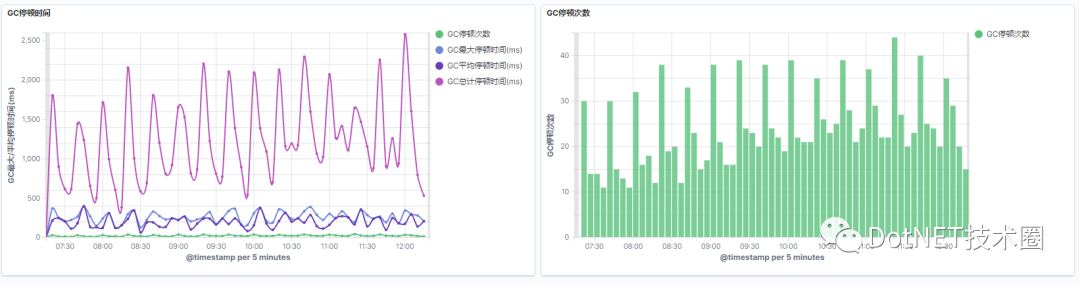
當然通過EventListener還可以實現更多的APM信息的采集,大家有興趣也可以研究看看。
本文代碼鏈接Github: https://github.com/InCerryGit/BlogCodes/tree/main/Get-GC-STW-Time
往期文章:
.NET性能優化-推薦使用Collections.Pooled(補充)
.NET性能優化-使用ValueStringBuilder拼接字符串
.NET性能優化-使用結構體替代類
边栏推荐
- uni-app---uni. Navigateto jump parameter use
- Flutter development: use safearea
- 百度评论中台的设计与探索
- Mobile heterogeneous computing technology GPU OpenCL programming (Advanced)
- Are databases more popular as they get older?
- LeetCode 556. Next bigger element III
- Tdengine already supports the industrial Intel edge insight package
- Baidu app's continuous integration practice based on pipeline as code
- Apache DolphinScheduler 入门(一篇就够了)
- 搞数据库是不是越老越吃香?
猜你喜欢
oracle 多行数据合并成一行数据

MySQL installation configuration and creation of databases and tables
![[NTIRE 2022]Residual Local Feature Network for Efficient Super-Resolution](/img/f3/782246100bca3517d95869be80d9c5.png)
[NTIRE 2022]Residual Local Feature Network for Efficient Super-Resolution
TDengine可通过数据同步工具 DataX读写
Coordinate system of view
Mobile heterogeneous computing technology GPU OpenCL programming (Advanced)
Develop and implement movie recommendation applet based on wechat cloud

卷起來,突破35歲焦慮,動畫演示CPU記錄函數調用過程

How to use sqlcipher tool to decrypt encrypted database under Windows system
【sourceTree配置SSH及使用】
随机推荐
Viewpager pageradapter notifydatasetchanged invalid problem
cent7安装Oracle数据库报错
Tongweb set gzip
【两个对象合并成一个对象】
From "chemist" to developer, from Oracle to tdengine, two important choices in my life
Node の MongoDB Driver
Idea debugs com intellij. rt.debugger. agent. Captureagent, which makes debugging impossible
Apache DolphinScheduler 系统架构设计
Unity skframework framework (XXII), runtime console runtime debugging tool
【el-table如何禁用】
Evolution of Baidu intelligent applet patrol scheduling scheme
[technical live broadcast] how to rewrite tdengine code from 0 to 1 with vscode
MySQL installation configuration and creation of databases and tables
What about wechat mall? 5 tips to clear your mind
Uncover the practice of Baidu intelligent testing in the field of automatic test execution
How to choose the right chain management software?
On July 2, I invite you to TD Hero online press conference
Three-level distribution is becoming more and more popular. How should businesses choose the appropriate three-level distribution system?
mysql安装配置以及创建数据库和表
Gradientdrawable get a single color