当前位置:网站首页>Client use of Argo CD installation
Client use of Argo CD installation
2022-07-05 06:21:00 【Boar Pei squeeze】
install argocd
kubectl create namespace argocd
kubectl apply -n argocd -f https://raw.githubusercontent.com/argoproj/argo-cd/stable/manifests/install.yaml
expose argocd ui
kubectl patch service -n argocd argocd-server -p '{"spec": {"type": "NodePort"}}'
obtain admin password
kubectl -n argocd get secret argocd-initial-admin-secret -o jsonpath="{.data.password}" | base64 -d; echo
cli End installation
https://github.com/argoproj/argo-cd/releases/download/v2.2.5/argocd-linux-amd64
mv argocd-linux-amd64 /usr/local/bin/argocd
cli End operation land argocd login ArgoCD_Address:Port
argocd login 192.168.8.68:30004

. from git Warehouse create a Application
Create a test-guesT app, Specify warehouse address 、 Application path 、 The goal is apiserver Address 、 The goal is namespace
argocd app create test-guest --repo http://git.rapha.top/jbjb/argo-cd.git --path test00 --dest-server https://kubernetes.default.svc --dest-namespace default
- List all app And designation app
argocd app list
argocd app get test-guest

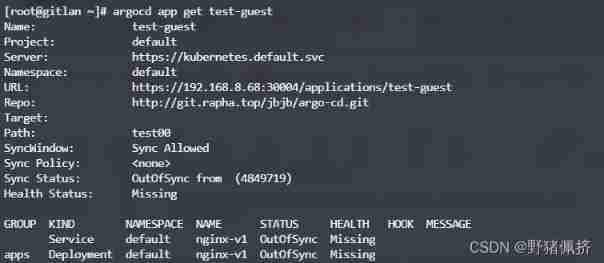
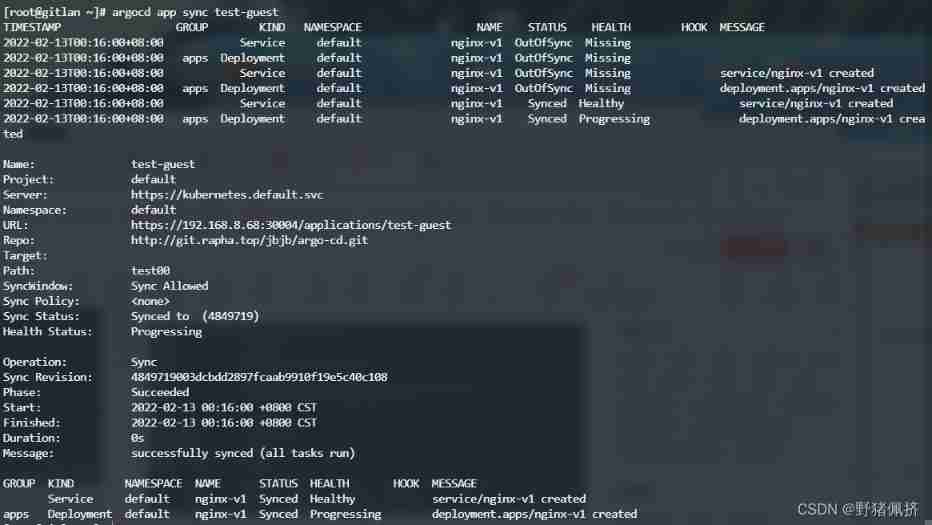
- Manual from git Warehouse synchronization assignment app
argocd app sync test-guest
Sign in UI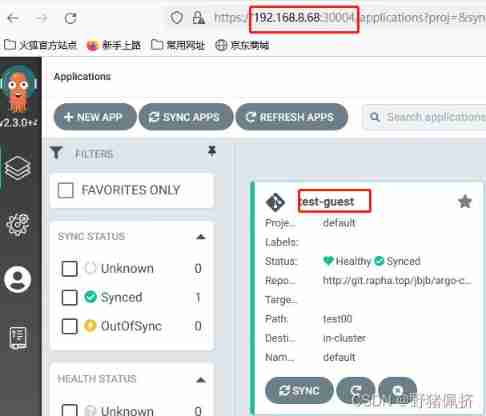
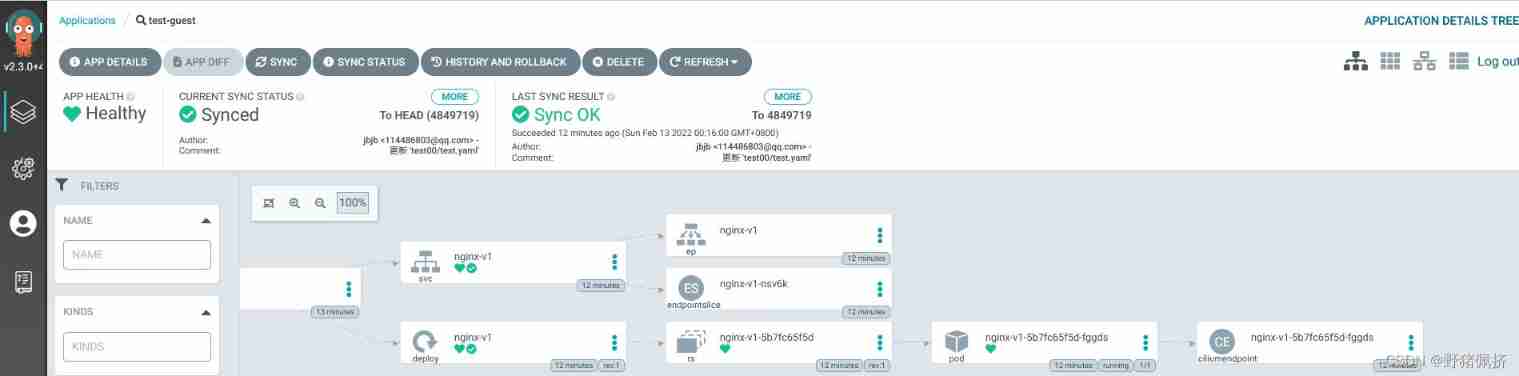
Delete
argocd app delete test-guest
Be careful !!! Delete words pod Also delete
More instructions
https://argo-cd.readthedocs.io/en/stable/user-guide/commands/argocd_app/
Add a default repo Solve the problem that requires user password login git Warehouse
argocd repo add http://git.rapha.top/jbjb/test01.git --username admin --password 123456
Add the project to be published as before
argocd app create test01 --repo http://git.rapha.top/jbjb/test01.git --path test --dest-server https://kubernetes.default.svc --dest-namespace default
see
[[email protected] ~]# argocd repo list
TYPE  NAME  REPO                                  INSECURE  OCI    LFS    CREDS  STATUS      MESSAGE  PROJECT
git         http://git.rapha.top/jbjb/test01.git  false     false  false  true   Successful
Manual sync
# see app
[[email protected] ~]# argocd app list
NAME    CLUSTER                         NAMESPACE  PROJECT  STATUS     HEALTH   SYNCPOLICY  CONDITIONS  REPO                                  PATH  TARGET
test01  https://kubernetes.default.svc  default    default  OutOfSync  Missing  <none>      <none>      http://git.rapha.top/jbjb/test01.git  test

[[email protected] ~]# argocd app sync test01
TIMESTAMP                  GROUP        KIND   NAMESPACE                  NAME    STATUS    HEALTH        HOOK  MESSAGE
2022-02-13T02:34:21+08:00            Service     default              nginx-v1  OutOfSync  Missing
2022-02-13T02:34:21+08:00   apps  Deployment     default              nginx-v1  OutOfSync  Missing
2022-02-13T02:34:21+08:00            Service     default              nginx-v1  OutOfSync  Missing              service/nginx-v1 created
2022-02-13T02:34:21+08:00   apps  Deployment     default              nginx-v1  OutOfSync  Missing              deployment.apps/nginx-v1 created2022-02-13T02:34:21+08:00            Service     default              nginx-v1    Synced  Healthy                  service/nginx-v1 created
2022-02-13T02:34:21+08:00   apps  Deployment     default              nginx-v1    Synced  Progressing              deployment.apps/nginx-v1 created

Name:               test01
Project:            default
Server:             https://kubernetes.default.svc
Namespace:          default
URL:                https://192.168.8.68:30004/applications/test01
Repo:               http://git.rapha.top/jbjb/test01.git
Target:
Path:               test
SyncWindow:         Sync Allowed
Sync Policy:        <none>
Sync Status:        Synced to  (898fa24)
Health Status:      Progressing

Operation:          Sync
Sync Revision:      898fa24a27981fb23a5f6e154fed9796e1d7937e
Phase:              Succeeded
Start:              2022-02-13 02:34:21 +0800 CST
Finished:           2022-02-13 02:34:21 +0800 CST
Duration:           0s
Message:            successfully synced (all tasks run)

GROUP  KIND        NAMESPACE  NAME      STATUS  HEALTH       HOOK  MESSAGE
       Service     default    nginx-v1  Synced  Healthy            service/nginx-v1 created
apps   Deployment  default    nginx-v1  Synced  Progressing        deployment.apps/nginx-v1 created
Delete one repo Source
[[email protected] ~]# argocd repo list
TYPE  NAME  REPO                                 INSECURE  OCI    LFS    CREDS  STATUS      MESSAGE  PROJECT
git         http://git.rapha.top/jbjb/rook-ceph  false     false  false  true   Successful

[[email protected] ~]# argocd repo rm http://git.rapha.top/jbjb/rook-ceph
Repository 'http://git.rapha.top/jbjb/rook-ceph' removed
[[email protected] ~]# argocd repo list
TYPE  NAME  REPO  INSECURE  OCI  LFS  CREDS  STATUS  MESSAGE  PROJECT
More command reference links : Click the official website to connect .
边栏推荐
- [BMZCTF-pwn] ectf-2014 seddit
- 可变电阻器概述——结构、工作和不同应用
- Record the process of configuring nccl and horovod in these two days (original)
- [rust notes] 14 set (Part 1)
- MIT-6874-Deep Learning in the Life Sciences Week 7
- 做 SQL 性能优化真是让人干瞪眼
- Sqlmap tutorial (II) practical skills I
- [learning] database: MySQL query conditions have functions that lead to index failure. Establish functional indexes
- Daily question 1189 Maximum number of "balloons"
- 927. Trisection simulation
猜你喜欢
1.14 - assembly line
Navicat連接Oracle數據庫報錯ORA-28547或ORA-03135

redis发布订阅命令行实现

阿里新成员「瓴羊」正式亮相,由阿里副总裁朋新宇带队,集结多个核心部门技术团队

Alibaba established the enterprise digital intelligence service company "Lingyang" to focus on enterprise digital growth
Overview of variable resistors - structure, operation and different applications

Appium automation test foundation - Summary of appium test environment construction

容斥原理 AcWing 890. 能被整除的数
Chapter 6 relational database theory
Leetcode-6111: spiral matrix IV
随机推荐
MPLS experiment
[BMZCTF-pwn] ectf-2014 seddit
Quickly use Amazon memorydb and build your own redis memory database
Navicat连接Oracle数据库报错ORA-28547或ORA-03135
Leetcode-22: bracket generation
Gauss Cancellation acwing 884. Solution d'un système d'équations Xor linéaires par élimination gaussienne
1.13 - RISC/CISC
Liunx starts redis
New title of module a of "PanYun Cup" secondary vocational network security skills competition
Leetcode stack related
[rust notes] 14 set (Part 1)
Leetcode-6110: number of incremental paths in the grid graph
Sqlmap tutorial (1)
[rust notes] 17 concurrent (Part 2)
SQLMAP使用教程(二)实战技巧一
Leetcode-6108: decrypt messages
2048项目实现
SPI details
Sum of three terms (construction)
博弈论 AcWing 892. 台阶-Nim游戏