当前位置:网站首页>[Galaxy Kirin V10] [server] soft RAID configuration
[Galaxy Kirin V10] [server] soft RAID configuration
2022-07-04 10:32:00 【GUI Anjun @kylinos】
One 、 Experimental environment
Galaxy Unicorn V10 0711 server x86_64
Two 、 With raid5 For example
raid5 yes raid0 and raid1 A compromise of , With and raid0 Similar data reading speed , Just one more parity message , The speed of writing data is slightly slower than that of a single disk , At the same time, because multiple data correspond to one parity information ,raid5 The disk space utilization ratio of raid1 high , Storage costs are relatively low , It's a solution that's used a lot .
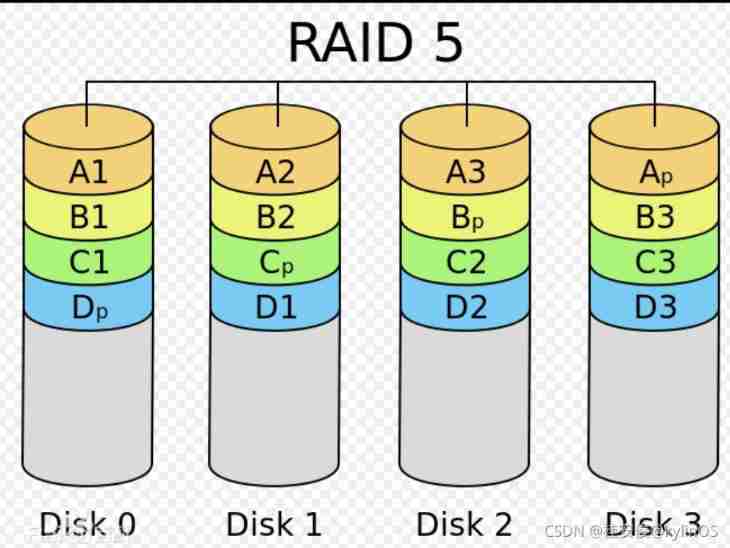
Number of hard disks required : At least 3 block , Can exceed 3 block ;
Hard disk utilization :(n-1)/n , among n Is the number of hard disks , Parity data actually adds up to one disk ;
Maximum disk failures : Bad at most 1 Block plate ;
1、raid5 To configure
Prerequisite : Get ready 4 Block hard disk , Here to sdb、sdc、sdd、sde For example , Self partition is sdb1、sdc1、sdd1、sde1
# mkfs.ext4 /dev/sdb1 // format partition
# mkfs.ext4 /dev/sdc1
# mkfs.ext4 /dev/sdd1
# mkfs.ext4 /dev/sde1
In the following ways 1 And way 2 Select an operation according to the actual needs :
The way 1:3 Block plate , do raid5, No redundant disk
# mdadm --create --auto=yes /dev/md5 --level=5 --raid-devices=3 /dev/sdb1 /dev/sdc1 /dev/sdd1
Parameter description :
--create: establish raid
--auto=yes: Decide to create a subsequent software disk array device , namely md[0-9]
/dev/md5:md5 by raid Device file name , Custom name , General habits raid5 Just name it md5, Easy to understand
--raid-devices=4: A device that uses several disks or partitions as a disk array
--level=5: Set the level of this group of disk arrays
The way 2:4 Block plate , do raid5, There is a redundant disk , If there is a fault during use , The redundant disk can automatically replace the bad disk
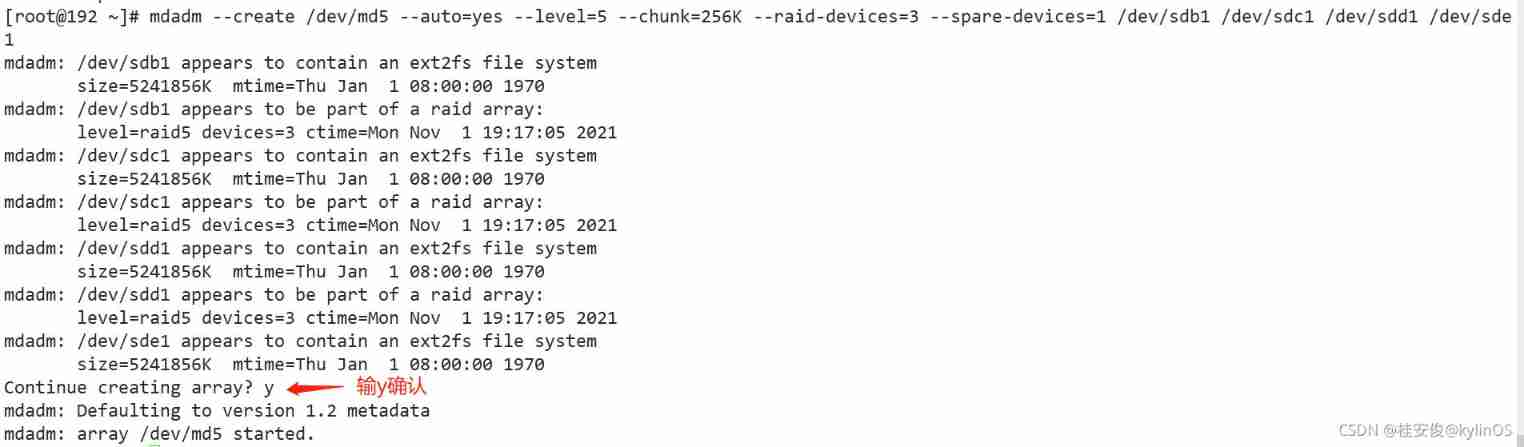
# mdadm --create /dev/md5 --auto=yes --level=5 --chunk=256K --raid-devices=3 --spare-devices=1 /dev/sdb1 /dev/sdc1 /dev/sdd1 /dev/sde1
Parameter description :
--chunk=256K: Determine the of this device chunk size , It's usually 64K perhaps 512K
--spare-devices=1: Use several disks or partitions as backup devices
# mdadm -D /dev/md5 // View the created raid Device details
[[email protected] ~]# mdadm -D /dev/md5
/dev/md5:     #raid Device file name
           Version : 1.2
     Creation Time : Mon Nov  1 19:31:24 2021       # Creation time
        Raid Level : raid5      #raid Grade
        Array Size : 10473472 (9.99 GiB 10.72 GB)      # Whole set raid Actual usable capacity
     Used Dev Size : 5236736 (4.99 GiB 5.36 GB)        # Capacity of each disk
      Raid Devices : 3      # form raid Number of disks
     Total Devices : 4      # Include spare Total disks
       Persistence : Superblock is persistent

       Update Time : Mon Nov  1 19:31:50 2021
             State : clean      # Current usage status of this disk array
    Active Devices : 3          # Number of devices started
   Working Devices : 4          # The number of devices currently using this array
    Failed Devices : 0          # Number of damaged equipment
     Spare Devices : 1          # Number of reserved disks

            Layout : left-symmetric
        Chunk Size : 256K       #chunk Small block capacity

Consistency Policy : resync

              Name : 192.168.1.13:5  (local to host 192.168.1.13)
              UUID : c18e80e3:2786d97c:8fbdd2b1:c9b8c07b
            Events : 18

    Number   Major   Minor   RaidDevice State
       0       8       17        0      active sync   /dev/sdb1
       1       8       33        1      active sync   /dev/sdc1
       4       8       49        2      active sync   /dev/sdd1

       3       8       65        -      spare   /dev/sde1   # notice sde1 As standby equipment in the waiting area

# Last 4 OK, here it is 4 Current status of devices ,RaidDevice  Refers to this Raid Disk order in
# cat /proc/mdstat // Check the status
[[email protected] ~]# cat /proc/mdstat
Personalities : [raid6] [raid5] [raid4]
md5 : active raid5 sdd1[4] sde1[3](S) sdc1[1] sdb1[0]
      10473472 blocks super 1.2 level 5, 256k chunk, algorithm 2 [3/3] [UUU]

unused devices: <none>
explain : The first line is : Pointed out that md05 by raid5 , And used sdd1,sde1,sdc1,sdb1, Wait for four disk devices . Brackets after each device [] The number in this disk is in RAID Order in (RaidDevice); as for sde1 hinder [S] Then represent sde1 by spare The meaning of ;
The second line is : This disk array has 10473472 individual block( Every block Unit is 1K), So the total capacity is about 9.98GB, Use RAID 5 Grade , Small block written to disk (chunk) The size is 256K, Use algorithm 2 Disk array algorithm . [m/n] Represents that this array requires m Devices , And n One device is working properly . So this md5 need 3 A device and this 3 All devices are in normal operation . hinder [UUU] It represents four required equipment ( Namely [m/n] Inside m) Start up of ,U Represents normal operation , if _ It means abnormal .
# mkfs.ext4 /dev/md5 // format
# blkid /dev/md5 // obtain UUID, write in fstab Realize automatic mount after power on

# mkdir /data2 // Create mount directory , Name and path customization
# vim /etc/fstab

# mount -a // If you enter and no error is reported, the mount is successful , This step is very important , Can be tested fstab Whether the writing is correct
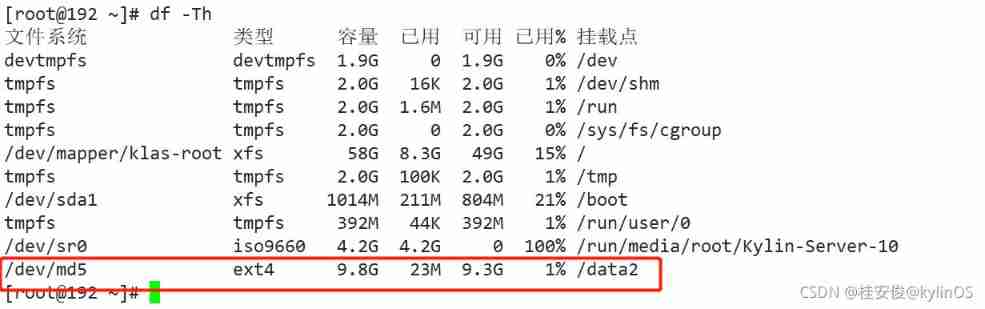
# df -Th //raid Disk mounted successfully
边栏推荐
- Development guidance document of CMDB
- Ruby时间格式转换strftime毫秒匹配格式
- Two way process republication + routing policy
- Latex arranges single column table pictures in double column format articles
- Realsense d435 d435i d415 depth camera obtains RGB map, left and right infrared camera map, depth map and IMU data under ROS
- Legion is a network penetration tool
- Recursive method to achieve full permutation (C language)
- Crawl Zhejiang industry and trade news page
- 原生div具有编辑能力
- Virtual machine configuration network
猜你喜欢

The future education examination system cannot answer questions, and there is no response after clicking on the options, and the answers will not be recorded
基于线性函数近似的安全强化学习 Safe RL with Linear Function Approximation 翻译 1
OSPF summary

Number of relationship models
Three schemes of ZK double machine room
Dynamic memory management
system design
Occasional pit compiled by idea
DCL statement of MySQL Foundation
【Day2】 convolutional-neural-networks
随机推荐
Deep learning 500 questions
Summary of several job scheduling problems
From programmers to large-scale distributed architects, where are you (I)
OSPF comprehensive experiment
Es entry series - 6 document relevance and sorting
Rhsca day 11 operation
[200 opencv routines] 218 Multi line italic text watermark
Error C4996 ‘WSAAsyncSelect‘: Use WSAEventSelect() instead or define _ WINSOCK_ DEPRECATED_ NO_ WARN
Reasons and solutions for the 8-hour difference in mongodb data date display
Recursive method to achieve full permutation (C language)
Sword finger offer 31 Stack push in and pop-up sequence
Press the button wizard to learn how to fight monsters - identify the map, run the map, enter the gang and identify NPC
leetcode1-3
How do microservices aggregate API documents? This wave of show~
MongoDB数据日期显示相差8小时 原因和解决方案
Online troubleshooting
Safety reinforcement learning based on linear function approximation safe RL with linear function approximation translation 1
Communication layer of csframework
Leetcode48. Rotate image
leetcode842. Split the array into Fibonacci sequences