当前位置:网站首页>PyTorch nn. Full analysis of RNN parameters
PyTorch nn. Full analysis of RNN parameters
2022-07-02 12:01:00 【raelum】
Catalog
One 、 brief introduction
torch.nn.RNN Used to build circular layers , The calculation rules are as follows :
h t = tanh ( W i h x t + b i h + W h h h t − 1 + b h h ) (1) \boldsymbol{h}_{t}=\tanh({\bf W}_{ih}\boldsymbol{x}_t+\boldsymbol{b}_{ih}+{\bf W}_{hh}\boldsymbol{h}_{t-1}+\boldsymbol{b}_{hh}) \tag{1} ht=tanh(Wihxt+bih+Whhht−1+bhh)(1)
among h t \boldsymbol{h}_{t} ht yes t t t The hidden state of the moment , x t \boldsymbol{x}_{t} xt yes t t t Time input . Subscript i i i yes i n p u t input input Abbreviation , Subscript h h h yes h i d d e n hidden hidden Abbreviation . W , b {\bf W},\boldsymbol{b} W,b They are weight and offset .
Two 、 Pre knowledge
First, let's review the general neural network , We usually feed a small batch of data in the process of training it . Might as well set batch_size = N \text{batch\_size}=N batch_size=N, The form of feeding data is :
X = [ x 1 T ⋮ x N T ] N × d {\bf X}= \begin{bmatrix} \boldsymbol{x}_1^{\text T} \\ \vdots \\ \boldsymbol{x}_N^{\text T} \end{bmatrix}_{N\times d} X=⎣⎢⎡x1T⋮xNT⎦⎥⎤N×d
among x i = ( x i 1 , x i 2 , ⋯ , x i d ) T \boldsymbol{x}_i=(x_{i1},x_{i2},\cdots,x_{id})^{\text T} xi=(xi1,xi2,⋯,xid)T Is the eigenvector , Dimension is d d d.
In dealing with sequence problems , We will transform the lexical elements into corresponding eigenvectors . For example, when dealing with an English sentence , We usually transform each word into an appropriate feature vector by some means . Let's set the sequence ( The sentence ) The length is L L L, So in this scenario , A sentence can be expressed as :
seq i = [ x i 1 T ⋮ x i L T ] L × d \text{seq}_i= \begin{bmatrix} \boldsymbol{x}_{i1}^{\text T} \\ \vdots \\ \boldsymbol{x}_{iL}^{\text T} \end{bmatrix}_{L\times d} seqi=⎣⎢⎡xi1T⋮xiLT⎦⎥⎤L×d
Each of them x i j , j = 1 , ⋯ , L \boldsymbol{x}_{ij},\;j=1,\cdots, L xij,j=1,⋯,L They all correspond to sentences seq i \text{seq}_i seqi One of the words in . Under the above agreement , We stay t t t moment Feed to RNN The data is :
X t = [ x 1 t T ⋮ x N t T ] N × d (2) {\bf X}_t= \begin{bmatrix} \boldsymbol{x}_{1t}^{\text T} \\ \vdots \\ \boldsymbol{x}_{Nt}^{\text T} \end{bmatrix}_{N\times d}\tag{2} Xt=⎣⎢⎡x1tT⋮xNtT⎦⎥⎤N×d(2)
thus ( 1 ) (1) (1) The formula is rewritten as
H t = tanh ( X t W i h + b i h + H t − 1 W h h + b h h ) (3) {\bf H}_t=\tanh({\bf X}_t{\bf W}_{ih}+\boldsymbol{b}_{ih}+{\bf H}_{t-1}{\bf W}_{hh}+\boldsymbol{b}_{hh})\tag{3} Ht=tanh(XtWih+bih+Ht−1Whh+bhh)(3)
among H t , H t − 1 {\bf H}_t,{\bf H}_{t-1} Ht,Ht−1 The shape of is N × h N\times h N×h, W i h {\bf W}_{ih} Wih The shape of is d × h d\times h d×h, W h h {\bf W}_{hh} Whh The shape of is h × h h\times h h×h, b i h , b h h \boldsymbol{b}_{ih},\boldsymbol{b}_{hh} bih,bhh The shape of is 1 × h 1\times h 1×h, The broadcast mechanism is used when summing .
stay nn.RNN in , We feed all the data at all times at one time , The data is in the form of :
X = [ seq 1 , seq 2 , ⋯ , seq N ] N × L × d or X = [ X 1 , X 2 , ⋯ , X L ] L × N × d {\bf X}=[\text{seq}_1,\text{seq}_2,\cdots,\text{seq}_N]_{N\times L\times d}\quad\text{or}\quad {\bf X}=[{\bf X}_1,{\bf X}_2,\cdots,{\bf X}_L]_{L\times N\times d} X=[seq1,seq2,⋯,seqN]N×L×dorX=[X1,X2,⋯,XL]L×N×d
The left side represents batch_first=True The circumstances of , The right represents batch_first=False The circumstances of .
Be careful : In a batch in , all sequence Keep the same length , namely L L L Need to be consistent .
3、 ... and 、 analysis
3.1 All the parameters

With pre knowledge , We can easily explain these parameters .
input_size: namely d d d;hidden_size: namely h h h;num_layers: namely RNN The number of layers . The default is 1 1 1 layer . This parameter is greater than 1 1 1 when , Will form the Stacked RNN, Also called multilayer RNN Or depth RNN;nonlinearity: That is, the nonlinear activation function . You can choosetanhorrelu, The default istanh;bias: Offset . Enabled by default , Can choose to close ;batch_first: That is, whether to choose to letbatch_sizeAs the first parameter in the input shape . Whenbatch_first=Truewhen , Input should have N × L × d N\times L\times d N×L×d This shape , Otherwise, it should have L × N × d L\times N\times d L×N×d This shape . The default isFalse;dropout: That is, whether to enabledropout. To enable , You should setdropoutProbability , At this time, except for the last floor ,RNN One will be added at the back of each floor dropout layer . The default is 0 0 0, That is, do not enable ;bidirectional: That is, whether to enable bidirectional RNN, Off by default .
3.2 Input parameters

Here we only consider batch The situation of .
When batch_first=True when , Input input Should have shape N × L × d N\times L\times d N×L×d, Otherwise it should have shape L × N × d L\times N\times d L×N×d.
h_0 Is the implicit state at the initial time . When RNN It is unidirectional RNN when ,h_0 The shape of the should be num_layers × N × h \text{num\_layers}\times N\times h num_layers×N×h; When RNN It's two-way RNN when ,h_0 The shape of the should be ( 2 ⋅ num_layers ) × N × h (2\cdot \text{num\_layers})\times N\times h (2⋅num_layers)×N×h. If the value of this parameter is not provided , The default is all 0 tensor .
3.3 Output parameters
Here we only consider batch The situation of .
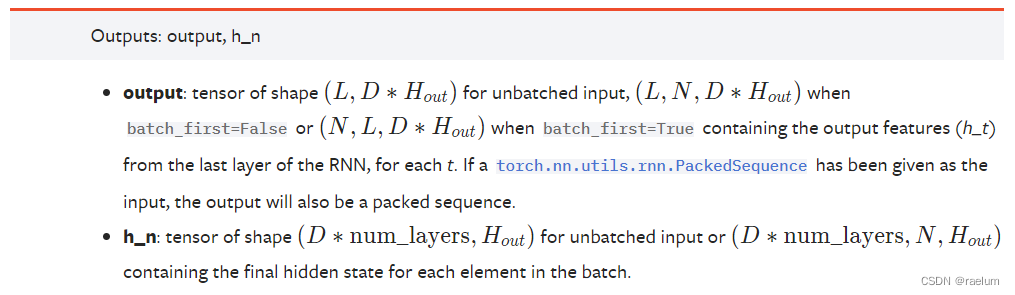
When RNN It is unidirectional RNN when : if batch_first=True, Output output Having shape N × L × h N\times L\times h N×L×h, Otherwise, it has a shape L × N × h L\times N\times h L×N×h. When batch_first=False when ,output[t, :, :] Represents the moment t t t when ,RNN The last layer ( The term "last layer" is used because it may appear Stacked RNN situation ) Output h t \boldsymbol{h}_t ht.h_n Represents the final implicit state , Shape is num_layers × N × h \text{num\_layers}\times N\times h num_layers×N×h.
When RNN It's two-way RNN when : if batch_first=True, Output output Having shape N × L × 2 h N\times L\times 2h N×L×2h, Otherwise, it has a shape L × N × 2 h L\times N\times 2h L×N×2h.h_n The shape of is ( 2 ⋅ num_layers ) × N × h (2\cdot \text{num\_layers})\times N\times h (2⋅num_layers)×N×h.
in fact , For unidirectional RNN, Yes
output = [ H 1 , H 2 , ⋯ , H L ] L × N × h , h_n = [ H L ] 1 × N × h \text{output}=[{\bf H}_1,{\bf H}_2,\cdots,{\bf H}_L]_{L\times N\times h},\quad \text{h\_n}=[{\bf H}_L]_{1\times N\times h} output=[H1,H2,⋯,HL]L×N×h,h_n=[HL]1×N×h
Four 、 Further understand through examples nn.RNN
One way with a single hidden layer RNN For example ( The following examples all default batch_first=False).
Suppose there is an English sentence :He ate an apple., Ignore . And set the word element as word (word) when , The length of the sequence is 4 4 4. For simplicity , Let's assume that each word element corresponds to a 6 6 6 The eigenvectors of the dimensions , Then the above sequence can be written as :
import torch
import torch.nn as nn

torch.manual_seed(42)
seq = torch.randn(4, 6)  #  Just for example
print(seq)
# tensor([[ 1.9269, 1.4873, 0.9007, -2.1055, 0.6784, -1.2345],
# [-0.0431, -1.6047, 0.3559, -0.6866, -0.4934, 0.2415],
# [-1.1109, 0.0915, -2.3169, -0.2168, -0.3097, -0.3957],
# [ 0.8034, -0.6216, -0.5920, -0.0631, -0.8286, 0.3309]])
Think of this sentence as a batch, namely ( Note that the shape is L × N × d L\times N\times d L×N×d):
inputs = seq.unsqueeze(1)
print(inputs)
# tensor([[[ 1.9269, 1.4873, 0.9007, -2.1055, 0.6784, -1.2345]],
# [[-0.0431, -1.6047, 0.3559, -0.6866, -0.4934, 0.2415]],
# [[-1.1109, 0.0915, -2.3169, -0.2168, -0.3097, -0.3957]],
# [[ 0.8034, -0.6216, -0.5920, -0.0631, -0.8286, 0.3309]]])
print(inputs.shape)
# torch.Size([4, 1, 6])
With inputs, We also need to initialize the implicit state h_0, Might as well set h = 3 h=3 h=3:
h_0 = torch.randn(1, 1, 3)
print(h_0)
# tensor([[[ 1.3525, 0.6863, -0.3278]]])
Next create RNN layer , In fact, you only need to input input_size and hidden_size that will do :
rnn = nn.RNN(6, 3)
Observe the output :
outputs, h_n = rnn(inputs, h_0)
print(outputs)
# tensor([[[-0.5428, 0.9207, 0.7060]],
# [[-0.2245, 0.2461, -0.4578]],
# [[ 0.5950, -0.3390, -0.4598]],
# [[ 0.9281, -0.7660, 0.5954]]], grad_fn=<StackBackward0>)
print(h_n)
# tensor([[[ 0.9281, -0.7660, 0.5954]]], grad_fn=<StackBackward0>)
5、 ... and 、 Write a single hidden layer one-way from scratch RNN
First write the frame :
class RNN(nn.Module):

    def __init__(self, input_size, hidden_size):
        super().__init__()
        pass

    def forward(self, inputs, h_0):
        pass
Our calculations follow ( 3 ) (3) (3) type , namely :
H t = tanh ( X t W i h + b i h + H t − 1 W h h + b h h ) {\bf H}_t=\tanh({\bf X}_t{\bf W}_{ih}+\boldsymbol{b}_{ih}+{\bf H}_{t-1}{\bf W}_{hh}+\boldsymbol{b}_{hh}) Ht=tanh(XtWih+bih+Ht−1Whh+bhh)
class RNN(nn.Module):

    def __init__(self, input_size, hidden_size):
        super().__init__()
        self.W_ih = torch.randn(input_size, hidden_size)
        self.W_hh = torch.randn(hidden_size, hidden_size)
        self.b_ih = torch.randn(1, hidden_size)
        self.b_hh = torch.randn(1, hidden_size)

    def forward(self, inputs, h_0):
        L, N, d = inputs.shape  #  Respectively corresponding to the sequence length 、 Lot size and feature dimension
        H = h_0[0]  #  because h_0 The shape of is (1,N,h), We need to use (N,h) To calculate
        outputs = []  #  Used to store h_1,h_2,...,h_L
        for t in range(L):
            X_t = inputs[t]
            H = torch.tanh(X_t @ self.W_ih + self.b_ih + H @ self.W_hh + self.b_hh)
            outputs.append(H)
        h_n = outputs[-1].unsqueeze(0)  # h_n It's actually h_L, But the shape at this time is (N,h)
        outputs = torch.cat(outputs, 0).unsqueeze(1)
        return outputs, h_n
To test our RNN That's right. , We need to use the same input to verify whether our output is consistent with the previous .
torch.manual_seed(42)
seq = torch.randn(4, 6)
inputs = seq.unsqueeze(1)
h_0 = torch.randn(1, 1, 3)

#  keep RNN Internal parameters : Weight and offset are consistent
rnn = nn.RNN(6, 3)
params = [param.data.T for param in rnn.parameters()]
my_rnn = RNN(6, 3)
my_rnn.W_ih = params[0]
my_rnn.W_hh = params[1]
my_rnn.b_ih[0] = params[2]
my_rnn.b_hh[0] = params[3]

outputs, h_n = my_rnn(inputs, h_0)
print(outputs)
# tensor([[[-0.5428, 0.9207, 0.7060]],
# [[-0.2245, 0.2461, -0.4578]],
# [[ 0.5950, -0.3390, -0.4598]],
# [[ 0.9281, -0.7660, 0.5954]]])
print(h_n)
# tensor([[[ 0.9281, -0.7660, 0.5954]]])
It can be seen that the result is consistent with the previous , This shows that we construct RNN That's right. .
Last
Bloggers lack of talent and knowledge , If there are any errors, please point them out in the comment area , thank !
边栏推荐
- Homer forecast motif
- 行業的分析
- CMake交叉编译
- 2022年遭“挤爆”的三款透明LED显示屏
- Pytorch builds LSTM to realize clothing classification (fashionmnist)
- Thesis translation: 2022_ PACDNN: A phase-aware composite deep neural network for speech enhancement
- Yygh-9-make an appointment to place an order
- ESP32音频框架 ESP-ADF 添加按键外设流程代码跟踪
- Mish-撼动深度学习ReLU激活函数的新继任者
- FLESH-DECT(MedIA 2021)——一个material decomposition的观点
猜你喜欢

From scratch, develop a web office suite (3): mouse events
How to Visualize Missing Data in R using a Heatmap
PyTorch搭建LSTM实现服装分类(FashionMNIST)
H5,为页面添加遮罩层,实现类似于点击右上角在浏览器中打开

【2022 ACTF-wp】

The computer screen is black for no reason, and the brightness cannot be adjusted.

HR wonderful dividing line

小程序链接生成

Three transparent LED displays that were "crowded" in 2022

R HISTOGRAM EXAMPLE QUICK REFERENCE
随机推荐
GGPlot Examples Best Reference
Pyqt5+opencv project practice: microcirculator pictures, video recording and manual comparison software (with source code)
The selected cells in Excel form have the selection effect of cross shading
Natural language processing series (III) -- LSTM
Mish-撼动深度学习ReLU激活函数的新继任者
HOW TO CREATE A BEAUTIFUL INTERACTIVE HEATMAP IN R
自然语言处理系列(二)——使用RNN搭建字符级语言模型
BEAUTIFUL GGPLOT VENN DIAGRAM WITH R
conda常用命令汇总
This article takes you to understand the operation of vim
C # method of obtaining a unique identification number (ID) based on the current time
Depth filter of SvO2 series
【2022 ACTF-wp】
K-Means Clustering Visualization in R: Step By Step Guide
史上最易懂的f-string教程,收藏这一篇就够了
HOW TO EASILY CREATE BARPLOTS WITH ERROR BARS IN R
How to Create a Beautiful Plots in R with Summary Statistics Labels
数据分析 - matplotlib示例代码
Implementation of address book (file version)
机械臂速成小指南(七):机械臂位姿的描述方法