当前位置:网站首页>Vert. x: A simple TCP client and server demo
Vert. x: A simple TCP client and server demo
2022-07-06 11:47:00 【You are little KS】
1. Statement
The current content is mainly for recording and learning Vert.x establish Tcp Service and realize communication demo, Current content reference Official documents
2. Server Demo
import io.vertx.core.AbstractVerticle;
import io.vertx.core.Promise;
import io.vertx.core.Vertx;
import io.vertx.core.buffer.impl.BufferImpl;

public class TcpServer extends AbstractVerticle {


	@Override
	public void start(Promise<Void> startPromise) throws Exception {

		vertx.createNetServer().connectHandler(socket -> {

			socket.handler(buffer -> {

				String context = buffer.toString("utf-8");
				System.out.println("server received some bytes: " + buffer.length()+",context :"+context);
				BufferImpl bufferImpl = new BufferImpl();
				bufferImpl.appendBytes(" Hello world ......".getBytes());
				socket.write(bufferImpl);
			});
			socket.closeHandler(handler->{

				System.out.println("connect close :"+handler);
			});
		}).exceptionHandler(socket->{

			socket.printStackTrace();
		}).listen(8888).onSuccess(handler -> {

			System.out.println("tcp server start up in port 8888 success!");
		});
	}

	public static void main(String[] args) {

		Vertx vertx2 = Vertx.vertx();
		vertx2.deployVerticle(new TcpServer());
	}

}
3. Client Demo
import io.vertx.core.AbstractVerticle;
import io.vertx.core.Future;
import io.vertx.core.Promise;
import io.vertx.core.Vertx;
import io.vertx.core.buffer.impl.BufferImpl;
import io.vertx.core.net.NetClient;
import io.vertx.core.net.NetSocket;

public class TcpClient extends AbstractVerticle {


	@Override
	public void start(Promise<Void> startPromise) throws Exception {

		vertx
		.createNetClient()
		.connect(8888, "localhost")
		.onComplete(socket->{

			NetSocket result = socket.result();
			result.handler(buffer->{

				String content = buffer.toString("utf-8");
				System.out.println("client received len:"+buffer.length()+",content:"+content);
			});
			result.closeHandler(handler->{

				System.out.println("socket close....");
			});
		})
		.onSuccess(handler->{

			System.out.println("connect localhost:8888 tcp server success!");
			BufferImpl bufferImpl = new BufferImpl();
			bufferImpl.appendBytes(" Hello, server !".getBytes());
			handler.write(bufferImpl);

		});
	}

	public static void main(String[] args) {

		Vertx vertx2 = Vertx.vertx();
		vertx2.deployVerticle(new TcpClient());
	}

}
4. test
Turn on the server 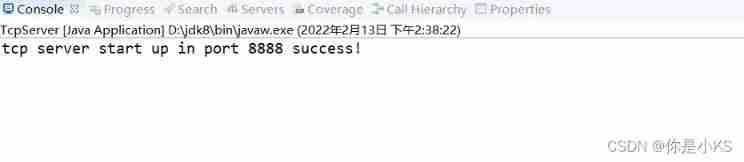
Open client
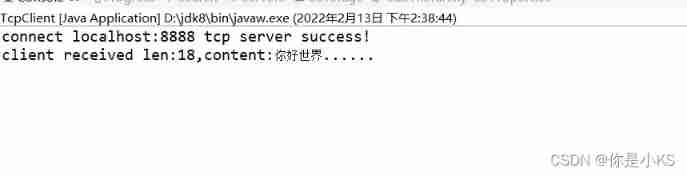
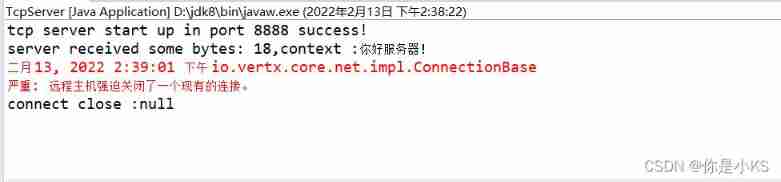
Test success
边栏推荐
猜你喜欢


![[蓝桥杯2017初赛]方格分割](/img/e9/e49556d0867840148a60ff4906f78e.png)
![[yarn] yarn container log cleaning](/img/1d/b48059ae2e6133ea9d9c38d31c4a86.png)

随机推荐
[yarn] yarn container log cleaning
How to build a new project for keil5mdk (with super detailed drawings)
2020 WANGDING cup_ Rosefinch formation_ Web_ nmap
快来走进JVM吧
2019腾讯暑期实习生正式笔试
库函数--(持续更新)
Mysql的索引实现之B树和B+树
wangeditor富文本组件-复制可用
PHP - whether the setting error displays -php xxx When PHP executes, there is no code exception prompt
[CDH] modify the default port 7180 of cloudera manager in cdh/cdp environment
[NPUCTF2020]ReadlezPHP
[AGC009D]Uninity
Solution of deleting path variable by mistake
數據庫高級學習筆記--SQL語句
L2-006 tree traversal (25 points)
Rhcsa certification exam exercise (configured on the first host)
Nodejs connect mysql
mysql实现读写分离
Project practice - background employee information management (add, delete, modify, check, login and exit)
MATLAB学习和实战 随手记