当前位置:网站首页>How to use diff and patch to update the source code
How to use diff and patch to update the source code
2022-07-04 10:31:00 【Big bear loves to work】
About updating the source code diff And patch command
Reference material :
①《 Master Linux》p17,p279–p280
②《 happy Linux Command line 》http://billie66.github.io/TLCL/ p291–p295
③《 Bird brother Linux Private dishes , Basics 3 edition 》p366–p368
diff command
It is mainly used to compare the differences between files or directories , coordination
patchCommand can realize the change between different program source code versions . A common use case isdiffThe program creates adiff fileorpatch Patch file, thenpatchUse this file to update the source codediff Comparison commands have different output styles , Here is a record of the most commonly used unified pattern style , I.e. use
-uOptions- Suppose there are two different files
file1.txtandfile2.txt, As shown below :
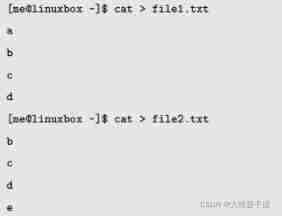
- Suppose there are two different files
call diff Command to compare , The output style is unified
diff -u file1.txt file2.txt
# The output is as follows :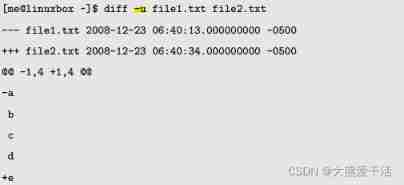
- The first two lines are the beginning of the file name and timestamp , The first file uses
---Make a mark , For the second file+++Make a mark - In the third line
@@ -1,4 +1,4 @@It describes that the range of differences in the first file is 1 Go to the first place 4 That's ok , The range of differences in the second document is 1 Go to the first place 4 That's ok ,-It means the first file ,+Represents the second file - The string after the third line is the text line itself , Start with three characters , Represents different meanings
SpaceIndicates that both files contain line changes ;-Indicates that when updating from one file to the second file, you need to delete and change lines ;+Indicates that the line change needs to be added when updating from the first file to the second file
- Be careful : The patch file has included all updates / Modify strategy , So when updating, you can update as long as you can find the file
- The first two lines are the beginning of the file name and timestamp , The first file uses
in addition :
diffIt can work in any text file , Source code 、 Configuration files, etcUse diff Command to generate difference file or patch file
diff -Naur old_file new_file > diff_file
# among old_file and new_file It can be either a file or a directory
-N  Indicates if it is a comparison directory , If document A Only appear in a directory , The preset is displayed as Only in.....
-u  Indicates using unified mode output , That is, the mode described above
-r  Indicates recursive comparison of subdirectories
-a  Means to compare text files line by line
for example :
diff -Naur file1.txt file2.txt > file.patchThen we can use
patchCommand andfile.patchUpdate the patch filepatchcommand# to update patch -pN < patch_file # Restore patch -R -pN < patch_file -p Said to ignore N Layer Directory ( This place is a little difficult to understand , I'll say later ) -R Means to restore the new file to the old versionThen, above : to update
file1.txtTofile2.txt# Type first to include file1.txt and file2.txt Under the directory of , Then execute the order patch < file.patch # We don't need to specify to update / Patched target file , because diff file /file.patch The file name has been included in the title line of the fileOr update with the following command :
-pParameters are mainly used in directory related places , Suppose there is a patch file with the beginning shown below :
situation 1: If you are currently in
srcUnder the table of contents , You can directly execute the following commands to update :patch -p0 < file.patch or patch < file.patchsituation 2: If the beginning of the patch is different from the current environment , You can use
-pAppropriately ignore several levels of directories
That is, if your current directory is
package-3.45, There issrcCatalog , For the patch file above , You need to ignore the first level directorypatch -p1 < file.patch # among file.patch You can also use the absolute path to locate the fileIf it is after the source code is updated , You can recompile and build 、 Installed
make clean main # Clean up the target file first , And then build
make install 	# install
边栏推荐
- 按键精灵跑商学习-商品数量、价格提醒、判断背包
- BGP ---- border gateway routing protocol ----- basic experiment
- Three schemes of ZK double machine room
- Network disk installation
- 按键精灵打怪学习-识别所在地图、跑图、进入帮派识别NPC
- uniapp---初步使用websocket(长链接实现)
- Native div has editing ability
- Rhcsa day 9
- From programmers to large-scale distributed architects, where are you (I)
- DCL statement of MySQL Foundation
猜你喜欢
Reasons and solutions for the 8-hour difference in mongodb data date display
【OpenCV 例程200篇】218. 多行倾斜文字水印
Rhcsa day 9
Dynamic memory management

From programmers to large-scale distributed architects, where are you (2)
Custom type: structure, enumeration, union
Software sharing: the best PDF document conversion tool and PDF Suite Enterprise version sharing | with sharing
DDL statement of MySQL Foundation
2. Data type
PHP代码审计3—系统重装漏洞
随机推荐
Architecture introduction
Service developers publish services based on EDAs
Deep learning 500 questions
Crawl Zhejiang industry and trade news page
183 sets of free resume templates to help everyone find a good job
Snake (C language)
Ruby time format conversion strftime MS matching format
Pod management
System.currentTimeMillis() 和 System.nanoTime() 哪个更快?别用错了!
Use the data to tell you where is the most difficult province for the college entrance examination!
Exercise 7-2 finding the maximum value and its subscript (20 points)
Does any teacher know how to inherit richsourcefunction custom reading Mysql to do increment?
Latex arranges single column table pictures in double column format articles
Seven examples to understand the storage rules of shaped data on each bit
今日睡眠质量记录78分
System. Currenttimemillis() and system Nanotime (), which is faster? Don't use it wrong!
Evolution from monomer architecture to microservice architecture
Four characteristics and isolation levels of database transactions
The future education examination system cannot answer questions, and there is no response after clicking on the options, and the answers will not be recorded
RHCE day 3