当前位置:网站首页>[200 opencv routines] 98 Statistical sorting filter
[200 opencv routines] 98 Statistical sorting filter
2022-07-06 15:07:00 【Xiaobai youcans】
【OpenCV routine 200 piece 】98. Statistical sorting filter
Welcome to your attention 『OpenCV routine 200 piece 』 series , Ongoing update
Welcome to your attention 『Python Small white OpenCV Learning lessons 』 series , Ongoing update
3.5 Statistical sorting filter
Statistical sorting filter is a spatial filter , The response is based on the order of pixel values in the filter neighborhood , The sorting result determines the output of the filter .
Statistical ranking includes median filter 、 Maximum filter 、 Minimum filter 、 Midpoint filter and modified alpha mean filter .
- Median filter : Replace the pixel value with the gray value in the predefined pixel neighborhood , Compared with linear smoothing filter, it can effectively reduce some random noise , And the fuzziness is much smaller .
f ^ ( x , y ) = m e d i a n ( r , c ) ∈ S x y { g ( r , c ) } \hat{f}(x,y) = {median} _{(r,c) \in Sxy} \{g(r,c)\} f^(x,y)=median(r,c)∈Sxy{ g(r,c)}
Because sorting operation is required , The operation time of median filter is very long .
OpenCV Provides cv.medianBlur Function to realize the median filtering algorithm , See 《 routine 1.73: Nonlinear filtering of image — Median filter 》.
- Maximum filter : Replace the pixel value with the maximum gray value in the predefined pixel neighborhood , It can be used to find the most bright spot in the image , Or used to weaken dark areas adjacent to bright areas , It can also be used to reduce pepper noise .
f ^ ( x , y ) = max ( r , c ) ∈ S x y { g ( r , c ) } \hat{f}(x,y) = \max _{(r,c) \in Sxy} \{g(r,c)\} f^(x,y)=(r,c)∈Sxymax{ g(r,c)}
- Minimum filter : Replace the pixel value with the minimum gray value in the predefined pixel neighborhood , It can be used to find the darkest point in the image , Or used to weaken the bright area adjacent to the dark area , It can also be used to reduce salt particle noise .
f ^ ( x , y ) = min ( r , c ) ∈ S x y { g ( r , c ) } \hat{f}(x,y) = \min _{(r,c) \in Sxy} \{g(r,c)\} f^(x,y)=(r,c)∈Sxymin{ g(r,c)}
- Midpoint filter : The pixel value is replaced by the mean of the maximum and minimum gray values in the predefined pixel neighborhood , Note that the value of the midpoint is often different from the median . Midpoint filter is a combination of statistical sorting filter and average filter , Suitable for dealing with randomly distributed noise , For example, Gaussian noise 、 Uniform noise .
f ^ ( x , y ) = [ max ( r , c ) ∈ S x y { g ( r , c ) } + min ( r , c ) ∈ S x y { g ( r , c ) } ] / 2 \hat{f}(x,y) = [\max _{(r,c) \in Sxy} \{g(r,c)\} + \min _{(r,c) \in Sxy} \{g(r,c)\}]/2 f^(x,y)=[(r,c)∈Sxymax{ g(r,c)}+(r,c)∈Sxymin{ g(r,c)}]/2
routine 9.12: Statistical sorting filter
    # 9.12:  Statistical sorting filter  (Statistical sorting filter)
    img = cv2.imread("../images/Fig0508a.tif", 0)  # flags=0  Read as grayscale image
    img_h = img.shape[0]
    img_w = img.shape[1]

    m, n = 3, 3
    kernalMean = np.ones((m, n), np.float32)  #  Generate box core

    #  Edge fill
    hPad = int((m-1) / 2)
    wPad = int((n-1) / 2)
    imgPad = np.pad(img.copy(), ((hPad, m-hPad-1), (wPad, n-wPad-1)), mode="edge")

    imgMedianFilter = np.zeros(img.shape)  #  Median filter
    imgMaxFilter = np.zeros(img.shape)  #  Maximum filter
    imgMinFilter = np.zeros(img.shape)  #  Minimum filter
    imgMiddleFilter = np.zeros(img.shape)  #  Midpoint filter
    for i in range(img_h):
        for j in range(img_w):
            # # 1.  Median filter  (median filter)
            pad = imgPad[i:i+m, j:j+n]
            imgMedianFilter[i, j] = np.median(pad)

            # # 2.  Maximum filter  (maximum filter)
            pad = imgPad[i:i+m, j:j+n]
            imgMaxFilter[i, j] = np.max(pad)

            # # 3.  Minimum filter  (minimum filter)
            pad = imgPad[i:i+m, j:j+n]
            imgMinFilter[i, j] = np.min(pad)

            # # 4.  Midpoint filter  (middle filter)
            pad = imgPad[i:i+m, j:j+n]
            imgMiddleFilter[i, j] = int(pad.max()/2 + pad.min()/2)

    plt.figure(figsize=(9, 7))
    plt.subplot(221), plt.axis('off'), plt.title("median filter")
    plt.imshow(imgMedianFilter, cmap='gray', vmin=0, vmax=255)
    plt.subplot(222), plt.axis('off'), plt.title("maximum filter")
    plt.imshow(imgMaxFilter, cmap='gray', vmin=0, vmax=255)
    plt.subplot(223), plt.axis('off'), plt.title("minimum filter")
    plt.imshow(imgMinFilter, cmap='gray', vmin=0, vmax=255)
    plt.subplot(224), plt.axis('off'), plt.title("middle filter")
    plt.imshow(imgMiddleFilter, cmap='gray', vmin=0, vmax=255)
    plt.tight_layout()
    plt.show()
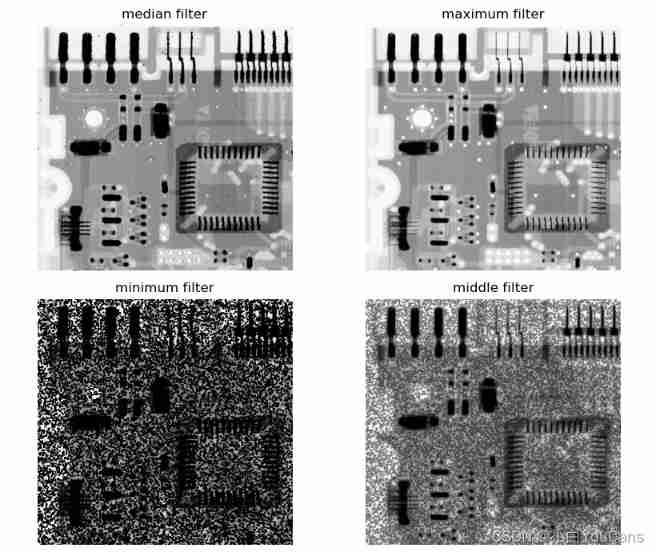
Program description :
It should be noted that , This routine and image processing results of various filters are to illustrate the programming method and program running results of filter implementation . Some filters in the figure have poor image processing effect , It can not fully reflect the performance of the filter , It only shows that the filter is not suitable for dealing with some types of noise . On the selection and comparison of statistical filters in dealing with different noises , You can refer to Gonzalez 《 digital image processing ( The Fourth Edition )》 Relevant contents of Chapter 5 .
( At the end of this section )
Copyright notice :
[email protected] Original works , Reprint must be marked with the original link
Copyright 2021 youcans, XUPT
Crated:2022-2-1
Welcome to your attention 『OpenCV routine 200 piece 100 piece 』 series , Ongoing update
Welcome to your attention 『Python Small white OpenCV Learning lessons 』 series , Ongoing update【OpenCV routine 200 piece 】01. Image reading (cv2.imread)
【OpenCV routine 200 piece 】02. Image saving (cv2.imwrite)
【OpenCV routine 200 piece 】03. Image display (cv2.imshow)
【OpenCV routine 200 piece 】04. use matplotlib Display images (plt.imshow)
【OpenCV routine 200 piece 】05. The properties of the image (np.shape)
【OpenCV routine 200 piece 】06. Pixel editing (img.itemset)
【OpenCV routine 200 piece 】07. Image creation (np.zeros)
【OpenCV routine 200 piece 】08. Copy of image (np.copy)
【OpenCV routine 200 piece 】09. Image clipping (cv2.selectROI)
【OpenCV routine 200 piece 】10. Image stitching (np.hstack)
【OpenCV routine 200 piece 】11. Split of image channel (cv2.split)
【OpenCV routine 200 piece 】12. Merging of image channels (cv2.merge)
【OpenCV routine 200 piece 】13. The addition of images (cv2.add)
【OpenCV routine 200 piece 】14. The image is added to the scalar (cv2.add)
【OpenCV routine 200 piece 】15. Weighted addition of images (cv2.addWeight)
【OpenCV routine 200 piece 】16. Addition of images of different sizes
【OpenCV routine 200 piece 】17. Gradient switching between two images
【OpenCV routine 200 piece 】18. Mask addition of images
【OpenCV routine 200 piece 】19. The circular mask of the image
【OpenCV routine 200 piece 】20. Bitwise operation of image
【OpenCV routine 200 piece 】21. Image overlay
【OpenCV routine 200 piece 】22. Add non Chinese text to the image
【OpenCV routine 200 piece 】23. Add Chinese text to the image
【OpenCV routine 200 piece 】23. Add Chinese text to the image
【OpenCV routine 200 piece 】24. Affine transformation of image
【OpenCV routine 200 piece 】25. Translation of image
【OpenCV routine 200 piece 】26. The rotation of the image ( Centered on the origin )
【OpenCV routine 200 piece 】27. The rotation of the image ( Centered on any point )
【OpenCV routine 200 piece 】28. The rotation of the image ( Right angle rotation )
【OpenCV routine 200 piece 】29. Image flipping (cv2.flip)
【OpenCV routine 200 piece 】30. Image zooming (cv2.resize)
【OpenCV routine 200 piece 】31. Image pyramid (cv2.pyrDown)
【OpenCV routine 200 piece 】32. Image distortion ( Crosscutting )
【OpenCV routine 200 piece 】33. Composite transformation of image
【OpenCV routine 200 piece 】34. Projection transformation of image
【OpenCV routine 200 piece 】35. Projection transformation of image ( Border filling )
【OpenCV routine 200 piece 】36. Conversion of rectangular coordinates and polar coordinates
【OpenCV routine 200 piece 】37. Gray processing and binary processing of image
【OpenCV routine 200 piece 】38. Inverse color transformation of image ( Image reversal )
【OpenCV routine 200 piece 】39. Linear transformation of image gray
【OpenCV routine 200 piece 】40. Image piecewise linear gray scale transformation
【OpenCV routine 200 piece 】41. Gray scale transformation of image ( Grayscale stratification )
【OpenCV routine 200 piece 】42. Gray scale transformation of image ( Bit plane layering )
【OpenCV routine 200 piece 】43. Gray scale transformation of image ( Logarithmic transformation )
【OpenCV routine 200 piece 】44. Gray scale transformation of image ( Gamma transform )
【OpenCV routine 200 piece 】45. Gray histogram of the image
【OpenCV routine 200 piece 】46. Histogram equalization
【OpenCV routine 200 piece 】47. Image enhancement — Histogram matching
【OpenCV routine 200 piece 】48. Image enhancement — Color histogram matching
【OpenCV routine 200 piece 】49. Image enhancement — Local histogram processing
【OpenCV routine 200 piece 】50. Image enhancement — Histogram statistics image enhancement
【OpenCV routine 200 piece 】51. Image enhancement — Histogram back tracking
【OpenCV routine 200 piece 】52. Image correlation and convolution
【OpenCV routine 200 piece 】53. Scipy Realize image two-dimensional convolution
【OpenCV routine 200 piece 】54. OpenCV Realize image two-dimensional convolution
【OpenCV routine 200 piece 】55. Separable convolution kernel
【OpenCV routine 200 piece 】56. Low pass cartridge filter
【OpenCV routine 200 piece 】57. Low pass Gaussian filter
【OpenCV routine 200 piece 】58. Nonlinear filtering — median filtering
【OpenCV routine 200 piece 】59. Nonlinear filtering — Bilateral filtering
【OpenCV routine 200 piece 】60. Nonlinear filtering — Joint bilateral filtering
【OpenCV routine 200 piece 】61. Guided filtering (Guided filter)
【OpenCV routine 200 piece 】62. Sharpen the image —— Passivation masking
【OpenCV routine 200 piece 】63. Sharpen the image ——Laplacian operator
【OpenCV routine 200 piece 】64. Sharpen the image ——Sobel operator
【OpenCV routine 200 piece 】65. Sharpen the image ——Scharr operator
【OpenCV routine 200 piece 】66. Low pass of image filtering / qualcomm / Band stop / Bandpass
【OpenCV routine 200 piece 】67. Comprehensive application of image enhancement in spatial domain
【OpenCV routine 200 piece 】68. Comprehensive application of image enhancement in spatial domain
【OpenCV routine 200 piece 】69. Discontinuous Fourier coefficients
【OpenCV routine 200 piece 】70. Fourier transform of one-dimensional continuous function
【OpenCV routine 200 piece 】71. Sampling of continuous functions
【OpenCV routine 200 piece 】72. One dimensional discrete Fourier transform
【OpenCV routine 200 piece 】73. Two dimensional continuous Fourier transform
【OpenCV routine 200 piece 】74. Anti aliasing of images
【OpenCV routine 200 piece 】75. Numpy Realize image Fourier transform
【OpenCV routine 200 piece 】76. OpenCV Realize image Fourier transform
【OpenCV routine 200 piece 】77. OpenCV Realize fast Fourier transform
【OpenCV routine 200 piece 】78. Fundamentals of image filtering in frequency domain
【OpenCV routine 200 piece 】79. The basic steps of image filtering in frequency domain
【OpenCV routine 200 piece 】80. Detailed steps of image filtering in frequency domain
【OpenCV routine 200 piece 】81. Gaussian low pass filter in frequency domain
【OpenCV routine 200 piece 】82. Butterworth low pass filter in frequency domain
【OpenCV routine 200 piece 】83. Low pass filtering in frequency domain : Printed text character repair
【OpenCV routine 200 piece 】84. The high pass filter is obtained from the low pass filter
【OpenCV routine 200 piece 】85. Application of high pass filter in frequency domain
【OpenCV routine 200 piece 】86. Frequency domain filtering applications : Fingerprint image processing
【OpenCV routine 200 piece 】87. Frequency domain passivation masking
【OpenCV routine 200 piece 】88. Laplace high pass filter in frequency domain
【OpenCV routine 200 piece 】89. Transfer function of band stop filter
【OpenCV routine 200 piece 】90. Frequency domain notch filter
【OpenCV routine 200 piece 】91. Gaussian noise 、 rayleigh noise 、 Irish noise
【OpenCV routine 200 piece 】92. Exponential noise 、 Uniform noise 、 Salt and pepper noise
【OpenCV routine 200 piece 】93. Histogram of noise model
【OpenCV routine 200 piece 】94. Arithmetic average filter
【OpenCV routine 200 piece 】95. Geometric mean filter
【OpenCV routine 200 piece 】96. Harmonic averaging filter
【OpenCV routine 200 piece 】97. Anti harmonic averaging filter
【OpenCV routine 200 piece 】98. Statistical sorting filter
边栏推荐
- Statistics 8th Edition Jia Junping Chapter 1 after class exercises and answers summary
- 【指针】求字符串的长度
- CSAPP家庭作业答案7 8 9章
- 数字电路基础(一)数制与码制
- 1. Payment system
- Fundamentals of digital circuits (I) number system and code system
- [oiclass] maximum formula
- Differences between select, poll and epoll in i/o multiplexing
- Logstack introduction and deployment -- elasticstack (elk) work notes 019
- Leetcode simple question: check whether two strings are almost equal
猜你喜欢
ucore lab1 系统软件启动过程 实验报告

150 common interview questions for software testing in large factories. Serious thinking is very valuable for your interview
Database monitoring SQL execution
Build your own application based on Google's open source tensorflow object detection API video object recognition system (II)
Keil5 MDK's formatting code tool and adding shortcuts
Express
Don't you even look at such a detailed and comprehensive written software test question?
数字电路基础(三)编码器和译码器
The common methods of servlet context, session and request objects and the scope of storing data in servlet.

Capitalize the title of leetcode simple question
随机推荐
Wang Shuang's detailed learning notes of assembly language II: registers
{1,2,3,2,5} duplicate checking problem
Numpy Quick Start Guide
ucore lab7 同步互斥 实验报告
Global and Chinese market of portable and handheld TVs 2022-2028: Research Report on technology, participants, trends, market size and share
The minimum sum of the last four digits of the split digit of leetcode simple problem
Opencv recognition of face in image
Summary of thread implementation
Don't you even look at such a detailed and comprehensive written software test question?
Global and Chinese markets of cobalt 2022-2028: Research Report on technology, participants, trends, market size and share
To brush the video, it's better to see if you have mastered these interview questions. Slowly accumulating a monthly income of more than 10000 is not a dream.
MySQL development - advanced query - take a good look at how it suits you
Numpy快速上手指南
Description of Vos storage space, bandwidth occupation and PPS requirements
Report on the double computer experiment of scoring system based on 485 bus
Software testing interview summary - common interview questions
CSAPP homework answers chapter 789
Global and Chinese market for antiviral coatings 2022-2028: Research Report on technology, participants, trends, market size and share
[HCIA continuous update] working principle of static route and default route
HackTheBox-Emdee five for life