当前位置:网站首页>跨域问题解决方案
跨域问题解决方案
2022-07-07 10:23:00 【YXXYX】
引言
跨域问题一般会在前后端分离的项目中遇到,跨域的产生是因为浏览器为了安全设置的同源策略,只有协议(http/https)、域名(www.test.com)、端口(8080/8081…)三者都相同时才不会产生跨域问题;
这也解释了为什么前后端分离的项目会有跨域问题,就比如我们在同一台服务器上开发,前端的url为:http://127.0.0.1:3000,而后端的url为:http://127.0.0.1:8080,两者端口都不同如果相互访问定然会产生跨域问题;
如图:
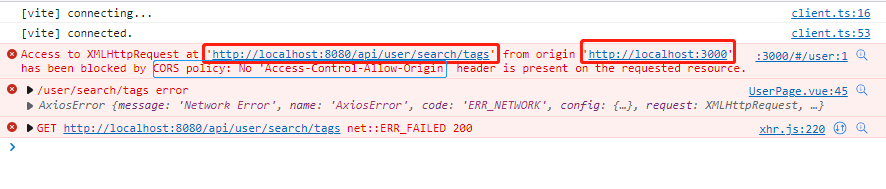
前端http://localhost:3000向后端发送请求:http://localhost:8080/api/user/search/tags,但是因为端口号不同,于是请求失败,报错信息也显示跨域策略阻塞:has been blocked by CORS policy: No 'Access-Control-Allow-Origin' header is present on the requested resource.
下面就分享一下我对于跨域问题的解决方法;
解决方法
下面就是几种方法解决上面案例;
WebMvcConfig配置类跨域配置
可以通过自定义配置类实现跨域请求,具体配置如下:
@Configuration
public class WebMvcConfig implements WebMvcConfigurer {

    @Override
    public void addCorsMappings(CorsRegistry registry) {

        // 设置允许跨域的路径
        registry.addMapping("/**")
                // 设置允许跨域请求的域名
                // 当Credentials证书为true时,Origin不能为星号,需为具体的ip地址(如果接口不带cookie,ip无需设成具体ip)
                .allowedOrigins("http://localhost:3000")
                // 是否允许证书 不再默认开启
                .allowCredentials(true)
                // 设置允许的方法
                .allowedMethods("*")
                // 跨域允许时间
                .maxAge(3600);
    }
}
前端向后端请求:
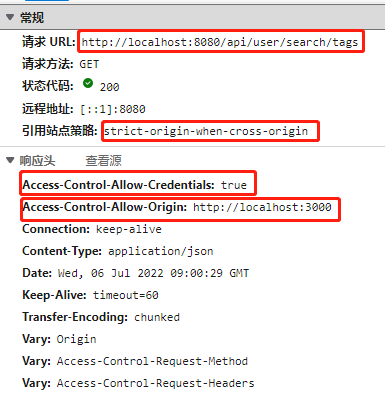
可以看到请求成功,并且跨域允许的url为配置的前端域名:http://localhost:3000
注解@CrossOrigin实现跨域
这个方法比上面方法就简单太多了,直接在后端Controller类上加上该注解,默认允许所有跨域请求,但是最好还是标明请求域名:
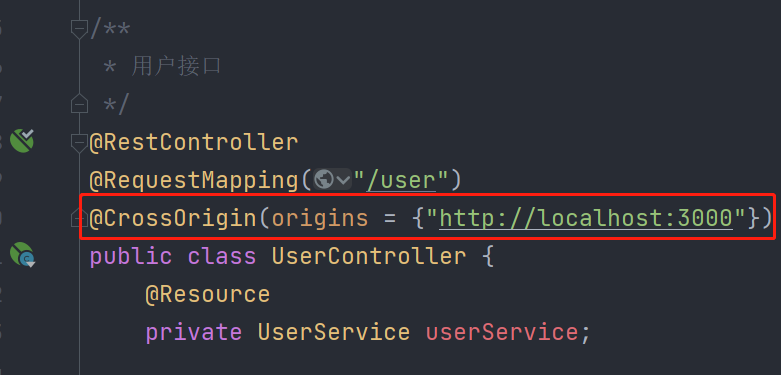
这样也可以实现跨域访问,相对于配置来说简单些,但是也有缺点,最后一块说;
结果就不展示了,和之前一样;
GateWay网关配置
网关配置一般是在微服务项目中单独有一个网关模块,因为微服务中的所有请求都要通过网关过滤,所以请求首先就是到网关,我们可以通过在网关服务中配置跨域:
在网关模块的application.yml配置文件中配置跨域:
# 跨域配置:
spring:
  cloud:
    gateway:
      globalcors: # 全局的跨域处理
        add-to-simple-url-handler-mapping: true # 解决options请求被拦截问题
        corsConfigurations:
          '[/**]': # 设置拦截哪些请求,/**表示拦截一切请求
            allowedOrigins: # 允许哪些网站的跨域请求
              - "http://localhost:3000"
            allowedMethods: # 允许的跨域ajax的请求方式
              - "GET"
              - "POST"
              - "DELETE"
              - "PUT"
              - "OPTIONS"
            allowedHeaders: "*" # 允许在请求中携带的头信息
            allowCredentials: true # 是否允许携带cookie
            maxAge: 360000 # 这次跨域检测的有效期
我们也可以自定义配置文件配置:
/** * 跨域统一配置 */
@Configuration
public class CorsConfig {

    // 处理跨域
    @Bean
    public CorsWebFilter corsFilter() {

        CorsConfiguration config = new CorsConfiguration();
        // 允许的请求头
        config.addAllowedMethod("*");
        // 允许的请求源 (如:http://localhost:8080)
        config.addAllowedOrigin("http://localhost:3000");
        // 允许的请求方法 ==> GET, HEAD, POST, PUT, PATCH, DELETE, OPTIONS, TRACE
        config.addAllowedHeader("*");
        // URL 映射 (如: /admin/**)
        UrlBasedCorsConfigurationSource source = new UrlBasedCorsConfigurationSource(new PathPatternParser());
        source.registerCorsConfiguration("/**", config);
        return new CorsWebFilter(source);
    }
}
这两种方法都可以实现网关的跨域配置;
总结
大体上介绍了三种解决跨域的方法,那么实际该如何选择呢?
@CrossOrigin注解:这种方法适合单体项目,比较灵活,实现简单;每一个Controller接口允许的跨域url都很清楚,但是Controller接口多了后就很麻烦;
WebMvcConfig配置类:这种方法适合单体项目,并且如果你觉得在每一个Controller上添加@CrossOrigin注解很麻烦的话,就可以使用这个方法;
GateWay网关配置:这种方法适合微服务项目,并且我分享的两种方法还是比较建议使用第一种方法,直接在application.yml文件配置;
需要注意一点:如果网关配置了跨域,那么就不要在其他地方配置跨域,比如再在Controller上加@CrossOrigin注解,如果这样跨域相当于没有配置,会失效;
边栏推荐
- What are the technical differences in source code anti disclosure
- Mise en œuvre du codage Huffman et du décodage avec interface graphique par MATLAB
- Flet教程之 14 ListTile 基础入门(教程含源码)
- Steps of redis installation and self startup configuration under CentOS system
- 开发一个小程序商城需要多少钱?
- wallys/Qualcomm IPQ8072A networking SBC supports dual 10GbE, WiFi 6
- Visual Studio 2019 (LocalDB)\MSSQLLocalDB SQL Server 2014 数据库版本为852无法打开,此服务器支持782版及更低版本
- Visual studio 2019 (localdb) \mssqllocaldb SQL Server 2014 database version is 852 and cannot be opened. This server supports version 782 and earlier
- Software design - "high cohesion and low coupling"
- 112. Network security penetration test - [privilege promotion article 10] - [Windows 2003 lpk.ddl hijacking rights lifting & MSF local rights lifting]
猜你喜欢
软件内部的定时炸弹:0-Day Log4Shell只是冰山一角
In SQL, I want to set foreign keys. Why is this problem
【全栈计划 —— 编程语言之C#】基础入门知识一文懂
Explore cloud database of cloud services together
![[data clustering] realize data clustering analysis based on multiverse optimization DBSCAN with matlab code](/img/83/0652e3138b87a4741dd8261a24d1e8.png)
[data clustering] realize data clustering analysis based on multiverse optimization DBSCAN with matlab code

清华姚班程序员,网上征婚被骂?
Cmu15445 (fall 2019) project 2 - hash table details

Completion report of communication software development and Application
UP Meta—Web3.0世界创新型元宇宙金融协议
La voie du succès de la R & D des entreprises Internet à l’échelle des milliers de personnes
随机推荐
防红域名生成的3种方法介绍
Present pod information to the container through environment variables
110. Network security penetration test - [privilege promotion 8] - [windows sqlserver xp_cmdshell stored procedure authorization]
【滤波跟踪】基于matlab捷联惯导仿真【含Matlab源码 1935期】
Hi3516 full system type burning tutorial
关于 Web Content-Security-Policy Directive 通过 meta 元素指定的一些测试用例
What is a LAN domain name? How to parse?
Sonar:Cognitive Complexity认知复杂度
Detailed explanation of debezium architecture of debezium synchronization
Unity map auto match material tool map auto add to shader tool shader match map tool map made by substance painter auto match shader tool
MATLAB实现Huffman编码译码含GUI界面
Solve the problem that vscode can only open two tabs
Cmu15445 (fall 2019) project 2 - hash table details
Flet教程之 18 Divider 分隔符组件 基础入门(教程含源码)
NGUI-UILabel
【全栈计划 —— 编程语言之C#】基础入门知识一文懂
Nuclear boat (I): when "male mothers" come into reality, can the biotechnology revolution liberate women?
[filter tracking] strapdown inertial navigation pure inertial navigation solution matlab implementation
30. Few-shot Named Entity Recognition with Self-describing Networks 阅读笔记
Swiftui tutorial how to realize automatic scrolling function in 2 seconds