当前位置:网站首页>Excel导入,导出功能实现
Excel导入,导出功能实现
2022-07-06 09:18:00 【Demon Lord(大魔王)】
日常在做后台系统的时候会很频繁的遇到Excel导入导出的问题,下面就流程写出
1.依赖 alibaba的easyexcel
<groupId>com.alibaba</groupId>
<artifactId>easyexcel</artifactId>
2.注解
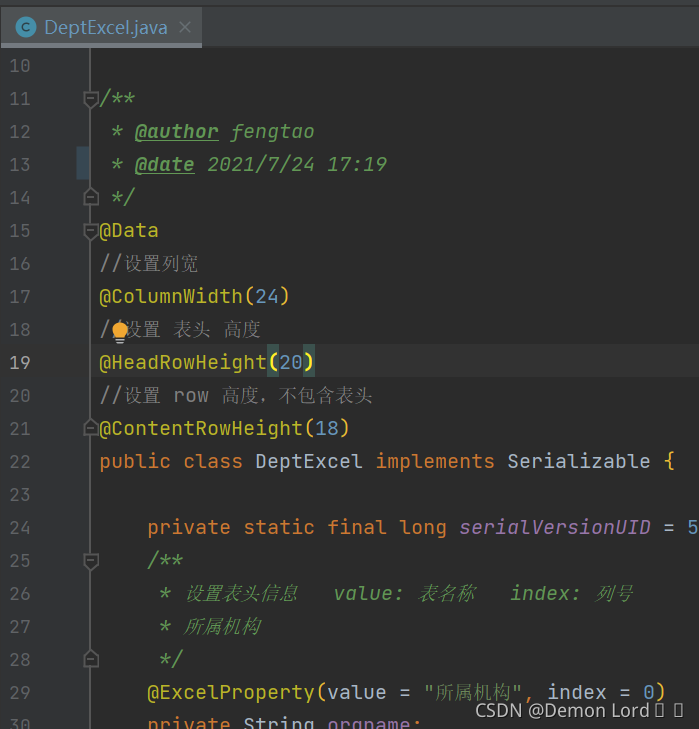
3.导入 isCovered是是否覆盖的参数,不需要这个功能可以忽略
    @PostMapping("/import-dept")
    @ApiOperationSupport(order = 13)
    @ApiOperation(value = "导入部门", notes = "传入excel")
    public void importDept(@RequestParam(value = "file") MultipartFile file, @RequestParam(value = "isCovered") String isCovered) throws IOException {
        deptService.importDept(file ,isCovered);
    }
Service层
    @Transactional(rollbackFor = Exception.class)
    @Override
    public void importDept(MultipartFile file, String isCovered) throws IOException {
        //取流
        InputStream inputStream = file.getInputStream();
        //转为定义的excel实体集合-根据部门分组
        List<DeptExcel> deptExcelList = EasyExcel.read(inputStream).head(DeptExcel.class)
                // 设置sheet,默认读取第一个
                .sheet()
                // 设置标题所在行数
                .headRowNumber(1)
                .doReadSync();
        List<Dept> deptList = new ArrayList<>();
        //循环字段翻译,就忽略了
        deptExcelList.forEach(deptExcel -> {
            Dept dept1 = new Dept();
            if (StringUtil.isNotBlank(deptExcel.getParentname())) {
                if (Objects.nonNull(DeptCache.getDeptByName(deptExcel.getParentname()))) {
                    dept1.setParentId(DeptCache.getDeptByName(deptExcel.getParentname()).getId());
                }
            }


            dept1.setVcode(deptExcel.getVcode());
            dept1.setVname(deptExcel.getVname());
            deptList.add(dept1);

        });
        if (isCovered.equals("0")) {
            deptList.forEach(dept -> {
                Long id = this.getOne(Wrappers.<Dept>query().lambda().eq(Dept::getVcode, dept.getVcode())).getId();
                if (id != null) {
                    dept.setId(id);
                    this.saveOrUpdate(dept);
                } else {
                    this.saveOrUpdate(dept);
                }
            });
        } else {
            deptList.forEach(this::saveOrUpdate);
        }
    }
4.导出
    /**
     * 导出部门
     */
    @GetMapping("/export-dept")
    @ApiOperationSupport(order = 14)
    @ApiOperation(value = "导出部门", notes = "传入user")
    public void exportDept(@ApiIgnore @RequestParam Map<String, Object> dept, HttpServletResponse response) {
        QueryWrapper<Dept> queryWrapper = Condition.getQueryWrapper(dept, Dept.class);
        List<DeptExcel> list = deptService.exportDept(queryWrapper);
        ExcelUtil.export(response, "导出部门" + DateUtil.time(), "导出部门表", list, DeptExcel.class);
}

     //写的工具类 就不全发出 自己拼进去
    private static <T> void export(HttpServletResponse response, String fileName, String sheetName, List<T> dataList, Class<T> clazz) {
        try {
            response.setContentType("application/vnd.ms-excel");
            response.setCharacterEncoding(Charsets.UTF_8.name());
            fileName = URLEncoder.encode(fileName, Charsets.UTF_8.name());
            response.setHeader("Content-disposition", "attachment;filename=" + fileName + ".xlsx");
            EasyExcel.write(response.getOutputStream(), clazz).sheet(sheetName).doWrite(dataList);
        } catch (Throwable var6) {
            throw var6;
        }
    }
Service层
    @Override
    public List<DeptExcel> exportDept(QueryWrapper<Dept> queryWrapper) {
        List<Dept> deptExcels = this.list(queryWrapper);
        List<DeptExcel> deptExcelList = new ArrayList<>();
        //翻译部分略过
        deptExcels.forEach(dept1 -> {
            DeptExcel deptExcel = new DeptExcel();
            if (dept1.getParentId() != null) {
                if (Objects.nonNull(DeptCache.getDept(dept1.getParentId()))) {
                    deptExcel.setParentname(DeptCache.getDept(dept1.getParentId()).getVname());
                }
            }
            deptExcel.setVname(dept1.getVname());
            deptExcel.setVcode(dept1.getVcode());
            deptExcelList.add(deptExcel);

        });
        return deptExcelList;
}边栏推荐
- GNSS定位精度指标计算
- Gateway fails to route according to the service name, and reports an error service unavailable, status=503
- Office提示您的许可证不是正版弹框解决
- NRF24L01故障排查
- @The difference between Autowired and @resource
- 地球围绕太阳转
- SSD technical features
- Unity3D摄像机,键盘控制前后左右上下移动,鼠标控制旋转、放缩
- 燕山大学校园网自动登录问题解决方案
- Liste des boucles de l'interface graphique de défaillance
猜你喜欢
What are the advantages of using SQL in Excel VBA
Particle system for introduction to unity3d Foundation (attribute introduction + case production of flame particle system)
In 2020, the average salary of IT industry exceeded 170000, ranking first
JS Title: input array, exchange the largest with the first element, exchange the smallest with the last element, and output array.
Compilation principle: preprocessing of source program and design and implementation of lexical analysis program (including code)

数据库课程设计:高校教务管理系统(含代码)
idea中好用的快捷键
编译原理:源程序的预处理及词法分析程序的设计与实现(含代码)
Fairygui loop list
There is no red exclamation mark after SVN update
随机推荐
Game 280 weekly
Particle system for introduction to unity3d Foundation (attribute introduction + case production of flame particle system)
What is the maximum length of MySQL varchar field
Halcon knowledge: gray_ Tophat transform and bottom cap transform
PR 2021 quick start tutorial, first understanding the Premiere Pro working interface
Latex learning
(the first set of course design) 1-4 message passing interface (100 points) (simulation: thread)
ESP8266连接onenet(旧版MQTT方式)
Single chip Bluetooth wireless burning
Fairygui character status Popup
GNSS定位精度指标计算
MySQL時間、時區、自動填充0的問題
第一人称视角的角色移动
Containers and Devops: container based Devops delivery pipeline
MySQL time, time zone, auto fill 0
VLSM variable length subnet mask partition tips
Unity3D制作注册登录界面,并实现场景跳转
MySQL replacement field part content
Unity3D,阿里云服务器,平台配置
Expected value (EV)