当前位置:网站首页>QT realizes window topping, topping state switching, and multi window topping priority relationship
QT realizes window topping, topping state switching, and multi window topping priority relationship
2022-07-06 16:16:00 【Larry_ Yanan】
We use QT During interface development , You may encounter the need to put the window on the top . The most common is , You need to make a floating toolbar , Suspension menu , Even a floating drawing board . This means that we need to put this window on the top “ System ” And ourselves “ Software ” On top of the window .
In fact, the implementation method is very simple , When creating this window class , Add one in the constructor Qt::WindowFlags
Enumeration identification
Widget::Widget(QWidget *parent)
    : QWidget(parent,Qt::Widget | Qt::WindowStaysOnTopHint)
    , ui(new Ui::Widget)
{

    ui->setupUi(this);
}
Qt::WindowStaysOnTopHint It means that the window is on the top , After setting, it can be suspended on the desktop .
For other enumeration identifiers , You can refer to this .Qt::WindowFlags Enumeration type resolution Like canceling the top toolbar 、 no border 、 Pop up or something , Can be realized .
Now there is a situation , We need to flexibly switch the top state of the window , Then you can directly call the relevant setting interface to realize .setWindowFlags();
To be specific :
void Widget::on_pushButton_clicked()
{

    if(!istop)
    {

        Qt::WindowFlags m_flags = windowFlags();
        setWindowFlags(m_flags | Qt::WindowStaysOnTopHint);
        show();
        qDebug()<<"always top";
    }else{

        //Qt::WindowFlags m_flags = windowFlags();
        //setWindowFlags(Qt::Widget);
        setWindowFlags(NULL);
        show();
        qDebug()<<"no always top";
    }
    istop=!istop;
}
setWindowFlags(Qt::Widget); and setWindowFlags(NULL); Can cancel the top status , Just reset it . But after this setting , The window is not displayed by default , So we need to show once . but show When , The window will flash obviously . This has not been well solved .
Another question , The priority between two top windows cannot be set and determined , That is to say, set two top windows in the same way , The drag between them , It can cover each other , It depends on which window the current focus clicks in .
This problem , On some occasions, it is mutually exclusive and contradictory .
At present, one method is , hold a Object set to b The parent of the object , that b The object is always at the top and a object
Widget::Widget(QWidget *parent)
    : QWidget(parent,Qt::Widget | Qt::WindowStaysOnTopHint)
    , ui(new Ui::Widget)
{

    ui->setupUi(this);
    son_widget_1 = new QWidget(this);
    son_widget_2 = new QWidget(son_widget_1);

    son_widget_1->setWindowFlags(Qt::Dialog | Qt::WindowStaysOnTopHint);
    son_widget_2->setWindowFlags(Qt::Dialog | Qt::WindowStaysOnTopHint);
    son_widget_1->setWindowTitle("son_widget_1");
    son_widget_2->setWindowTitle("son_widget_2");

    son_widget_1->show();
    son_widget_2->show();
}
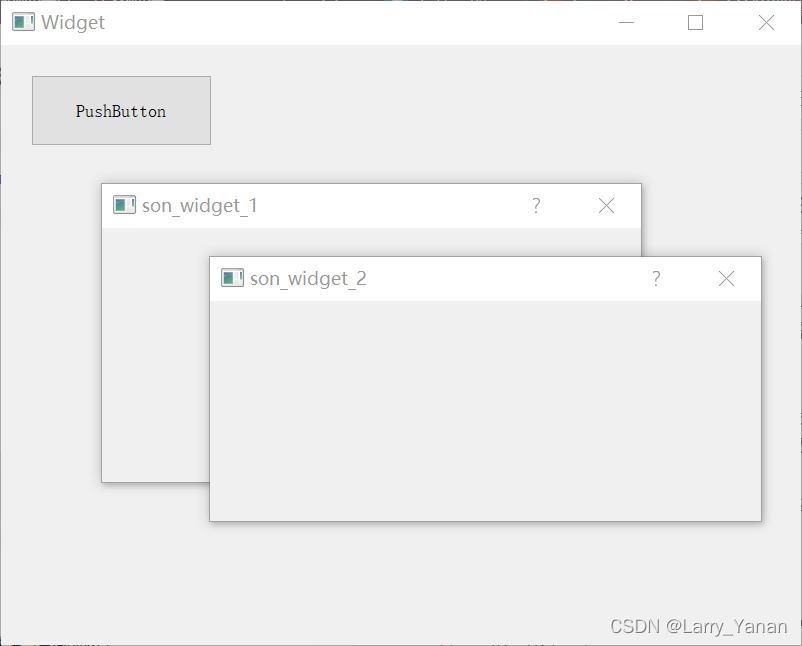
These three top windows are superimposed on each other , It's related to the relationship between father and son .(son_widget_1/2 Set up Qt::Dialog, If it is Qt::Widget, When the parent class is set , Is a child part of the parent class ).
2022.5.25 Add
Thank the friends in the comment area for providing better solutions , It solves the problem that you must show Caused by flickering , The following code has been verified to be feasible :
void Widget::on_pushButton_clicked()
{

    if(!istop)
    {

// Qt::WindowFlags m_flags = windowFlags();
// setWindowFlags(m_flags | Qt::WindowStaysOnTopHint);
// show();
        qDebug()<<"always top";

        QWindow* pWin = this->windowHandle();
        pWin->setFlags(Qt::Widget | Qt::WindowStaysOnTopHint);
    }else{

        //Qt::WindowFlags m_flags = windowFlags();
// setWindowFlags(Qt::Widget);
// //setWindowFlags(NULL);
// show();

        QWindow* pWin = this->windowHandle();
        pWin->setFlags(Qt::Widget);
        qDebug()<<"no always top";
    }
    istop=!istop;
}
边栏推荐
猜你喜欢
The "sneaky" new asteroid will pass the earth safely this week: how to watch it
分享一个在树莓派运行dash应用的实例。
Luogu P1102 A-B number pair (dichotomy, map, double pointer)

Basic Q & A of introductory C language
C language is the watershed between low-level and high-level

Some problems encountered in installing pytorch in windows11 CONDA
“鬼鬼祟祟的”新小行星将在本周安全掠过地球:如何观看
Quick to typescript Guide

The concept of C language array

Flask框架配置loguru日志库
随机推荐
Codeforces Round #797 (Div. 3)无F
QT模拟鼠标事件,实现点击双击移动拖拽等
Codeforces Round #803 (Div. 2)A~C
日期加1天
读取和保存zarr文件
D - function (HDU - 6546) girls' competition
2027. Minimum number of operations to convert strings
1013. Divide the array into three parts equal to and
[exercise-7] (UVA 10976) fractions again?! (fraction split)
Sanic异步框架真的这么强吗?实践中找真理
指定格式时间,月份天数前补零
1605. Sum the feasible matrix for a given row and column
QT实现窗口置顶、置顶状态切换、多窗口置顶优先关系
Basic Q & A of introductory C language
Programmers, what are your skills in code writing?
Effet d'utilisation, déclenché lorsque les composants de la fonction sont montés et déchargés
AcWing:第56场周赛
第 300 场周赛 - 力扣(LeetCode)
MariaDB的安装与配置
Analysis of protobuf format of real-time barrage and historical barrage at station B