当前位置:网站首页>【深度学习】图像多标签分类任务,百度PaddleClas
【深度学习】图像多标签分类任务,百度PaddleClas
2022-07-07 10:27:00 【XD742971636】
百度PaddleClas
百度PaddleClas GitHub链接:https://github.com/PaddlePaddle/PaddleClas。
在项目中PaddleClas/docs/en/advanced_tutorials/multilabel/multilabel_en.md目录下面是对多标签分类任务的指导,版本迭代找不到的话就搜索multilabel应该就能找到。本文跟着这个指导实战一遍。
我下载的分支是release/2.4,文章使用的代码和数据我都传百度云了一份:https://pan.baidu.com/s/19d7dSK075Vs_KzwmhwxGzA?pwd=e22x 。
Docker环境
之前pip安装paddle环境被坑惨了,这次直接上Docker得了,显卡V100找CUDA11版本,去PaddleClas路径执行:
sudo docker run --gpus all -v $PWD:/paddle --shm-size=8G --network=host -it paddlepaddle/paddle:2.1.0-gpu-cuda11.2-cudnn8 /bin/bash
创建docker的时候默认shm大小为64M,所以要给shm-size=8G 。共享内存的一个介绍。
dockerHub:https://hub.docker.com/r/paddlepaddle/paddle/tags?page=1&name=gpu
数据准备
原始数据:https://lms.comp.nus.edu.sg/wp-content/uploads/2019/research/nuswide/NUS-WIDE.html
我使用百度处理好的NUS-WIDE-SCENE数据就舒服多了,在docker容器中执行:
cd /paddle/dataset

mkdir NUS-WIDE-SCENE
cd NUS-WIDE-SCENE
wget https://paddle-imagenet-models-name.bj.bcebos.com/data/NUS-SCENE-dataset.tar
tar -xf NUS-SCENE-dataset.tar
最终路径:
训练Train
首先修个BUG才行:
https://github.com/PaddlePaddle/PaddleClas/issues/2136
在docker容器中执行:
unset GREP_OPTIONS

cd /paddle && python -m pip install -i https://pypi.tuna.tsinghua.edu.cn/simple --upgrade pip && pip config set global.index-url https://pypi.tuna.tsinghua.edu.cn/simple && pip install -r requirements.txt
单gpu训练:
export CUDA_VISIBLE_DEVICES=0
python3 tools/train.py -c ./ppcls/configs/quick_start/professional/MobileNetV1_multilabel.yaml
多gpu训练:
export CUDA_VISIBLE_DEVICES=0,1,2
python3 -m paddle.distributed.launch --gpus="0,1,2" tools/train.py -c ./ppcls/configs/quick_start/professional/MobileNetV1_multilabel.yaml
训练完成的日志:
[2022/07/06 11:15:51] ppcls INFO: [Train][Epoch 10/10][Iter: 220/273]lr(CosineAnnealingDecay): 0.00008615, HammingDistance: 0.04837, AccuracyScore: 0.95163, MultiLabelLoss: 0.12250, loss: 0.12250, batch_cost: 0.11690s, reader_cost: 0.00017, ips: 547.48235 samples/s, eta: 0:00:06
[2022/07/06 11:15:53] ppcls INFO: [Train][Epoch 10/10][Iter: 230/273]lr(CosineAnnealingDecay): 0.00005571, HammingDistance: 0.04836, AccuracyScore: 0.95164, MultiLabelLoss: 0.12258, loss: 0.12258, batch_cost: 0.11685s, reader_cost: 0.00017, ips: 547.68878 samples/s, eta: 0:00:05
[2022/07/06 11:15:54] ppcls INFO: [Train][Epoch 10/10][Iter: 240/273]lr(CosineAnnealingDecay): 0.00003187, HammingDistance: 0.04824, AccuracyScore: 0.95176, MultiLabelLoss: 0.12239, loss: 0.12239, batch_cost: 0.11688s, reader_cost: 0.00017, ips: 547.55123 samples/s, eta: 0:00:03
[2022/07/06 11:15:55] ppcls INFO: [Train][Epoch 10/10][Iter: 250/273]lr(CosineAnnealingDecay): 0.00001466, HammingDistance: 0.04826, AccuracyScore: 0.95174, MultiLabelLoss: 0.12251, loss: 0.12251, batch_cost: 0.11687s, reader_cost: 0.00017, ips: 547.61131 samples/s, eta: 0:00:02
[2022/07/06 11:15:56] ppcls INFO: [Train][Epoch 10/10][Iter: 260/273]lr(CosineAnnealingDecay): 0.00000406, HammingDistance: 0.04826, AccuracyScore: 0.95174, MultiLabelLoss: 0.12253, loss: 0.12253, batch_cost: 0.11674s, reader_cost: 0.00017, ips: 548.24794 samples/s, eta: 0:00:01
[2022/07/06 11:15:57] ppcls INFO: [Train][Epoch 10/10][Iter: 270/273]lr(CosineAnnealingDecay): 0.00000006, HammingDistance: 0.04833, AccuracyScore: 0.95167, MultiLabelLoss: 0.12271, loss: 0.12271, batch_cost: 0.11677s, reader_cost: 0.00017, ips: 548.08781 samples/s, eta: 0:00:00
[2022/07/06 11:15:58] ppcls INFO: [Train][Epoch 10/10][Avg]HammingDistance: 0.04835, AccuracyScore: 0.95165, MultiLabelLoss: 0.12271, loss: 0.12271
[2022/07/06 11:16:00] ppcls INFO: [Eval][Epoch 10][Iter: 0/69]MultiLabelLoss: 0.09744, loss: 0.09744, HammingDistance: 0.03527, AccuracyScore: 0.96473, batch_cost: 2.53691s, reader_cost: 2.42421, ips: 100.91014 images/sec
[2022/07/06 11:16:05] ppcls INFO: [Eval][Epoch 10][Iter: 10/69]MultiLabelLoss: 0.12671, loss: 0.12671, HammingDistance: 0.05005, AccuracyScore: 0.94995, batch_cost: 0.38076s, reader_cost: 0.24564, ips: 672.34270 images/sec
[2022/07/06 11:16:10] ppcls INFO: [Eval][Epoch 10][Iter: 20/69]MultiLabelLoss: 0.11945, loss: 0.11945, HammingDistance: 0.04848, AccuracyScore: 0.95152, batch_cost: 0.49853s, reader_cost: 0.36578, ips: 513.50869 images/sec
[2022/07/06 11:16:15] ppcls INFO: [Eval][Epoch 10][Iter: 30/69]MultiLabelLoss: 0.12125, loss: 0.12125, HammingDistance: 0.04789, AccuracyScore: 0.95211, batch_cost: 0.47429s, reader_cost: 0.34168, ips: 539.75512 images/sec
[2022/07/06 11:16:20] ppcls INFO: [Eval][Epoch 10][Iter: 40/69]MultiLabelLoss: 0.11817, loss: 0.11817, HammingDistance: 0.04819, AccuracyScore: 0.95181, batch_cost: 0.49539s, reader_cost: 0.36272, ips: 516.76400 images/sec
[2022/07/06 11:16:24] ppcls INFO: [Eval][Epoch 10][Iter: 50/69]MultiLabelLoss: 0.10450, loss: 0.10450, HammingDistance: 0.04773, AccuracyScore: 0.95227, batch_cost: 0.47807s, reader_cost: 0.34755, ips: 535.48813 images/sec
[2022/07/06 11:16:30] ppcls INFO: [Eval][Epoch 10][Iter: 60/69]MultiLabelLoss: 0.11237, loss: 0.11237, HammingDistance: 0.04781, AccuracyScore: 0.95219, batch_cost: 0.49771s, reader_cost: 0.36855, ips: 514.35504 images/sec
[2022/07/06 11:16:32] ppcls INFO: [Eval][Epoch 10][Avg]MultiLabelLoss: 0.12195, loss: 0.12195, HammingDistance: 0.04765, AccuracyScore: 0.95235
[2022/07/06 11:16:32] ppcls INFO: [Eval][Epoch 10][best metric: 0.05279040170066246]
[2022/07/06 11:16:32] ppcls INFO: Already save model in ./output/MobileNetV1/epoch_10
[2022/07/06 11:16:33] ppcls INFO: Already save model in ./output/MobileNetV1/latest
评估Evaluation
评估Evaluation:
python tools/eval.py -c ./ppcls/configs/quick_start/professional/MobileNetV1_multilabel.yaml -o Arch.pretrained="./output/MobileNetV1/best_model"
日志:
[2022/07/06 11:37:38] ppcls INFO: train with paddle 2.1.0 and device CUDAPlace(0)
W0706 11:37:38.849289  1058 device_context.cc:404] Please NOTE: device: 0, GPU Compute Capability: 7.0, Driver API Version: 11.2, Runtime API Version: 11.2
W0706 11:37:38.854460  1058 device_context.cc:422] device: 0, cuDNN Version: 8.1.
[2022/07/06 11:37:45] ppcls INFO: [Eval][Epoch 0][Iter: 0/69]MultiLabelLoss: 0.11629, loss: 0.11629, HammingDistance: 0.04096, AccuracyScore: 0.95904, batch_cost: 3.46316s, reader_cost: 2.33148, ips: 73.92095 images/sec
[2022/07/06 11:37:48] ppcls INFO: [Eval][Epoch 0][Iter: 10/69]MultiLabelLoss: 0.14044, loss: 0.14044, HammingDistance: 0.05525, AccuracyScore: 0.94475, batch_cost: 0.45712s, reader_cost: 0.32888, ips: 560.03236 images/sec
[2022/07/06 11:37:54] ppcls INFO: [Eval][Epoch 0][Iter: 20/69]MultiLabelLoss: 0.13331, loss: 0.13331, HammingDistance: 0.05347, AccuracyScore: 0.94653, batch_cost: 0.51752s, reader_cost: 0.38610, ips: 494.66824 images/sec
[2022/07/06 11:37:58] ppcls INFO: [Eval][Epoch 0][Iter: 30/69]MultiLabelLoss: 0.14082, loss: 0.14082, HammingDistance: 0.05283, AccuracyScore: 0.94717, batch_cost: 0.48707s, reader_cost: 0.35611, ips: 525.59345 images/sec
[2022/07/06 11:38:04] ppcls INFO: [Eval][Epoch 0][Iter: 40/69]MultiLabelLoss: 0.13737, loss: 0.13737, HammingDistance: 0.05317, AccuracyScore: 0.94683, batch_cost: 0.50345s, reader_cost: 0.37316, ips: 508.48973 images/sec
[2022/07/06 11:38:08] ppcls INFO: [Eval][Epoch 0][Iter: 50/69]MultiLabelLoss: 0.12236, loss: 0.12236, HammingDistance: 0.05288, AccuracyScore: 0.94712, batch_cost: 0.48819s, reader_cost: 0.35907, ips: 524.38639 images/sec
[2022/07/06 11:38:14] ppcls INFO: [Eval][Epoch 0][Iter: 60/69]MultiLabelLoss: 0.13099, loss: 0.13099, HammingDistance: 0.05294, AccuracyScore: 0.94706, batch_cost: 0.50024s, reader_cost: 0.37077, ips: 511.75699 images/sec
[2022/07/06 11:38:16] ppcls INFO: [Eval][Epoch 0][Avg]MultiLabelLoss: 0.13865, loss: 0.13865, HammingDistance: 0.05279, AccuracyScore: 0.94721
预测Prediction 推理Infer
预测Prediction 推理Infer:
python3 tools/infer.py -c ./ppcls/configs/quick_start/professional/MobileNetV1_multilabel.yaml -o Arch.pretrained="./output/MobileNetV1/best_model"
日志:
W0706 11:42:24.642689  1302 device_context.cc:404] Please NOTE: device: 0, GPU Compute Capability: 7.0, Driver API Version: 11.2, Runtime API Version: 11.2
W0706 11:42:24.648531  1302 device_context.cc:422] device: 0, cuDNN Version: 8.1.
[{
    'class_ids': [6, 13, 17, 23, 30], 'scores': [0.99138, 0.83019, 0.5909, 0.99387, 0.91533], 'file_name': './deploy/images/0517_2715693311.jpg', 'label_names': []}]
images/0517_2715693311.jpg 这张图: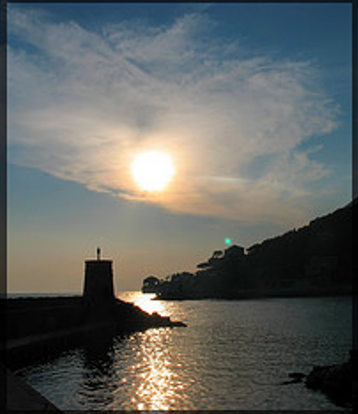
打印出数据里的NUS_labels.txt中的第6, 13, 17, 23, 30行(从0开始计数): sed -n '7p;14p;18p;24p;31p' NUS_labels.txt (从1开始计数),即是模型得到的这五个类别:
clouds
lake
ocean
sky
water
而这张图的实际标签是什么呢,使用cat multilabel_train_list.txt |grep 0517_2715693311得到:
0517_2715693311.jpg 0,0,0,0,0,0,1,0,0,0,0,0,0,1,0,1,0,0,0,0,0,0,0,1,0,0,1,0,0,0,1,0,0
也就是7 14 16 24 27 31 (从1开始计数),sed -n '7p;14p;16p;24p;27p;31p' NUS_labels.txt :
clouds
lake
mountain
sky
sunset
water
在这张图上效果一般。
导出模型Export model
官网介绍了一些转成paddle产品的:
python3 tools/export_model.py \
    -c ./ppcls/configs/quick_start/professional/MobileNetV1_multilabel.yaml \
    -o Arch.pretrained="./output/MobileNetV1/best_model"

cd ./deploy

python3 python/predict_cls.py \
     -c configs/inference_multilabel_cls.yaml
而我想转成onnx,看了Paddle2ONNX文档才发现,上个步骤也是需要的,需要模型结构文件:inference.pdmodel,模型参数文件inference.pdiparams。
安装:pip install paddle2onnx onnx onnx-simplifier onnxruntime-gpu
导出模型:paddle2onnx --model_dir inference/ --model_filename inference.pdmodel --params_filename inference.pdiparams --save_file model.onnx --opset_version 10 --enable_dev_version True --enable_onnx_checker True
参数选项
| 参数 | 参数说明 |
|---|---|
| –model_dir | 配置包含Paddle模型的目录路径 |
| –model_filename | [可选] 配置位于--model_dir下存储网络结构的文件名 |
| –params_filename | [可选] 配置位于--model_dir下存储模型参数的文件名称 |
| –save_file | 指定转换后的模型保存目录路径 |
| –opset_version | [可选] 配置转换为ONNX的OpSet版本,目前支持7~15等多个版本,默认为9 |
| –enable_dev_version | [可选] 是否使用新版本Paddle2ONNX(推荐使用),默认为False |
| –enable_onnx_checker | [可选] 配置是否检查导出为ONNX模型的正确性, 建议打开此开关。若指定为True, 默认为False |
| –enable_auto_update_opset | [可选] 是否开启opset version自动升级,当低版本opset无法转换时,自动选择更高版本的opset 默认为True |
| –input_shape_dict | [可选] 配置输入的shape, 默认为空; 此参数即将移除,如需要固定Paddle模型输入Shape,请使用此工具处理 |
| –version | [可选] 查看paddle2onnx版本 |
- 使用onnxruntime验证转换模型, 请注意安装最新版本(最低要求1.10.0):
如你有ONNX模型优化的需求,推荐使用onnx-simplifier,也可使用如下命令对模型进行优化:
python -m paddle2onnx.optimize --input_model model.onnx --output_model new_model.onnx
如需要修改导出的模型输入形状,如改为静态shape:
python -m paddle2onnx.optimize --input_model model.onnx \
                               --output_model new_model.onnx \
                               --input_shape_dict "{'x':[1,3,224,224]}"
不同模型输入输出对比
边栏推荐
- SQL lab 1~10 summary (subsequent continuous update)
- Simple network configuration for equipment management
- <No. 9> 1805. Number of different integers in the string (simple)
- When OSPF specifies that the connection type is P2P, it enables devices on both ends that are not in the same subnet to Ping each other
- (待会删)yyds,付费搞来的学术资源,请低调使用!
- Sonar:cognitive complexity
- DOM parsing XML error: content is not allowed in Prolog
- Completion report of communication software development and Application
- HCIA复习整理
- NGUI-UILabel
猜你喜欢
![[shortest circuit] acwing1128 Messenger: Floyd shortest circuit](/img/a4/783bdcc2b97938efc77b7da6442866.png)
[shortest circuit] acwing1128 Messenger: Floyd shortest circuit
EPP+DIS学习之路(1)——Hello world!
Completion report of communication software development and Application
Rationaldmis2022 advanced programming macro program
Visual Studio 2019 (LocalDB)\MSSQLLocalDB SQL Server 2014 数据库版本为852无法打开,此服务器支持782版及更低版本
Sort out the garbage collection of JVM, and don't involve high-quality things such as performance tuning for the time being
千人规模互联网公司研发效能成功之路
![[data clustering] realize data clustering analysis based on multiverse optimization DBSCAN with matlab code](/img/83/0652e3138b87a4741dd8261a24d1e8.png)
[data clustering] realize data clustering analysis based on multiverse optimization DBSCAN with matlab code

H3C HCl MPLS layer 2 dedicated line experiment
Summed up 200 Classic machine learning interview questions (with reference answers)
随机推荐
SQL head injection -- injection principle and essence
(待会删)yyds,付费搞来的学术资源,请低调使用!
数据库系统原理与应用教程(009)—— 概念模型与数据模型
顶级域名有哪些?是如何分类的?
Superscalar processor design yaoyongbin Chapter 8 instruction emission excerpt
Is it safe to open Huatai's account in kainiu in 2022?
【数据聚类】基于多元宇宙优化DBSCAN实现数据聚类分析附matlab代码
Completion report of communication software development and Application
VSCode的学习使用
About web content security policy directive some test cases specified through meta elements
Matlab implementation of Huffman coding and decoding with GUI interface
[filter tracking] comparison between EKF and UKF based on MATLAB extended Kalman filter [including Matlab source code 1933]
Steps of redis installation and self startup configuration under CentOS system
112.网络安全渗透测试—[权限提升篇10]—[Windows 2003 LPK.DDL劫持提权&msf本地提权]
即刻报名|飞桨黑客马拉松第三期盛夏登场,等你挑战
Cenos openssh upgrade to version 8.4
<No. 8> 1816. Truncate sentences (simple)
[filter tracking] strapdown inertial navigation pure inertial navigation solution matlab implementation
Superscalar processor design yaoyongbin Chapter 9 instruction execution excerpt
powershell cs-UTF-16LE编码上线