当前位置:网站首页>sklearn之feature_extraction.text.CountVectorizer / TfidVectorizer
sklearn之feature_extraction.text.CountVectorizer / TfidVectorizer
2022-07-06 09:16:00 【想成为风筝】
sklearn.feature_extraction: 特征提取
该sklearn.feature_extraction模块处理从原始数据中提取特征。它目前包括从文本和图像中提取特征的方法。
用户指南:有关详细信息,请参阅特征提取部分。
feature_extraction.DictVectorizer(*[, ...])
将特征值映射列表转换为向量。
feature_extraction.FeatureHasher([...])
实现特征散列,也就是散列技巧。
从图像
该sklearn.feature_extraction.image子模块收集实用程序以从图像中提取特征。
feature_extraction.image.extract_patches_2d(...)
将 2D 图像重塑为补丁集合
feature_extraction.image.grid_to_graph(n_x, n_y)
像素到像素连接图。
feature_extraction.image.img_to_graph(图片,*)
像素到像素梯度连接图。
feature_extraction.image.reconstruct_from_patches_2d(...)
从它的所有补丁重建图像。
feature_extraction.image.PatchExtractor(*[, ...])
从图像集合中提取补丁。
来自文本
该sklearn.feature_extraction.text子模块收集实用程序以从文本文档构建特征向量。
feature_extraction.text.CountVectorizer(*[, ...])
将文本文档集合转换为令牌计数矩阵。
feature_extraction.text.HashingVectorizer(*)
将文本文档的集合转换为标记出现的矩阵。
feature_extraction.text.TfidfTransformer(*)
将计数矩阵转换为标准化的 tf 或 tf-idf 表示。
feature_extraction.text.TfidfVectorizer(*[, ...])
将原始文档集合转换为 TF-IDF 特征矩阵。
sklearn.feature_selection: 特征选择
该sklearn.feature_selection模块实现了特征选择算法。它目前包括单变量过滤器选择方法和递归特征消除算法。
用户指南:有关详细信息,请参阅功能选择部分。
feature_selection.GenericUnivariateSelect([...])
具有可配置策略的单变量特征选择器。
feature_selection.SelectPercentile([...])
根据最高分数的百分位选择特征。
feature_selection.SelectKBest([score_func, k])
根据 k 个最高分选择特征。
feature_selection.SelectFpr([score_func, alpha])
过滤器:根据 FPR 测试选择低于 alpha 的 pvalues。
feature_selection.SelectFdr([score_func, alpha])
过滤器:为估计的错误发现率选择 p 值。
feature_selection.SelectFromModel(估计,*)
基于重要性权重选择特征的元转换器。
feature_selection.SelectFwe([score_func, alpha])
过滤器:选择与 Family-wise error rate 对应的 p 值。
feature_selection.SequentialFeatureSelector(...)
执行顺序特征选择的转换器。
feature_selection.RFE(估计器,*[,...])
具有递归特征消除的特征排名。
feature_selection.RFECV(估计器,*[,...])
使用交叉验证进行递归特征消除以选择特征数量。
feature_selection.VarianceThreshold([临界点])
删除所有低方差特征的特征选择器。
feature_selection.chi2(X, y)
计算每个非负特征和类之间的卡方统计数据。
feature_selection.f_classif(X, y)
计算所提供样本的 ANOVA F 值。
feature_selection.f_regression(X, y, *[, ...])
返回 F 统计量和 p 值的单变量线性回归测试。
feature_selection.r_regression(X, y, *[, ...])
计算每个特征和目标的 Pearson 的 r。
feature_selection.mutual_info_classif(X, y, *)
估计离散目标变量的互信息。
feature_selection.mutual_info_regression(X, y, *)
估计连续目标变量的互信息。
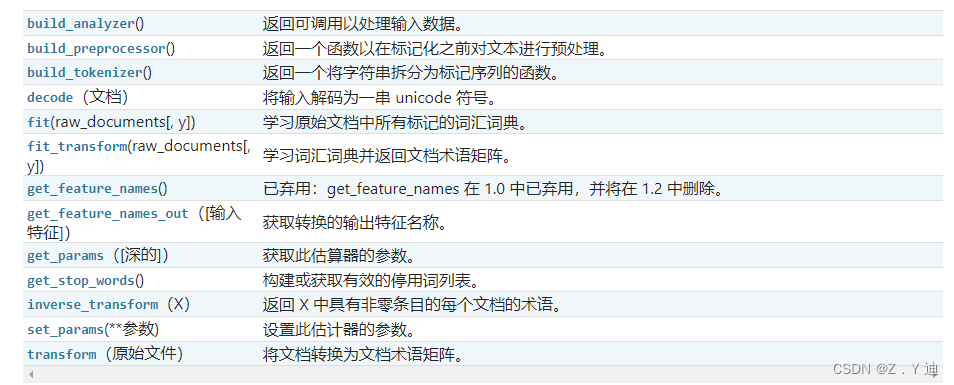
feature_extraction.text.TfidVectorizer
例子:
>>> from sklearn.feature_extraction.text import CountVectorizer
>>> corpus = [
...     'This is the first document.',
...     'This document is the second document.',
...     'And this is the third one.',
...     'Is this the first document?',
... ]
>>> vectorizer = CountVectorizer()
>>> X = vectorizer.fit_transform(corpus)
>>> vectorizer.get_feature_names_out()
array(['and', 'document', 'first', 'is', 'one', 'second', 'the', 'third',
       'this'], ...)
>>> print(X.toarray())
[[0 1 1 1 0 0 1 0 1]
 [0 2 0 1 0 1 1 0 1]
 [1 0 0 1 1 0 1 1 1]
 [0 1 1 1 0 0 1 0 1]]
>>> vectorizer2 = CountVectorizer(analyzer='word', ngram_range=(2, 2))
>>> X2 = vectorizer2.fit_transform(corpus)
>>> vectorizer2.get_feature_names_out()
array(['and this', 'document is', 'first document', 'is the', 'is this',
       'second document', 'the first', 'the second', 'the third', 'third one',
       'this document', 'this is', 'this the'], ...)
 >>> print(X2.toarray())
 [[0 0 1 1 0 0 1 0 0 0 0 1 0]
 [0 1 0 1 0 1 0 1 0 0 1 0 0]
 [1 0 0 1 0 0 0 0 1 1 0 1 0]
 [0 0 1 0 1 0 1 0 0 0 0 0 1]]
sklearn.feature_extraction.text.TfidfVectorizer
例子:
>>> from sklearn.feature_extraction.text import TfidfVectorizer
>>> corpus = [
...     'This is the first document.',
...     'This document is the second document.',
...     'And this is the third one.',
...     'Is this the first document?',
... ]
>>> vectorizer = TfidfVectorizer()
>>> X = vectorizer.fit_transform(corpus)
>>> vectorizer.get_feature_names_out()
array(['and', 'document', 'first', 'is', 'one', 'second', 'the', 'third',
       'this'], ...)
>>> print(X.shape)
(4, 9)
边栏推荐
猜你喜欢
How to configure flymcu (STM32 serial port download software) is shown in super detail
Word排版(小计)
Machine learning notes week02 convolutional neural network

Small L's test paper
【CDH】CDH5.16 配置 yarn 任务集中分配设置不生效问题
快来走进JVM吧

{one week summary} take you into the ocean of JS knowledge

分布式节点免密登录
error C4996: ‘strcpy‘: This function or variable may be unsafe. Consider using strcpy_ s instead
Reading BMP file with C language
随机推荐
【presto】presto 参数配置优化
Codeforces Round #771 (Div. 2)
STM32型号与Contex m对应关系
[Flink] cdh/cdp Flink on Yan log configuration
互聯網協議詳解
L2-007 家庭房产 (25 分)
Integration test practice (1) theoretical basis
Hutool中那些常用的工具类和方法
Library function -- (continuous update)
mysql实现读写分离
【yarn】CDP集群 Yarn配置capacity调度器批量分配
【CDH】CDH5.16 配置 yarn 任务集中分配设置不生效问题
TypeScript
常用正则表达式整理
MATLAB学习和实战 随手记
Using LinkedHashMap to realize the caching of an LRU algorithm
Aborted connection 1055898 to db:
What does usart1 mean
SQL time injection
快来走进JVM吧