当前位置:网站首页>5分钟掌握机器学习鸢尾花逻辑回归分类
5分钟掌握机器学习鸢尾花逻辑回归分类
2022-07-06 09:24:00 【ブリンク】
本文将使用5分钟时间帮助大家掌握机器学习中最经典的鸢尾花分类案例。
简述
使用scikit-learn库,配合Numpy、Pandas可以使机器学习变得简单,利用基于Matplotlib的seaborn库可以更简单地实现可视化。
首先导入所要用到的库:
from sklearn import datasets
# 我们从sklearn自带的数据集中获取数据即可
import numpy as np
import pandas as pd
import seaborn as sns
from sklearn.linear_model import LogisticRegression
# 使用逻辑回归进行学习
from sklearn.model_selection import train_test_split
# 使用它分割数据为训练集和测试集
导入数据
sklearn为我们准备好了一些用作练习使用的数据集,其中就包括现在要使用的鸢尾花数据,我们只需要使用datasets的 l o a d i r i s ( ) load_iris() loadiris()方法即可:
iris_data = datasets.load_iris()
得到的iris_data是sklearn中自带的类型,我们可以使用 i r i s . k e y s ( ) iris.keys() iris.keys()方法查看它包含有哪些内容,他会返回一个字典:
>>> iris.keys()

dict_keys(['data', 'target', 'frame',
            'target_names', 'DESCR', 'feature_names',
            'filename', 'data_module'])
其中包含150组数据,data表示包含的数据,target表示标签,也就是这朵花属于哪一类的鸢尾花,数据中的鸢尾花一共有3种setosa, versicolor和virginica,它们包含在target_names中,表示标签的名称。feature_names表示特征的名称,也就是鸢尾花特点的描述,比如有在数据集中有花瓣长度、宽度和花萼长度、宽度。其余内容在本例中用不到,不做过多介绍。
下面将数据和标签提取出来,并存储在Pandas的DataFrame中,:
>>> data = iris.data
>>> data = data.pd.DataFrame(data,columns = iris.target_names)
# 把列名改为特征的名称
>>> data.head()
	sepal length (cm)	sepal width (cm)	petal length (cm)	petal width (cm)
0	5.1	                3.5	                1.4	                0.2
1	4.9	                3.0	                1.4	                0.2
2	4.7	                3.2	                1.3	                0.2
3	4.6	                3.1	                1.5	                0.2
4	5.0	                3.6	                1.4	                0.2
数据可视化
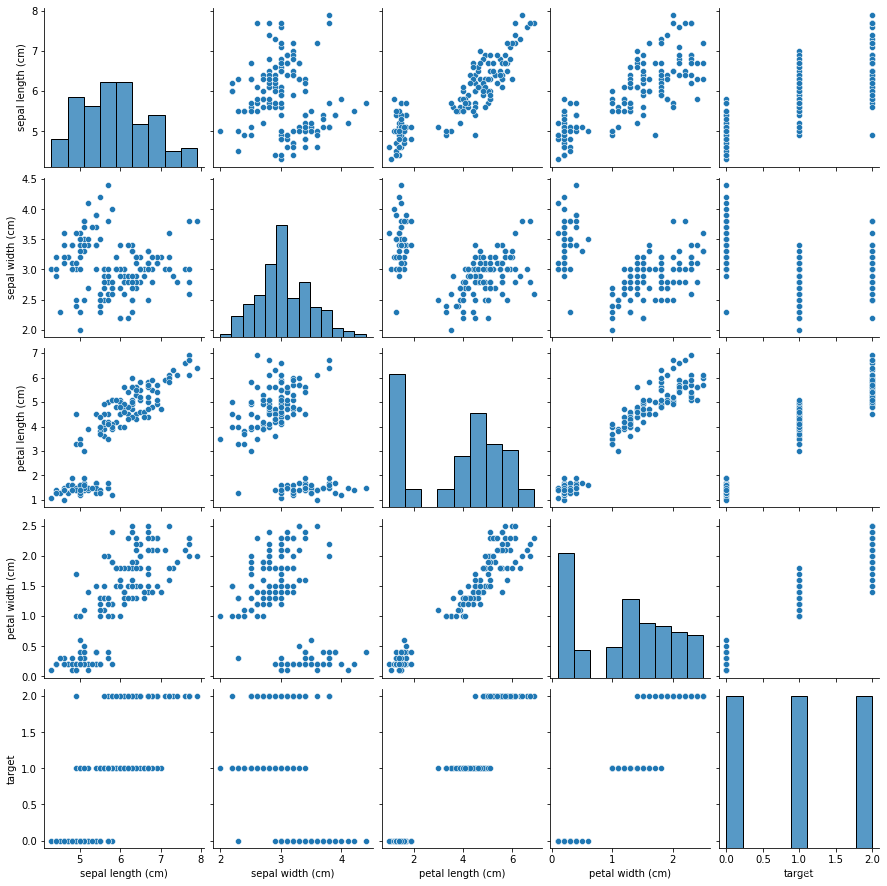
使用seaborn的 p a i r p l o t ( ) pairplot() pairplot()方法可以快速查看每两个变量之间的关系,包括与它们自己:
sns.pairplot(data)
模型建立
使用sklearn的估计器建立一个逻辑回归的模型:
modle = LogisticRegression()
数据预处理
首先把所有的数据处理为训练集和测试集,以便我们对模型进行测试,使用train_test_split()方法可以很容易做到这一点,它将分别返回x训练集,x测试集,y训练集,y测试集:
x_train,x_test,y_train,y_test = train_test_split(X=data,y=iris.target,train_size=0.8)
# 80%的数据作为训练集 其余作为测试集
训练模型
使用估计器的 f i t ( ) fit() fit()方法可以对模型进行训练:
model.fit(x_train,y_train)
模型评估
可以直接估计器的 s c o r e ( ) score() score()方法计算模型在测试集下的得分或者说准确率:
>>> model.score(x_test,y_test)
0.9333333333333333 # 正确率达到了93.33%,这与训练集和测试机的划分有关
模型预测
可以使用训练好的模型对测试机数据进行预测,也就是说,当你得知了一组关于鸢尾花特征的数据,就可以使用该模型得知它属于哪一种类:
>>> s = model.predict(x_test)
array([1, 2, 1, 2, 1, 0, 2, 1, 0,
        0, 0, 2, 1, 0, 2, 0, 1, 2,
        1, 1, 2, 2,1, 2, 0, 2, 1, 2, 0, 0])
        # 其中0表示setosa,1表示versicolor,2表示virginica
边栏推荐
- 《统计学》第八版贾俊平第十一章一元线性回归知识点总结及课后习题答案
- JDBC事务、批处理以及连接池(超详细)
- Interview Essentials: what is the mysterious framework asking?
- Apache APIs IX has the risk of rewriting the x-real-ip header (cve-2022-24112)
- 外网打点(信息收集)
- Network layer - simple ARP disconnection
- An unhandled exception occurred when C connected to SQL Server: system Argumentexception: "keyword not supported:" integrated
- 函数:求1-1/2+1/3-1/4+1/5-1/6+1/7-…+1/n
- 《统计学》第八版贾俊平第三章课后习题及答案总结
- 浅谈漏洞发现思路
猜你喜欢
Data mining - a discussion on sample imbalance in classification problems
Record an edu, SQL injection practice
Intel oneapi - opening a new era of heterogeneity
《统计学》第八版贾俊平第四章总结及课后习题答案
Tencent map circle
Based on authorized access, cross host, and permission allocation under sqlserver
外网打点(信息收集)
《统计学》第八版贾俊平第九章分类数据分析知识点总结及课后习题答案
Uibutton status exploration and customization
1.支付系统
随机推荐
How to turn wechat applet into uniapp
How to test whether an object is a proxy- How to test if an object is a Proxy?
{1,2,3,2,5}查重问题
Apache APIs IX has the risk of rewriting the x-real-ip header (cve-2022-24112)
《统计学》第八版贾俊平第九章分类数据分析知识点总结及课后习题答案
An unhandled exception occurred when C connected to SQL Server: system Argumentexception: "keyword not supported:" integrated
The difference between layer 3 switch and router
【指针】查找最大的字符串
Intranet information collection of Intranet penetration (2)
MySQL interview questions (4)
【指针】删除字符串s中的所有空格
【指针】求二维数组中最大元素的值
Xray and Burp linked Mining
“Hello IC World”
Lintcode logo queries the two nearest saplings
《统计学》第八版贾俊平第四章总结及课后习题答案
指针--剔除字符串中的所有数字
移植蜂鸟E203内核至达芬奇pro35T【集创芯来RISC-V杯】(一)
《统计学》第八版贾俊平第十二章多元线性回归知识点总结及课后习题答案
Hackmyvm target series (2) -warrior